Welcome to Silicon Alley (Hollywood 3.0)


Aerial_Hollywood_SignThe next big thing has already begun… on Silicon Beach. If the term is unfamiliar, think in terms of a third generation’s reinvention of Hollywood (with a far larger SoCal geographic area)–first came movies, then TV, now Internet. This fast-growing community makes use of the (hungry) local creative community, welcomes investment from 20th century moguls, and offers instruction and consulting to old school Hollywood studios.

Read all about in this article, published in Variety just before Thanksgiving.

It’s official: everything has changed.


I just reviewed an astonishing PowerPoint from Mary Meeker at Kleiner Perkins. It contains a thorough explanation of our rapidly changing, and changed, world. From mobile phones and to the Rose Bowl, newspapers to cash registers, borrowing and lending money to door locks, hiring to education, our contemporary wave of technology  has transformed the world.

The deck is 88 pages long, and worth all of the time you will spend thinking about it today, this week, this year.

I will add to this post tonight. Right now, it’s off to work, transforming an old TV station into something entirely new. (Thanks, Mary, for the encouragement. And for the pile of useful, persuasive data.)

Tech Changes Education

The Schoology logo connects classroom management, online learning and social networking.

Late in October, just before the storms, Forbes ran a useful summary of several trends that promise to reshape classroom education. It was swritten by Jeremy Friedmanthe CEO of Schoology, a company that makes software for the classroom.

No surprise that the key trends emphasize individualized learning based upon technology. Certainly, the ubiquity of cloud computing encourages document sharing, and collaboration regardless of each individual student’s location. “The 2012 Horizon Report, which provides insights into education technology trends, predicts that collaborative environments are about one year away from mainstream adoption.” That seems ambitious to me, but I’m sure that the most advanced, well-funded, tech-enabled schools will begin to make this statement true.

Given the realities of most schools, the idea of cross-platform integration may seem like an impossible dream, but vendors are beginning to work together to unify their approaches to digital learning. Forbes believes more strongly in this future than I do, or, perhaps, than most teachers probably do.

It’s now nearly impossible to imagine a classroom without mobile technology, but again, imagination is ahead of reality. Certainly, “(Mobile apps) are abundant, inexpensive and easily accessible…” but the question is not the apps, it’s the devices. A new movement toward BYOD (“Bring Your Own Device,” of course) is gaining traction. In itself, this is remarkable: just two years ago, many teachers, principals and administrators were doing everything they could to keep Twitter, Facebook, Tumblr and other “distractions” away from the classroom. Still, the levels of coordination present major challenges: Apple, Android or Windows? Curriculum at the national, state, district, school, classroom, or individual level? For all students, advanced students, average students, challenged students? Apps are easier to develop and produce than traditional software, but it’s not the software engineering that’s the issue, it’s what it does, and how what it does fits into any sort of master plan.

This raises the issue of adaptive learning, a domain that is already being addressed by at least one company: Knewton “responds in real time to the activity of each user on the system and adjusts to provide the most relevant content…” What’s more: “Knewton is able to capture every move a student makes – scores, speed, accuracy, delays, keystrokes, click-streams and drop-offs. The platform collects this data and the software adapts to challenge and persuade the user to learn based on his/her individual style. Pretty amazing stuff!

The buzz idea of the year seems to be gamification–that is, just about everything becomes a kind of game. At first, this seems to be a frivolous undertaking, but you need to think more broadly about games and how they work. A good game is a simulation of life, a design for activity within bounded rules. In this regard, games are a simplification, a reduction of real life situations that allow learners to focus on specific learning objectives. And, these learning objectives are readily scored, and, under the best of circumstances, presented in a way that connects learning and fun.

There’s funding behind this approach: “Game-based learning is even one of the priorities of the Bill & Melinda Gates Foundation, which earlier this year helped launch the Games, Learning and Assessment (GLASS) Lab. According to the organization, GLASS Lab is “based on the understanding that digital games and simulations can support student learning by providing immediate feedback for students, teachers and parents on students’ progress toward established learning goals”” The article describes even more funding from the game maker Electronic Arts, and the Entertainment Software Association, and, also, from the MacArthur Foundation. The non-profit at the center of all of this: Institute of Play. I looked at their website. I need to visit. Soon.

Hurricane Hackers – A New Way to Help, or Be Helped

“Hola! Welcome to #HurricaneHackers: a shared space for gathering information and organizing tech+social projects related to Hurricane Sandy.”

“Dear Civic Media fans —

If you’re in a safe, powered, Internet’d place, here’s a great opportunity to contribute to realtime and future work around Hurricane Sandy…

http://bit.ly/hurricanehackers-gdoc

Civic’s “Hurricane Hackers” is collecting ideas and datasets to create tools related to the storm…and already building tools with them. Everything is welcome. Well-developed projects already include a dynamic timeline, a map of livestreams, and an incredible set of hurricane-related resources — both historical and for Sandy.” (from their introductory email)

This pop-up site may become a very useful tool in the next 24-72 hours. It’s a contributory document, a group collaboration to gather relevant links and guidance. The organization behind the project is the Center for Civic Media at the MIT Media Lab. Find it here.


It’s best explained by example. Below, some excerpts (1045AM eastern time on Monday):

—–

Project Brainstorming:

What might we make? Add your own idea, or +1 those you like.

Ways to help

  • SandBag.it: a map of places that need sandbagging, and a way for people to sign up to help sandbag at particular locations.
  • AfterSandy Benefit Parties: when Sandy’s over, have people hold house parties as benefits for people who lose something. Start organizing these early, while there’s lots of attention. Maybe just use MeetUp to do this.
  • CrashPads? Matching people with spare rooms with people who need them?

Sandy Impacts

Apologies for the sometimes-ugly formatting. Cut-and-paste is not always perfect.

More later. Be safe.

Posted in an independent bookstore

One of New Hampshire’s three Toadstool Bookshop outlets. They’re located in Peterborough, Keene, and Milford. If you’re in the neighborhood, be sure to visit the one in Keene, and then grab a beer and a burger (and gigantic onion rings) at Elm City Brewery, located in the same large ex-factory as NH’s best bookstore. With ebooks, there’s concern for the survival of even this fittest of independent booksellers.

“PLEASE THINK TWICE BEFORE YOU BUY A KINDLE

We are very grateful to all of those of you who have said you would like to support us by purchasing your e-books through us. This will become extremely important to us as more and more people begin using e-readers. We ask that you please bear in mind that only certain types of readers are compatible with our website. Fortunately, most of the common ones are. These include the iPad, Nook, Sony, and Kobo. However, the Kindle is not compatible.

Amazon has chosen to force Kindle users o make their e-book purchases only through their website.

Please think twice before getting one for yourself or for a gift. The future of independent bookstores such as our depends upon every sale, the physical book and the e-book. None will exist without the support of loyal book buyers such as yourself. Thank you so much for thinking about us, and be assured our love remains [for] the real book, there for your browsing in a real bookstore.

(Kindle Fire update: With Amazon’s new Kindle Fire tablet, it is possible to sideload an Android app that make it possible to purchase and read ebooks from the website of independent booksellers such as ours. But you do have to do this outside the Amazon App store. This will not work with the original Kindles. B&N’s new tablet Nook also requires a sideloaded app.”

Some other thoughts about Amazon and its relationship to independent booksellers:

Slate: Don’t Support Your Local Bookseller

Harvard Business Review: Amazon Should Partner with Independent Booksellers

Huffington Post / Poetry Foundation: Independent Booksellers: How to Compete with Amazon

and the most comprehensive and thoughtful view, written for The Nation: The Amazon Effect

Guest Article: Legal Developments / Over-The-Top TV

Aereo’s marketing materials. The service is now launching in the New York City area.

With Aereo now in launch mode, this unconventional service (based upon thousands of tiny television antenna–each smaller than a dime), the television industry is facing some interesting questions about even its most basic operating assumptions.

As a result of reader interest in the blog post “I Want to Watch TV on My iPad,” here’s a legal view of the Aereo situation.This material is used with permission of the law firm Drinker, Biddle & Reath, and it originally appeared in the firm’s Antenna newsletter as “Legal Developments Affecting Over-the-Top TV.” The article was written by DBR communications attorney Howard Liberman and and his associate, Jennifer T. Criss.

—–

The past several weeks have seen important developments regarding “over-the-top” television. More and more consumers are moving away from traditional means of watching television and are embracing services that provide access to television programming directly on computers, tablets, and mobile devices. While some services such as Hulu distribute copyrighted content with permission of copyright owners, other over-the-top services are providing access to copyrighted content without obtaining copyright licenses or paying retransmission fees to TV stations.

One such over-the-top service, Aereo, provides the signals of local broadcast stations to subscribers who “rent” one of thousands of miniature antennas located in Aereo’s facility, for a monthly fee. In March, numerous television broadcasters, including ABC, CBS, NBC, Fox, and PBS. brought suit against Aereo for copyright infringement. While local stations would ordinarily be available for free to any household with an antenna, today most consumers receive access to local stations through subscriptions with cable or satellite providers. The broadcast companies argue that Aereo, which is backed by Barry Diller, is infringing copyrighted material by allowing its users to access live broadcasts over the Internet. Aereo asserts that it is simply providing access to programming that consumers are able to receive for free by allowing consumers to rent its miniature antennas either on a recurring or a per-program basis.

On July 11,2012, Judge Alison J. Nathan of the U.S. District Court for the Southern District ofNew York ruled that Aereo can continue providing services to its subscribers while the case moves through the courts. Judge Nathan concluded that Aereo does not retransmit broadcast channels to its customers because the company provides an individual miniature antenna for each customer rather than offering access to a single, large antenna that transmits signals to all Aereo subscribers. The court disagreed with the television broadcasters’ claim that they would be irreparably harmed and lose numerous customers should Aereo continue its activity until a final ruling in the case.

For now, Aereo operates only in New York City. But Aereo is planning to expand into additional U.S. markets. Thus, it is important for all TV broadcasters to be aware of developments in this litigation. In the meantime, the FCC is considering what constitutes a “channel” within its definition of “multichannel video programming distributor” (“MVPD”). The FCC is questioning whether Internet-based services such as Aereo and Hulu should be considered MVPDs if they distribute more than one broadcast or cable television channel. Including these services as MVPDs could mean that television stations could seek retransmission consent payments for the delivery of their signals by these systems.

As the Aereo case and the FCC proceeding move forward, it is clear that consumer access to television is rapidly changing. With companies such as Google, Apple and Sony considering offering video channels directly to subscribers via the Internet and going “over the top” of cable and satellite providers, defining what constitutes a “retransmission” and what service qualifies as an MVPD is critical to shaping the next decade of television viewing. Today’s viewers don’t just want their MTV; they want their MTV available inexpensively, 24-7, and on their computers, tablets and smartphones. These two proceedings – the Aereo litigation and the

FCC’s effort to re-define “MVPD” – will have a major impact on the future of over-the-air broadcast television.

This issue also has the attention of Congress. Hearings have been held in both the House and the Senate in recent weeks, as lobbyists and trade associations are gearing up for the introduction of legislation — perhaps this year – to make substantial revisions in U.S. communications laws for the first time since the passage of the landmark 1996 Act. We will monitor all these proceedings and provide updates in future issues.

Outta Here! – A Friendly How-to Guide

With good cell phone service and a robust Internet connection, we’d like to think we can live, and work, pretty much anywhere. True enough, if the term is days, weeks or months, but what about years? What about (gasp!) forever?

Why leave? You’ll find lots of good reasons (good stories, too) in the newly revised second edition of Getting Out: Your Guide to Leaving America by Mark Ehrman:

The US had become unbearable after 9/11…We purchased 1.25 acres of land about 20 minutes south of Oaxaca…There is nothing like living, immersing oneself entirely, in another country, culture, language, etc.” — Cara Smiley, 40

I have been leaving the US all my life–starting with study abroad and then the Peace Corps…” — Kerry Kittel, age 49

Life here in Copenhagen is just so much more livable than any place I’ve experienced in the US. I take a train and boat to work. I ride my bicycle to buy groceries…” — Bill Agee, 50

You might think of this as the ultimate traveler’s book (no tourists allowed). Pages of (fascinating) personal stories are followed by advice about visas, second passports, and citizenship. There are many ways to gain citizenship, or at least, residency… marry in, play your ethnic race card, buy your way in, teach English, etc.

Fantasizing about where you might go…and stay? If you’re looking for the world’s highest rate of Internet penetration, try Greenland, Iceland, Norway, or Finland. Best infrastructure? Switzerland, Hong King, Singapore, France, Iceland, or Sweden. Fastest Internet? South Korea. Safest? Germany, or Canada. Growing job market? China, India, Taiwan. Best place to start a new business? New Zealand, Australia or Canada.

Need a more in-depth analysis? That’s the second half of the book. Sixty-one countries, each considered in terms of governance, Internet, healthcare, working there, taxes, women’s issues, life expectancy, moving there, and more.

If i was among the 300,000 who left home, where would I like to go? In fact, I would love to spend a month, maybe several, in every one of those sixty countries–but I suppose that answer evades the question. If I had to choose today, my starter list would probably include:

  • Bahamas
  • Canada
  • Denmark
  • France
  • Italy
  • Japan
  • Sweden
  • United Kingdom

Where would you go? And stay?

—–

And, from the same publisher, the real dirt on living in the country. The book is called (of course!) Get Your Pitchfork On!

I Want to Watch TV on My iPad (The Plot Thickens)

Last week, a U.S. district judge provided Aereo with a go-ahead on TV that we’ll be able to watch on our mobile devices, but that oversimplifies an interesting story. Here’s the original article, plus an update that, I am certain, will be rewritten once again as the legal dust-up continues. Some of the issues are significant, and will resonate beyond this particular venture. Worth reading.

Here’s the original story published on March 6, 2012:

You’re looking at an array of television antennas. These antennas are used to capture local broadcast signals that you can watch, if you pay a monthly subscription fee, on your computer, tablet, or phone. Aereo (formerly Bamboom) is the company behind the scheme, and, as you might expect, they’ll be spending a lot of time in the legal system as they argue with broadcasters regarding the rights and wrongs of live retransmission (that is, if Aereo is to survive, the broadcast networks want to see monthly cash–just like they receive from the cable operators).

Ah, the free airwaves, the ones that broadcasters use for the public good. Ah, the intellectual property that broadcasters carry over those airwaves, the IP that cable service providers pay to carry. Ah, the unresolved legal gotcha!! Any company that attempts to make those signals available via a secondary distribution scheme must pay for the right, or so say the broadcast networks.

The price for the service? $12 per month. The debut date? March 12. The place: for now, the New York metropolitan area.

For cord cutters, this may be a terrific deal. But it’s unclear whether the courts will block Aereo’s progress, as they have with ivi.tv and others who attempted to climb the walls of the castle without paying the required tribute (or, as I’m adding in my updated version of this article… others who attempted to challenge the current system of copyright and payments for distribution rights to intellectual property).

Slingbox? That’s okay. Over-the-air mobile TV? That’s not ready yet, except in a few markets on a test basis. Watch over-the-air TV? Sure. Watch via cable or satellite? As long as you’re paying for the privilege. Watch on another device? Nope, not yet. Or, maybe the answer is yes. We’ll find out in a few weeks.

_____

Here’s the update that I wrote on March 12, 2012:

From Bloomberg: Predicting a “great fight” with traditional media companies, billionaire Barry Diller said he plans to expand his new Aereo Web-based television service to 75 to 100 cities within a year, reports Bloomberg.

Diller, speaking at the South by Southwest Interactive festival in Austin, Texas, noted that efforts by Walt Disney Co. and other media companies to cite copyright violations were “absolutely predictable,” since entrenched companies always protect their turf, the story says.

Want to know more? Here’s a bunch of links:

The tech explanation:

http://www.techspot.com/news/47467-aereo-offers-tv-over-internet-with-antennas-engineered-to-comply-with-law.html

The consumer angle:

http://www.forbes.com/sites/dorothypomerantz/2012/02/29/how-much-are-you-willing-to-pay-to-cut-the-cord/

The business story:

http://online.wsj.com/article/SB10001424052970204059804577229451364593094.html?mod=wsj_share_tweet#printMode

The investment story:

http://www.bizjournals.com/sanfrancisco/news/2012/02/14/iac-l20-million-aereo-barry-diller-vc.html?s=print

_____

Here’s the update as of July 17, 2012

Again from Bloomberg (July 13, 2012): “A U.S. district judge this week allowed Aereo to continue operating while television networks pursue a copyright lawsuit against the company. Aereo captures broadcast signals with small antennas and streams them to devices such as Apple Inc. (AAPL)’s iPad, without paying for the programming.” As a result of the ruling, Diller is now planning a nationwide rollout.

As I pondered what all of this might mean, I read an essay on TV NewsCheck’s website, written by television executive Lee Spieckerman. I contacted him, and we spoke for a while about the ruling and its implications. In short, he believes that Judge Nathan bungled the decision:

“We see loopy rulings from Federal judges all the time, and I think this fits into that category… She misread the governing law!”

Spieckerman’s argument is based in part upon law and in part upon common industry practice. His legal argument tracks back to a 1993 law which requires operators of paid television systems to secure the necessary rights from local broadcasters. The concept is called “retransmission consent” and that ruling has proven to be something of a windfall for local broadcasters as a result of the fees paid by cable operators in exchange for this consent. According to  Spieckerman, these fees are now worth about $2 billion to the commercial broadcast network, plus an additional several billion dollars to local stations. This, plus the additional revenues from political advertising resulting from the Citizens United decision, provide the advertising base necessary for local television news to survive. (Seems to me, we should all understand the economics and consequences of this new approach to journalism funding–a worthwhile topic for a future article). Back to his other argument: “there is no tradition in this country for renting antennas–nobody rents antennas!”

Digging deeper with Mr. Spieckerman, and the real argument emerges. This is all about copyright infringement, and protection of distribution rights associated with intellectual property. Judge Nathan’s ruling begins to disrupt a system by which cable operators compensate owners of cable networks and local stations. ESPN receives $4.69 per cable subscriber–do the math and that’s about $50 per year per subscriber multiplied by 100 million subscribers, and that’s $5 billion per year in subscription fees. Spieckerman believes local broadcast station fees to be 20-50 cents, but acknowledges that these deals are confidential. (Consider that Comcast, Time Warner, and other cable operators charge consumers charge those 100 million subscribers over $1,000 per year–1o0 million x $100 = $100,0o0,000,000, or $100 billion, also good raw material for another Digital Insider article.)

Of course, the local station operators are anxious to negotiate with Diller’s Aereo. And Diller is anxious to go with the Judge’s ruling because it requires no fees. For now, according to Bloomberg,

We’re going to really start marketing… Within a year and a half, certainly by ’13, we’ll be in most major markets.”

To which Mr. Spieckerman counters:

Who is going to be next? This is a pandora’s box, and when you start circumventing and tearing down the few elements there are in the industry and inviting the destruction of an important industry. If I have any intellectual property that I want to distribute, I do not want anybody able to steal my material.”

Beyond the Easel – Serious Field Work

I visited B&H Photo in Manhattan with a sketched diagram in my hand, hoping to find something that would allow me to attach a shelf to my tripod. When I was using the tripod only for still photography, the need was there, but minimal. When I started using the tripod for drawing and painting (with a sketch board firmly attached to the tripod head), it became clear that I needed a place for my pastels, my paints, the water, the paper towels. When I added videography, the tripod kept the camera firm and fluid, but I needed a handy place for the microphone, the iPad, the Zoom audio recorder, and other supplies.

After trying to rig something on my own, and failing, I started visiting local hardware stores, and was able to cobble together a solution involving perforated steel strips and cotton twine. At best, I had devised a temporary solution. Entering B&H, my hopes were not high.

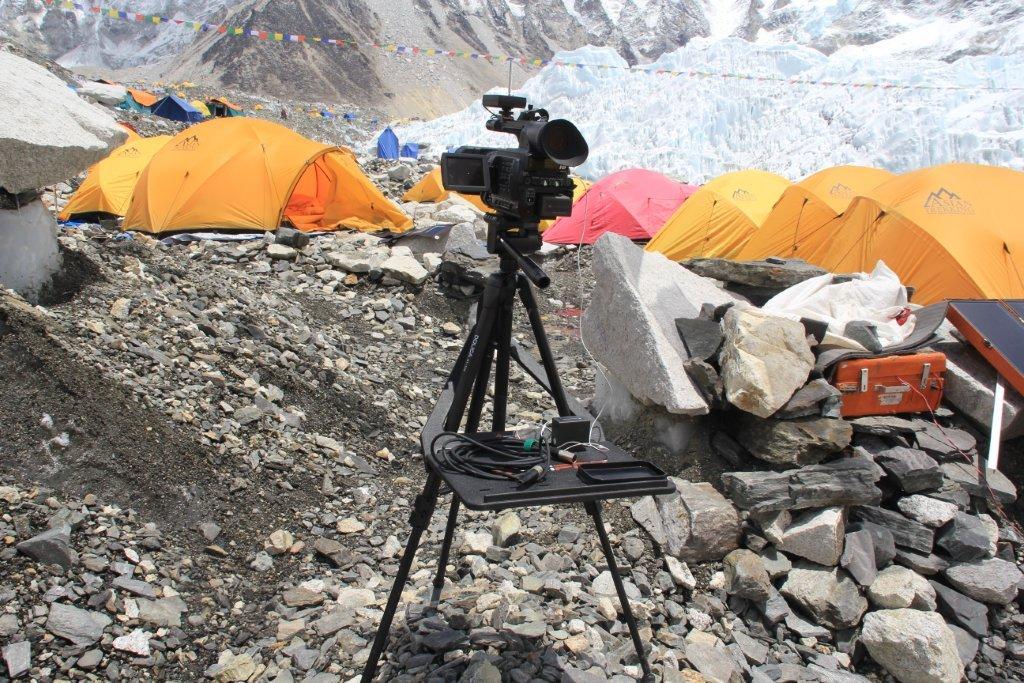
Then, I spotted a large, flat piece of plastic called a Tripad. Aha! This was the solution. As you can see in the image, the Tripad surface extends from two of the three tripod legs. The genius part–the part that I never considered when I was doing my own (lame-o) inventing was a brace that fit over the head of the tripod and supported itself by hanging onto the far leg. B&H has lots of tripods, and I happened to find myself there around dinner time, when the busy store wasn’t too crowded. The Tripad worked: it was stable, not too large, and, quite perfect. The surface measures 15 inches wide and 11 inches deep (plus the part that connects to the tripod legs); the second triangular piece fits over the head and onto the leg. It weighs three pounds and holds eight. It comes along with me, but mostly when I travel by car; it’s little heavy and large for casual use, but durable and solid for professional applications. Here’s the video; see for yourself. The Tripad costs $99, and you can buy it here.

Now, back in my inventing days, I was thinking (though never seriously) about a setup that might involve not a full shelf but a pair of arms extending, on the perpendicular, from the tripod legs. There is an artist’s tripod with this design (Mabef M27), but I could never quite figure out which search terms could be used to find such a contraption on Google.

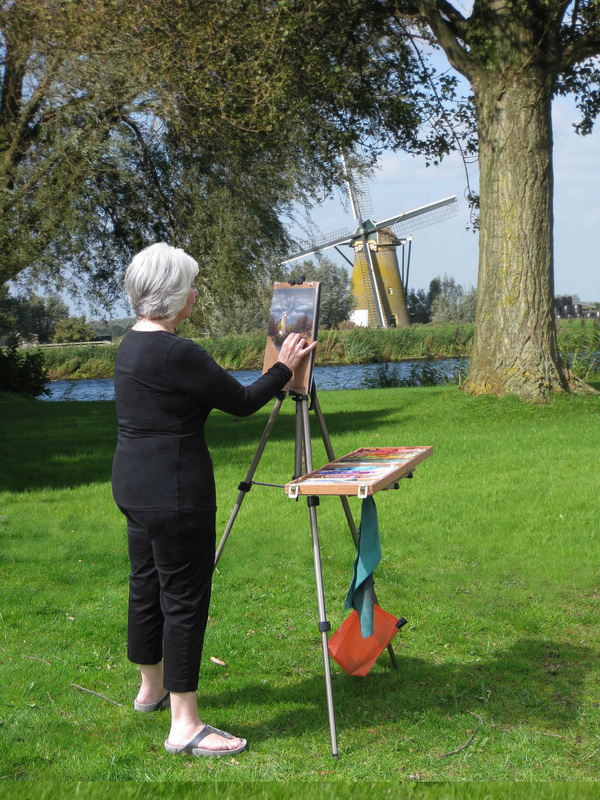
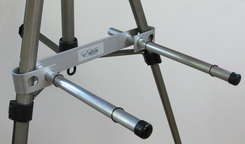
Then, I got lucky. I found the Easel Butler: Maximillian (or, for friends, Max). I liked the site immediately: the device “weights less than two bananas.” And that turns out to be true. In ounces, that’s 11.5, and in length, it’s 14 inches. There is a metal brace that slides over two easel legs. The brace has two holes: into each hole, you place a metal rod. The rods are kept in place by rubber o-rings (which you must be careful not to close, especially when working in the field). There’s a bag that attaches to the far side of the easel, a counterweight. With Max’s arms outstretched, I was able to place a full box of pastels without once worrying about an accident due to instability (clumsiness is, of course, another matter entirely). Easel Butler sets up in an about a minute, and requires about as much time to strike and put away. It comes with a nice little bag. It’s sturdy, well-thought-out, and well made. And the whole package is light enough for anyone to take along, and small enough to fit into a suitcase so it can travel with you, anywhere in the world. Want to see it in action? Watch this… Or just buy it here for $37.95.

I’m happy. A month ago, I was traveling some inept path with no real understanding of how to solve a problem. Now, I have two good solutions, each well-suited to a particular creative application. Below, some additional pictures that may convince you to invest, or, at least, to think differently about the way you work when you create.

Here’s the Tripad on a trip to Mount Everest.

I hadn’t considered this possibility before, but the Easel Butler allows one pair of arms to be attached to all three sides of the tripod. For a pastel artist, or a serious videographer or photographer, this is a terrific (and extremely cost effective) solution. Lightweight, too!

Here’s a more relaxed, in-the-field version of the Easel Butler in use. Very, very simple.

A Great Idea for Great Ideas

Once upon a time, OmniGraffle software was provided free with every Apple Mac computer. That’s how I learned about it. Now, I use OmniGraffle on my iPad and the desktop. When it comes to sketching out ideas, and presenting them in a clear and colorful manner, there is no better (or easier-to-use) product.

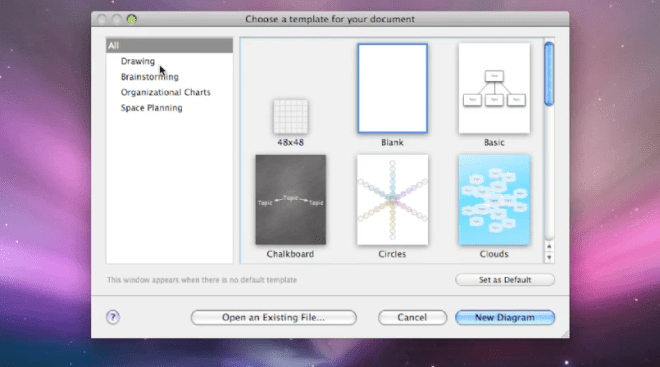
So, what does OmniGraffle do? Well, it depends upon what you want it to do. Start with a blank sheet, or some on-screen graph paper, or set yourself up for a cloud cluster (also called a mind map), or a whiteboard, or a chalkboard. There are connected notes, so you can use it as a kind of bulletin board, Whatever works for you, you’ll find the basic template in the full Standard or Professional version for use on the Mac (a great many features are available on the iPad version, which may suffice for some users).

Choose the template, then start drawing. Easy enough to begin with a box, color it, shade it, add text, make a copy, the sorts of things that you do in PowerPoint or Keynote all the time. Here, the tools are more varied, more versatile, including a bezier tool to draw shapes as you would in Adobe Illustrator (if you don’t know how to do this, it’s worth asking someone for help, but once you understand how it works, you’ll find yourself using this tool quite often).

So, let’s say that you begin with a free-form drawing, a visual exploration, a sketch to explain an idea to yourself or to others. It begins to make some sense, so you want to change its form, maybe move into a cloud of connected ideas, or a set of related on-screen index cards, or an organizational chart with colors to indicate levels or positions. Easy to do–this software is designed for versatility, and for intuitive thinking. The results can become quite sophisticated–and yet, they are not difficult to pull together, even under the pressure of time.

Automatic layouts save time, and make everything look a lot tidier, a lot more clear. There’s quick and easy access to frequently used tools, like color palettes and the font selector. There’s a user community called Graffletopia that creates “stencils” that can be used to create, for example, a director’s plan for film, or visualizations for software programmers. Browsing through Graffletopia, the utility of OmniGraffle becomes very clear: this is a visualization tool for working professionals. It’s easy to use, versatile, and, you’ll find, quite popular among certain knowledgable groups.

OmniGraffle is not a drawing tool, but instead, it is a tool for making (and easily revising) diagrams. I like the language from Omni’s website: “OmniGraffle knows what makes a diagram different from a drawing, and gives you the tools to create amazing diagrams quickly and easily. Lines stay connected to their shapes, unlike with illustration programs, where you would have to redraw your diagram every time you moved something.” As someone who often uses visuals to explain–and has become quite tired of the limitations of, say, Keynote or the level of sophisticated required for Adobe Illustrator–OmniGraffle feels just right to me. I find that the interface is intuitive (best if you’re already a Mac user), and that, from time to time, I need to take a moment and figure out how a tool works. That’s good–it’s just a few steps more sophisticated than my current abilities.

Most of the time, I’m sketching a diagram between meetings, capturing the basic idea. And although I can complete a pro-quality diagram on the iPad (and often do), I find myself in need of some certain advanced features, such as import/export from/to Visio (a Windows-only product). Most of the time, my diagram is on the simple side: colored boxes with type, perhaps a cloud to indicate an interesting idea. By holding my finger down, then dragging, I can group my clouds and/or boxes. Better yet, a smart selection tool allows quick selection of, for example, just the blue rectangles. I can create Adobe-style layers, then copy, or turn them on and off. Very handy, qick, and effective. Easily learned, too, in daily use, the iPad version has proven to be extremely useful, in part because it combines some of the best features found in OmniGraffle Professional (such as tables) with a sophisticated automatic diagramming tool, and a freehand tool, too.

To be clear, there are three different OmniGraffle products, each with its own unique set of benefits.

OmniGraffle for iPad costs $49.99 from the AppStore–a high-priced product that turns out to be a very good value because it does so much, so easily. OmniGraffle Standard, for Mac, costs $99.99, and OmniGraffle Professional, also for Mac, costs $199.99. Compare their features here. And, happily, you can get a free trial download for either of the Mac products (and any of the many excellent OmniGroup products). They do things the right way. It’s impressive.