Gigapixel Images (Updated)

Consider this: your new-ish digital camera shoots images containing roughly 10 megapixels. That’s old news. All of the cool people are shooting images with 100 times as much resolution. Images with 1,000 megapixels!

Of course, these images are huge. Too large to print. But not too large to view on the web it’s difficult to take in the stunning clarity of the whole image, but it is fun to pick any part of the gigantic image and appreciate the clarity.

There are digital gigapixel panoramas, and digital gigapixel macro (close-up) images. But before you even consider making one yourself, you need to develop a plan and a process. think

in terms of shooting a series of panoramic images where the top, left, bottom and right sides must be perfected aligned with the image above, below and to each side. It can be done, but most tripod heads are not designed with this precision requirement. To do the job in the best possible way, take a look at the GigaPan EPIC Pro, a programmable mount.

Good video tutorials here.

If you’re interested in learning more, one very good source is the spring 2012 issue of a terrific new international photography magazine called c’t Digital Photography. Click here for access for past issues.

Here’s the world’s largest indoor image. Click to see the image the 360 cities site, where you can explore the Strahov Library in astonishing detail.

UPDATE: A team at Duke University posted a letter to Nature magazine. In a story published by DPReview, a theoretical design exists for a 960 megapixel camera that’s small enough to be used in the field. As they’ve imagined the new AWARE-2 camera, their work led to a design that arranges a series of cameras in a hemispherical arrangement, pointing at a single, spherical lens that the team have dubbed the ‘gigagon.’ The use of a single lens avoids the cost and complexity of having specialist optics on each sub-camera, while the curved design scales more easily than a flat array of cameras. The team believes this approach would continue to work for up to 50GP cameras.

From DPReview: “A diagram showing the hemispherical arrangement of the sub-cameras, and their relationship to the ‘Gigagon’ main lens (top right).”
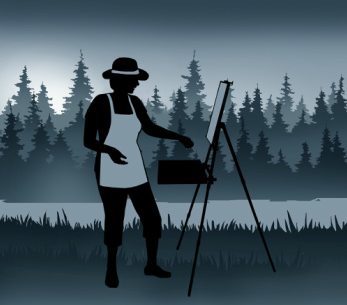
Beyond the Easel – Serious Field Work

I visited B&H Photo in Manhattan with a sketched diagram in my hand, hoping to find something that would allow me to attach a shelf to my tripod. When I was using the tripod only for still photography, the need was there, but minimal. When I started using the tripod for drawing and painting (with a sketch board firmly attached to the tripod head), it became clear that I needed a place for my pastels, my paints, the water, the paper towels. When I added videography, the tripod kept the camera firm and fluid, but I needed a handy place for the microphone, the iPad, the Zoom audio recorder, and other supplies.

After trying to rig something on my own, and failing, I started visiting local hardware stores, and was able to cobble together a solution involving perforated steel strips and cotton twine. At best, I had devised a temporary solution. Entering B&H, my hopes were not high.

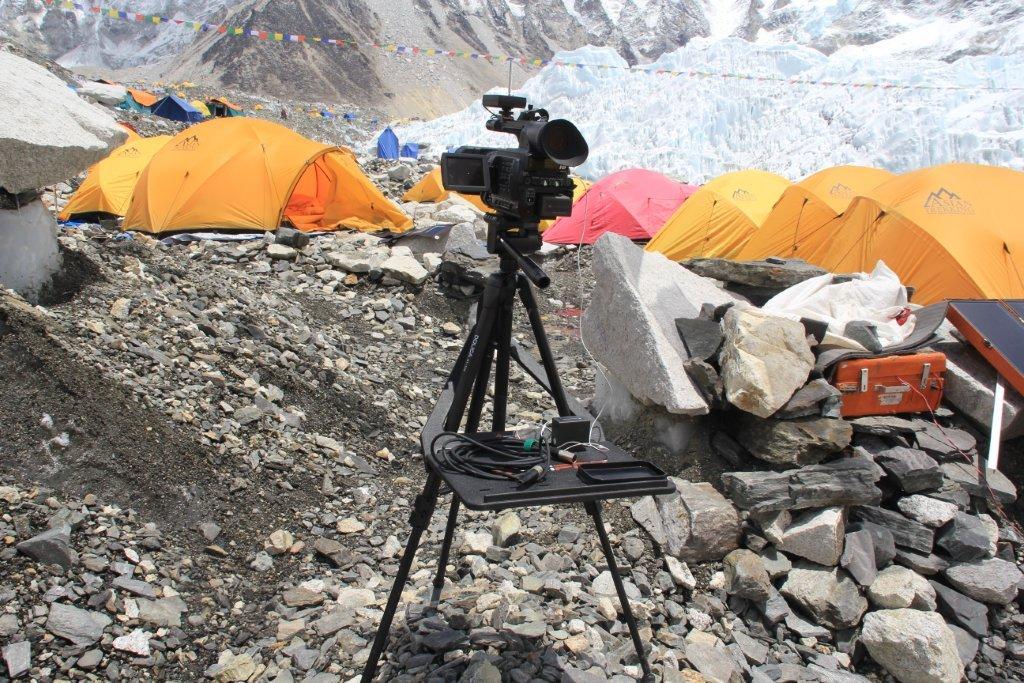
Then, I spotted a large, flat piece of plastic called a Tripad. Aha! This was the solution. As you can see in the image, the Tripad surface extends from two of the three tripod legs. The genius part–the part that I never considered when I was doing my own (lame-o) inventing was a brace that fit over the head of the tripod and supported itself by hanging onto the far leg. B&H has lots of tripods, and I happened to find myself there around dinner time, when the busy store wasn’t too crowded. The Tripad worked: it was stable, not too large, and, quite perfect. The surface measures 15 inches wide and 11 inches deep (plus the part that connects to the tripod legs); the second triangular piece fits over the head and onto the leg. It weighs three pounds and holds eight. It comes along with me, but mostly when I travel by car; it’s little heavy and large for casual use, but durable and solid for professional applications. Here’s the video; see for yourself. The Tripad costs $99, and you can buy it here.

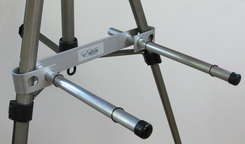
Now, back in my inventing days, I was thinking (though never seriously) about a setup that might involve not a full shelf but a pair of arms extending, on the perpendicular, from the tripod legs. There is an artist’s tripod with this design (Mabef M27), but I could never quite figure out which search terms could be used to find such a contraption on Google.

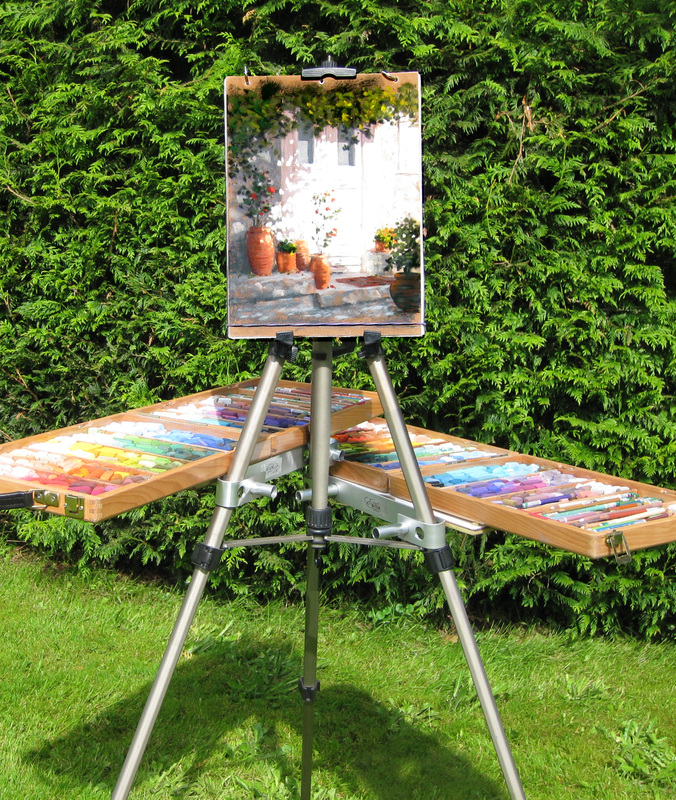
Then, I got lucky. I found the Easel Butler: Maximillian (or, for friends, Max). I liked the site immediately: the device “weights less than two bananas.” And that turns out to be true. In ounces, that’s 11.5, and in length, it’s 14 inches. There is a metal brace that slides over two easel legs. The brace has two holes: into each hole, you place a metal rod. The rods are kept in place by rubber o-rings (which you must be careful not to close, especially when working in the field). There’s a bag that attaches to the far side of the easel, a counterweight. With Max’s arms outstretched, I was able to place a full box of pastels without once worrying about an accident due to instability (clumsiness is, of course, another matter entirely). Easel Butler sets up in an about a minute, and requires about as much time to strike and put away. It comes with a nice little bag. It’s sturdy, well-thought-out, and well made. And the whole package is light enough for anyone to take along, and small enough to fit into a suitcase so it can travel with you, anywhere in the world. Want to see it in action? Watch this… Or just buy it here for $37.95.

I’m happy. A month ago, I was traveling some inept path with no real understanding of how to solve a problem. Now, I have two good solutions, each well-suited to a particular creative application. Below, some additional pictures that may convince you to invest, or, at least, to think differently about the way you work when you create.

Here’s the Tripad on a trip to Mount Everest.

I hadn’t considered this possibility before, but the Easel Butler allows one pair of arms to be attached to all three sides of the tripod. For a pastel artist, or a serious videographer or photographer, this is a terrific (and extremely cost effective) solution. Lightweight, too!

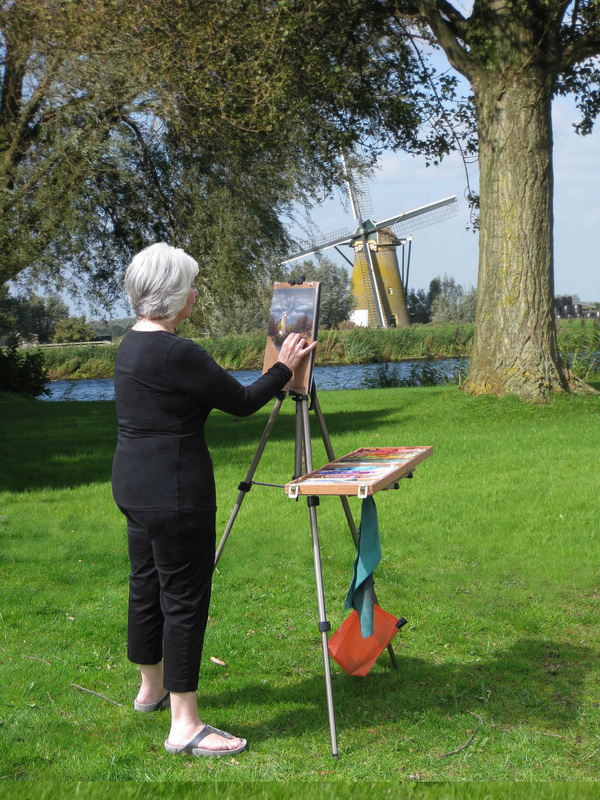
Here’s a more relaxed, in-the-field version of the Easel Butler in use. Very, very simple.

A Great Idea for Great Ideas

Once upon a time, OmniGraffle software was provided free with every Apple Mac computer. That’s how I learned about it. Now, I use OmniGraffle on my iPad and the desktop. When it comes to sketching out ideas, and presenting them in a clear and colorful manner, there is no better (or easier-to-use) product.

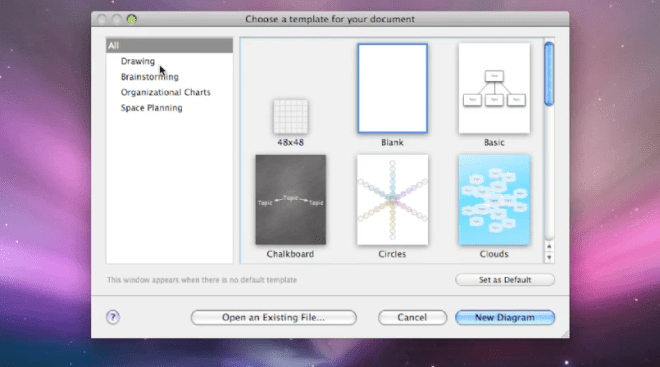
So, what does OmniGraffle do? Well, it depends upon what you want it to do. Start with a blank sheet, or some on-screen graph paper, or set yourself up for a cloud cluster (also called a mind map), or a whiteboard, or a chalkboard. There are connected notes, so you can use it as a kind of bulletin board, Whatever works for you, you’ll find the basic template in the full Standard or Professional version for use on the Mac (a great many features are available on the iPad version, which may suffice for some users).

Choose the template, then start drawing. Easy enough to begin with a box, color it, shade it, add text, make a copy, the sorts of things that you do in PowerPoint or Keynote all the time. Here, the tools are more varied, more versatile, including a bezier tool to draw shapes as you would in Adobe Illustrator (if you don’t know how to do this, it’s worth asking someone for help, but once you understand how it works, you’ll find yourself using this tool quite often).

So, let’s say that you begin with a free-form drawing, a visual exploration, a sketch to explain an idea to yourself or to others. It begins to make some sense, so you want to change its form, maybe move into a cloud of connected ideas, or a set of related on-screen index cards, or an organizational chart with colors to indicate levels or positions. Easy to do–this software is designed for versatility, and for intuitive thinking. The results can become quite sophisticated–and yet, they are not difficult to pull together, even under the pressure of time.

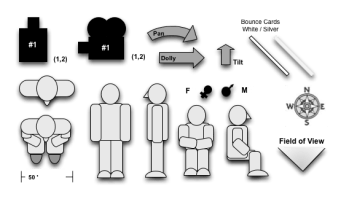
Automatic layouts save time, and make everything look a lot tidier, a lot more clear. There’s quick and easy access to frequently used tools, like color palettes and the font selector. There’s a user community called Graffletopia that creates “stencils” that can be used to create, for example, a director’s plan for film, or visualizations for software programmers. Browsing through Graffletopia, the utility of OmniGraffle becomes very clear: this is a visualization tool for working professionals. It’s easy to use, versatile, and, you’ll find, quite popular among certain knowledgable groups.

OmniGraffle is not a drawing tool, but instead, it is a tool for making (and easily revising) diagrams. I like the language from Omni’s website: “OmniGraffle knows what makes a diagram different from a drawing, and gives you the tools to create amazing diagrams quickly and easily. Lines stay connected to their shapes, unlike with illustration programs, where you would have to redraw your diagram every time you moved something.” As someone who often uses visuals to explain–and has become quite tired of the limitations of, say, Keynote or the level of sophisticated required for Adobe Illustrator–OmniGraffle feels just right to me. I find that the interface is intuitive (best if you’re already a Mac user), and that, from time to time, I need to take a moment and figure out how a tool works. That’s good–it’s just a few steps more sophisticated than my current abilities.

Most of the time, I’m sketching a diagram between meetings, capturing the basic idea. And although I can complete a pro-quality diagram on the iPad (and often do), I find myself in need of some certain advanced features, such as import/export from/to Visio (a Windows-only product). Most of the time, my diagram is on the simple side: colored boxes with type, perhaps a cloud to indicate an interesting idea. By holding my finger down, then dragging, I can group my clouds and/or boxes. Better yet, a smart selection tool allows quick selection of, for example, just the blue rectangles. I can create Adobe-style layers, then copy, or turn them on and off. Very handy, qick, and effective. Easily learned, too, in daily use, the iPad version has proven to be extremely useful, in part because it combines some of the best features found in OmniGraffle Professional (such as tables) with a sophisticated automatic diagramming tool, and a freehand tool, too.

To be clear, there are three different OmniGraffle products, each with its own unique set of benefits.

OmniGraffle for iPad costs $49.99 from the AppStore–a high-priced product that turns out to be a very good value because it does so much, so easily. OmniGraffle Standard, for Mac, costs $99.99, and OmniGraffle Professional, also for Mac, costs $199.99. Compare their features here. And, happily, you can get a free trial download for either of the Mac products (and any of the many excellent OmniGroup products). They do things the right way. It’s impressive.

Easy-to-Use Audio Studio-to-Go

The Zoom H4n has become one of my favorite tools, but most people have never heard of it, or seen it, or even know that such a thing exists.

Zoom makes portable audio recorders–pocket sized recording studios about the size of Sony’s original Walkman, but so much more versatile. This is the ideal companion for a digital camera or camcorder–with far better sound, and far more control over the recording process. It’s ideal for recording of music rehearsals, recitals, and performances. It’s handy for audio interviews, and for the recording of meetings. With proper cabling and a phono pre-amp, you can digitize your vinyl LPs. It’s a useful four track audio recorder, so you can use it to make a record. And, of course, you can use it to listen to music, speeches, podcasts, any audio recording with remarkable fidelity because everything is digital.

Let’s take it from the top…and the bottom.

On top, there is an X-Y (crisscrossed) pair of small microphones. The quality is good, the sound is clean, and they can each be adjusted to cover either a 90-degree pickup area (for more intimate situations or to reduce unwanted noise), or a 120-pickup pattern (to pick up a wider area). Or, plug one or two professional microphones into the bottom (1/4 inch phono plugs or XLR connectors). Or, plug an 1/8 inch mini stereo cable into the mic jack on the back). Control the input level by watching digital VU meter on the small golden screen (backlit when necessary) and adjusting the rocker switch with one finger during the record session.

Here’s a closer look at the screen. No, it’s not iPhone quality, but yes, it’s functional. Time code runs on top, file number next, then sound levels. Buttons below allow track selection, and in another mode, allow selection of files and formats. Buttons are small, screen is small, but everything works fine in the field.

You can choose to record in either .wav (high quality) or .mp3 (low quality, but smaller file sizes) at various sample rates. In multitrack mode, you can record on each of up to four tracks, or play back on up to three of them. Buttons are small, but overdubbing is within the capabilities of this little machine, and that’s useful if you are recording your own tracks for a music demo, for example, because you can listen to your primary vocal while laying down a harmony track, for example, or listen to the drum track while playing your saxophone).

For more sophisticated work–and an easier time–use the Zoom H4n as the interface between, say, your microphones and a more robust Digital Audio Workstation (such as Logic Pro, Garage Band and Samplitude), but, sadly, not ProTools, which requires only M-Audio devices.

Need a metronome or a guitar tuner? They’re built-in, too.

You will record on an SD card. Power comes from either an AC cable or handy AA batteries. You can plug the Zoom H4n into your computer via a USB micro connector. If you need more battery time, flip into “stamina mode” which shuts down some features and dramatically increases recording time (6 hours in normal mode, 11 in stamina mode).

 The Zoom H4n is all so well thought out! I wish every product was as thoughtfully designed!

Recently, I used the Zoom to record audio interviews while recording video interviews on the Olympus PEN EP-3 digital (still) camera. I placed the Zoom just out of frame, and later, in editing, matched the audio track from the Zoom with the EP-3’s video and audio tracks (once synchronized, the Olympus audio track was muted, and subsequently, replaced). Under the right circumstances, this is a better solution than a wired external microphone or a finicky wireless microphone. What’s more, the Zoom provides broadcast-quality results. The sound quality is fabulous. And because the Zoom is small, it fits into my small shoulder bag alongside the small micro four thirds Olympus PEN EP-3. This is a complete HD quality remote shooting rig that I can easily carry in a shoulder bag with plenty of available space for an iPad, wallet, cell phone, ear buds, and (much) more. Add a 32GB SD card, and I can carry hundreds of record albums with me, just in case I feel like listening, not recording.

There is so much more. If you’re intrigued, simply download the instruction manual.

The Zoom H4n price: under $300. And, for $199, you can enjoy a similar device with reduced features with an H2n (seems less sturdy to me, though). And if that’s still too much, Zoom offers a $99 alternative, model H1.

Success! Good Health! Longevity! Fabulous Children!

You can do it! You’ll need a college degree and you’ll need to move to a place where 21st century America’s promise shines. Seattle, the SF Bay Area, New York City,

Boston, and the ring around Washington, DC.–those are the places where innovation is held in high esteem and is most likely to be funded so that new companies can be born, grow, and change the economic picture for employees, shareholders, and those smart enough to live nearby.

These are the places where venture capitalists fund big opportunities, and if a company seems promising, a VC will often require a move to, say, Silicon Valley, or not to fund the company at all. The “thickness” of the job opportunities in the Silicon Valley (and a very small number of other places), and the thickness of people with the necessary skills to suit those needs, not only attracts the best (and highest paid) people to these centers, where their high incomes tend to generate more jobs for the local economy (usually with salaries that are higher than even unskilled high school dropouts will find at home). If you’re an attorney, you’ll make as much as 30-40% more if you work in these areas than in an old rust belt city. The same is true for cab drivers and hair stylists.

Much has been made of Google’s employee perks; they won’t play in Hartford or Indianapolis, but neither of those places, nor most other American cities, see the kinds of financial results and spillover effects in the community enjoyed by the area around San Francisco. This is becoming the area that drives the American 21st century. And it’s very difficult for other cities to get into the game.

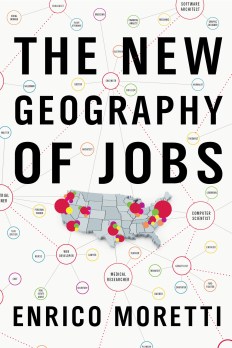
Author and UC Berkeley Professor Enrico Moretti has just published a book that presents a compelling picture of the much-changed US economy. The title of the book, The New Geography of Jobs, undersells the concept. Yes, if you can, you should move to any of these places, where you will make more money than you will at home–regardless of whether you are a high school dropout or a Ph.D. You will probably live longer, remain healthier, provide a better path for your children, live in a nicer home, have smarter friends, smoke less, drive a nicer car, you name it… the American dream lives large in San Diego, but in Detroit or Flint, Michigan, it’s gone and it’s not likely to return any time soon.

Average male lifespan in Fairfax, VA is 81 years. In nearby Baltimore, it’s just 66.

That’s a fifteen year difference. This statistic tracks with education attained, poverty level, divorce rates, voter turnout (and its cousin, political clout), lots more.

Want to remain employed? Graduate from college.

Nationwide unemployment rates: about 6-10% for high school only, 10-14% for incomplete high school, 3-4% for college graduates.

College degrees matter…far more than you might think. In Boston, with 47% of its population holding college degrees, for example, the average college graduate earns $75k and the average high school graduate earns $62,000. By comparison, Vineland NJ–just outside Philadelphia in South Jersey, has just 13% college graduates, and a college graduate earns an average of $58,000, with high school graduates at $38,000. Yes, it costs less to live in Vineland, but over a lifetime, people who live in Vineland are leaving hundreds of thousands of dollars on the table, perhaps as much as a half million dollars over a lifetime.

Real cost of college, including sacrificed employment: $102,000. At age fifty, average college graduate earns $80,000, but average high school graduate earns $30,000.

If a 17-year old goes to college, he or she will earn more than a million dollars lifetime. If not, it’s less than a half million.

What’s more, 97% of college educated moms are married at delivery, compared with 72% of high school-only grads. Just 2% of college-educated moms smoked during pregnancy compared with 17% with a high school education and 34% of drop-out moms. Fewer premature babies, fewer babies with subsequent health issues. Almost half of college graduates move out of their birth states by age 30. By comparison: 27 percent of high school dropouts and 17 percent of high school dropouts. The market for college graduates is more national; the market for non-grads is more local.

Caught in the middle? The best thing you can do is hang out with people who are pushing their way up the productivity curve. That is, MOVE! Leave the town where things aren’t happening, and take a job, almost any job with growth potential, in a place with high potential.

While the arguments about fencing lower-income immigrants out persist, most people earning graduate degrees today are immigrants. And a high percentage of people who start significant new businesses, funded by venture capital, are first generation Americans.

Today, an immigrant is significantly more likely to have an advanced degree than a student born in the US.

Foreign born workers account for 15% of the US labor force, but  half of US doctorate degrees are earned by immigrants. Immigrants are 30% more likely to start a business. Since 1990, they have accounted for 1in 4 venture backed companies. When they start a new business, they generate high-value jobs, which brings more money into the community (not any community, only the ones with a thick high-skill / high value workforce and a thick range of desirable jobs), and the people who fill these jobs generate more jobs in the retail and services sector, jobs that pay more in the high value areas than they do at home.

A century ago, investment money went to Detroit for its car industry, and to the midwest for productive factories. That era is ending. Innovation in the health sciences, technology, software, internet, mobile, and other fields is the driver of American productivity–but not everywhere. Clusters attract the best and the brightest from metros without the necessary thickness, leaving lesser places with fewer people who can make big things happen.

There is so much more here (sorry for the long blog post, but this is a very powerful book). We need to generate more college graduates, especially more men, and especially more people with STEM expertise (science, technology, engineering, math). We need to do a far better job in educating and creating opportunity (including opportunity for mobility) among those with fewer advantages. We’ve got a lot of work to do. First step: read the book!

A Book about Books

“I am an invisible man.”

“We were around Barstow on the edge of the desert when the drugs began to take hold.”

“On a sticky August evening two weeks before her due date, Ashima Ganguli stands in the kitchen of a Central Square apartment, combining Rice Krispies and Planters peanuts and chopped red onion in a bowl.”

So begins three contemporary books: Ralph Ellison’s Invisible Man (1952), Hunter S. Thompson’s Fear and Loathing in Las Vegas (1971), and Jhumpa Lahiri’s The Namesake (2003). One is about African Americans, another is about the counter culture, and the third opens with a view of new Americans, attempting to recreate a dish she recalled from her native India. Our tastes change with the times–only sixty years separate Ellison from Obama.

With so many words propelled at us each day, so many stories on so many media, there’s not much opportunity to consider the big picture, to develop a sense of the stories we are telling one another. I suspect that’s what caused English Professor Kevin Hayes to write A Journey Through American Literature (Oxford University Press).

In Hayes’s world, the word “literature” embraces poetry, travel writing, autobiography, and fiction. Whether Benjamin Franklin or Stephen Crane, Eugene O’Neill or T. Coraghessan Boyle, his examples consider the broad sweep of 250 years. His definition of literature includes bits of Seinfeld and The Simpsons, and acknowledges films as literature, too.

Skateboarding through media theory and aesthetics, Smithsonian American Art Museum is acknowledging videogames as art this summer. And I’m certain that every word in write in this blog, and every word you write in your email rants, will stand the test of time as great literature, too.

Yes, there is interesting, substantial work being done in all corners of art and media. Often, the work goes unnoticed, or receives a flash of publicity for fifteen seconds. It’s just too easy to forget about the good stuff until somebody says, or writes, “hey, this is worth a look!”

This summer, for me, Hayes is that somebody. Here’s a starter checklist:

  • Walden by Henry David Thoreau
  • The Adventures of Huckleberry Finn by Mark Twain
  • Their Eyes Were Watching God by Zora Neale Hurston
  • The Iceman Cometh by Eugene O’Neill
  • The Invisible Man by J.D. Salinger
  • Travels with Charley by John Steinbeck
  • Beneath the Underdog by Charles Mingus
  • China Men by Maxine Hong Kingston
  • The House on Mango Street by Sandra Cisneros

Yes, Hayes is an English professor. No, I will not write a term paper, nor will I abide by any deadline. This time, I’m not reading for the professor or the course or the grade. I’m reading for myself. And I plan to read these books not on a screen, but through the ancient technology of ink on paper. Some, I will buy in a used bookstore, some I will buy from the NEW bookstore that just opened not a mile from my home, some I will borrow, at no charge, from a good local public library.

Welcome to summer!

The Magical Watercolours of Joseph Zbukvic

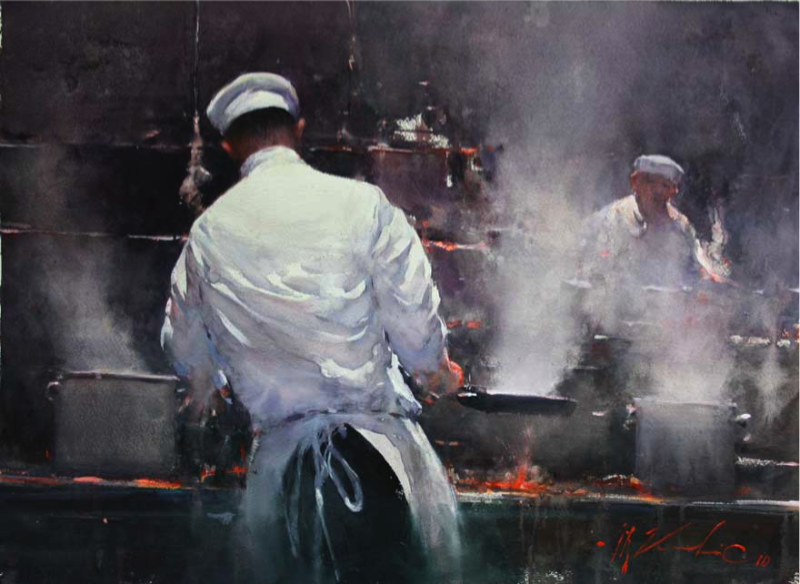
Joseph Zbukvic is one of the world’s best watercolor painters. In an era when technology dominates art, it’s wonderful to see what this man can do with paint, water, brushes and paper.

I encourage you to watch the entire 20-plus minutes of the video (link below). If you want to get right to the good stuff, pick it up around 2-3 minutes in. This is an Australian TV series. Put Some Colour in Your Life. You will want to start paying close attention when the artist begins his version of “working in Photoshop”–a digital-free approach to thinking through a picture. I watched, I paint, and I learned more in twenty minutes than I’ve learned from dozens of how-to books. This is phenomenal work, gimmick-free, technology-free, just the good stuff. Click here to watch.

Here’s a look at some of the artist’s work. Be sure to visit the gallery section of the artist’s website.

Green, Blue, and Extremely Portable

One side is green and the other is blue. It stretches so your chroma-key productions have a lightweight, flat background. But it’s a good idea to stretch even more with clips.

Or: chroma-key, anywhere.

It’s amazing how easy portable video production has become. You can shoot high definition video with a smart phone, a tablet, a FlipCam (and similar products), an inexpensive video camcorder, a digital still picture camera… The list goes on.

Most of the time, the recorded video is real life… people in action, scenery, and so on. Sometimes, it’s interesting to explore new creative domains. Often, these explorations involve the placement of people or objects in imagined places, and this is often achieved through a technical miracle called chroma-key.

What can you (and some kids) do with chroma-key? Here’s a step-by-step example that’s fun to watch. (Click to watch the video.)

You know chroma-key: it’s the technology used to place your local meteorologist in front of a digital weather map. The subject performs in front of a green screen, and then, all of the green is (miraculously) dropped out of the image so that it can be replaced with your choice of alternative video. In fact, any color can be used as the chroma-key color, but most often, a deeply saturated green or blue is used because these colors are not (usually) seen in the colors of human skin or hair or eyes. The colored area is usually painted, or created with a cloth stretched very tightly and lit evenly. When using chroma-key, folds and shadows cause difficulty.

With these challenges in mind, I had very high hopes for the FlexDrop2 from Photoflex. The portable package is a big, lightweight fabric disc, not quite a yard in diameter. It sets up with not much more than the flick of a wrist, and opens to a taut five foot by seven foot panel. Very cool.

Mostly, the FlexDrop is flat, but the use of a small clamp here and there is necessary to eliminate all visible shadows and wrinkles. Unfortunately, it’s not a standalone device…it is designed to be attached to a lighting stand or other pipes or tubes (and these are rarely lightweight).

Hands on, FlexDrop2 really works. One person can stand in front of a field of nothing but blue (one side) or green (the other), and then, live or with a good edit application, the chroma-key process can be used to drop out the blue or green and drop in any video still, animation, graphic, or footage. Two people? Hang the FlexDrop2 horizontally. Another good use: as a background for stop-motion animation, but you will need to dress the tabletop surface with an additional green or blue cloth (exactly the same color as FlexDrop2).

At $165, the FlexDrop2 is a nice-to-have, a bit expensive unless you use it often. And, of course, there are less costly ways to make chroma-key happen: buy a cloth and stretch it yourself, paint a wall, etc. But this one is handy, portable, stretches nicely, stores without taking up much space, and does the job in a professional manner. One catch: it’s not so easy to collapse and pack away. This video shows you how to pack it up.

BTW: Thanks to Kristy and to Rebecca for their help with this article.

Learning from Woody

On July 12, 2012, Woody Guthrie would have been 100 years old. This poster commemorates a life well-lived, and a voice that has never rested. You can support the Woody Guthrie Foundation if you buy this poster. You can learn a lot from Woody. I did, as explained below.

“Hey kids, want to sing a song? Some of you might know this song, but the words can be hard to remember. Here’s a sheet with the lyrics…”

This land is your land, this land is my land

From California to the New York Island

From the Redwood Forest to the Gulf Stream waters

This land was made for you and me.

Singing “This Land Is Your Land” as a group exercise begins an exploration of surprising dimensions. Note how broad, deep and wide Woody Guthrie’s river of highway manages to travel.

Just as most people’s knowledge of Martin Luther King begins and ends with an “I Have a Dream” speech and a murder in Memphis, most people’s knowledge of Woody Guthrie begins and ends with one popular song. Turns out, there was a lot more to Woody, and, a lot more to this particular song. Here’s a lyric that you might not have heard Woody sing:

 There was a big high wall there that tried to stop me;

Sign was painted, it said private property.

But on the back side it didn’t say nothing;

That side was made for you and me.

Woody sang this song (and many of his songs) with different verses (see note 1 below). Among folk singers, and storytellers, this remains common practice (also, among jazz musicians, but rarely among the commercial performers whose recordings are usually the definitive versions of their songs). In fact, Woody’s own life story can be difficult to follow because he often recalled his own life as a storyteller might– with different details depending upon his audience.

As I think about Woody Guthrie, and about how people learn, I envision a different kind of education than most people find at school, an education based upon individual learning and ideas that connect with one another, and with the heart and soul. I think that’s a better way to learn, or, at least, i think that’s the way I learn.

Turns out, Woody’s full name was Woodrow Wilson Guthrie, and he was named for a presidential candidate, then president of Princeton University. By age 14, Woody was living pretty much on his own in his hometown, Okemah, Oklahoma; his mother had been institutionalized with the Huntington’s Disease that would later take her life, and his father was living in Texas (see note 2 below). Woody becomes a street musician, then leaves for promise of California, one more Okie whose life was shaped by the Dust Bowl tragedy. In Los Angeles, he sang hillbilly music on the radio as part of a duo, but spent lots of his spare time thinking about, and writing about, working class people who could not find work. Woody wrote protest songs, and, for a few months, wrote for a Communist newspaper (though he was never a member of the Party).

Learning about Woody in the 1930s leads the interested student (me, among them) into the plight of real people during the Depression; ways in which creative people somehow earn a living; why creative people sometimes find traditional work difficult to do; the importance of unions for the working man; the story of the Grand Coulee Dam and the Columbia River; socialism and communal living; the blacklists of the early 1950s; life in a singing group; writing an autobiography; the usefulness of cartooning (Woody drew cartoons); the work of the Library of Congress in preserving the nation’s heritage; the slow demise of Coney Island and Brooklyn in the 1940s; deportation of immigrants; the emergence of Bob Dylan and 1960s folk singers in Greenwich Village; the life of Leadbelly, an ex-convict (doing time for murder) who sang his way out of lifetime in prison to become a popular folksinger (he was Woody’s friend; “Goodnight Irene” was one of his songs); Sacco & Vanzetti and questions regarding fair trials; the concept of an artist’s legacy; a son carrying on his father’s work and then finding his own way as an artist and a man; a granddaughter finding her way through the music industry, too.

Clearly, Woody’s music and Woody’s story appeals to me. In writing these two pages, I’ve learned a lot, and I’m certain that I will follow up. That’s how I learn. I wonder whether most people learn this way. I suspect they do.

Notes:

1 – An interesting question for aspiring musicians: when is a song “finished?” Is a song a continuing work of art that should be malleable, or is it final at the time it is recorded. This conversation quickly leads to another about copyrights and how they work: which version of the song would be protected by copyright, and why?

2 – Later, Woody Guthrie would die from the same hereditary disease. This leads the student to a study of genetics, family trees and genealogy, and diseases of the nervous system. George Huntington’s 1872 discovery of the disease is an interesting story about how diseases are identified, and how medical research has evolved. Back further, one theory of the “witches” burned in 1672 in Salem, Massachusetts connects the women involved with symptoms associated with Huntington’s disease. Playwright Arthur Miller told this Salem story differently when he wrote his play, The Crucible, to get people to think more critically about anti-Communist campaign waged by the dubious Senator Joseph McCarthy.

3 – Further encouragement: I’m not the first to see the value of Woody Guthrie’s life and art as a platform for further learning in a many related areas of knowledge. Guthrie curriculum materials can be found here.

Gestures in a Virtual World

This slideshow requires JavaScript.

Two interesting articles, each overlapping the other, both worth reading because they may change your thinking about the ways we interact with computers and the virtual world.

The first article, from the BBC, is about surgeons in a London hospital who are learning to use voice commands and hand gestures to control medical instruments. The process, based upon Microsoft’s Kinect technology (more on this in the second article), allows greater precision and higher efficiency while eliminating some sterilization issues. For certain procedures, this “touch-less” approach to medicine is likely to become the norm within the next 10 years or so.

The second article, from the NY Times, is about Microsoft’s shift from “does not condone the modification of its products” and would “work closely with law enforcement . . . to keep Kinect tamper-resistant…” to an understanding that Kinect was going to become something greater than a videogame input device, and that Microsoft might not control the ways in which Kinect would be used in the marketplace. Eventually, Microsoft decided to release a non-game version of Kinect, still bound by a range of rules that are hopelessly out of step with today’s open-everything tech development world. The story is longish, and worth reading because, well, the article’s author said it so well:

The idea of a loosely knit band of outsider creative coders forcing a massive company to rethink a crucial new product is appealing.

I suspect both articles are the result of Microsoft’s publicity machine, both supporting an expanded view of Kinect specifically and Microsoft generally. No matter. Both are interesting, and the trend is worth a few minutes of your time. As the heat in this area increases, the keyboard, mouse, and other 20th century input devices become less likely to survive, at least in their present conception.