You Bought the Camera. Now Buy the Book.

You spend $300, maybe $400, on a feature-rich digital camera. You start by shooting in automatic mode, then experiment with aperture or shutter priority, white balance, low light shooting and maybe a few special effects.

You want to understand image manipulation, image processing, image retouching, but these are not easy to learn, and they are difficult to master.

There’s a large gap between (a) what today’s cameras and software can do, and (b) our understanding of these features and how to use them.

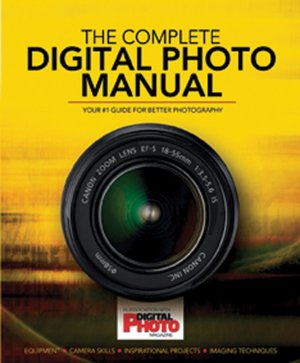
After a Goldilocks routine (too artsy, too techy, etc), I found a wonderful guide in The Complete Digital Photo Manual. Just the right balance for me–written in plain language with lots of helpful diagrams and photographs.

The book begins with an illustrated section about compact cameras–higher end models like Canon’s G10, cameras built for extreme conditions, super zooms–followed by a walk through various types of DSLR cameras and the most common features. There’s an important sidebar about image sensors. Then, it’s on to a similar section about lenses.

Next, the book explains how to set up the camera, explaining each of the features commonly offered on digital camera menus. The are good, clear explanations about metering patterns and histograms, white balance and image sharpness.

And then, about 1/3 of the way through the book, comes the best stuff. Every significant Photoshop tool and menu item is simply explained, often with step-by-step diagrams and abundant examples and illustrations. Two-page spreads include Hue/Saturation, clone Stamp and Healing Brush, Layer Masks, Channels, Hand Coloring, and more.

Then, there’s another group of spreads offering specific direction to, for example, Replace a Boring Sky, Blur Waves with a Long Exposure, lots more.

The last of the truly helpful sections explains how to make good use of RAW images, a feature viable on most serious cameras.

The Complete Digital Photo Manual was produced in association with England’s Digital Photo Magazine.

The book costs less than $25 at Barnes & Noble (and other fine retailers). Think about it: you spent how much on the digital camera? Why wouldn’t you make this investment?
The Ultimate Road Trip

It’s the biggest thing we’ve ever built–bigger than the pyramids of Egypt, about a hundred times as long as the Panama Canal, easily eight times the length of The Great Wall of China. It’s newer, too. And, soon, we’ll probably build it all over again.

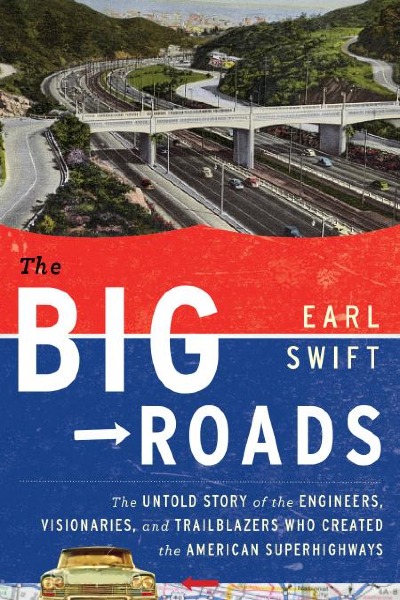
As Earl Swift explains in The Big Roads: The Untold Stories of the Engineers, Visionaries and Trailblazers Who Created the American Superhighways, the U.S. interstate highway system is forty-seven thousand miles long, and it is the “greatest public works project in history.”

Messy as our current dilemma about infrastructure may seem, life was worse before the interstates, before modern roads. In the good old days, New York City’s horses output 2.5 million pounds of manure every day, plus 60 thousand pounds of urine. In 1893, the agriculture department got things rolling with a new Office of Road Inquiry, whose boss, a Civil War veteran, declared Americans “have the worst roads in the civilized world.” Still, intrepid automobiling pioneers attempted a cross-country race in 1903 (one car included a dog, Bud, who wore goggles and “became a hit in every town they visited.”) This was the beginning of an industry, complete with sales stunts on a grand scale: Carl Fisher, whose early days were consistently colorful (and completely crazy), “rigged a Stoddard-Dayton roadster to a massive balloon and flew it over Indianapolis, vowing to drive it back into town from wherever he landed.” (Actually, Fisher stripped the floating car and drove home in a look-a-like spare). Not long after, Fisher partnered with two other car crazy businessmen  and built the Indianapolis Speedway. Fisher was among the first to campaign for a big interstate highway system.

A half-century later, in 1956, “nearly $2.6 billion had been committed to the work… contracts had been awarded on more than a thousand bridges… construction was under way or about to begin on nearly two thousand miles of highway.” Half the book is about the wrangling, the engineering and politics, the slowdowns due to the Great Depression and World War II, and all sorts of rational and irrational arguments about the nature of the undertaking, the roles of the states versus the Federal government, the best ways to pay (tolls? gas tax? Federal funds? State funds?), and much more. In fact, the weakest part of the book attempts to describe this wrangling–Swift (great name for the author of a book about fast highways, BTW) does his to craft a story from his astonishing collection of arcane research. With Detroit pumping out over 5 million cars per year (1 in 3.5 citizens owned a car), America had a mess on its hands. Far too many cars driving on roads that were designed decades earlier. Trucks made the situation worse, both by contributing to congestion and also by damaging roads never built for a big truck’s combination of weight and speed. “Snarls at New York’s George Washington Bridge were traced back eighty-four miles–seriously, eight-four miles–to Monticello, New York.”

Even in these early stages, Swift explains that the highway system had its critics: Lewis Mumford published articles and books about the loss of city neighborhoods, and the economic destruction of towns and villages across the nation. By the 1960s, the environment movement gradually imposed restrictions on engineers who were once able to construct interstate highways pretty much anywhere, regardless of impact on animals, ecosystems, even city parks. Several Baltimore neighborhoods fought tremendous battles, and today, there is no interstate highway system cutting across Baltimore–the local activists won their battle. Visitors to Baltimore’s lovely old Fell’s Point neighborhood can thank those activists–if the interstate was built as planned, that neighborhood would be gone.

Swift goes on the record to give credit where it’s due, often to government functionaries who exceeded the call of duty, but his writing is far more interesting when he’s on the road himself, or when he’s telling the (too-brief) stories of how Howard Johnson’s or other roadside co-conspirators grew to be a part of American life on the road.

What’s more, I wish he had told us more about the next fifty years, or perhaps, the next twenty. Apparently, the interstate highway system was built for about a half century’s useful life. It has not been properly maintained. As the most dedicated of the government figures, Frank Turner, pointed out, “Highways grow old and wear out at a fairly predictable ages and lifespans, and therefore must be replaced or restored.”

Swift explains, “One federal study suggested that all levels of government should spend a combined $225 billion a year for the next fifty years to rehabilitate surface transportation…they’re currently spending just 40 percent of that, in a country that does 96 percent of its traveling by car and truck.”

So begins a brief discussion about dedicated truck lanes, alternative fuels and other incremental improvements. The bigger question is potentially world-changing and certainly mind-bending, so I offer it as the basis for Swift’s next book. A century ago, visionaries came up with the idea of cars (and trucks), and then, a connected interstate highway system to move people and goods in a safe, reliable, cost-effective way. By the time the interstate highway system was completed in the late 1960s, most of those people were either gone or too old to drive. Given the astonishing public good, the modernization of America, and the tremendous downside associated with our current system, I wish Swift would encourage a discussion so we can decide whether to, and how to:

(a) spend another $11 trillion ($225 x 50 years) to fix and upgrade a highway system conceived before television, McDonalds, cell phones, FedEx or the internet, or

(b) come up with an equally bold conception of transportation that could sustain us until, say, 2112?

Here’s the photo of author Earl Swift as published on the literary festival’s website.

Looks like a strange, unimaginable number, that 2112, but in 1912, when Fisher and his friends were tooling around Indianapolis in their early model cars, 2012 must have seemed as far away, and as impossible, as a 47,000 mile highway system connecting every city and town in what is now called the lower 48 states.

BTW: In researching the author, I found this impressive bit about his interests: “An avid outdoorsman, Swift has through-hiked the Appalachian Trail, circumnavigated the Chesapeake Bay by sea kayak, and traveled the 435-mile length of the James River by foot, canoe, and kayak.” I found it here.

The Big Roads was published in 2011 by Houghton Mifflin Harcourt.

Buy it from Powell’s Books.

A Go-Everywhere iPad/Android Keyboard

Competing against nothing is not easy. Every iPad and every Android tablet comes with an on-screen keyboard that costs nothing and weighs nothing. In fact, I am using one right now. It’s fine for short documents with no formatting, but I prefer a proper keyboard for longer writing sessions.

I use the Apple wireless keyboard that came with my iMac (I use a wired keyboard on my desk, so this one was a spare. I invested in a durable slipcase from www.sfbags.comfor $29. and I carry an extra pair of AA batteries, just in case the Bluetooth eats too much power. Mostly, it works as well as any Bluetooth device. It’s a bit taller than the iPad, but then, it is a full-sized computer keyboard. Weight of keyboard, case and two sets of batteries: one pound. I do not carry it everywhere.

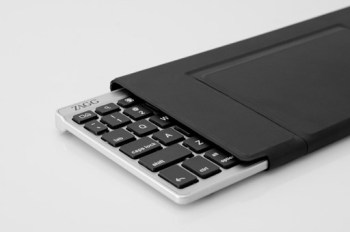
The new ZAGGKeys FLEX is about 3/4 as long as the Apple keyboard, so the keys are closer together. It weighs about 3/4 of a pound, but it is much more compact. Power is provided via USB, not AA cells. Special buttons on the keyboard are used for undo, cut, paste, and search. The keyboard easily switches from Apple to Android mode. One button pairs the keyboard to either device.

The niftiest part is the stand that doubles as the case. It’s lightweight and very stable–more firm that Apple’s magnetic iPad cover.

The keyboard is a little clunky and a little noisy–convenient but Apple’s keyboard is both elegant and silent.

Cost: Apple wireless keyboard ($69) + SF bags slipcase ($29) + a year’s batteries = $100.

Cost: ZAGGKeys FLEX: about $80.

At the recent Consumer Electronics Show, there were dozens of iPad accessory-makers on the show floor. I like ZAGG–they seem to come up with clever solutions. Here, they’ve got a good idea, but $20 and a quarter pound are not enough to overcome the significant quality advantage of the Apple / SF Bags solution.

Know What? Why?

New York Times illustration by Viktor Koen

Here’s an article by former Harvard President Lawrence Summers. It was tucked into the Education Life section of the January 22, 2012 issue, so you may have missed it.

http://www.nytimes.com/2012/01/22/education/edlife/the-21st-century-education.html?pagewanted=all

Summers is attempting to change the debate. Some key ideas:

1. Getting information is now the easy part. Twenty-first century education ought to be about processing and contextualizing information.

2. Processing and contextualizing leads to collaboration.

3. New technology allows the best teachers to be connected to every student. Everything else seems to be clutter.

4. Despite best efforts on the interactive side, most learning is passive: watch, listen, learn. Active learning is the future, but we’re just beginning to understand how and why.

5. Learn a language. Travel the world. Be global.

6. Education must shift from information dissemination to analysis.

Although he’s on the elitist side, the ideas make sense. The complete article isn’t long, but it does present ideas worth pondering.

Tools: Publish your own eBook (or, iBook)

Within the next 30 days, I am going to publish my first eBook. How I wish Mashable had published this chart of eBook publishing software applications before I got started. I struggled through Adobe InDesign and gave up. I would have used Apple iBook Author but it was not available. For me, Scrivener was the best available solution–and it seems to be working, but Apple has upped the game with its (and free) software.

Have a look, and be sure to pass this post on to anyone who might be considering their first eBook.

A chart comparing all the ePub tools available to users.

How iBooks Author Stacks Up to the Competition [CHART]

Big Cities, 1860 Edition

I just came across the 1860 census. Fascinating.

With just over 800,000 people, our biggest city was New York. Philadelphia was second with just over a half-million. Third? Brooklyn, not yet part of New York, followed by Baltimore and Boston.

New Orleans was the sixth largest city, about the size of Cincinnati and St. Louis.

Surprises?  Buffalo, Rochester, Albany, Troy, Utica–the Erie Canal was completed in 1825, so this was high time for upstate New York. Also, Newark (NJ) as our eleventh largest city, on par with Washington, D.C., Detroit, Cleveland, Charleston (South Carolina), Hartford (CT). None of these cities were larger than 100,000; in fact, most of them were smaller than 50,000. Newark was home to 72,000 people–about the size of a modest suburb today.

Only one city on the list was west of the Mississippi: San Francisco. Population, just over 50,000, or about the size of Pittsburgh (then, Pittsburg), PA.

If you feel like exploring, visit: http://www.census.gov/population/www/censusdata/hiscendata.html

Bend Me, Shape Me, See Right Through Me

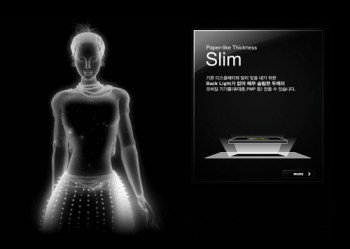
This falls into the category of “totally amazing stuff.” You’re looking at one of several Samsung screens that will probably be available sometime in 2012. Yes, that’s a cell phone. Apparently, Samsung (which is turning itself into an awesome company on the display side, BTW) is working with Nokia to bring this concept to life, and to market, and to change everybody’s notions of what a phone, and a display, can be.

Initially, Samsung’s new screens will be introduced in Nokia phones.  Soon after, there will be tablets that are not only flexible, but see-through. Imagine looking through a map, with interactive directions, and directly in front of you at the same time. (Certainly, there will be heads-up displays used in automobiles for just that purpose, but maybe that comes a bit later on.)

The technology is called “flexible AMOLED.”

Interesting? This is just one of many mind-blowing moments in Samsung’s (Japanese-language) video. And, if you want more insight, check out this article in the London Daily Mail.

Even more interesting a thoroughly conceptual video from Samsung which illuminates the company’s view of their future. (It may take a moment to load.)

Apple TV in 2012?

Here's one of several pictures of the current Apple TV interface. For more, visit http://www.apple.com/appletv/

Apple has been experimenting with home television since 2006, when the company introduced Apple TV. Released last year, second generation Apple TV has sold over 2 million units. Apple TV is an accessory. The new product will be a complete solution: a TV set with an Apple logo, Apple software, and Apple’s reinvention of yet another product category.

For those unfamiliar with Apple TV, here’s the Apple blurb:

“With Apple TV, everything you want to watch — movies, TV shows, photo slideshows, and more — plays wirelessly on your widescreen TV. No managing storage. No syncing to your iTunes library. HD movies and TV shows from iTunes and Netflix play over the Internet on your HDTV, and music and photos stream from your computer. All you have to do is click and watch.”

According to Smarthouse, there will be three Apple models: 32″, a mid-size, and 55″. It will include “A totally new software interface has been written that allows users to call up programs using voice commands via the new Siri personal assistant app…” It may be operated by your existing iPad or iPhone (provided it’s Siri-ous).

Add Apple’s FaceTime and the TV becomes a big-screen video conferencing center, fully compatible with millions of iPhones and iPads.

How might the new TV look? The first place that answers come together tends to be MacRumors, my favorite Mac site for its up-to-the-minute coverage, its willingness to republish rumors from reliable sources (often with smart commentary), and the site’s Buyer’s Guide, which tells consumers when to buy each Mac and Apple portable device.

How much will it cost? I’m guessing $1,199 for the low-priced model, and $1,99 for the high, with a $1,499 price point for the in-between model. Just a guess based upon Apple’s past practices. If I was in charge of television at Sony, or any other high-priced television manufacturer, I would be very, very concerned. And I would not bother to convince myself that, somehow, DroidTV (or whatever) is likely to win the race.

Why?

1. With the iPad turning three years old, Apple’s huge base of early adopters will be ready for a new, high-priced toy.

2. For a decade, Apple has been studying this market, figuring out the best integrated hardware, network, usability, operating system and app plays.

3. Apple already sells an accessory product with the base functionality already in place and operating in two million homes (three or four million by launch time).

4. Apple has a well-developed retail network–people like to see a TV before buying. Best Buy, Radio Shack, and Target sell Apple products.

No competitor enjoys these advantages.

Why Buy a Camcorder?

On my iPhone, I can shoot video. I can edit, too. I can shoot video on my camcorder, but I can’t edit (not easily, anyway). And that got me to thinking about just what I might want or need in a standalone video recording device.

Although you can find camcorders that record onto videotape or DVD, the standard recording format is now the SD card–the same type of card used in most digital cameras, but with far more available storage capacity.

Less than $200 buys a pocketable video camera and recorder, similar in design to the Flip camera that was popular a few years ago. JVC sells about eight different models, all quite similar to the Flip cameras and to one another. All shoot HD-quality movies, 5MP still images, and easily transfer creative work to a nearby computer via USB connection. The GC-WP10A is especially appealing because it’s waterproof, records time lapse, includes face detection, a 3-inch touch screen, and an image stabilizer to reduce shaky videography (which is a common problem with small hand-held cameras). Compare it with JVC’s GC-FM1BUS, which shoots 8MP still images and offers an HDMI output to digital TV screens, but lacks face detection. Spend fifty dollars less, and you’ll save money but sacrifice some features. If not JVC, you will find similar products from Kodak, Samsung, and lots of other companies. In this price range, there will not a tremendous difference in features or reliability.

If you’re heading in this direction, be sure to check out the Zoom Q3--made by a company now well-known for high-quality portable audio recorders (which I will write about in a future blog post). I really like the design of the Q3–and its emphasis on audio recording.

Beginning around $250, you can buy a digital camcorder with a long zoom len

s, image stabilization, and adequate low-light shooting capability in a package that easily fits into your jacket pocket. Try, for example, Panasonic’s HDC-SD80R, which sells for less than $300, with a 32x zoom lens (that is, if you are 32 feet away, you will appear to be just 1 foot away from the camera). If you visit Panasonic’s camcorder website, you w

ill find 23 similar Panasonic models with prices as low as about $200 and as high as $1,000+. What’s the difference? The HDC-TM900K sells for about $900, and includes three image sensors, which means superior image quality, manual control over exposure and focus (with manual control, more professional results are possible, but these require skill, practice and patience). The lens is better, too. Is one camera worth $600 more than another? If you’re shooting video for YouTube, the answer is probably “no” (though the manual controls would be useful). If you’re shooting video to be seen on a 50-inch HD monitor, the answer is “yes.”

For a few hundred dollars more, you can buy similar camcorders with interchangeable lenses.

But wait! That’s just the beginning!!

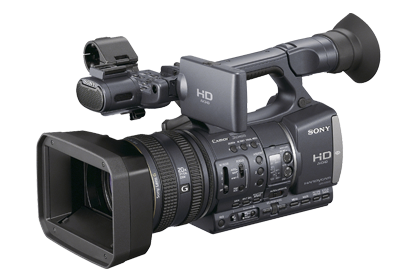
For professional quality results, plan to spend about $2,000 for a model similar to Sony’s HDR-FX7. The big difference between these lower-priced pro models and lesser lights is three-fold: image quality, technical capabilities, and creative control.

Image quality is easy to understand, and easy to see. The sensor and the associated image processing technology is superior to lower-priced models, and so is the lens. The viewfinder offers more detail, better contrast, more accurate color, and more detailed information about camera settings. The lens is, roughly, a 20x optical zoom. The zoom controls are smooth, and can be handled with nuance.

Jump to the $3,500 model HDR-AX2000 for professional XLR microphone connectors, even better image sensing and processing, and vastly improved low-light shooting. You could shoot a television series for a cable network with this camera. In fact, many professional production companies now use these cameras–and others like it–for just that purpose.

Look for a post about dual system audio recording in the near future.

So: which camcorder is right for you?

If you shoot a few minutes of video from time to time, and post your output on the web, then you may be able to use your smartphone.

If you shoot some videos, and some still pictures, and you really don’t need high quality audio, or even a microphone for the occasional interview, then you can use a recent vintage digital still camera. If yours is more than 2-3 years old, it may be time for an update if you want to shoot video.

If you are serious about still photography and videography, then you should consider a digital SLR, with its long zoom lens and substantial body size. Although most digital SLR bodies include a built-in stereo microphone, your work will be better if you attach a stereo microphone, or shoot “double system” with an entirely separate audio recorder (the topic of a future blog post).

In fact, it makes more sense to invest in a digital SLR than a standalone camcorder in the $300-$1,000 range. These are useful if you shoot a lot of video–but you can do the same, with greater flexibility–with a digital SLR.

If you serious about videography, then a serious prosumer or low-range professional camcorder is the appropriate choice. Most people who use these cameras devote considerable time to video editing–the camera alone isn’t going to make anyone a star. Fortunately, video editing software is now widely available at reasonable prices. Unfortunately, professional quality video editing requires a lot of time and careful work.

With any of these HD camcorders, the work can be stunning. For the best results, professionals rely on quality lenses, sensors, image processing and microphones.

Meet Boxie


Boxie is a friendly little robot who lives and works at MIT Media Lab. He’s a busy little guy, and his story may change your perceptions of robots in our future.

Boxie Labcast