21st Century Debate

Although the series has been on the air for over five years, I discovered Intelligence ² within the past twelve months. Last night, I watched Malcolm Gladwell argue that college football was a bad idea because it involved the bashing of heads, and that, surely, there was some other game these people could play that would not, you know, involve bashing the heads of students (or anybody else, for that matter). On his team: Buzz Bissinger (he created Friday Night Lights, a popular TV series about football). Bissinger (see in the screen shot below) was strident, fierce and passionate in his well-researched beliefs: (a) colleges and universities should not be in the business of entertaining the masses, and (b) they should not be in the business of providing a farm system for professional football. On the other side, predictably, were two articulate football players who have moved on to bright careers (presumably, they, too have been beaten on the head several thousand times, but seemed to be okay with the way things turned out). Both were associated with FOX Sports: Tim Green and Jason Whitlock. In the advanced game of debate, their arguments proved to be less convincing.

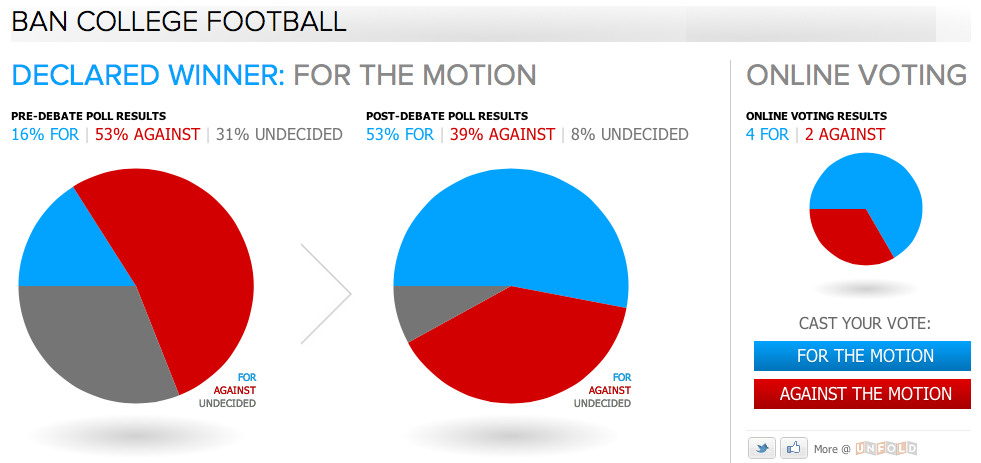
Football is not high of my list of things I care about, but the debate was compelling (and, having now watched several episodes, it’s fair to say that some are very passionate and others are not as much fun to watch). The series is called Intelligence Squared. There are two teams and three rounds. First round: each team member presents his case, his ideas in detail. Second round, they mix it up by arguing with one another. Third round: closing arguments. What’s the point? At the start of each show, the audience at NYU’s Skirball Center votes on a straightforward question: “Should college football be banned?” (yes, the question is black-white and there are grey areas, discussed during debate, but not a part of the ultimate vote on the simple question). Panelists answer questions from members of the audience. End of show: now that they have been presented with convincing arguments, the audience votes again. One team wins (Gladwell-Bissinger), the audience applauds, and we’re done for the evening.

The influence of Stanford Professor James Fishkin is evident here. Deliberative Polling also involves a baseline vote, then immersion in fact-based information seasoned by strong opinion, with a re-vote after the information has been received and processed.

A look at the website suggests that this is modern media done properly. Of course, you can watch or listen to the whole debate (or an edited version, audio+video or audio only). You can listen on about 220 NPR radio stations, or watch on some public TV stations. Or, you can watch on fora.tv. For each episode, the site features a comprehensive biography on each of the four debaters, a complete transcript, and a rundown on the key points made by each debater, along with extensive links to relevant research. In short, you can watch an episode, then read a lot more from the debaters and from the thought leaders who influenced the debaters’ opinions. It’s presented in a  clean, easily accessible (non-academic) way. You can easily dive right in, learn a lot in a short time (if you wish), or spend a few hours to deeply consider what was said, why it was said, and why the voting audience did or did not change its collective mind.

The topics are provocative (and always simplified so they can be stated as a yes/no question for voting). Some examples:

BTW: If you like this sort of thing, you should spend some time at fora.tv, which features an abundance of intelligent, well-informed, well-researched lectures and discussions. Much of the material is free (advertiser and foundation supported). Fora.tv goes in directions that TED does not. And isn’t it interesting that there are now hundreds of these smart media outlets now available on the internet? In their way, they are taking the place of the 20st century dream of public television…with a broad range of ideas presented from every part of the world, abundant links to related ideas and research. Much of it is free, much of it is provocative, and very little of it is actually seen on television.

Secrets of the Rijsttafel

The rijstaffel at Ramayani. For link, see below.

Three things you need to know: (a) translated from the Dutch, the word means “rice table;” (b) in order to taste this Indonesian speciality at its best, you should consider traveling to Amsterdam, where rijsttaffel has been popular for several hundred years; (c) the dish, or, more accurately, the presentation of dishes is a blend of Dutch and Indonesian, and not quite native to either place; and (d) for reasons I don’t understand, this appealing combination of Asian food has never found its place in America.

A typical Dutch rijsttaffel usually consists of several dozen small dishes (often, forty dishes is the count), so this is the kind of meal that you’ll want to enjoy with several friends. Beer is your most likely accompaniment: the most popular Indonesian beer is a lager called Bintang, but if you’re dining in Amsterdam, you’ll find a wide range of superior Dutch and German beers just about everywhere.

A good rijsttaffel will feature dishes that highlight specific colors, spices, flavors, and textures. At first, the textures may be off-putting as they may run from crunchy to soggy to runny to gelatinous. And the array of colors may overwhelm. Relax–there’s just a bit of everything, and there’s no law that requires that everything be tasted by every person at the table.

From Wikipedia, banana leaves, rice, and a meat filling. It’s called lemper.

The grilled banana leaves–green in color–are likely to be lemper. Inside, there’s a bit of sticky rice and a meat or fish filling (think in terms of an Asian tamale) with rice in place of cornmeal.  Also wrapped: lumpia, which will be familiar as a deep-fried, crispy spring roll.

Golden in color, perkedel are a mix of ground meat and mashed potato, fried up so that it looks like a flat meatball. If you are familiar with frikadeller (flat Danish or German meatballs).

From Wikipedia, an Indonesian fried rice platter with shredded egg omelette, meat floss, and a pair of spiced meat dishes. And more.

Nasi kuning will be familiar as fried rice, often served on a larger platter surrounded by serundeng (a relish of coconut and spices), urap (cooked vegetable salad, often shredded, also with coconut), balado udang (shrimp in a chili sauce). Sometimes, the rice is served in its own bowl, and these side dishes are served among the many small bowls that fill the rijstaffel.

You’re likely to find some flavorful soups and stews, too. Sayur Iodeh is a coconut soup with vegetables (jackfruit, various types of Asian squash, melinjo, and more. Semur is a beef stew in a sweet soy gravy with ginger, onions, garlic and other (generally) familiar spices.

Pisang goreng is more of street food, and perhaps, more of a breakfast or lunch snack than a dinner staple, but you’ll often find this sweet dish on the rijstaffel as well.

Ayam gurang is fried chicken with special spices. Satay will also be familiar–it’s marinated meat on a thin skewer. There are various curries, some similar to those you would find in an Indian restaurant, some with different spices (a curry is a blend of spices, not a particular spice, so variety should come as no surprise).

From Wikipedia – Traditional sambal terasi served on stone mortar with garlic and lime.

Keep your eyes open for the sambal dishes–the dishes made from peppers of every variety and every degree on the Scoville Scale. Indonesians love their peppers, and it’s not unusual to find several sambals on the buffet, including dishes made with lemon, mango and other fruits, including the (very smelly) durian. Not all sambals contain pepper.

Of course, specialties abound. For example, Indonesia Restaurant (see below) features Kepiting mask telor, which is crab served on egg with sweet and sour sauce. And you may find something different, just for the sake of giving a new food a try, as with the same restaurant’s mutton satay.

I know it’s difficult to imagine all of this in a single meal (and I’ve named less than half of what you’re likely to find in a rijsttaffel), but as I say, the dishes are small, and all of this is intended to be shared by several people. But do you really need to travel to Amsterdam to enjoy this dining experience?If all of this is sounding a bit like a cross between Indian food and Chinese dim sum, you’re getting the right idea. I wish I could communicate more about the delicate, powerful, varied spicing and “mouth feel” of these dishes–it’s great fun to jump from one dish to a very different one–but you’ll need to fly to Amsterdam or try one of the restaurants below for that experience. A rijsttaffel is not the sort of dish that any reasonable person would prepare for casual dining at home.

Well, no… you could poke around Yelp and find some viable options closer to home. I did, and here’s what I found:

Indonesia Restaurant – Philadelphia. Choose from one of four different rijsttaffel menus, priced at $15, $17.50 or $20, $25.

Hardena/Waroeng Surabaya Restaurant, also in Philly. Very popular.

Mie Jakarta – No surprise that some of the best Indonesian food in New York City can be found in the international borough of Queens.

Java Indonesian Rijsttafel – This one’s in Park Slope, Brooklyn.

Satay Sarinah – A more upscale place in Alexandria, Virginia, outside Washington, DC. Very instructive website.

Borobudur – Great place in San Francisco. Very instructive menu online, too.

Jayakarta – Berkeley, California

Ramayani Westwood – Los Angeles, California. Unassuming, but a great neighborhood place.

Bandung – Madison, Wisconsin

Indomania – Miami Beach, Florida

For updated information, visit Dutch in America from time to time.

And how about the best rijsttafel restaurants in Amsterdam and Europe?

Tempo Doeloe Indonesia – Amsterdam. Good detailed menu info here. Check online for latest reviews.

Sampurna – Amsterdam. Probably the best choice; consistently great reviews.

Kantjil & de Tijger – Amsterdam. Upscale with a varied menu. Temptations abound, but talk the group into joining together for the rijsttafel–you’ll be glad you did!

Bali Bali – London, in the West End.

Here’s a look at just a few of the rijsttafel dishes served in Amsterdam’s Kantjil & de Tijger restaurant.

Beyond the Easel – Serious Field Work

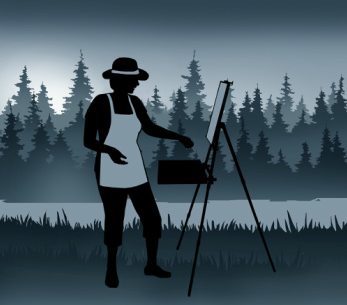
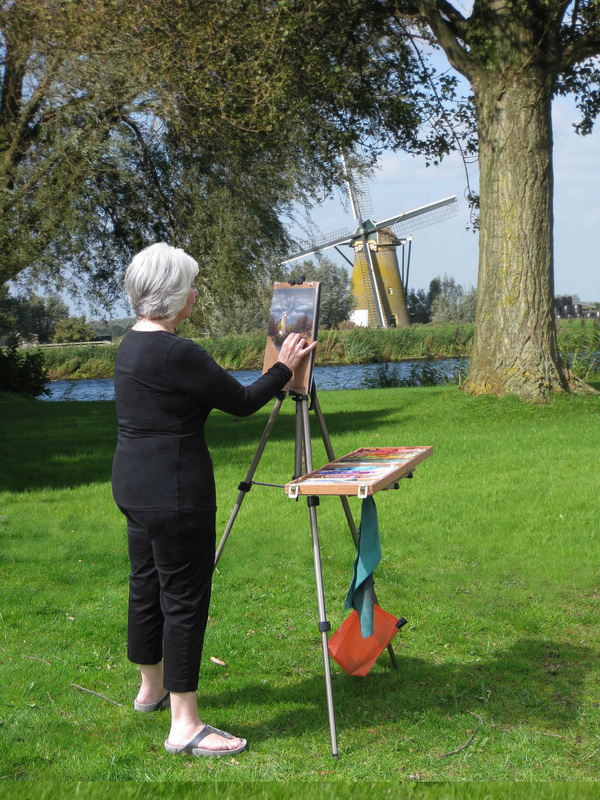
I visited B&H Photo in Manhattan with a sketched diagram in my hand, hoping to find something that would allow me to attach a shelf to my tripod. When I was using the tripod only for still photography, the need was there, but minimal. When I started using the tripod for drawing and painting (with a sketch board firmly attached to the tripod head), it became clear that I needed a place for my pastels, my paints, the water, the paper towels. When I added videography, the tripod kept the camera firm and fluid, but I needed a handy place for the microphone, the iPad, the Zoom audio recorder, and other supplies.

After trying to rig something on my own, and failing, I started visiting local hardware stores, and was able to cobble together a solution involving perforated steel strips and cotton twine. At best, I had devised a temporary solution. Entering B&H, my hopes were not high.

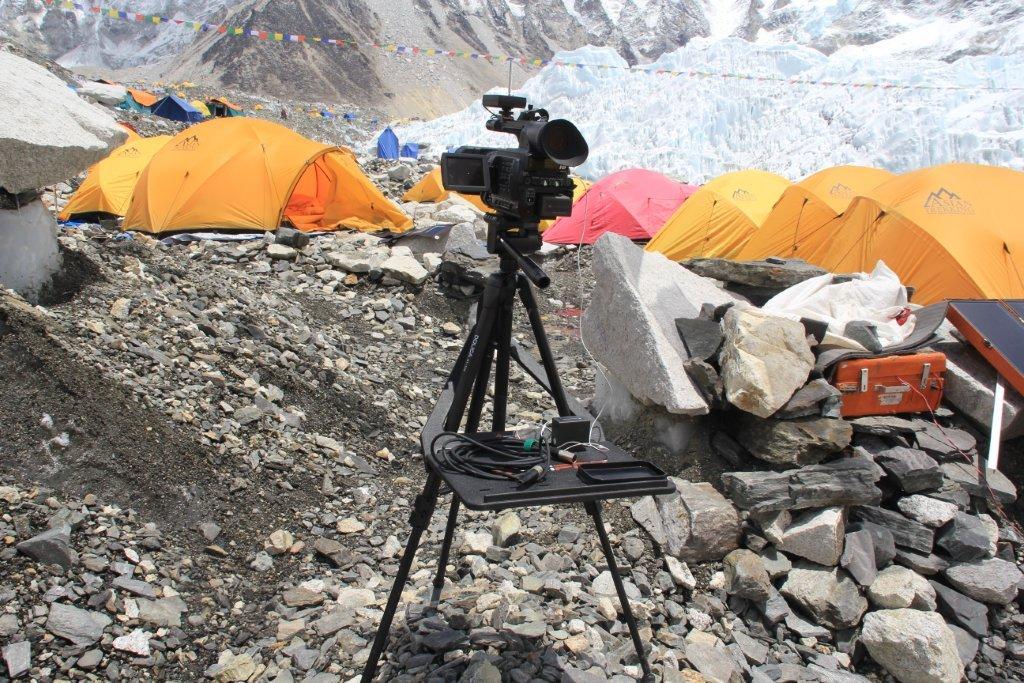
Then, I spotted a large, flat piece of plastic called a Tripad. Aha! This was the solution. As you can see in the image, the Tripad surface extends from two of the three tripod legs. The genius part–the part that I never considered when I was doing my own (lame-o) inventing was a brace that fit over the head of the tripod and supported itself by hanging onto the far leg. B&H has lots of tripods, and I happened to find myself there around dinner time, when the busy store wasn’t too crowded. The Tripad worked: it was stable, not too large, and, quite perfect. The surface measures 15 inches wide and 11 inches deep (plus the part that connects to the tripod legs); the second triangular piece fits over the head and onto the leg. It weighs three pounds and holds eight. It comes along with me, but mostly when I travel by car; it’s little heavy and large for casual use, but durable and solid for professional applications. Here’s the video; see for yourself. The Tripad costs $99, and you can buy it here.

Now, back in my inventing days, I was thinking (though never seriously) about a setup that might involve not a full shelf but a pair of arms extending, on the perpendicular, from the tripod legs. There is an artist’s tripod with this design (Mabef M27), but I could never quite figure out which search terms could be used to find such a contraption on Google.

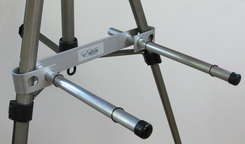
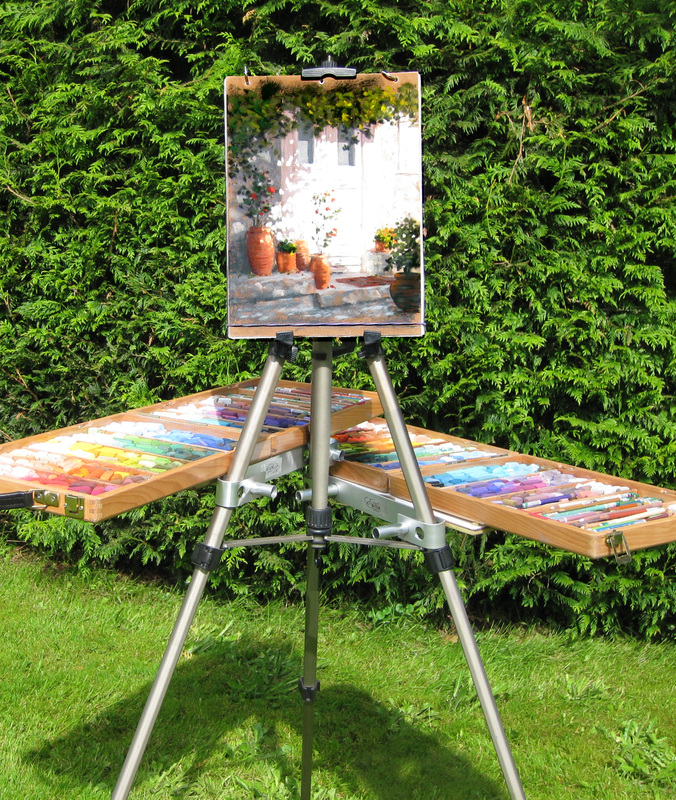
Then, I got lucky. I found the Easel Butler: Maximillian (or, for friends, Max). I liked the site immediately: the device “weights less than two bananas.” And that turns out to be true. In ounces, that’s 11.5, and in length, it’s 14 inches. There is a metal brace that slides over two easel legs. The brace has two holes: into each hole, you place a metal rod. The rods are kept in place by rubber o-rings (which you must be careful not to close, especially when working in the field). There’s a bag that attaches to the far side of the easel, a counterweight. With Max’s arms outstretched, I was able to place a full box of pastels without once worrying about an accident due to instability (clumsiness is, of course, another matter entirely). Easel Butler sets up in an about a minute, and requires about as much time to strike and put away. It comes with a nice little bag. It’s sturdy, well-thought-out, and well made. And the whole package is light enough for anyone to take along, and small enough to fit into a suitcase so it can travel with you, anywhere in the world. Want to see it in action? Watch this… Or just buy it here for $37.95.

I’m happy. A month ago, I was traveling some inept path with no real understanding of how to solve a problem. Now, I have two good solutions, each well-suited to a particular creative application. Below, some additional pictures that may convince you to invest, or, at least, to think differently about the way you work when you create.

Here’s the Tripad on a trip to Mount Everest.

I hadn’t considered this possibility before, but the Easel Butler allows one pair of arms to be attached to all three sides of the tripod. For a pastel artist, or a serious videographer or photographer, this is a terrific (and extremely cost effective) solution. Lightweight, too!

Here’s a more relaxed, in-the-field version of the Easel Butler in use. Very, very simple.

A Great Idea for Great Ideas

Once upon a time, OmniGraffle software was provided free with every Apple Mac computer. That’s how I learned about it. Now, I use OmniGraffle on my iPad and the desktop. When it comes to sketching out ideas, and presenting them in a clear and colorful manner, there is no better (or easier-to-use) product.

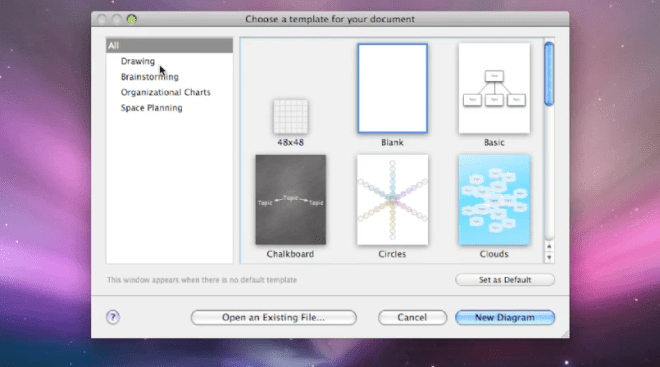
So, what does OmniGraffle do? Well, it depends upon what you want it to do. Start with a blank sheet, or some on-screen graph paper, or set yourself up for a cloud cluster (also called a mind map), or a whiteboard, or a chalkboard. There are connected notes, so you can use it as a kind of bulletin board, Whatever works for you, you’ll find the basic template in the full Standard or Professional version for use on the Mac (a great many features are available on the iPad version, which may suffice for some users).

Choose the template, then start drawing. Easy enough to begin with a box, color it, shade it, add text, make a copy, the sorts of things that you do in PowerPoint or Keynote all the time. Here, the tools are more varied, more versatile, including a bezier tool to draw shapes as you would in Adobe Illustrator (if you don’t know how to do this, it’s worth asking someone for help, but once you understand how it works, you’ll find yourself using this tool quite often).

So, let’s say that you begin with a free-form drawing, a visual exploration, a sketch to explain an idea to yourself or to others. It begins to make some sense, so you want to change its form, maybe move into a cloud of connected ideas, or a set of related on-screen index cards, or an organizational chart with colors to indicate levels or positions. Easy to do–this software is designed for versatility, and for intuitive thinking. The results can become quite sophisticated–and yet, they are not difficult to pull together, even under the pressure of time.

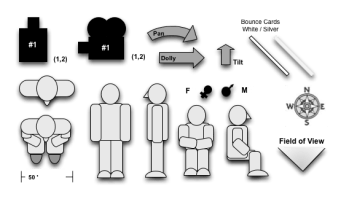
Automatic layouts save time, and make everything look a lot tidier, a lot more clear. There’s quick and easy access to frequently used tools, like color palettes and the font selector. There’s a user community called Graffletopia that creates “stencils” that can be used to create, for example, a director’s plan for film, or visualizations for software programmers. Browsing through Graffletopia, the utility of OmniGraffle becomes very clear: this is a visualization tool for working professionals. It’s easy to use, versatile, and, you’ll find, quite popular among certain knowledgable groups.

OmniGraffle is not a drawing tool, but instead, it is a tool for making (and easily revising) diagrams. I like the language from Omni’s website: “OmniGraffle knows what makes a diagram different from a drawing, and gives you the tools to create amazing diagrams quickly and easily. Lines stay connected to their shapes, unlike with illustration programs, where you would have to redraw your diagram every time you moved something.” As someone who often uses visuals to explain–and has become quite tired of the limitations of, say, Keynote or the level of sophisticated required for Adobe Illustrator–OmniGraffle feels just right to me. I find that the interface is intuitive (best if you’re already a Mac user), and that, from time to time, I need to take a moment and figure out how a tool works. That’s good–it’s just a few steps more sophisticated than my current abilities.

Most of the time, I’m sketching a diagram between meetings, capturing the basic idea. And although I can complete a pro-quality diagram on the iPad (and often do), I find myself in need of some certain advanced features, such as import/export from/to Visio (a Windows-only product). Most of the time, my diagram is on the simple side: colored boxes with type, perhaps a cloud to indicate an interesting idea. By holding my finger down, then dragging, I can group my clouds and/or boxes. Better yet, a smart selection tool allows quick selection of, for example, just the blue rectangles. I can create Adobe-style layers, then copy, or turn them on and off. Very handy, qick, and effective. Easily learned, too, in daily use, the iPad version has proven to be extremely useful, in part because it combines some of the best features found in OmniGraffle Professional (such as tables) with a sophisticated automatic diagramming tool, and a freehand tool, too.

To be clear, there are three different OmniGraffle products, each with its own unique set of benefits.

OmniGraffle for iPad costs $49.99 from the AppStore–a high-priced product that turns out to be a very good value because it does so much, so easily. OmniGraffle Standard, for Mac, costs $99.99, and OmniGraffle Professional, also for Mac, costs $199.99. Compare their features here. And, happily, you can get a free trial download for either of the Mac products (and any of the many excellent OmniGroup products). They do things the right way. It’s impressive.

Easy-to-Use Audio Studio-to-Go

The Zoom H4n has become one of my favorite tools, but most people have never heard of it, or seen it, or even know that such a thing exists.

Zoom makes portable audio recorders–pocket sized recording studios about the size of Sony’s original Walkman, but so much more versatile. This is the ideal companion for a digital camera or camcorder–with far better sound, and far more control over the recording process. It’s ideal for recording of music rehearsals, recitals, and performances. It’s handy for audio interviews, and for the recording of meetings. With proper cabling and a phono pre-amp, you can digitize your vinyl LPs. It’s a useful four track audio recorder, so you can use it to make a record. And, of course, you can use it to listen to music, speeches, podcasts, any audio recording with remarkable fidelity because everything is digital.

Let’s take it from the top…and the bottom.

On top, there is an X-Y (crisscrossed) pair of small microphones. The quality is good, the sound is clean, and they can each be adjusted to cover either a 90-degree pickup area (for more intimate situations or to reduce unwanted noise), or a 120-pickup pattern (to pick up a wider area). Or, plug one or two professional microphones into the bottom (1/4 inch phono plugs or XLR connectors). Or, plug an 1/8 inch mini stereo cable into the mic jack on the back). Control the input level by watching digital VU meter on the small golden screen (backlit when necessary) and adjusting the rocker switch with one finger during the record session.

Here’s a closer look at the screen. No, it’s not iPhone quality, but yes, it’s functional. Time code runs on top, file number next, then sound levels. Buttons below allow track selection, and in another mode, allow selection of files and formats. Buttons are small, screen is small, but everything works fine in the field.

You can choose to record in either .wav (high quality) or .mp3 (low quality, but smaller file sizes) at various sample rates. In multitrack mode, you can record on each of up to four tracks, or play back on up to three of them. Buttons are small, but overdubbing is within the capabilities of this little machine, and that’s useful if you are recording your own tracks for a music demo, for example, because you can listen to your primary vocal while laying down a harmony track, for example, or listen to the drum track while playing your saxophone).

For more sophisticated work–and an easier time–use the Zoom H4n as the interface between, say, your microphones and a more robust Digital Audio Workstation (such as Logic Pro, Garage Band and Samplitude), but, sadly, not ProTools, which requires only M-Audio devices.

Need a metronome or a guitar tuner? They’re built-in, too.

You will record on an SD card. Power comes from either an AC cable or handy AA batteries. You can plug the Zoom H4n into your computer via a USB micro connector. If you need more battery time, flip into “stamina mode” which shuts down some features and dramatically increases recording time (6 hours in normal mode, 11 in stamina mode).

 The Zoom H4n is all so well thought out! I wish every product was as thoughtfully designed!

Recently, I used the Zoom to record audio interviews while recording video interviews on the Olympus PEN EP-3 digital (still) camera. I placed the Zoom just out of frame, and later, in editing, matched the audio track from the Zoom with the EP-3’s video and audio tracks (once synchronized, the Olympus audio track was muted, and subsequently, replaced). Under the right circumstances, this is a better solution than a wired external microphone or a finicky wireless microphone. What’s more, the Zoom provides broadcast-quality results. The sound quality is fabulous. And because the Zoom is small, it fits into my small shoulder bag alongside the small micro four thirds Olympus PEN EP-3. This is a complete HD quality remote shooting rig that I can easily carry in a shoulder bag with plenty of available space for an iPad, wallet, cell phone, ear buds, and (much) more. Add a 32GB SD card, and I can carry hundreds of record albums with me, just in case I feel like listening, not recording.

There is so much more. If you’re intrigued, simply download the instruction manual.

The Zoom H4n price: under $300. And, for $199, you can enjoy a similar device with reduced features with an H2n (seems less sturdy to me, though). And if that’s still too much, Zoom offers a $99 alternative, model H1.

4K will be 4x better than HDTV

Even higher definition TV. Much higher. With 3D. Without glasses. We may never leave home again.

So says long-time consumer electronics public relations executive Lois Whitman in her blog, DigiDame. According to Lois: Current HD maxes out at 1080 lines or a 1080p picture. 4K HD is 4096 lines, or 4096p.

Ars Technica is a whole lot more critical.

IMHO, this is going to make spectrum reallocation more complicated. Right now, television stations and broadband operators are wrangling to use over-the-air spectrum for delivery of, well, television and broadband services. HDTV is a heavy user–and this new 4K technology will require a lot more bandwidth. Perhaps not over-the-air bandwidth, which might be put to better uses, but when we consider the available bandwidth built out by cable and satellite operators, well, 4K is likely to overwhelm their infrastucture, too. We’ll need new superDVDs or some other medium to carry the data associated with this new format… and I’m certain that will arrive soon enough.

As we Americans (and folks around the world) consider public telecommunications policy and the use of all sorts of bandwidth for television signal delivery, will 4K make the discussion, well, at least 4x more interesting? Will Snow White and the Huntsman be 4x more fun in 4KTV? Apparently, the answer is yes if (a) you sit really close to your new 4KTV, or (b) yes, if your screen exceeds 60 inches (not popular in most homes, just too darned big).

The question is: will viewers find 4x four times more interesting than HDTV? As Apple pushes its retina displays, and camera manufacturers begin to push the 20+ megapixel sensors for even-better-than-the-best imagery, when do we reach the point of diminishing returns? Does anybody need or want a 4K TV? And how might that answer change when 4K TVs are the only kind of TV that Best Buy (or whatever retailer manages to stay alive) sells in 2015?

Cool stuff, but I sure would like the manufacturers to focus on something more important than RHDTV*.

—–

* Ridiculously High Definition TV, a term I made up. You may also see the term QFHD (Quad Full High Definition), which somebody else made up.

Success! Good Health! Longevity! Fabulous Children!

You can do it! You’ll need a college degree and you’ll need to move to a place where 21st century America’s promise shines. Seattle, the SF Bay Area, New York City,

Boston, and the ring around Washington, DC.–those are the places where innovation is held in high esteem and is most likely to be funded so that new companies can be born, grow, and change the economic picture for employees, shareholders, and those smart enough to live nearby.

These are the places where venture capitalists fund big opportunities, and if a company seems promising, a VC will often require a move to, say, Silicon Valley, or not to fund the company at all. The “thickness” of the job opportunities in the Silicon Valley (and a very small number of other places), and the thickness of people with the necessary skills to suit those needs, not only attracts the best (and highest paid) people to these centers, where their high incomes tend to generate more jobs for the local economy (usually with salaries that are higher than even unskilled high school dropouts will find at home). If you’re an attorney, you’ll make as much as 30-40% more if you work in these areas than in an old rust belt city. The same is true for cab drivers and hair stylists.

Much has been made of Google’s employee perks; they won’t play in Hartford or Indianapolis, but neither of those places, nor most other American cities, see the kinds of financial results and spillover effects in the community enjoyed by the area around San Francisco. This is becoming the area that drives the American 21st century. And it’s very difficult for other cities to get into the game.

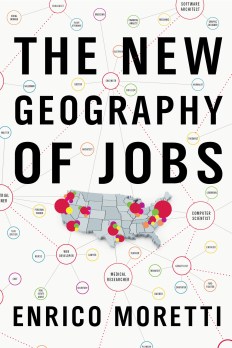
Author and UC Berkeley Professor Enrico Moretti has just published a book that presents a compelling picture of the much-changed US economy. The title of the book, The New Geography of Jobs, undersells the concept. Yes, if you can, you should move to any of these places, where you will make more money than you will at home–regardless of whether you are a high school dropout or a Ph.D. You will probably live longer, remain healthier, provide a better path for your children, live in a nicer home, have smarter friends, smoke less, drive a nicer car, you name it… the American dream lives large in San Diego, but in Detroit or Flint, Michigan, it’s gone and it’s not likely to return any time soon.

Average male lifespan in Fairfax, VA is 81 years. In nearby Baltimore, it’s just 66.

That’s a fifteen year difference. This statistic tracks with education attained, poverty level, divorce rates, voter turnout (and its cousin, political clout), lots more.

Want to remain employed? Graduate from college.

Nationwide unemployment rates: about 6-10% for high school only, 10-14% for incomplete high school, 3-4% for college graduates.

College degrees matter…far more than you might think. In Boston, with 47% of its population holding college degrees, for example, the average college graduate earns $75k and the average high school graduate earns $62,000. By comparison, Vineland NJ–just outside Philadelphia in South Jersey, has just 13% college graduates, and a college graduate earns an average of $58,000, with high school graduates at $38,000. Yes, it costs less to live in Vineland, but over a lifetime, people who live in Vineland are leaving hundreds of thousands of dollars on the table, perhaps as much as a half million dollars over a lifetime.

Real cost of college, including sacrificed employment: $102,000. At age fifty, average college graduate earns $80,000, but average high school graduate earns $30,000.

If a 17-year old goes to college, he or she will earn more than a million dollars lifetime. If not, it’s less than a half million.

What’s more, 97% of college educated moms are married at delivery, compared with 72% of high school-only grads. Just 2% of college-educated moms smoked during pregnancy compared with 17% with a high school education and 34% of drop-out moms. Fewer premature babies, fewer babies with subsequent health issues. Almost half of college graduates move out of their birth states by age 30. By comparison: 27 percent of high school dropouts and 17 percent of high school dropouts. The market for college graduates is more national; the market for non-grads is more local.

Caught in the middle? The best thing you can do is hang out with people who are pushing their way up the productivity curve. That is, MOVE! Leave the town where things aren’t happening, and take a job, almost any job with growth potential, in a place with high potential.

While the arguments about fencing lower-income immigrants out persist, most people earning graduate degrees today are immigrants. And a high percentage of people who start significant new businesses, funded by venture capital, are first generation Americans.

Today, an immigrant is significantly more likely to have an advanced degree than a student born in the US.

Foreign born workers account for 15% of the US labor force, but  half of US doctorate degrees are earned by immigrants. Immigrants are 30% more likely to start a business. Since 1990, they have accounted for 1in 4 venture backed companies. When they start a new business, they generate high-value jobs, which brings more money into the community (not any community, only the ones with a thick high-skill / high value workforce and a thick range of desirable jobs), and the people who fill these jobs generate more jobs in the retail and services sector, jobs that pay more in the high value areas than they do at home.

A century ago, investment money went to Detroit for its car industry, and to the midwest for productive factories. That era is ending. Innovation in the health sciences, technology, software, internet, mobile, and other fields is the driver of American productivity–but not everywhere. Clusters attract the best and the brightest from metros without the necessary thickness, leaving lesser places with fewer people who can make big things happen.

There is so much more here (sorry for the long blog post, but this is a very powerful book). We need to generate more college graduates, especially more men, and especially more people with STEM expertise (science, technology, engineering, math). We need to do a far better job in educating and creating opportunity (including opportunity for mobility) among those with fewer advantages. We’ve got a lot of work to do. First step: read the book!

This Just In… (from Aaron Sorkin)

I just watched The Newsroom on HBO. Aaron Sorkin in back on TV!

Probably fair to say that I was one of the dozen people who watched Studio 60 on the Sunset Strip with any regularity. Most people will recall Sorkin’s The West Wing with greater clarity.

Here’s the scoop. Jeff Daniels is a far better news anchor here than William Hurt was on Broadcast News, but the anchor is again struggling with a smartest-one-in-the-room brunette who is suddenly his Executive Producer. Once again, the anchor is a guy with issues, but in Sorkin’s hands, those issues drive the storyline. Daniels’ Will McAvoy has serious doubts about the news, his role in it, and whether journalism will ever matter more than ratings. Fortunately, there’s a moral compass, albeit one who drinks a lot. Sam Waterston is quickly mastering the craggy, seen-it-all puppeteer by way of Ben Bradlee.

Episode one contains the usual Sorkin hijinx: a bit of slapstick from the good-looking young man who doesn’t speak up until he saves the day (think Sam Seaborn, but see Jim Harper, above), the aforementioned brunette (MacKenzie McHale, who served embedded time) who takes control and out-maneuvers her mean spirited anchor (for whom she continues to carry the torch), insecure occupational glue (as the old newsroom crew is dismissed and the new one takes charge before job interviews are complete), backstories that just begin to reveal themselves, “let’s watch that again with closed captioning on” fast-talking during the key scenes, the busy workplace where important and loopy things happen simultaneously, the earnest speeches (one about Man of La Mancha) that deflate moments after their most dramatic deliveries, the open story lines that make me want to watch the next episode.

It’s all here. It’s good television. It moves, it winds, it surprises, it’s fun to watch, and it’s smart. And there’s sex, no violence.

It’s early yet, and Sorkin is still finding his footing. But it’s a real Sorkin show, and, well, it’s been a long time since The West Wing.

Now, if Stephen Sondheim would write a brilliant new musical for Broadway, everything will be back to normal.

A Book about Books

“I am an invisible man.”

“We were around Barstow on the edge of the desert when the drugs began to take hold.”

“On a sticky August evening two weeks before her due date, Ashima Ganguli stands in the kitchen of a Central Square apartment, combining Rice Krispies and Planters peanuts and chopped red onion in a bowl.”

So begins three contemporary books: Ralph Ellison’s Invisible Man (1952), Hunter S. Thompson’s Fear and Loathing in Las Vegas (1971), and Jhumpa Lahiri’s The Namesake (2003). One is about African Americans, another is about the counter culture, and the third opens with a view of new Americans, attempting to recreate a dish she recalled from her native India. Our tastes change with the times–only sixty years separate Ellison from Obama.

With so many words propelled at us each day, so many stories on so many media, there’s not much opportunity to consider the big picture, to develop a sense of the stories we are telling one another. I suspect that’s what caused English Professor Kevin Hayes to write A Journey Through American Literature (Oxford University Press).

In Hayes’s world, the word “literature” embraces poetry, travel writing, autobiography, and fiction. Whether Benjamin Franklin or Stephen Crane, Eugene O’Neill or T. Coraghessan Boyle, his examples consider the broad sweep of 250 years. His definition of literature includes bits of Seinfeld and The Simpsons, and acknowledges films as literature, too.

Skateboarding through media theory and aesthetics, Smithsonian American Art Museum is acknowledging videogames as art this summer. And I’m certain that every word in write in this blog, and every word you write in your email rants, will stand the test of time as great literature, too.

Yes, there is interesting, substantial work being done in all corners of art and media. Often, the work goes unnoticed, or receives a flash of publicity for fifteen seconds. It’s just too easy to forget about the good stuff until somebody says, or writes, “hey, this is worth a look!”

This summer, for me, Hayes is that somebody. Here’s a starter checklist:

  • Walden by Henry David Thoreau
  • The Adventures of Huckleberry Finn by Mark Twain
  • Their Eyes Were Watching God by Zora Neale Hurston
  • The Iceman Cometh by Eugene O’Neill
  • The Invisible Man by J.D. Salinger
  • Travels with Charley by John Steinbeck
  • Beneath the Underdog by Charles Mingus
  • China Men by Maxine Hong Kingston
  • The House on Mango Street by Sandra Cisneros

Yes, Hayes is an English professor. No, I will not write a term paper, nor will I abide by any deadline. This time, I’m not reading for the professor or the course or the grade. I’m reading for myself. And I plan to read these books not on a screen, but through the ancient technology of ink on paper. Some, I will buy in a used bookstore, some I will buy from the NEW bookstore that just opened not a mile from my home, some I will borrow, at no charge, from a good local public library.

Welcome to summer!

Go-Anywhere Hard Drives + MacAir Storage Ideas

This year, one of my projects has been a documentary about my father. I shot the documentary with an professional HD camera, edited in Adobe Premiere Pro on an iMac, and found myself in a mess of troubles. Then, I learned that serious editing requires an external hard drive. I’ve become a fan of these small devices, in part because they speed up the process and reduce crashes, and in part, because it’s easy to tote the whole project from one computer (at my home) to another (in my office, an hour away). When files are especially large, it’s helpful to bypass digital transfer via ftp and the like, and simply ship the entire drive from one place to another.

Mostly, I’ve been using  GoFlex Pro drives from Seagate. All of the images, video, and audio files that I recorded in the UK in May are now on a 750GB drive that costs about $125. It’s about 3 inches by 5 inches by a half-inch thick, and weighs about a third of a pound. At 7200RPM, it’s fast. It comes with a removable cable adapter, so you can use it as a FireWire 800 drive (for video editing), or as a USB 2.0 drive (offering about half the data transfer speed of FireWire 800, but useful because not every computer includes a FireWire 800 jack). Facing the future, you can buy a Thunderbolt adapter, which allows a connection that’s a dozen times faster than FireWire 800. The flexibility may be useful, but the cost is high: a $90 adapter for a drive that costs $125. (Note that Thunderbolt portable drives are not yet available, and that Thunderbolt desktop drives are still quite costly.) In any case, this drive is designed for use by either a Mac or a Windows computer.

If you haven’t explored portable external drives in a while, you’re likely to be surprised by their appealing combination of small size, light weight, high capacity, speed, and reasonable price. Some even come in colors (not sure why this is important, but it is a trend worth noting). Whether you’re buying for back-up, for convenience (no need to bring your laptop; just bring the drive), or for special projects, they’re worth a look.

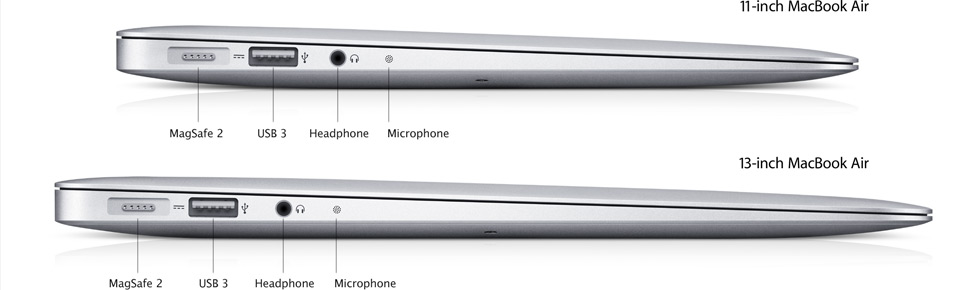
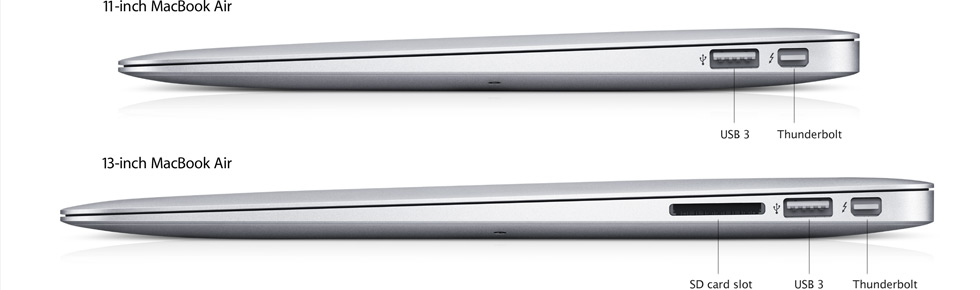
What’s more, if you’ve got your eye on one of those new MacBook Air models, the portable drive adds a lot of storage without requiring a large investment in dollars or weight. Buy an 11-inch with just 64GB internal storage for $999 from Apple, then spend about $125 more to increase your available storage by 750GB (with USB 2.0, you’ll be transferring at a half a gig per second, not speedy, but certainly acceptable for most uses). Better yet, spend $225 for 10 GB per second Thunderbolt speed–Thunderbolt is now standard on every Air. By comparison, you may beef up storage with a 64GB or 128GB SD card, but transfer speed is under 100MB per second, a whole lot slower than other options. Below, left-side and right-side views of the new Air, showing both USB 3.0 and Thunderbolt connectors.