Three New Quality Cameras for Spring

‘Tis the season for some new $500+ plus cameras, one from Sony, one from Panasonic, and, at about twice the price, one rumored for upcoming release from Olympus.
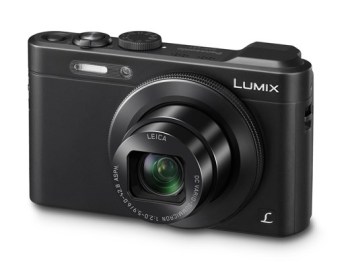
Panasonic LF1kPanasonic’s newcomer DMC-FL1 is sleek, black, and conveniently sized. It  comes with a 7x optical zoom and a fast 2.0 lens (at the widest angle setting). The 12 megapixel camera includes a built-in EVF (electronic viewfinder), a far better way to compose images than the LED panel found at the back of every digital camera. It’s the kind of camera that any serious photographer ought to keep in a pocket or shoulder bag, and, for convenience, it’s possible to use WiFi to export images.

For a more detailed rundown, click on the picture of the camera and read the Digital Photography Review preview of the camera.
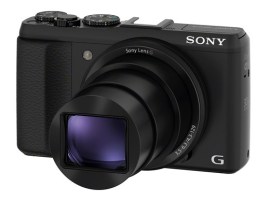
Once again, Digital Photography Review is the best source of info about new cameras. Click on the photo to read their feature on the Sony HX50V.

Once again, Digital Photography Review is the best source of info about new cameras. Click on the photo to read their feature on the Sony HX50V.

For the same price, Sony’s newest entry in this category, model HX5oV includes a 30x digital zoom–an idea that I’ve never loved because I’d rather the camera do the optical work and that the digital magnification be done on the computer, where greater control is possible.  This camera records JPG images, but not RAW images. Taken together, the digital zoom and the lack of RAW images suggest that this camera is intended for a more of an amateur photographer who simply wants to shoot handsome images without spending much time perfecting them on a computer.

There is no electronic viewfinder, another indication of its super-amateur status. Still, this is a 20 megapixel camera that includes both WiFi image transfer and GPS. And, there’s image stabilization. On the downside, you can’t record RAW images with this camera, only JPG.

Both cameras offer some level of exposure control, and both shoot HD video. On just about any sort of a journey, either camera would be a superior companion.

Olympus_ep5_zps5b4bee21As for my personal choice, I remain a big fan of Olympus interchange lens cameras in the micro-four thirds format, and for the next month or two, the buzz in that world will be about the upcoming EP-5. It’s a retro design reminiscent of the much-loved Olympus PEN film cameras, and an update of the popular EP-3. If the rumors are accurate (and we’ll know that within the next two weeks), this will be a 16MP version with the same sensor found in Olympus’s equally well-regarded EM-5. No electronic viewfinder included as part of this model, but a new add-on viewfinder is, apparently, coming, too. Here, my favorite source of things to come is 43 Rumors (the 43 refers to the micro four thirds format, an image sensor size that’s generally now fairly common for cameras in the $500-$1,000 range). For more, and for updates on these intriguing rumors, click on the Olympus EP-5 camera from the 43 Rumors site.
4K TV – Sooner Than You Think!

A few days ago, I was on the phone with the FCC and an interesting question came up. Will broadcast stations have enough over-the-air bandwidth to provide 4K service to the public? I was struck by the question because 4K is such a new idea, and because I’d never really thought about it as broadcast idea.

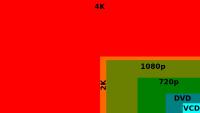
Compare 1080 pixels (dark green0 with 4000 pixels (red) and you get a sense of how much more picture information (resolution, detail) is available on the new 4K TV sets.

Compare 1080 pixels (dark green0 with 4000 pixels (red) and you get a sense of how much more picture information (resolution, detail) is available on the new 4K TV sets.

What’s 4K TV? It’s a much higher-resolution version of HDTV. And the first 4K TV sets are arriving soon (see below0. In order to provide all of that picture information, more data is required, which means larger storage devices, and, in order to provide that data to connected TV sets, more bandwidth is required, too. That’s the basic theory, but it’s important not to think about 4K in terms of the current systems because of that always-astonishing digital magic trick: compression. Yes, 4K requires a lot of data and a lot of bandwidth. But “a lot” is a relative term. And yes, there are new digital broadcast standards on the way. Good news for consumers and for broadcasters, who will be able to pack more and prettier program material into their TV signals, not-so-good news for broadcasters who are attempting to build a coherent strategy related to the upcoming FCC TV spectrum auction, in which many stations will trade their licenses for cash, or for the opportunity to share a channel with another broadcaster in the market.

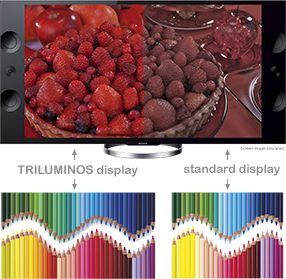
panel2_imageAnyway… I woke up this morning to an announcement from Sony… with all sorts of enticing promises: improved detail, improved color rendition, better audio, screen mirroring so what’s on your tablet can be viewed on your new TV (albeit it in lesser detail, a service currently available to Apple users).

How much? $5,000 for the 55-inch model, and $7,000 for the 65-inch model.

What are you going to watch? Well, yeah, that’s always the problem at this stage. Here’s a terrific article about “upscaling” the currently available media, which seems to require 24x improvement. More data will require more robust local storage, and so, we move closer to a complete convergence of television, home network, home digital storage devices in sophisticated home library systems, and, perhaps far more likely, streaming solutions in their next phase: advanced versions of Netflix, Hulu, and so forth, tweaked to serve big files for 4K TV sets.

Which brings us back around to the TV station wondering about its 4K future. Sure, it’s technically possible to broadcast 4K, but in the few years remaining for the current broadcast standard, this seems fairly unlikely because (a) it will be expensive for television stations to install in their master control facilities, and (b) relatively few people will leap from their new-ish HDTVs to 4K sets in the next year or two.

Sony-4KTVDo we want or need even more resolution than 1080i HDTV sets provide? Maybe for microscopy or astrophotography or other science work that demands the highest possible resolution. Do I think ESPN is investing in a whole new 4K operation–cameras, video switcher, storage, transmission, etc. so I can watch baseball in even higher resolution. You know they are, or will soon be, doing just that. And when they do, we’ll buy the sets because, you know, people will come…

Great App for Ideas; No iPad Version Yet

Although it currently lacks an iPad version, there’s a wonderful software application called Curio 8 that offers a remarkable combination of fully integrated features related to the world of ideas. I discovered it recently, and I’m just beginning to understand how useful Curio 8 can be.

Basically, Curio 8 combines these functions in a single package:

  • Note taking
  • Brainstorming
  • Mind mapping
  • Task management
  • Presentation


It’s a little bit OmniGraffle, a little bit Evernote, with some of the functions of Keynote, but it’s also a drawing program that’s also useful for presentations. Although it’s awkward to describe Curio 8 in terms of other software applications, this particular application more than holds its own in each of these categories (and more).

As in Keynote (Apple’s answer to Microsoft’s PowerPoint, very popular on iPads), you begin by choosing an “Idea Space” (in Keynote lingo, a “theme”). You can then drag documents (PDFs, RTF word processing files, image files; also, web links) into the Curio 8‘s Organizer, and assign properties to each of these items. For example: notes, metadata, color, style, size, color. In addition, as you would with Things or any of the GTD apps (“Getting Things Done,” a fancy to-do list), you can assign filters (“hot”,”under peer review,” etc.) You can also assign the name of an Evernote Notebook or an Evernote Tag because there is deep integration between Curio 8 and Evernote.

That’s only the beginning. Once the Curio 8 “project” is established, you can add any of these and more:

  • Basic shape, styled shape, stencil (all similar to OmniGraffle)
  • A list, such as a to-do list (complete with iCal syncing) or a bulleted list
  • A mind map (similar to XMind or any number of other mapping apps)
  • A table
  • An index card (similar to Corkulus)
  • An screen snapshot (similar to Grab)
  • An audio or video recording

Curio-ScreenThese audio and video recordings must be made live–there’s a built-in recorder. In this version, Curio 8 does not support, say, .mov files, but you can paste the link to a YouTube or Vimeo file (requiring Curio 8 to be used with an internet connection in order to see these files).

But wait! There’s more!! The next set of features allows various sorts of sketching, drawing and painting with a variety of pens and brushes.

You can export the Curio 8 project as a .tiff, .jpeg, .png, .PDF, .html, and for selected items, you can export, for example, a .csv file from a table.

Assets used in one Curio 8 project can be easily accessed for use in another (gee, I wish this was a common feature in Pages and Keynote).

In addition, there’s a bit of scripting that will recall, for example, FileMaker. You can assign an action to a specific asset within a project. Click on a shape and Curio 8 will automatically set up a new email message, or open a URL, or open a specific file.

Curio 8 is the work of a very creative guy named George who lives and works in North Carolina. His company is called Zengobi, and so, you can find out more about Curio 8 by visiting http://www.zengobi.com. In case you’re curious, Zen is, of course, a Japanese sect of Mahayana Buddhism “that aims at enlightenment by direct intuition through meditation” and Goby is a small fish that swims in the shallow waters near North Carolina.

Often, George reports to his users via his blog. On March 13, he boasted about the addition of “the #1 requested mind mapping feature: mind map relationship lines.” On March 4, he explained the difference between a Concept Map and a Mind Map (the latter allows only one parent diagram per child). Lots of detail, all very useful and all wonderfully focused on the customer’s needs.

ScrivenerThis is the joy of working with a small software company: the product is terrific, and the company is highly responsive to customer needs. The same can be said about Literature & Latte, makers of the equally useful Scrivener word processor for authors, academics, screenwriters and playwrights.

The frustration, both for the company and for the user, is the amount of time required to build applications. In both situations, users have been patiently waiting for an essential tool: the tablet version of the software. Both of these programs are feature-rich. They have set a very high standard and they now serve a very specific niche customer base that expects an extraordinary feature set and a supremely reliable product.Typically, a small company is doing all it can to manage a Mac version (Literature & Latte recently released its first Windows version, but Zengobi has not). Add an app, and not just an iPad app, but a fully functional Android app as well, and the resource tug becomes uncomfortable.

And so, Curio 8 users do precisely what Scrivener users have learned to do. Be happy with the Mac-based product and its evolving feature set, and wait, patiently, for the inevitable release of the iPad app. In both cases, it’s coming soon. Even larger companies must take their time with app development–learning a great deal from every iteration. I’ve become a big fan of the OmniGroup products, happily using OmniFocus to manage my daily affairs, but only on the iPad and iPhone. Turns out, those apps are now so good that the older Mac app is so far behind that I don’t really understand how to use it. So what is OmniGroup doing? Redeveloping the Mac app so that it works the same way as their iOS apps.

We’re all learning a lot from this new wave of software application development. And, mostly, we’re discovering that this is all a very new way of thinking. Getting it right takes time.

Steve Wozniak: 1984 Speech

What fun! Here’s Apple co-founder Steve Wozniak speaking about the earliest days of Apple Computer, working with Steve Jobs, and more. It’s a moment in time, a speaking engagement from 1984. He is speaking to the Denver Apple Pi Computer club. Thank you, Vince Patton, for uploading these videos to YouTube for all to see. You can watch the whole speech, in order, here, or just sample some of the best moments on the video clips below.

Attending College, Ended up at Hewlett Packard (including the excitement of obsoleting the slide rule!)

Wozniak and his passion for programming:

College Pranks:

Making the Apple I Computer:

There are more, I think, but this will keep us all busy for a half hour or so.

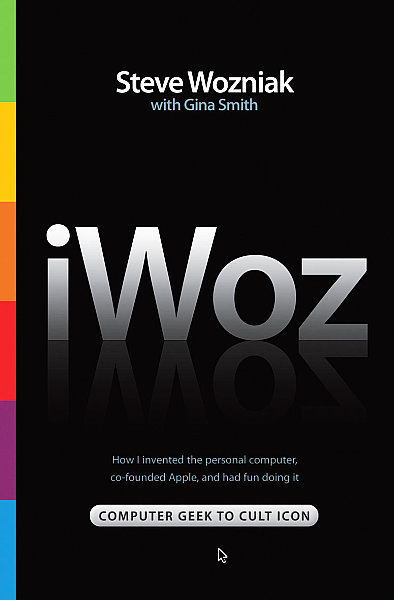
BTW, Wozniak is an articulate, engaging public speaker. The same is true of his work as an author. If you haven’t read his book, iWoz, I wholeheartedly recommend it.

iWoz

A Portable Speaker as Good as Your iPad

Tablets are spectacular inventions, but, as a rule, their internal loudspeakers do a poor job reproducing sound. With tiny loudspeaker drivers, often pointing in any direction except toward your ears, assisted by an amplifier never intended to seriously reproduce music, even the most appealing iPad is so uninterested in music, it contains only a single monaural loudspeaker.

Most people either enjoy the experience as-is, and don’t worry much about fidelity. Or, they use a pair of stereo headphones and enjoy the kind of audio that seems to exist inside the tablet (or phone), but won’t come out without some sort of accessory.

For months, I’ve been seeking a portable speaker for use with a tablet, or a phone, that provides the seemingly impossible combination of small size, convenient weight, sufficient amplification for listening at desk or in a bedroom, and, most important of all, clarity across the dynamic range (that is: nice clear highs, credible mid-tones and, perhaps most difficult in a tiny setup, bass is crisp and well-defined).

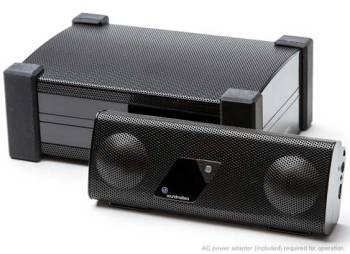
FoxL, basic model, front view, now apparently on sale for about $120.

FoxL, basic model, front view, now apparently on sale for about $120.

At a trade show, I found what I was looking for. It comes from a small company called soundmatters and it goes by the name of FoxL. In fact, there are several models.

The core of these devices is a hybrid loudspeaker design that soundmatters calls a “Twoofer,” which combines “tweeter” and ‘woofer.” This design allows a dynamic range that begins as low as 80Hz, or roughly what you would hear from a good tabletop stereo system, and also allows highs in the 20KHz range, which seems fairly commonplace. These speakers fit into a ruggedly constructed (mostly) metal box that is, truly, pocketable. The dimensions: 5.6 inches wide, 2.2 inches high, and 1.4 inches deep. It’s about the size of an eyeglass case. It weighs 9.5 ounces. (By comparison, the popular JAMBOX weighs 12 ounces, and, overall, it’s about 20 percent larger). Does the size matter? For a portable device, sure it does… the smaller (and lighter) the device, the more likely I will take it along in my shoulder bag.

But only if it sounds (very) good.

Right now, I’m listening to a recording by The Lincoln Center Jazz Orchestra led by Wynton Marsalis. The album is called Live in Swing City, and the tune is a complicated arrangement called “Chinoiserie” and it contains some very aggressive performances, lots of solos, deep notes, a barking saxophone, a sweet backup horn section, and a live audience in the background. Not an easy combination for a so-so audio system. The results are excellent–but I am careful to keep the audio level no higher than about 80% on both the iPad and the FoxL (which contains its own amplifier and volume control). The system can play louder, but bits of distortion and harshness make the listening just a bit unpleasant.

For something completely different, I switched to Peter, Paul & Mary, a trio that was always well-recorded, and whose individual voices and harmonies are both distinctive and familiar. The album is See What Tomorrow Brings and the song is “If I Were Free.” Mary is singing lead, and the nuances of her vocal are presented with appropriate warmth, if just the slightest bit lacking in punch. The guitars and the male background vocals sound clear and wonderful. The opening guitar on “Early Morning Rain” and Paul Stookey’s vocal sound ideal, and once again, the vocals are right, too.

The opening drums and other percussion on Vampire Weekend’s “Oxford Comma” grabs the listener with just the right power and clarity. The vocals sound fine. The more frenetic “Walcott” has enough bass and the right drum sound to fill a (very) small room.

“Way Over Yonder in the Minor Key” by Wilco on their Woody Guthrie tribute album, Mermaid Avenue, also sounds right. The vocal is crisp and clear, and when the background vocals kick in, with the additional instrumentation, everything holds together beautifully.

Dawn Upshaw brings her operatic voice to artful arrangements of Weill, Bernstein and other 20th century heroes on her album, I Wish It So. I’m very familiar with her version of Sondheim’s “There Won’t Be Trumpets” because it was one of a half dozen songs I used to test loudspeakers and sound systems for a feature story in Stereophile, a high-end audio magazine. Once again, Upshaw’s nuance in Upshaw’s voice is about right, but again, there’s a small lack of punch.

Presence turns out to be less of an issue for Karan Casey, who brings her pretty Irish voice to the ballad “She Is Like The Sparrow” on her self-titled album, but the low string accompaniment must be played at about 70% to avoid distortion. When the sound level is monitored, and the FoxyL is placed on its soft rubberized mat (supplied), the presentation is rich and quite wonderful.

Concerned about the occasional presence of distortion, I find some songs with distinctive and abundant bass. The little speakers sounded fine on Bonnie Raitt’s “Love Has No Pride,” and when Charlie Haden plays the bass behind James Cotton’s voice and harmonica on “All Walks of Life” from their Deep in the Blues album, the level of distortion was neither obvious nor troublesome. No problem on the Emerson Quartet’s version of various Beethoven String Quartets, either. In fact, they sounded terrific.

All of my listening was done with an iPad2 connected, by a supplied cable (miniplug to miniplug) to the most basic FoxL model ($149). For fifty dollars more, you can buy a Bluetooth model (I’m not a huge fan of Bluetooth for music listening because the sound, inevitably, cuts in and out). Both will run for 12 hours on a single battery charge (charger included). An additional $30 buys a total of 20 hours of battery life and a pretty silver enclosure. You can also charge via USB. My one complaint: a poor design on the back of the device–an easel stand is made of plastic and can be difficult to open.

Visit the website to learn more about an accessory subwoofer (also quite small) that plugs into any FoxL device.

FoxL with its subwoofer.

FoxL with its subwoofer.

iPad4: Slightly Smaller, Lighter Package

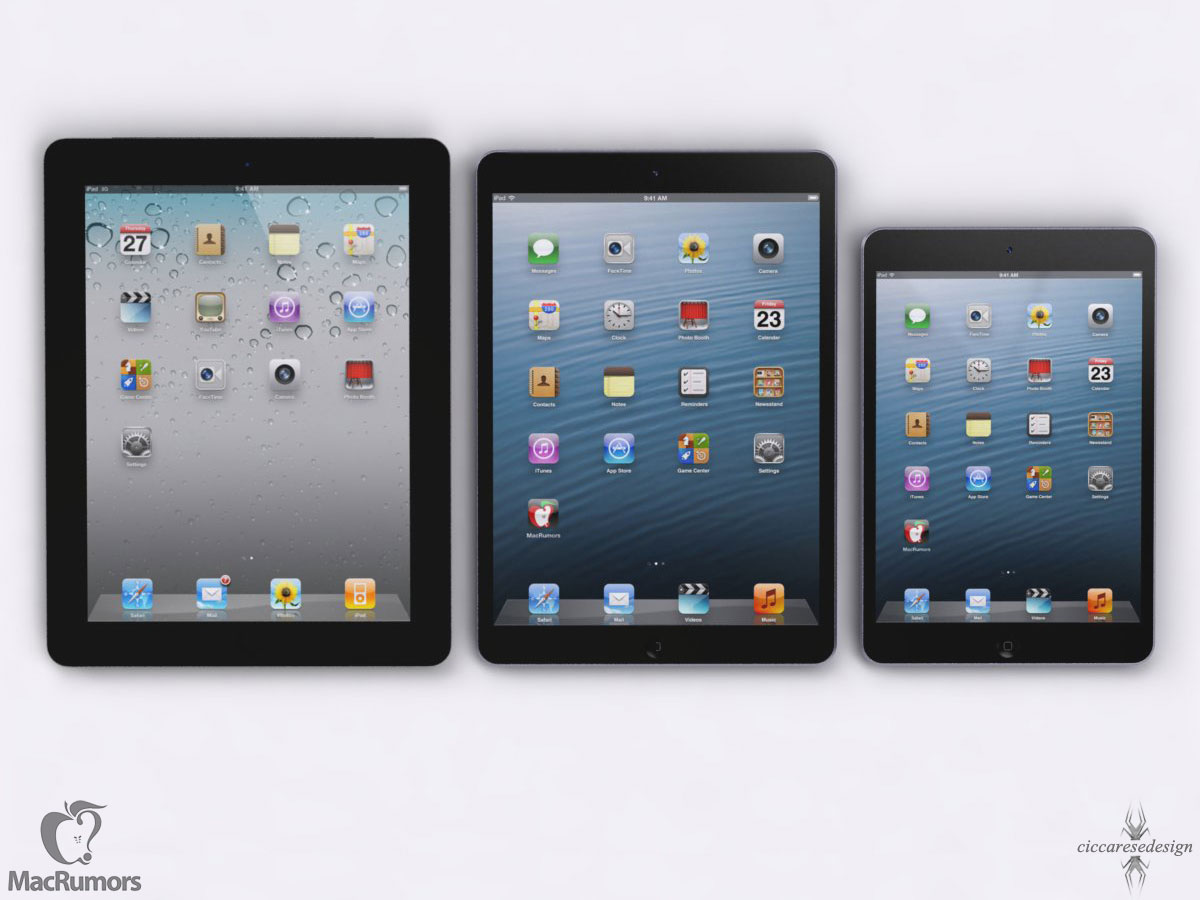
macrumors-ipad5cMacRumors published an interesting article about the new full-sized iPad, the one that will become available by September or October of this year.

The new model will be about 1 inch less wide, and about 2mm thinner than the current iPad Retina Display. It will resemble the current iPad Mini, which employs a far thinner border on the left and right sides of the screen.

And, in case you missed it, Apple introduced a new 128 GB version of the current iPad this week. It’s now available, and, I suspect, autumn will bring a 32 GB, 64 GB and 128 GB model, with no more 16 GB iPads after this year.

I really like MacRumors. They hold their sources to very high standards, and if they’re not always 100% on the money, their revelations are consistently sane, reasonable, and forward-thinking.

The Perfect Gift (for the Couple Who Has Everything)

Couple

To watch the (short) video, click on the pic. I wonder if the term “conspicuous consumption” applies if (a) the object of affection is concealed in the backyard, and (b) if it can be stowed underground.

CES 2013: What Mattered and Why

Just after Christmas, the Consumer Electronics Show convenes in Las Vegas to showcase all that’s new for the coming year. Most of it is upgrades, retreads, and modest improvements over the past year’s stuff. Some of it suggests a new shape for the industry, and for the ways that we work, play, and communicate. Here’s a brief rundown on what might matter most:

  • The disk drive maker Seagate will soon offer a “local cloud” storage device that you can set up in your home or office. Local storage, easily reached via local wi-fi. IT professionals will recognize this as a NAS, short for Network Attached Storage. At about $250 for 4TB, the lesser configurations don’t save enough money to be worth your time.
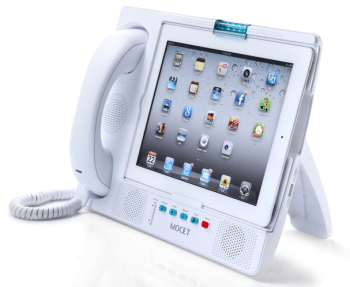
  • Expanded uses for phones and tablets. One shining example is the new MOCET iPad Communicator. Phones and tablets are extremely versatile. Adding capabilities beyond, say, a clock radio or external speakers, will become increasingly commonplace. Remember: you’re carrying a fairly powerful computer. Why not put it to use?

    MOCET

    To go to the site, click on the picture.

  • OLED is a video technology that allows for very thin screens–and flexible ones. The price of manufacture is dropping, so we’ll begin to see OLED screens enter the race between plasma and LED screens. Eventually, this organic (!) technology will win out, and become commonplace. (The “O” in OLED stands for “organic.)
  • Previously, I wrote about the new 4K screens. They’re beginning to be shown as demos.
  • Touch screens and gestures will begin to replace keyboards and remote controls. As the technology allows for greater precision, older ways of interacting with computers (and tablets) and with videogames and TV sets will shift our conception of an interface into the modern age.
  • Smart phones seem to be getting larger–more screen real estate is better for mail, web, games, and movies. Tablets seems to be getting smaller (the line between a small tablet and a big phone is becoming difficult to discern). Tablets are also becoming larger–imagine what you could do with a 20-inch portable tablet! Here, we’re starting to blur the distinction between a computer monitor, a TV set and a tablet. It’s tough to forecast where these trends are heading.
  • Samsung has become the Sony of the 2010s–an exciting company with innovation in every direction. The quality is there, too. But there are still lessons to be learned about user interfaces and design.
  • Very small storage devices are continuing to expand their storage dimensions. Kingston, for example, showed off a 1TB flash drive–larger than the popular thumb drives, but still quite portable.
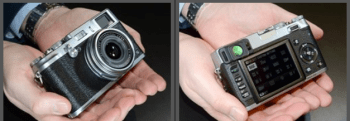
  • From DPReview's coverage, the latest Fujifilm digital camera. Click on the image to see their story.

    From DPReview’s coverage, the latest Fujifilm digital camera. Click on the image to see their story.

    It’s now a regular routine: cool new cameras introduced at CES. For a solid rundown, visit DPReview. I think my favorite stuff is the expansion of Fuji small-sensor line. These cameras look like the real think, shoot terrific images, and tend to be somewhat more intuitive in their interfaces. (More on these soon.)

  • Automotive electronics has always been a key aspect of CES. Sure, car stereos and car security systems remain center stage. Now that cars plug into wall sockets, the vehicles themselves are becoming digital devices. This time around, lots of cars as harbingers. Next time, I’ll bet we start seeing hybrid devices that confuse the definitions of bicycles, motorcycles, golf carts, and other short-range transportation devices.
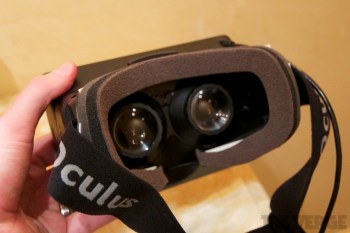
  • Oculus Verge

    To read The Verge’s story about the Oculus Rift, click on the image.

  • Your smartphone and/or your tablet will become a monitoring control center and remote control. You know how we’re beginning to program a DVR from afar? Or read date/time stamps on the foods in the fridge? It won’t be long before we all have a remote dashboard to tell us about the fuel in the car, the meds in the bathroom, when the last time the dog was walked, body fat, etc. add some robotic controls and digital life becomes even more interesting.
  • I’ve wondered why immersive video game displays have taken so long to gain traction in the marketplace. Now, it looks like the (Kickstarter-funded) Oculus Rift will change the way gamers see and experience the experience of game play. There’s good multimedia coverage in The Verge.

The Fourth Good Idea (The One That Works!)

Good idea #1 – On every iPad, Apple includes a slot for an SD card. That way, I can copy a file from my computer, insert it into the player without any fuss, and edit a document or watch a movie.

Didn’t happen.

Good idea #2 – Recognizing the error of its ways, Apple introduces a $30 accessory called the Camera Connection Kit. It includes two small white blocks, one of which allows the insertion of an SD card into an iPad. But only for transferring pictures. Forget about editing a Pages or Numbers file, or watching a movie.

Good idea #3 – Seagate introduces GoFlex, a lightweight, portable disk drive that connects, wirelessly, to any iPad. The secret is a wireless network created by the device; that’s how the connection to the iPad is made. The capacity is 500GB, a very healthy amount of space for all sorts of files. Unfortunately, Seagate’s interface technology proves difficult to use, and, at least for me, it seems to work less often than other devices. (Seagate has provided help, not once but several times. New Year’s Resolution: Since I love this idea, I will try again and get it right.) It costs less than $200.

AirstashGood idea #4 – Maxell introduces AirStash. It’s a small wireless network, and it worked the first time. There are three parts, well-integrated. The first is an app, clean and simple, just a list of files organized by file type (movies, etc.) The second in an SD card (up to 32GB). You insert the SD card into your computer, load it up with files, and plug it into the third part. That’s a device roughly the size of a large cigarette lighter. On one end: an SD card slot. On the other, well, nothing you need to make the connection (more on that in a moment). You find the AirStash network in the list of available wireless networks, make the connection, return to the app, and just watch the movie (or whatever it is you want to do). From time to time, you need to recharge the AirStash battery–that’s the third part, a USB plug that you insert into any computer or USB/AC adapter for the recharge.

My test device was loaded with several good films: I watched The King’s Speech and Inception, and both played flawlessly.

Sorry, but I can’t resist:

Good idea #5: AirStash is updated so that it can be used without shutting down the WiFi network that you usually use. Right now, that’s a flaw. I hope it will be fixed.

So, that’s the story. AirStash is a product that really works. And it’s simple enough that I was able to write an article about half as long as usual, simply because, well, this really is a simple product to use, and to explain. Whoever made this happen, good work! (And thank you for solving the problem that Apple never should have created in the first place!)

AirStash Phone

Here’s a look at the AirStash app for the iPhone. Simple, straightforward and intuitive.

It’s a Clean Machine

Spending too much time in the dusty bins of used record stores, I often buy “perfectly good” LPs for less than $5. It’s a bargain: terrific old Leonard Bernstein (or, if you prefer, Jethro Tull or Blondie) recordings for far less than their CD equivalents would cost, and far more fun than their digital file equivalents.

The Spin-Clean is a cost-effective ($79) way to bathe a vinyl record.

The Spin-Clean is a cost-effective ($79) way to bathe a vinyl record. Click on the picture for more infromation.

But old records are often dirty. And they’re not always easy to wash. For one thing, you don’t want to wet the paper labels (one on each side), so submersion is out of the question. This leaves the listener in the decidedly odd position of either dipping the vertical LP and spinning it in a trough, or wiping it ’round, which is both awkward and potentially damaging.

So what’s a listener to do?

Buy a cleaning machine.

There are several kinds. One involves a bin, and looks kinda awkward. Most people use a rectangular box with a vacuum cleaner inside (seriously!). In this category, the long-time industry leader is a company that I recall from decades ago: Nitty Gritty.

Nitty Gritty 1

The Nitty Gritty 1.0 is the lowest priced product in the company’s line. It contains a vacuum cleaner.

You’re looking at the least expensive Nitty Gritty machine, the Model 1.0. A quick tour helps to explain what this cleaning machine does, and suggests the options available on the more expensive models.

On the left, the low cylinder is, in fact, the top half of a sandwich. Lift the wooden part and you’ll find that it’s the top pad, and that the bottom pad is on the machine. Place the vinyl record in-between, and the pads cover the top and bottom labels. The rest of the record is exposed. And that takes us to the slot in the middle of the machine. It’s covered in velvet, because this is the place where the vinyl is exposed to a powerful vacuum cleaner that sits just below the slot. With this model, you hand-turn the LP by finger-control (there’s a slight indent in the top pad, just about visible in the photo). The remaining items are a wet solution (see below) and a small brush. And, over on the far right, there’s an on-off switch. For more on how it works, click here.

Does it work? Yes, the system works really well. A record that’s dusty will be cleaned, and much of the surface noise will disappear. Results are much improved with the application of the Pure 2 solution; 16 ounces will keep most listeners going for a year or two.

The Nitty Gritty products are well-made, and so, they’re not inexpensive. Budget $500 plus shipping and you’ll be fine with an oak-grained model or something equally attractive. For twice the price, the record turns automatically and the fluid is dispensed by the machine, not by hand. The product line is explained on Nitty Gritty’s website.

Is it worth the money? I guess that question can only be answered “yes” by someone who (a) frequently listens to vinyl; (b) believes that a $500 turntable is in the inexpensive / affordable range, and (c) has invested in a full-scale, grown-up stereo system. If you’re among those people, this would seem to be an essential accessory in an analog world, one that’s often overlooked, in part, because few people seem to know that such a contraption exists. It does, and for serious listeners, it’s a good investment.

For even more information, watch this video from someone who cares deeply, and knows a lot, about keeping records clean.