Yesterday’s post ran long, so I decided to cut it in half. Here’s the rest of it, or the third in a series of two articles. (Something like that…)
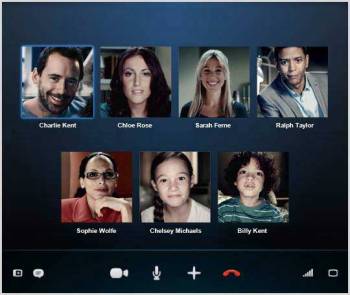
A group video call on Skype.
Dot #4: Connectivity and Sharing. Here in the 21st century, we demand not only connectivity but sharing of information in real time. We fall short in whiteboard-type environments where we can see ideas and people simultaneously, and when we do, the interaction is sub-par, but this will steadily improve through Skype, Google, and new ventures. All portable devices must connect anywhere, at any time–this is a shortcoming of some apps (Evernote, for example) and some devices (most portable computers, unless a separate wireless hot spot is generated by a nearby cell phone). This is foolish retro-thinking. The next generation of computers, tablets, all devices should include built-in connectivity for WiFi, 3G, 4G, and so on. Fortunately, these devices and their related systems work very well. And, fortunately, the technology is constantly improving to allow more throughput, faster speeds, fewer problems, and increased security. What we don’t have quite yet is a kind of super-DropBox where it’s easy to share any document on any device, regardless of whether it’s in the cloud or on a specific device. VPN (Virtual Private Network) technology resembles a solution, but what we need is a more robust, full-featured, easy-to-use system. I suspect Apple and Google are hard at work developing something to do this job–they’re already on the way with Google Docs and the new iWork set for release later this year.
Dot #5: Output. This one is confusing. I own an iPad which doesn’t do well in an environment where printed documents are the standard. Most printers won’t talk to a tablet–though some now have email addresses for that purpose (yes, some printers have email addresses–seems confusing, I know). When I was using a portable computer, I often printed documents. With the tablet, I find myself storing documents and reading them on the tablet’s screen. Far less printing. Almost none, in fact. My output is, typically, an email to someone who wants or needs to read something I wrote. I do print some documents for reference, but printed documents are difficult to revise, so I tend to focus on digital copies. The file folder in my briefcase were once filled with paper, but now, not so much. Even handwritten notes are being replaced by the notes that I take on the tablet–when they’re in Evernote, they’re very easily shared with my other devices and with other people via email or shared settings.
Dot #6: Portable. For me, this means the device goes just about everywhere I go. In that regard, the iPhone (any smartphone, really) is a suitable solution, if one with a too-small screen. There is access to web and email, phone, messaging, internet, iWork documents, Evernote, the list goes on. The tablet does not go everywhere because it’s a little too big, even for someone like me who is rarely seen outside my home without a shoulder bag. There’s some minor conflict here about size: the phone ought to be larger, the iPad needs to be both small enough to carry everywhere (the iPad Mini) but large enough to provide a full page of printed material or to create diagrams or word processing documents or spreadsheets or presentations (the iPad full-size model). At first, I was sure I would need a keyboard, so I bought one and thought I’d carry it everywhere. I don’t. In fact, I use the portable keyboard only when I have a lot of writing to do away from home–not so often, as it turns out.
How long does the device need to run between recharges? Eight hours seems pretty reasonable, more is nice.
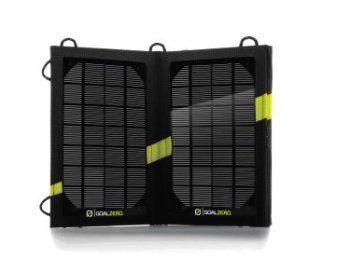
GoalZero’s external solar charger is convenient, but this technology should be built into every portable device.
Any accessories required, as one might carry with a portable computer? Absolutely not.
One further notion about portability: the device must be easily used anywhere. With an iPad or tablet of sufficient size, that’s anywhere at all, standing, sitting, lying down. With a portable computer, a desktop surface makes the process so much more comfortable–though some people can work with the computer on their lap (I need a fat pillow to do that, and the computer tends to slide around). The tablet can be raised or lowered to adjust for eye position and lighting; this is difficult to do with a portable computer.
Of course, everyone’s needs are different, and some people use their portable device as a power tool. For most users, I suspect this is overkill–just like a gigantic SUV might be for local grocery runs and soccer practice.
What’s next? I think we’ll see keyboards becoming vestigial, and improved touch screens as the standard for portable devices. I know the devices will become faster, contain more storage, offer better screens and longer battery power, and we all know that prices will remain quite low, but will slowly rise. There will be more pocketable devices, and attempts to move away from a traditional flat screen. OLED technology, for example, allows a screen to roll up for storage. This will be the next frontier, worthy because the size of the screen is the key determinant for portability. Once that dot becomes more flexibly defines, all of the other dots line up in support. That’s the longer-term future.

For the shorter-term future, I’d look to combining my tablet and phone into a single device that works and plays nicely with a more powerful computer (which will also evolve) in my home or office.
And what about power? Since they can be charged almost anywhere, I like solar cells. They’re small, flat, and becoming affordable. I also like charging mats. AC adapters are probably unavoidable, but better batteries make them less essential.
Sorry for the long post, and for the multiple parts. This was interesting to write, so I just kept going.


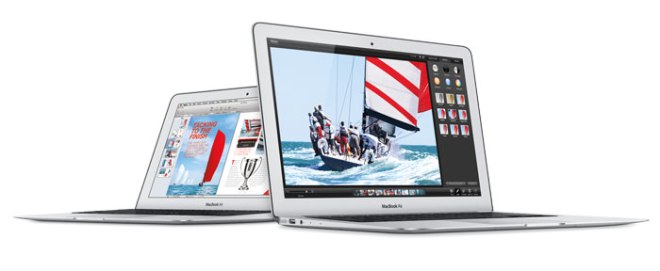
 When the latest upgrades to the MacBook Air were released last week, I thought I might finally break my pattern–iPad for portability, iMac for serious work in the home office–with an in-between machine that could do both. After hours of research and experimentation with the Air in various settings, I decided to wait until the autumn to upgrade the iPad, once again leaving the portable out of the mix. Why? The Air does not connect via 3G/4G, but instead requires a separate network to be established on my iPhone (clunky solution, but it works). And, to my astonishment, I actually prefer the touch screen to the keyboard when computing in a mobile environment. I sacrifice a degree of functionality for the reduced weight and increased connectivity, but then, most of my mobile work does not result in an elaborate finished product–this, I do on a computer.
 Today is Sunday the 16th, and I have lunch at noon. That’s easy to see on the colorful Windows 8 interface. Right now, it’s 68 degrees and it’s going to rain today. Click through for details, and the weird non-intutitive interface design returns. It’s unclear what to do next, the brief instructions are unclear and the type is often too small to read. Click once or twice more, and the whole deal looks like Windows from the turn of the century. For reasons I do not understand, several “chickets” appear on the right side of the screen. These offer a combination of settings, search, and device access–not sure why these are shown separately, but the more I dive into Windows 8, the more I come up with “why would they do it that way?” questions. I’ve now spent several hours with Windows 8. Overall, I’d give it a “meh.”

 I raced home tonight to watch two hours of programming that will never appear on television. You may not even recognize the name of the program: “WWDC2013” I don’t know how many other people watched, but I suspect it’s over a million.
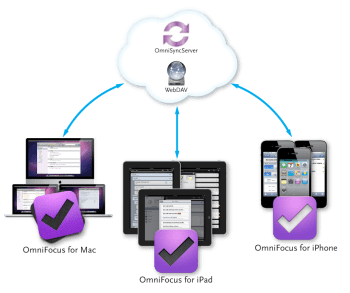 So what’s the big deal about OmniFocus? There are dozens of to-do and reminder apps, with sync, available for far less than OmniFocus.
 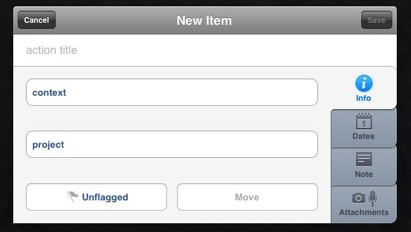 Although it is possible to make a quick task entry, the more complete entry panel is more useful. After naming the task, I select a context from my own list that includes: Awaiting Response, Call, Create, First Contact, Followup, Just Do It, On Hold, Purchase, Research, Schedule, Visit Web Site, and Write. Then, I select a project, again from my own list that includes: Art, Books, Digital Insider, Home, Music, Software, Travel, Web Site, and various, specific work-related projects. I can stop there, deciding to add a flag to any high-priority tasks, but I prefer to add a due date to every task (start dates are also an option, but I don’t work that way). There’s a nice big note field, and I use hat to capture URLs, reminders of the most recent attempted contact (left phone message on 3.13.2013; sent reminder email on 10.12.2012). I can add a photograph, .jog, .gif, .png, or record an audio message.




 On January 5, 1070, the ABC Television Network debuted a new half-hour soap opera series called All My Children. After seven years, the series was sufficiently popular to win an hour-long time slot. It remained on the air until September 23, 2011, cancelled due to changing audience and lifestyle behaviors.


 Every day, about ten American die and about ten more are injured in motor vehicle crashes involving a distracted driver.

 I learned about the relationship between

 Digital Insider