Stinking Bishop, or Why British Food Rules

The cheese is named for the Stinking Bishop pear, which is used to make the perry used to rinse the cheese at it ages. The cheese is soft, produced in limited quantities from the milk of once-nearly-extinct Gloucestershire cows. The great care associated with this special cheese is not unusual. In fact, special attention to local foods was a hallmark of my recent journey through the Cotswolds, the English countryside just east of Oxford. Never have I taken a trip where fresh food was so abundant, so front-and-center. If you’re still caught up in the mythology about lousy British food, reality has passed you by.

While we’re on the subject of cheese, I should note two very special cheese shops, one in the Cotswolds railroad village of Moreton-on-the-marsh (beautiful old main street, endless shops and old inns, railroad just a few blocks away). The Moreton shop is called Cotswolds Cheese Company; the one on swanky Jermyn Street in London is Paxton & Whitfield. In  Moreton, I tasted my first Single Gloucester (mild, classy and grassy, but nothing to get me excited about), and my first Double Gloucester (lots of fresh character, earthy, stronger and richer flavor), and also, a Burford (a simple, smooth cheddar). I bought a small hunk of each, a baguette and a blackcurrant-apple juice, and ate lunch on the short train trip to Oxford. In the second, I tasted Stinking Bishop and then benefitted from a very friendly cheesemonger who introduced me to several British cheeses, including an ale-washed Caerphilly that I happily munched whilst window shopping along Jermyn Street (where their London store is located). Great cheeses, all local to Britain, most produced within a two hour drive.

When I visited the Cotswolds, it was asparagus season, and, seemingly everywhere I went, delicate smoked salmon was available. I combined the two, as an appetizer, at Bourton-on-the-water’s Rose Tree Restaurant, and learned something about the taste of fresh English asparagus. It’s sweet. The taste resembles American asparagus–even my local variety here at home–but only somewhat. The flavor is delicate, and welcoming. And, apparently, May is its favorite time of year. I followed by Beef Wellington with local mushrooms and local beef. This was in keeping with another modern, organic restaurant in the same village, The Croft, where I enjoyed one of the beefiest, freshest tasting hamburgers I’ve ever eaten, and also, a tasty Steak and Ale Pie, the latter being a house speciality also available with chicken or fish. Of course, the ale was local.

If there was any lingering doubt about the quality of British country food, a visit to Daylesford Organic presented an extraordinary argument in favor of the flavor and beauty of fresh food. (To learn more, here’s a whole page filled with videos.) I wanted to try every gorgeous fruit and vegetable, then sit down for a proper dinner to enjoy the local, organic fresh meats, and then, dessert. But it was just 10 in the morning, and all I could fit into my post-breakfast appetite was a delicious little scone. Next time, I will build at least one day’s meals around a visit to Daylesford.

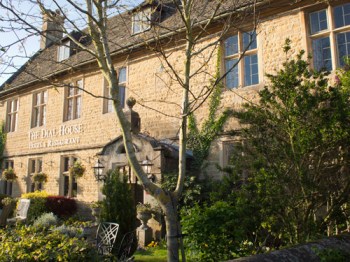
Back to Bourton. Here’s dinner at the Dial House, known for its local cuisine and extremely creative dishes (a completely delicious meal, worth the drive to Bourton the very next time you visit Britain):
  • Canapes – Ballantine Ham hock with cornichon (French gherkin) gel on top, smoked butter foam with poached mussels
  • Cauliflower with white truffle oil
  • Homemade – carmelized shallots with garlic and cumin
  • Salmon with lemon air with fromage blanc, keta (caviar), crispy salmon skin, panacotta and cucumber
  • Cornish Brill with cep purée (mushroom), sea aster (flower resembling a daisy)
  • Yuzu (Japanese lime/lemon) with coconut sorbet and chocolate strands
In fact, you should stay over (I did, at the Halford House, a B&B owned by the Dial and just blocks away), if for no other reason than to head for nearby Bibury and the fresh smoked trout (from the trout farm just down the road), and the excellent smoked salmon, both served at a fancy local establishment called The Swan.
Bourton-on-the-water and other Cotswolds villages are not very far from London, just about a 90 minute train ride to another world, a place largely untouched by the industrial revolution, a place whose focus is now shifting toward serious local food. One chef behind this trend is Rob Rees, a visionary I met over tea at Sudeley Castle in Wynchcombe; his unabashed promotion of the region and its stunning food is something you ought to know more about. Rob speaks eloquently about the importance of farm foods, and a local food economy, and more broadly, about the importance of proper food for growing children. He brings industry, government, and family kitchens together in ways that are altogether unique, as explained on his web site.
Oh, I nearly forgot about the side trip to Canterbury, which is on the eastern side of London (Cotswolds are on the west). Take the train to Canterbury West (there are two train stations), and when you walk out of the station, look immediately to the left. You will see an old train shed turned (six days a week) into a local farmer’s market called The Goods Shed. Sample the smoked haddock, made just outside of town, and note the smooth, non-fishy, salty-sweet flavor. Try the fruit-enhanced Florentine cookies. Taste the apple cider, also from nearby. Then, do the cathedral and your shopping, and return for dinner (here’s the spring 2012 menu). Mine included perfect scallops. The restaurant menu is built from produce available at the market.
——
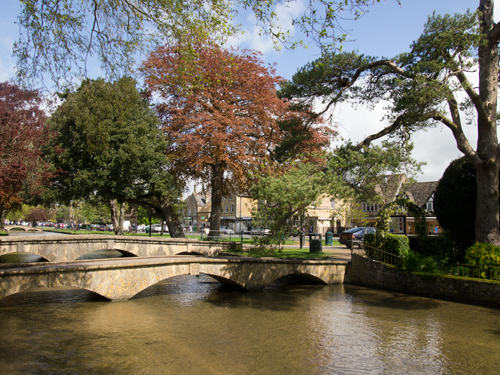
Me, I’m just back, ready to write some more about British food (a topic I never thought I would ever write about), this time from Cardiff and Pembrokeshire. More later. Meantime, enjoy Bourton-on-the-water in the photo below.

Jack DeJohnette: One of The Best


Jack DeJohnette is one of those extraordinary jazz musicians whose career is largely unknown to those who do not follow jazz. Too bad. (Let’s do what we can to remedy the situation.)

Background: He came up through Chicago’s avant-garde scene, working as part of the AACM (Association for the Advancement of Creative Musicians); played with John Coltrane’s quintet in 1966; then worked with a young Keith Jarrett in Charles Lloyd’s group; then made some history as a drummer on Miles Davis’s Bitches Brew sessions (and on eight other albums from the early 1970s); soon, his circle included John McLaughlin, Chick Corea and Dave Holland. In fact, for 25 years, he has been a part of a trio with Keith Jarrett on piano, and Gary Peacock on bass–their series of Standards albums are extraordinary (watch them here). The complete list of DeJohnette albums and collaborations is a long one; fortunately, Wikipedia maintains a good list. As both a leader and a co-conspirator, DeJohnette’s portfolio includes so many albums, so much excellent work, that it may be difficult to know where to begin.

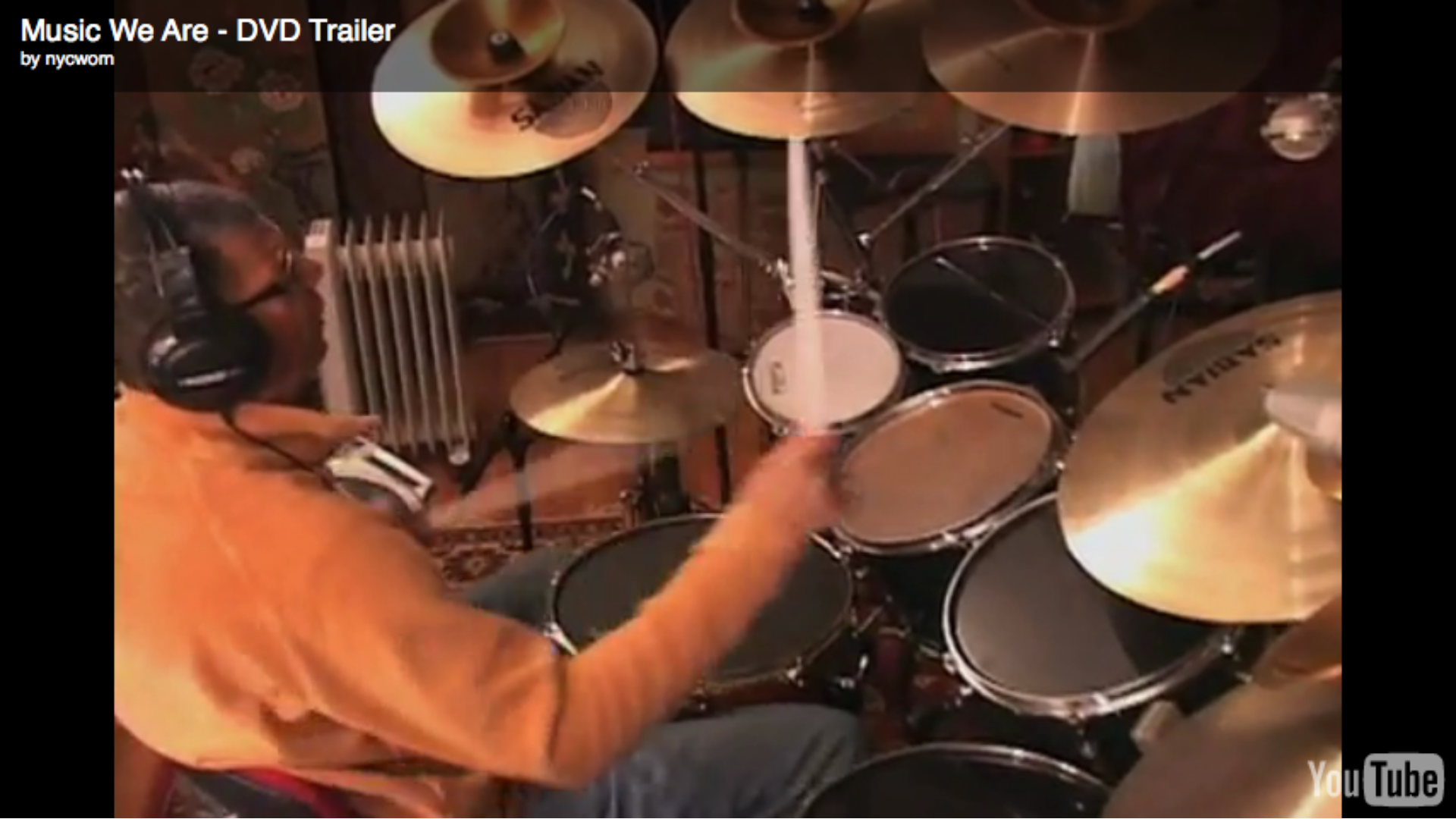
For starters, I’d suggest a 1984 CD called Album Album because it offers both an avant-garde sensibility and easy access for anyone willing to take the time to listen. The interplay between saxophones–the formidable David Murray on tenor,  the lesser known John Purcell on alto and soprano, and a young Howard Johnson on tuba and baritone sax–is consistently inventive, with a relentless flow of interesting ideas, varied textures, and explorations of old ideas made new. DeJohnette is the controlling influence, ever present, often leading the way. Plus, there’s this sense of style, short bursts in lavish settings, that provide the basis for an album released in 2009–that’s 25 years later–called Music We Are.

For DeJohnette, the melodica is an old friend: he played melodica on his first significant solo album, excerpted here on YouTube. On the 2009 release, the melodica provides a winning c

ombination of tango sensibility, bits of remaining avant-garde (sounding more mainstream here, perhaps due to the passage of time), and the kind of atmospheric soundscape that was central to Weather Report’s earliest work. The creative collaboration here is with pianist Danilo Perez, who explains, in the album’s liner notes, that he has been playing with DeJohnette since 1992, and that his first encounter with the famous drummer was listening to DeJohnette playing “some beautiful piano.” John Patitucci plays electric and upright bass. They work together beautifully. That is to say: this is a very special album, one that pulls together so many different jazz styles, so successfully, that it defies categorization. It swings, it makes you think, it makes you dance, it does a whole lot of stuff really well.

In fact, they explain how it all comes together on a 25-minute DVD that comes, free, with the Music We Are CD. This is a solid documentary, explaining the creative process from composition and performance through recording and editing. After watching it, you will wonder why every CD doesn’t include an accompanying “how we did it” DVD.

Hey, I was going to write about the newest DeJohnette CD, Sound Travels, but this article is probably long enough. I will write about Sound Travels soon, I promise.

Do You Think You Can App?


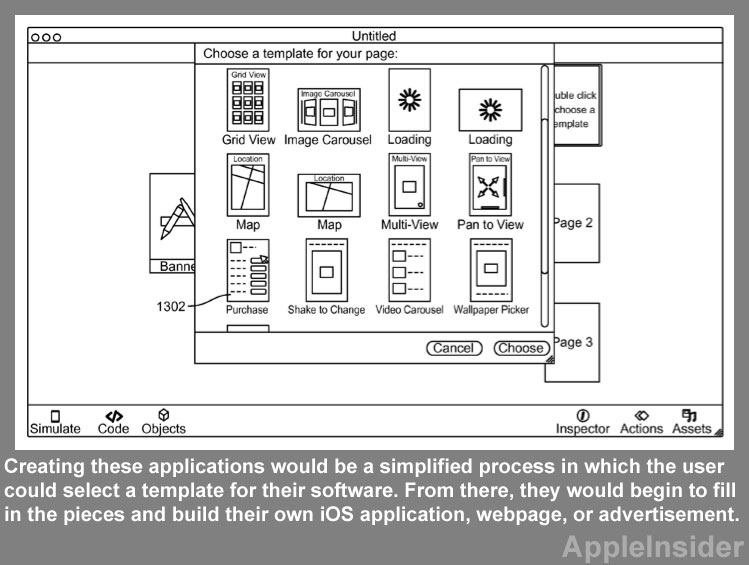
Think back to the time when you wondered whether you could desktop publish (before you knew what a “font” was), build your own website, or shoot or edit video? All of these were once unavailable to the average person. Now, Apple has filed a patent that could lead to make-your-own apps.

No surprise that message boards are filled with doubt. Making apps is too specialized, too complicated, too much of a commitment for the average person, too demanding in terms of knowledge and training and skills. Doubters point to iWeb, which was a make-your-own website tool that Apple provided, then pulled from the market.

Still, I wouldn’t dismiss the idea too quickly. No, most of us can’t or won’t build our own websites, but technology and invention race around the rocks–so we blog, and post images, and Tweet, and distribute information via tools that weren’t available the day before yesterday.

Do I want my own app? Sure, I guess, but the question suggests a solution chasing a problem.

If we flip the question, and assume, for example, that we (jointly) own an artisanal bread bakery, we might want to make it easy for our customers to know what’s baking, and what’s fresh out of the over, and we might not want to pay someone to build an app. A bake-your-own app might be just the thing for small business, or for authors who want to provide more than an eBook can easily provide, the list of potential problems that a homegrown app could solve is large. What’s more, the interactivity of a good app creates a high level of engagement between the provider and the customer, so apps could be the step beyond blogs and tweeting.

But I think there’s even more to the question. Blogs, tweets, apps–these assume current technology. And yet, we know that current technology lasts only a few years before the whole game changes. By 2015, we’ll be into advanced optical displays, a better cloud that makes the whole idea of local storage and local apps obsolete. Quite likely, we’ll be buying a broader range of devices–and I’m sure I don’t want a circa-2012 app as the my interface with thousands of internet radio stations (I really want easy-to-use internet radio in my car with lots and lots of stations from around the world).

Nothing is standing still–and that’s one of the challenges addressed in the Apple Insider article–how to build apps that easily (and automatically) customize for an increasingly varied range of devices.

What about Black-and-White?

Back in the analog stone age, shooting in monochrome was a creative choice made in advance. You’d buy a few ISO 400 rolls of Ilford HP5 or Kodak Tri-X, and head out for a day of serious photography, hoping for just one image worthy of framing.

In fact, black-and-white analog photography offers several advantages. There is at least four times as much picture information, so contrasts can be stronger, textures can be more refined, and enlargements can be, well, larger. About half of this work is done in the field, mostly by selecting and composing with intelligence, and by selecting an appropriate optical filter to place on the lens. For example, sky contrast can be dramatically increased by using a red filter, but sometimes, detail in shadows is lost with a red filter, so an orange filter may be more suitable. Corrections are then made in the analog or digital darkroom, a trial-and-error process that becomes easier after a lot of hours of experimentation and instruction.

Working with a digital camera, the best black-and-white images are derived from color images, but maybe not in the way you’d think. The adventure begins with a digital camera that can shoot RAW images–so plan to spend at least $500 on the camera. Lesser cameras, and less-than-serious photographers with better cameras, shoot in JPG to jam more images onto an SD card. If you start with a JPG created in the camera, your black-and-white images will lack detail, clarity and snap. Your expensive digital camera offers an instant monochrome option. No, you shouldn’t use it, not if you are serious about your photography.

Instead, you can achieve miracles by post processing your RAW image in Aperture, Photoshop, or other software capable of handling RAW images. With desktop software, you can add the equivalent of colored filters and gradient filters, with a level of precision unavailable in the field, and unavailable in old school darkrooms.

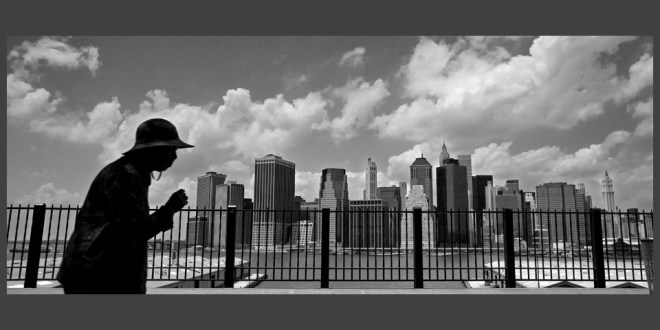
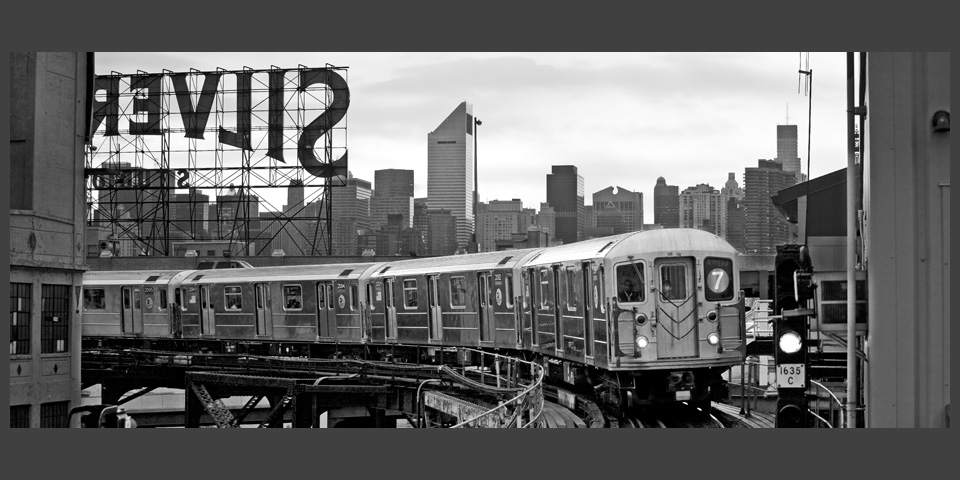
In his book, Hoffmann goes into considerable detail about how this picture was made, and why it is so effective. He’s a very good teacher.

Is it worth the time? It’s worth the time if you train yourself to create the best possible images by learning a lot about composition, mood, street photography, landscape work, architectural photography, and abstract work from a master teacher. I’ve spent the past month or two studying the second edition of a fine book entitled The Art of Black and White Photography by Torsten Andreas Hoffmann, published by Rocky Nook Press. He provides the necessary technical information, but spends most of his instructional time on important photographic ideas: how to avoid the cliché, achieving balance, dealing with visual irritations that cannot be moved, capturing people in their natural surroundings, visual rhythm, form and composition. Hoffmann is especially effective when he writes about, and photographs in, a strongly graphic style: strong contrasts, superior use of line and form, repetition to suggest speed or solidity. (Study the three Hoffmann images in this article, and notice, for example, the repeated pattern of small verticals–the fence posts in the top image, the decorative balusters in the second, and the train doors in the third supported in the distance by the verticals of the Manhattan skyline). These are not snapshots–they are photographs–and if there was any doubt about a blurry line between those two ideas, it disappears here. These are advanced ideas, most suitable for the experienced photographer or for the ambitious newcomer. The reward is in the learning, of course, and also in the tour of Hoffmann’s portfolio, which is sampled in this article and offered in expansive form on the photographer’s website.

The photographer is based in NYC. This image is one my favorites, but it comes from his website, and does not appear in the book.

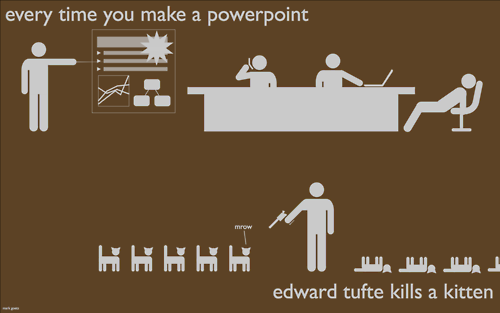
Edward Tufte Kills Two More Kittens

Last night, I was one of two keynote speakers for an innovation event. As a speaker, I’m supposed to be the teacher. Three people in the audience were fast asleep. I am their grateful student.

I spoke for over a half hour. I’m pretty sure we should pass a law, or perhaps, a constitutional amendment, that assures no speech will ever run longer than 20 minutes.

I structured my speech with over 100 clever little slides (I used Keynote, which is cooler than PowerPoint). Every visual cue was carefully tied to specific words in my written script. So I paid more attention to the script and the visuals than I did to the audience. Occasional ad-libs only made the speech longer.

The gentleman who preceded me, a college president, used Prezi. What a cool visual presentation! I remember almost nothing he said. (Too busy looking at the cool imagery.)

So here’s a digital insider take on speeches, the morning after. Just talk to the audience. Tell them what you know. Allow yourself one index card with three key points.

Anybody in the audience who want to see the charts, graphs, photos, etc., tell them to visit your website or blog. In that environment, they can study the visuals in their own time, not in a crowded auditorium. When they hear hear you talk about an important idea, they can visit your website for more information.

Which is to say: speeches are terrific for revving up the audience and introducing new ideas, but they are not very useful for detailed presentation of ideas. Websites are not a good way to rev up the audience and introduce new ideas–there is no personal touch, except, sometimes, with an extraordinary video–but for details and the day-by-day updates, they’re terrific.

I trust the guys in the back row slept well. Last night, they were the most powerful teachers in the room.

For more on Tufte/kittens:

Tufte Kitten Kill Count

Intro to Tufte:

The Visual Display of Quantitative Information

A Quality Camera You Won’t Leave at Home (4 of 4)

Continuing the series about small, high-powered digital cameras, our discussion finishes up with video. And this is the part that confuses me most. These cameras shoot very pretty pictures–high-definition, widescreen, beautiful image quality. But none of these cameras allows the user to control or monitor the audio associated with that video.

Audio Rant

Let me rant on that first, and then, we’ll talk pictures. Each of these cameras can record audio with a built-in microphone, usually a stereo microphone. What’s missing: an audio meter so you can see whether the audio being recorded is too loud or too soft, a jack for an external microphone, and a jack for an external earbud or headphone to monitor the audio as it is being recorded. In comparison with the photo and video imaging in these cameras, these audio capabilities are very simple. But they are largely absent.

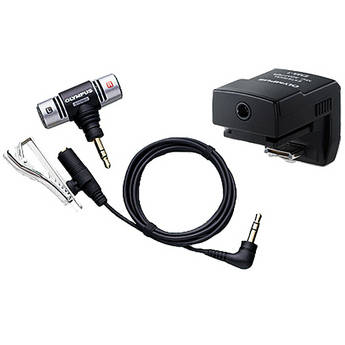
This Olympus device adds a microphone via the camera's flash shoe. It costs $60 at B&H, the source of this photo.

Olympus offers an $89 microphone and cable (SEMA-1) that slides into the hot shoe of the PEN cameras, and it works nicely, but the cable is short, and because it’s connected directly above the lens, the cable finds its way into the shot whenever the camera is turned or manipulated. So what we have is a high-quality digital audio recorder that’s useful only to record “wild sound”–the ambient sound on location. To record sound that’s comparable in quality to the video side, you must record audio separately, on a standalone digital recorder, and then match the audio and the video, on separate tracks, in your editing software. That’s possible, if you have time and patience, and a good set of editing skills. (This will be the topic of an article in the near future.)

End of rant.

Very Good Video

On the picture side, the cameras are very, very good good. Even the $499 Olympus E-PM1 can record up to 29 minutes of  magnificent 1080 60i HD video by just pressing a button. The newest Olympus E-M5, scheduled for April, takes a leap forward by recording H.264 .mov files, making capture and editing easier, and mostly eliminates the dreaded “jello effect” in which vertical lines wobble during a pan of even moderate speed–an improvement over current PEN cameras.

This rather ugly picture is part of a rather clear video explanation of the jello effect.

This is not to minimize the astonishing video image quality available from these cameras–perhaps more astonishing because motion video is not the primary purpose or function of these cameras. Certainly, we’re seeing professional videographers use their DSLRS, with special grips, to record television programs–digital photography has really changed the way we think about video production. And, if you place a mirrorless camera on a tripod, you can achieve stunning results. Even hand-held, with image stabilization, automatic exposure, and automatic focus, the Olympus and Panasonic cameras can do great things.

The same is true, with varying degrees with success on the focus side, and in contrasty situations, for competitors. Of course, you can use just about DSLR to shoot terrific still pictures and still video. And, in most cases, you’ll be able to do so with an earplug, an external microphone, and much more control over the video as it is being recorded. But those cameras are bigger and heavier than their mirrorless counterparts.

Summing Up

If you want to own a full-featured digital camera that takes great pictures and offers every conceivable feature, buy yourself a DSLR. You can buy a very good one, perhaps the Canon EOS Rebel T3i with an inexpensive 18-135mm lens, with an 18 MP APS-C sensor for just over $1,000.

For me, this is a camera that’s fun to use, fun to own, and likely to leave home only sometimes. It’s just too big and too heavy for me to carry along with me. Certainly, I would bring it special events or when I feel like spending an afternoon taking pictures.

I would be more likely to carry something like the new Canon G1X ($799), which offers a 14 MP sensor that’s slightly larger than the one used by micro four thirds cameras, but smaller than the typical APS-C standard. It’s a wonderful small camera, a bit heavier and bulkier than it appears to be, with an optical viewfinder (old school: you simply look through it, like a telescope) with plenty of manual control. The lens deflates my enthusiasm: it’s a zoom, 28-112 mm with not much of a large aperture: f/2.8-5.8. If this camera was offered with a normal prime lens and a maximum aperture of, say, f/2.0, I’d be all over it. Still, this is a camera I want to know more about.

Essentially, I want the equivalent of a good DSLR, but I am not willing to carry around anything that’s bulky, large or heavy. This is why mirrorless cameras intrigue me. So far, I believe the Olympus E-P3 offers the best combination of solid construction, good design, superior image quality, and, most important of all, very good prime (non-zoom) lenses at reasonable prices (and, zoom lenses, too). I love the fact that these cameras (like their DSLR siblings) shoot high quality video as a kind of bonus. And as much as I have come to enjoy the EP-3, I am very intrigued by the new-ish Panasonic GX1, and even more intrigued by the E-M5, the first new Olympus for 2012.

For a complete rundown on all mirrorless cameras, circa December, 2011, click here.

And, BTW, here’s a really clear review of the E-P3.

—–

Here are the links to the rest of The Quality Camera That Goes Everywhere:

Part 1: Lens

Part 2:  Sensor

Part 3: Body

A Quality Camera You Won’t Leave at Home (3 of 4)

Good solid camera body, good grip, pancake-style wide angle lens, easy to handle, easy to control. I like the Olympus PEN E-P3 camera.

In the two past articles, we looked at digital camera systems by focusing on the lenses and the image sensors. Now, it all comes together with an article about digital camera bodies. As you know from the previous two articles, I am especially interested in a camera system that offers high quality images but does so with a small, lightweight package that I can carry with me everywhere I go.

What the Body Should Do

Despite too many features and never enough buttons or controls, every digital camera body serves essentially the same functions. Backing away from the land of the complicated, here’s what I expect from a digital camera body:

It must be easy to handle, and hold steady, while composing and taking a picture. It is exceedingly difficult to do this with just two points of contact. You need a triangle for stability. Or, you need a tripod (or monopod). At the very least, the body must include a sturdy hand grip.

The various knobs, buttons and switches must be large enough to manipulate, and well-placed so they can be operated without looking at the labels.

The most common operations should require no more than one touch.

It must offer automatic exposure and automatic focus, each with a manual option.

Ideally, the body should be stabilized by technology as well as my own hands.

What Most Bodies Don’t Do

In the land of micro four thirds, APS-C and similar cameras, and on most point-and-shoot cameras, there is no built-in viewfinder. This is a problem for several reasons.

First, the viewfinder completes the triangle that allows steady hand-held work.

Second, the viewfinder blocks out light and distraction so you can concentrate on composition and exposure.

Third, if the viewfinder is an accessory, it’s likely to be small, expensive, and easy to lose. Expensive: about $250 for a high-tech item that’s much smaller than a golf ball.

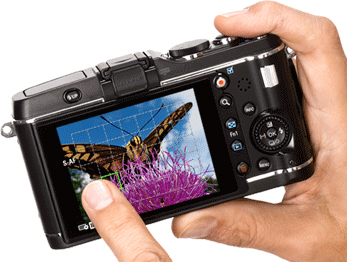
Here's a look at the back of the E-P3. The left finger is pointing at a focal point. In one mode, this finger touch can trigger the shutter.

Features

Camera manufacturers love to market their cameras by emphasizing features. After using an E-P3 for several months, my initial thought has been confirmed time and again. Most of what the camera does, I don’t need. And, as it happens, what a micro four thirds camera does is somewhat less than what a DSLR does. Most of it is clutter, or, at least, image work that would be more effectively done not in the field, but with a portable or desktop computer whose screen allows a far more critical approach to changes in color temperature, or conversion to monochrome.

How I’ve Learned to Shoot

I shoot RAW. That’s important. Shooting RAW images allows me to capture as much picture information as possible, and then, in the quiet of my home office, I edit the images, knowing that the original remains intact. RAW images require more storage space on SD cards than JPEGs require–so buy yourself an additional card (they are becoming inexpensive) or two. I should mention that RAW shooting requires special software, such as Apple’s Aperture or Adobe Bridge (comes with Photoshop).

I use manual and automatic exposure, and I use manual and automatic focus. When I have the time, and the shooting situation allows, I will mess with f/stops and shutter speeds. Not every shooting situation allows, so I rely upon automatic.

On the Olympus E-P3, I leave White Balance in automatic mode, and I do the same with Image Stabilization. Two fewer things to think about.

I keep the Art Filters off (I can apply special effects later), and stick with either Natural or Vivid images.

I shoot in 4:3 format, and may decide to crop later on.

I keep the flash in the off position. I’m glad it’s built into the E-P3 (it’s not always part of micro four thirds cameras), but I don’t use it except in special situations because I use faster (larger aperture) lenses.

The OLED screen on the E-P3 is a touch screen with just a few features that make use of this technology. One that I use often combines the selection of the image’s focal point with a shutter release. I just point at the spot where I want the image to be focused, and the EP-3 takes the picture. Cool!

Buttons, Menu Screens, and Interfaces

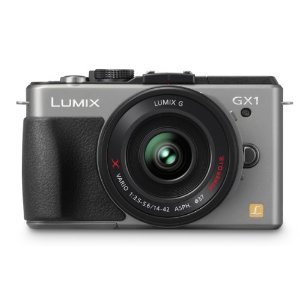
A handsome, modern body for Panasonic's very capable GX1 micro four thirds camera.

At first, every new interface seems confusing. Use the camera every day for a few weeks, and everything becomes easier. I like the way that Panasonic’s GX-1 displays f/stops and shutter speeds. I like the layout of the Olympus E-P3’s physical buttons are laid out (but I wish each one contained a tiny LED so I could find it in the dark). I find the grid guides very useful on the Olympus as well–and I never turn them off.

Every camera includes some outstanding button and menu features, and some that don’t matter a whole lot in the real world. When you’re in the store, you may be much affected by the confusing menu. Get past it. Instead, concentrate on whether the camera feels good in your hands, whether the technology is sufficient for your needs, and on the quality of the lenses that can be used with the body you have in mind.

Advanced Technology

In this era of high-tech everything, it’s easy enough to overlook the obvious. Olympus, Panasonic and the others have packed an enormously sophisticated computer into a box half the size of a roast beef sandwich. The result is a camera system with tremendous flexibility and very impressive image quality.

Although I’ve questioned the accessory viewfinder concept, the implementation is very impressive, moreso on the VF-2 with its 1.4 million dots (very high resolution, very bright screen), less so with the more utilitarian, and less costly, VF-3 (just under a million dots, and you’d be surprised by the difference). The VF-2 costs $249, and the VF-3 costs $179. These fit onto any of the recent Olympus PEN cameras (see below).

Face detection amazes me. Scene Select  makes it easy to, for example, shoot fireworks without messing around with optimum settings. Very convenient.

Small stuff matters, too. An infrared beam allows accurate focusing under dim lighting conditions.

It’s easy to shoot multiple exposures and to remain in focus while doing so.

These cameras shoot movies (not uncommon in 2012, but still amazing to me, and detailed more fully in the next article).

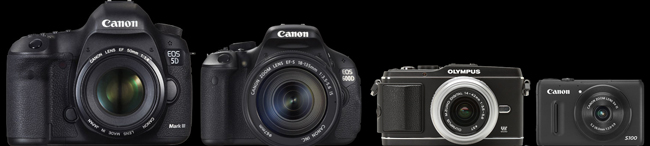
Here's a relative size comparison between a full-sized professional DSLR, a consumer DSLR, a micro four thirds camera with interchangeable lenses (but no mirror, so it's not an SLR, and so, it's a mirror less camera), and one of the best small compact cameras.

Body Styles

In fact, there are about a hundred mirrorless cameras and camera bodies for sale at B&H.

At $7,000 or more, Leica makes four full-frame mirrorless cameras; their lenses are exquisite, and, sadly, so are their prices.

Fuji’s X-Pro 1 is a 16MP APS-C camera, coming in April, that costs $1,699 for the body. It’s a terrific camera, but somewhat heavy (some would say, professional in heft) in this smaller class. Sony’s NEX-7 is a 24 MP champ, but I find the lenses too large for the small body; buy the body with a kit lens for $1,349, or the 16 MP model, with fewer features, for half that price.

The Nikon 1 camera comes in two models: the J1 with a 10-30mm lens (in 35mm lingo, that’s a 27-72mm lens) for $600 or the V1, which adds a built-in viewfinder, for $900. The Nikon 1 comes in colors, including red and pink (two years from now, will anybody be glad they bought a red camera body with a red lens?)

The micro four thirds cameras also come in colors (sigh). The starter model is Olympus’s $499 E-PM1, complete with kit lens, or Panasonic’s $399 GF3, body only. When I compare these two cameras on the very useful Snapsort website, the winner is the Olympus because it includes in-camera image stabilization, and other features associated with costlier models. When hold these two cameras in my hand, I find the controls on the Olympus a bit tiny and the lack of a grip  off-putting, but in truth, the camera is small enough for use without one.

The mid-price models ($699) are Panasonic’s G3 for including the kit lens and thankfully, a built-in viewfinder (though not as good as the better add-on versions), which competes with the Olympus E-PL3. Both offer tilt LED screens so you can use the camera by holding it over your head or at the level of a child or pet’s eyes.

Serious photographers will likely spend a bit more money for either the Panasonic GX-1 ($799 with kit lens) or my current favorite, the Olympus E-P3 ($899 with kit lens). For me, it’s a close call, because both cameras are solidly built (more solidly, it seems, that their lower-priced kin), and because the cameras are intelligently designed, with every feature, and every button, in a reasonable, logical place. The Olympus feels better in my hands, but you may prefer the Panasonic for the same reason. I like the Olympus images a lot–the color is true, the sharpness and depth are present in every shot, and, well, the camera just makes sense to me.

Quick Changes

This market changes every year, and sometimes, more than once a year. A new Panasonic model GF5 is likely by summer. Olympus’s new E-M5, with a 16 MP sensor, image quality that competes successfully with the larger APC-S technology, and a built-in viewfinder is just around the corner. BH Photo is already selling it with delivery likely in late April, for $999 for the body alone, or $1,299 for the body with a new 12-50mm kit lens. And everybody is wondering whether Canon will enter the category with a powerful, small, interchangeable lens kit of its own.

And…

Oh, one more thing. Video. Now standard in many digital cameras, the video capabilities of mirrorless cameras are worth a look. The video article will be final one in this series.

Part 1: Lens

Part 2:  Sensor

Part 4: Video

A Quality Camera You Won’t Leave at Home (2 of 4)

I took this picture with an Olympus PEN camera because it was small enough to tote on a day in NYC. I left my bigger camera at home. Somehow, I always do.

For most photographers trained in the 20th century, the universal standard was 35mm film. The size of the negative: about 35mm wide, and about 24mm high, or, about 1 inch by 1.4 inches. Serious professional photographers preferred larger negatives, and the 120 film format remained (and remains) popular: here, the negative is 2 1/4 inches square, or wider, several times larger than the 35mm film popular with consumers. Larger negatives offer superior image quality, but they also require larger and more costly cameras and lenses.

Digital Image Sensors

So film is old-school, Kodak is gasping for survival, and everyone’s shooting snapshots with their iPhones using a 5 megapixel sensor that’s the size of a your smallest fingernail. And, for most purposes, including posting pictures on Facebook and printing snapshots, the image quality is adequate–as long as you’re shooting in place that has enough light, and not too much contrast.

What’s a sensor? It’s a flat surface filled with a great many small light-sensitive receptors. There are two popular designs: CMOS and CCD. The difference between them is complicated, and explained here. http://en.wikipedia.org/wiki/Image_sensor

ISO and Sensitivity

In the film days, 400 ISO (or, if you’re older, ASA) film was four times as sensitive as 100 ISO film. In other words, using 400 ISO film instead of 100 ISO film offered benefits similar to using a lens with a large maximum aperture, perhaps an f/1.4 lens in place of an f3.6 lens.

The comparison is not a perfect one, though. Increased sensitivity often comes with increased grain, reduced detail, and lesser color quality / color clarity. Cameras that cost more than a few hundred dollars are fine up to about 800 ISO, but then, the image degrades. Newer sensors do a far better job in the 800, 1600 and even 3200 ISO range than older models. This is the push: buy a camera with better “low light sensitivity”–that is, with improved image rendition in the higher ISO ranges–and your 2012-vintage 16 MP camera will produce better images than my 2010-vintage 12 MP camera with its ancient two-year-old sensor design.

Megapixels and Sensor Size

Although camera marketers have latched onto megapixels as a way to justify different camera prices (a 10 MP camera costs more than a 5 MP camera), the number of megapixels on the image sensor should not guide you, at least not from the start.

Instead, focus on the size of the sensor. A “full-frame” sensor is the size of 35mm film–and requires a large, professional-quality body and accompanying lenses. For example the new Canon EOS 5D Mark III is a $3,500 camera that weighs about two pounds and occupies about 90 cubic inches, without a lens.

By comparison, an Olympus E-P3 uses a micro four thirds sensor that’s about 40% of the size, but it costs less than $1,000, weighs 11 ounces, and occupies less than 20 cubic inches, also without a lens.

In the real world of my life, I will not carry five pounds of camera, lenses and accessories with me everywhere, but I will carry a pound. If the image quality is acceptable.

Nikon, Sony, Fuji, and the Rest

In fact, several different sensor designs are becoming popular.

You’ve probably seen commercials and print ads for the Nikon 1 system, for example. It’s based upon a CX sensor format that’s about a quarter of the full 35mm frame. Image quality is good–and with the small sensor, Nikon has been able to manufacture small bodies (as small as reasonable ergonomics allow), and small lenses.

Sony’s small system is called the NEX, and they’ve already been through several generations their APC-S sensor system. The sensor size is somewhat larger than the micro four thirds standard, but somehow, this has resulted in an awkward combination of slightly larger lenses and slightly smaller bodies. The standard zoom, priced at $299, weighs about 7 ounces, but it’s about 2 1/2 inches wide and tall. This is a reasonable size for the lens, but the body is about 25% too small to balance the whole contraption. Fact is, APC-S requires a slightly larger body–16 cubic inches isn’t enough. Samsung, with its NX200, offers a seemingly more bulky body for an APS-C sensor, but, alas, there is no APC-S collective for that format, so Sony lenses are not compatible with Samsung lenses.

Fuji’s upcoming X-Pro 1 also uses a proprietary APS-C sensor for a wonderful new interchangeable lens system, but again, the larger sensor is associated with serious weight – the camera weighs a pound, occupies nearly 30 cubic inches without a lens, and operates (at a very high level) with (for now) just three proprietary lenses.

Panasonic and Olympus

Neither Panasonic nor Olympus are among the very largest camera makers, but they have benefitted from working together. By year end, there will be about 18 lenses in their micro four thirds format, each of them fully operable with significant advances in their micro four thirds sensor technology.

In fact, Olympus got off to a very good start with its earliest PEN cameras. Early on, the company’s engineers and management understood the importance of rendering accurate flesh tones, as well as a neutral, pleasing color palette. (Fujifilm and Nikon have also excelled in this quest.) By combining this special feature with the small size made possible by the micro four thirds format, PEN cameras quickly became a popular choice for serious photographers.

At this moment in 2012, Panasonic offers an extraordinary little micro four thirds camera, the GX1 ($699) that weighs just 11 ounces, occupies less than 20 cubic inches, and offers very impressive image quality with a 16 MB sensor. It’s filled with nifty features that will be addressed in the next article). This camera’s small size and wide array of available lenses and accessories makes it very appealing.

And yet, many photographers seem to prefer the slightly older Olympus E-P3, the current top-of-the-line PEN camera. It costs more ($899), and offers only a 12MB sensor, but the images are consistently excellent. This is not due to the number of megapixels, but instead, it is due to the right combination of engineering, aesthetic decisions during the design process (incorporating both lens and sensor design), and a corporate culture (a culture that has apparently remained intact despite gargantuan financial issues at the Board level).

This moment in 2012 (I am writing on the day after St. Patrick’s Day) is about to change.  Olympus is reading its small 16 MP camera, the E-M5, and a new Panasonic GF-5 is also on its way.

The Whole Package

Of course, it’s not just the sensor and it’s not just the lenses that make a camera or camera system. It’s the overall design philosophy, most often captured in the design of the camera body. That’s what’s coming up next.

Part 1: Lens

Part 3: Body

Part 4: Video

A Quality Camera You Won’t Leave at Home (1 of 4)

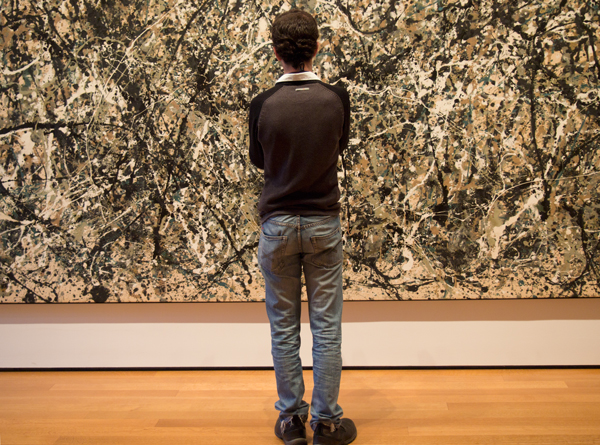
It's not about cameras, it's about making pictures. And you can't make a picture if the camera is too heavy or too cumbersome to bring along with you. On a recent visit to NYC's MOMA, I took pictures of objects and paintings that I wanted to know better. With PEN in shoulder bag, I took pictures in one of the world's great museums--something I would never have done with a heavier camera because that camera would have remained at home.

For most of photography’s history, there have been two types of cameras: snapshot cameras and serious creative tools. The digital revolution has obscured the boundary line with an immense number of features and over 500 different digital camera models, but three fundamentals remain.

First, you need a good lens to take a good picture.

Second, you need a camera whose construction won’t let you down.

Third, you need the best possible surface to record the image.

For me, there’s a fourth. I need a camera that isn’t too large or too heavy for me to carry almost everywhere I go.

And for you, there may be a fifth. How good are the camera’s video capabilities?

In this article, and several to follow, I’ll look at each of the fundamentals and, hopefully, encourage you to buy the best possible camera for your unique personal needs. Much of the information in these articles will focus on a system designed by Olympus cameras, but I will cover other systems, too.

Buying a Lens

Whether a lens is bought as part of the camera (common on point-and-shoot cameras), or removable (as on DSLR cameras), your first decision is whether that lens ought to be a zoom lens.

Certainly, a zoom lens is convenient and versatile. Often, a zoom lens is inexpensive. And, more often, you simply have no choice because the camera and the lens are permanently attached to one another.

Let’s use the Olympus PEN system as our example. Each of the PEN bodies is offered with an inexpensive “kit” lens as part of a discounted package: in this case, a 14-42mm 1:3.5-5.6 lens. The PEN system is based upon small cameras and small lenses–an advantage we’ll discuss later on–in the land of 35mm cameras, this lens would be a 28-84mm lens, covering wide angle, normal and telephoto focal lengths. That’s useful, and typical of kit lenses. So, too, is the aperture: a lens with a 3.5-5.6 maximum aperture is not designed to shoot in dim or low light situations. This is a typical disadvantage for kit zoom lenses–and it’s a show-stopper for me. Here’s why:

Given the choice of a lens with a wide opening–designed to shoot in low light–or an accessory flash that adds bulk, requires batteries, and smoothly illuminates only a limited area–I’ll choose the lens every time.

And, I’ll make it a prime lens, not a zoom. Why?

Three reasons. First, I must think about the image, my position, the framing, the composition, and the appropriate tool to create the image. Second, the maximum aperture is likely to be larger. Third, the image quality is likely to be better: sharper, clearer, with better color rendition and far less distortion.

So let’s have a look at some Olympus PEN lenses. There are eleven in the current product line, with several more coming this spring, and there is full compatibility with a dozen more in the Panasonic catalog, all related to a new-ish photographic standard called Micro Four Thirds that will be explained later in these posts.

Remember: the kit lens is 14-42mm 1:3.5-5.6 lens, and if you bought it outside of the kit, it would cost $299. Instead, I would buy one wide angle and one telephoto lens.

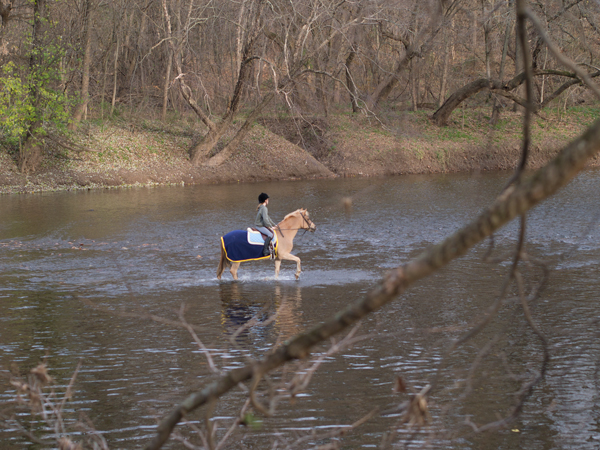
The subject was 164 meters away from me. The image was shot with a short telephoto lens (see below), the Olympus 45mm (a 90mm equivalent).

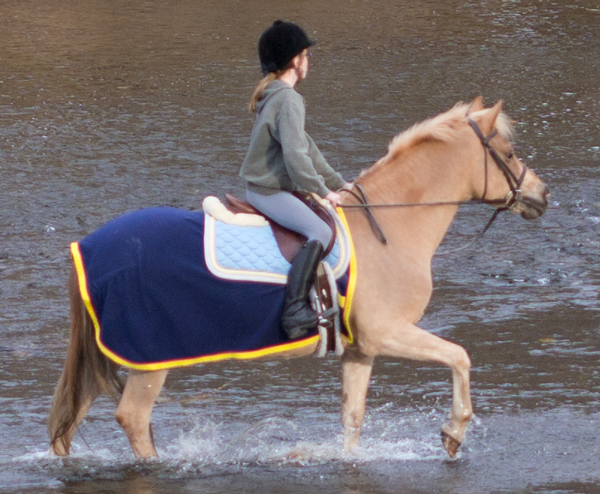
Although the image is not absolutely perfect, I was impressed by the detail on the horse blanket, the horse's muscles, the water falling off the hoof, and the overall clarity of the color. Remember: this was shot from quite a distance. This is a crop from the above photo. Yes, there's a bit of fringe distortion around the yellow, but remember you're looking at an enlargement of over 500%--the equivalent of a 4x6 inch print blown up to 20x 30 inches. Not perfect, but impressive.

Short Telephoto

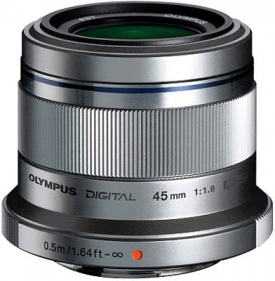
The Olympus 45mm lens for micro four thirds is only about 2 inches wide and high.

Instead, I would spend a little more for OIympus’s 45mm 1.8 lens, a 90mm equivalent designed for portraits (a shorter lens distorts facial features), and to pull in landscapes that are a bit far off. It costs $399.

I’ve read a lot of test reports about this lens (you should, too, before you buy any lens). This one is typical.

 The Olympus M.ZUIKO DIGITAL 45mm f/1.8 is a lens that makes sense because it’s small, useful, and excellent. The important center resolution is already on a very good level straight from wide open aperture and only the corners are somewhat softer here. The quality is very high across the image field when stopping down to f/4. Vignetting, lateral chromatic aberrations as well as distortions are all well controlled and not relevant in field conditions.

Short Wide Angle

I’ve been using OIympus 17mm f/2.8 wide angle lens quite successfully, and, generally, I find it to be excellent. In doing my research, I’ve found web reviews with grades in the B or B- range. Panasonic’s 20mm f/1.7 may be a better choice but it costs a bit more and it’s closer to a normal lens (50mm lens in 35mm camera lingo) than a wide angle. The Olympus 17mm lens costs $299, and the Panasonic 20mm lens costs $399. Both are “pancake” lenses–less than an inch thick. In fact, the Olympus 45mm lens is less than 2 inches thick.

Shorter, and Longer

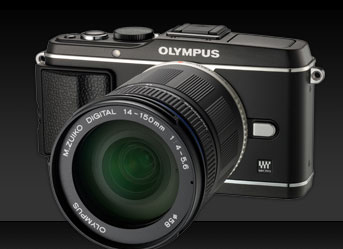
Here's an E-P3 with a longer zoom lens--it maxes out at 150mm, or, in 35mm lingo, 300mm (long enough for wildlife, not long enough for baseball).

For most people–that is, most people who are serious about photography–these two lenses will serve just about any purpose. You can go wider with Olympus’s 12mm 2.0 lens, but it costs $799. You cannot go deeper with a prime lens; instead, you’ll need either Olympus’s remarkable 75-300 f/4.8-6.7 for $899, and if you do, you’ll be thankful for the PEN system’s built-in image stabilization feature, again discussed later on. Take a moment here: that’s a lens that, in 35mm terms, gets up to 600mm, remarkable reach for a lens that weighs less than a pound and is less than 5 inches long. Here are some sample images.

Speed and Weight

At the risk of repeating myself, I consider speed and weight to be critical factors for my lenses.

Speed matters–that is, the largest available aperture matters–because I can shoot in a wider range of lighting situations with a faster lens. I much prefer a 1.8 lens to a 3.5 lens because a 1.8 lens allows me to shoot with HALF as much available light (3.5 divided by 1.8 is, roughly, 2).

Weight matters, and so does size. I’m not a professional photographer, but I do like to carry a camera with me. Olympus’s 45mm lens weighs 116 grams, or about 4 ounces, and their 17mm weighs 71 grams, or about 2.5 ounces. For less than 7 ounces, I’m carrying a relatively complete photographic kit, one that offers high quality images, solid and reliable design, and almost no strain on my shoulder or neck. In theory and in practice, this turns out to be a very good idea.

Other Options

As we’ll explore in the next post, the Olympus-Panasonic effort in micro four thirds technology is paralleled in a Sony system called NEX, a Nikon system called Nikon 1, Fuji with its X system, and several others. Each is based upon a particular image sensor design, and that begins our next chapter, which covers not body design (as you might expect) but instead, the 21st century equivalent of photographic film. Stay tuned.


Part 2:  Sensor

Part 3: Body

Part 4: Video