Did you hear what I said?

Here’s what I want from a Bluetooth headset: (a) you can hear me, (b) I can hear you, and (c) hassle-free phone pairing. For those of us who rely upon these devices, it’s tough to find happiness. And, it’s difficult to comprehend the experience of the other person on the line, the one who is supposedly listening to the conversation. It’s on item (a) that many headsets fall below expectations, but unless you ask, you have no way of knowing what the other person is (not) hearing.

I decided to experiment with two of the most highly-rated  Bluetooth devices.

Blue Ant's Q2 looks great in any color. It's small, well-designed, and sounded good to me.

Sure enough, I fell in love with its small size and wonderful incoming sound quality of the nifty Blue Ant Q2. Pairing with my iPhone: easy. Noise cancellation: in theory, great, in practice, not so great (even a gentle breeze was a problem). Fit and style: terrific; the device just hooks over the ear and looks sleek. Little button to press when making or receiving a call: sometimes, a bit hard to find, but okay with practice. Several voice control features added to a positive experience: terrific! I can ask the phone, “am I connected?” or to “redial” or to repeat all available menu commands. Finally, here’s a smart device that sounds good, looks good, and works properly. Or so  my great expectations imagined.

When I started asking people how I sounded, the comments were, at best, noncommittal and often, negative. Most often, I was told that the sound was “a little weak” and that they were hearing “some but not all of the words” and that they heard “a lot of background noise.” The more negative comments I heard, the more I experimented–trying different locations, different phones, interior, exterior, quiet, slightly breezy, in cars and trains, out walking the dog, etc. No change in the comments I received.

Since I could hear the other person so clearly, at first, I questioned the other person’s phone system, ears, sanity, whether they were using an inadequate phone or earpiece on their end, and so on. More than a month’s calls led me to the sad conclusion: although I could hear the other person, they could not hear me, not clearly, and, often, not completely.

So, I continued my Goldilocks routine by returning to an headset I had used before with some complaints. I liked the clunky big-battery-behind-the-ear, big-boom-microphone Plantronics PRO when I owned a previous model, but the incoming volume was unacceptably low. For most of February, I’ve been using the newer PRO HD, and found two improvements much to my liking. The first improvement is a better incoming sound system: every call is loud enough, and every call is clear. The second: I like the sensor that tells the headset when it is actually on my ear (if it’s not on my ear, it won’t take the call; if it is on my ear, it will answer calls automatically without requiring me to press a button).
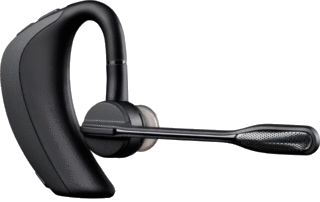
Of course, the big test is not what I can hear, but what you can hear when you call me. I was really hoping for good results on that score–and sure enough, the PRO HD came through. Several people asked me whether I was actually on a headset because the sound was so clear. So far, not one person has complained about sound quality. For me, that’s extraordinary; I’ve been hearing complaints about my Bluetooth headsets for years.

Wind noise? Yeah, that’s still there. Better than the Blue Ant Q2, but a breezy day is a problem for an exposed microphone. On the Pro HD, the boom microphone is long and large enough to accept the equivalent of the wind muffle that location video shooters use–a soft furry condom to catch the wind–maybe that teeny accessory is on its way? And while we’re on the topic of accessories, even the PRO HD is really small, and really easy to lose. I sure wish Plantronics would develop some sort of carry-everywhere accessory to minimize the loss of its $100 device (so far, I’ve lost two of them).

This blog post is already on the long side. I’ll review Blue Ant’s Q4 speakerphone in a separate article.

Links:
Blue Ant Q2

Plantronics PRO HD

(Almost) Paperless Office

I’m not 100%, but I’m close. My working life is now mostly on-screen. And, as of yesterday, there’s no longer a five-inch stack of business cards on my desk.

Truly, I don’t use my full-sized color laser printer more than once a month. I carry around very few file folders, often, none at all. Just about everything is digital, easy to find, easy to search, Dropbox-able and email-able.

The biz cards presented a conundrum. This stack from a trade show, that one from four years of office meetings. My old systems–looseleaf notebooks with plastic insert pages, and a desktop filebox–were overwhelmed.

So I took the ultimate step: scanning business cards into some sort of database (in my case, Bento).

It worked. Not perfectly, but well enough to rate a good solid B-plus.

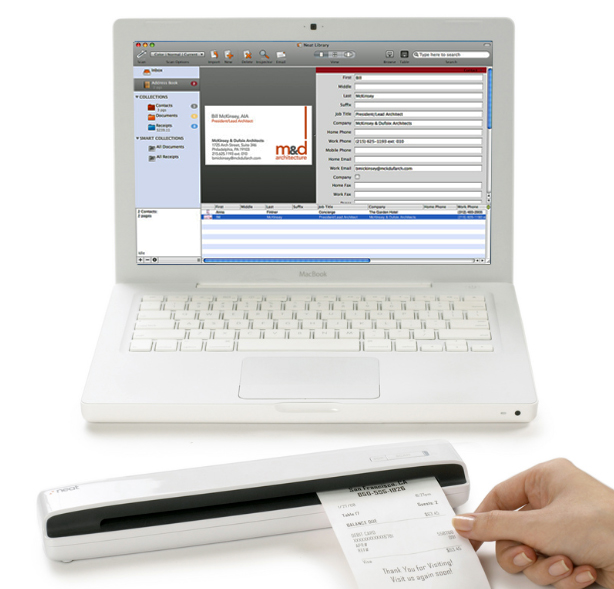
There are several available systems. I used the Neat Receipts Mobile Scanner for Mac. The scanner is about nine inches wide, maybe an inch high and two inches wide. There’s a large open slot that can be used to scan 8.5 x 11 pages (a nice convenience), receipts (hence the product name), and, for me, business cards. Each card is individually placed into the slot, and there’s a button marked “scan”–easy enough. I had some trouble because I connected the mini-USB cable to my Mac keyboard; the scanner requires more power than the keyboard can provide, so it must be plugged directly into the computer (an inconvenience).

The software grabs the image, quickly implements an OCR run (Optical Character Recognition), and places each bit of information in an appropriate field in its database. For some cards, the OCR does a perfect job. Usually, there are a few missteps, easily corrected because (a) the card is displayed alongside the database record, and (b) just about any item on the card can be manually dragged (and re-recognized) into your choice of database fields.

My several work sessions were amazingly productive–for three reasons. First, I was able to scan several inches of cards into the database in just a few hours (including my output from the Neat database to my Bento database). Second, the process itself required me to edit the batch of cards, to throw some of them away. Third, as soon as some cards were scanned, I copied the information and wrote a re-introduction email (“Hi, we met in 2008, thought I’d get back in touch…”)

And, perhaps best of all, I’m no longer accumulating random business cards in rubber-banded piles. Now, as soon as I collect a few cards, I scan them into the database.

Oh–one more note–if a business card presents a hyperactive multi-color design, don’t bother scanning because Neat will become completely flustered. Just type the information into the database.

Again, I’m not 100%, but the combination of hardware, software, and a new compulsion keep everything in order gets me closer to a 21st century workflow.

A Go-Everywhere iPad/Android Keyboard

Competing against nothing is not easy. Every iPad and every Android tablet comes with an on-screen keyboard that costs nothing and weighs nothing. In fact, I am using one right now. It’s fine for short documents with no formatting, but I prefer a proper keyboard for longer writing sessions.

I use the Apple wireless keyboard that came with my iMac (I use a wired keyboard on my desk, so this one was a spare. I invested in a durable slipcase from www.sfbags.comfor $29. and I carry an extra pair of AA batteries, just in case the Bluetooth eats too much power. Mostly, it works as well as any Bluetooth device. It’s a bit taller than the iPad, but then, it is a full-sized computer keyboard. Weight of keyboard, case and two sets of batteries: one pound. I do not carry it everywhere.

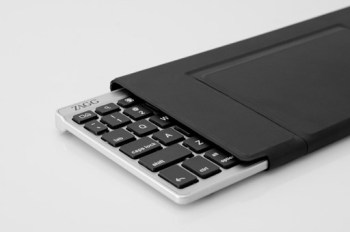
The new ZAGGKeys FLEX is about 3/4 as long as the Apple keyboard, so the keys are closer together. It weighs about 3/4 of a pound, but it is much more compact. Power is provided via USB, not AA cells. Special buttons on the keyboard are used for undo, cut, paste, and search. The keyboard easily switches from Apple to Android mode. One button pairs the keyboard to either device.

The niftiest part is the stand that doubles as the case. It’s lightweight and very stable–more firm that Apple’s magnetic iPad cover.

The keyboard is a little clunky and a little noisy–convenient but Apple’s keyboard is both elegant and silent.

Cost: Apple wireless keyboard ($69) + SF bags slipcase ($29) + a year’s batteries = $100.

Cost: ZAGGKeys FLEX: about $80.

At the recent Consumer Electronics Show, there were dozens of iPad accessory-makers on the show floor. I like ZAGG–they seem to come up with clever solutions. Here, they’ve got a good idea, but $20 and a quarter pound are not enough to overcome the significant quality advantage of the Apple / SF Bags solution.

Tools: Publish your own eBook (or, iBook)

Within the next 30 days, I am going to publish my first eBook. How I wish Mashable had published this chart of eBook publishing software applications before I got started. I struggled through Adobe InDesign and gave up. I would have used Apple iBook Author but it was not available. For me, Scrivener was the best available solution–and it seems to be working, but Apple has upped the game with its (and free) software.

Have a look, and be sure to pass this post on to anyone who might be considering their first eBook.

A chart comparing all the ePub tools available to users.

How iBooks Author Stacks Up to the Competition [CHART]

Apple TV in 2012?

Here's one of several pictures of the current Apple TV interface. For more, visit http://www.apple.com/appletv/

Apple has been experimenting with home television since 2006, when the company introduced Apple TV. Released last year, second generation Apple TV has sold over 2 million units. Apple TV is an accessory. The new product will be a complete solution: a TV set with an Apple logo, Apple software, and Apple’s reinvention of yet another product category.

For those unfamiliar with Apple TV, here’s the Apple blurb:

“With Apple TV, everything you want to watch — movies, TV shows, photo slideshows, and more — plays wirelessly on your widescreen TV. No managing storage. No syncing to your iTunes library. HD movies and TV shows from iTunes and Netflix play over the Internet on your HDTV, and music and photos stream from your computer. All you have to do is click and watch.”

According to Smarthouse, there will be three Apple models: 32″, a mid-size, and 55″. It will include “A totally new software interface has been written that allows users to call up programs using voice commands via the new Siri personal assistant app…” It may be operated by your existing iPad or iPhone (provided it’s Siri-ous).

Add Apple’s FaceTime and the TV becomes a big-screen video conferencing center, fully compatible with millions of iPhones and iPads.

How might the new TV look? The first place that answers come together tends to be MacRumors, my favorite Mac site for its up-to-the-minute coverage, its willingness to republish rumors from reliable sources (often with smart commentary), and the site’s Buyer’s Guide, which tells consumers when to buy each Mac and Apple portable device.

How much will it cost? I’m guessing $1,199 for the low-priced model, and $1,99 for the high, with a $1,499 price point for the in-between model. Just a guess based upon Apple’s past practices. If I was in charge of television at Sony, or any other high-priced television manufacturer, I would be very, very concerned. And I would not bother to convince myself that, somehow, DroidTV (or whatever) is likely to win the race.

Why?

1. With the iPad turning three years old, Apple’s huge base of early adopters will be ready for a new, high-priced toy.

2. For a decade, Apple has been studying this market, figuring out the best integrated hardware, network, usability, operating system and app plays.

3. Apple already sells an accessory product with the base functionality already in place and operating in two million homes (three or four million by launch time).

4. Apple has a well-developed retail network–people like to see a TV before buying. Best Buy, Radio Shack, and Target sell Apple products.

No competitor enjoys these advantages.

Why Buy a Camcorder?

On my iPhone, I can shoot video. I can edit, too. I can shoot video on my camcorder, but I can’t edit (not easily, anyway). And that got me to thinking about just what I might want or need in a standalone video recording device.

Although you can find camcorders that record onto videotape or DVD, the standard recording format is now the SD card–the same type of card used in most digital cameras, but with far more available storage capacity.

Less than $200 buys a pocketable video camera and recorder, similar in design to the Flip camera that was popular a few years ago. JVC sells about eight different models, all quite similar to the Flip cameras and to one another. All shoot HD-quality movies, 5MP still images, and easily transfer creative work to a nearby computer via USB connection. The GC-WP10A is especially appealing because it’s waterproof, records time lapse, includes face detection, a 3-inch touch screen, and an image stabilizer to reduce shaky videography (which is a common problem with small hand-held cameras). Compare it with JVC’s GC-FM1BUS, which shoots 8MP still images and offers an HDMI output to digital TV screens, but lacks face detection. Spend fifty dollars less, and you’ll save money but sacrifice some features. If not JVC, you will find similar products from Kodak, Samsung, and lots of other companies. In this price range, there will not a tremendous difference in features or reliability.

If you’re heading in this direction, be sure to check out the Zoom Q3--made by a company now well-known for high-quality portable audio recorders (which I will write about in a future blog post). I really like the design of the Q3–and its emphasis on audio recording.

Beginning around $250, you can buy a digital camcorder with a long zoom len

s, image stabilization, and adequate low-light shooting capability in a package that easily fits into your jacket pocket. Try, for example, Panasonic’s HDC-SD80R, which sells for less than $300, with a 32x zoom lens (that is, if you are 32 feet away, you will appear to be just 1 foot away from the camera). If you visit Panasonic’s camcorder website, you w

ill find 23 similar Panasonic models with prices as low as about $200 and as high as $1,000+. What’s the difference? The HDC-TM900K sells for about $900, and includes three image sensors, which means superior image quality, manual control over exposure and focus (with manual control, more professional results are possible, but these require skill, practice and patience). The lens is better, too. Is one camera worth $600 more than another? If you’re shooting video for YouTube, the answer is probably “no” (though the manual controls would be useful). If you’re shooting video to be seen on a 50-inch HD monitor, the answer is “yes.”

For a few hundred dollars more, you can buy similar camcorders with interchangeable lenses.

But wait! That’s just the beginning!!

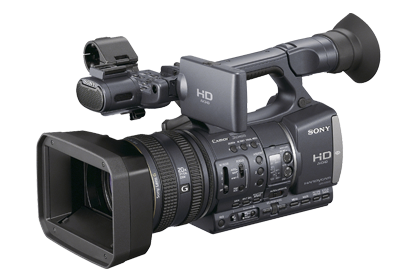
For professional quality results, plan to spend about $2,000 for a model similar to Sony’s HDR-FX7. The big difference between these lower-priced pro models and lesser lights is three-fold: image quality, technical capabilities, and creative control.

Image quality is easy to understand, and easy to see. The sensor and the associated image processing technology is superior to lower-priced models, and so is the lens. The viewfinder offers more detail, better contrast, more accurate color, and more detailed information about camera settings. The lens is, roughly, a 20x optical zoom. The zoom controls are smooth, and can be handled with nuance.

Jump to the $3,500 model HDR-AX2000 for professional XLR microphone connectors, even better image sensing and processing, and vastly improved low-light shooting. You could shoot a television series for a cable network with this camera. In fact, many professional production companies now use these cameras–and others like it–for just that purpose.

Look for a post about dual system audio recording in the near future.

So: which camcorder is right for you?

If you shoot a few minutes of video from time to time, and post your output on the web, then you may be able to use your smartphone.

If you shoot some videos, and some still pictures, and you really don’t need high quality audio, or even a microphone for the occasional interview, then you can use a recent vintage digital still camera. If yours is more than 2-3 years old, it may be time for an update if you want to shoot video.

If you are serious about still photography and videography, then you should consider a digital SLR, with its long zoom lens and substantial body size. Although most digital SLR bodies include a built-in stereo microphone, your work will be better if you attach a stereo microphone, or shoot “double system” with an entirely separate audio recorder (the topic of a future blog post).

In fact, it makes more sense to invest in a digital SLR than a standalone camcorder in the $300-$1,000 range. These are useful if you shoot a lot of video–but you can do the same, with greater flexibility–with a digital SLR.

If you serious about videography, then a serious prosumer or low-range professional camcorder is the appropriate choice. Most people who use these cameras devote considerable time to video editing–the camera alone isn’t going to make anyone a star. Fortunately, video editing software is now widely available at reasonable prices. Unfortunately, professional quality video editing requires a lot of time and careful work.

With any of these HD camcorders, the work can be stunning. For the best results, professionals rely on quality lenses, sensors, image processing and microphones.

Bagging It

This was the year I bought an iPad and my wife bought a Kindle. Then, we went shopping, each of us in search of a slim, durable, protective case. Function matters more than fashion. Each device would require a snug fit. I needed something weather-resistant because I planned to carry the iPad to meetings, with or without an outer bag or case. To save on shipping, we tried to find one company to serve our needs.

After visiting a handful of retail stores, we visited a dozen websites. We found a great little company called SF Bags. We were impressed by Gary, the owner, who appeared in videos to explain each of his products. There were eight entirely unique iPad solutions, and the same number of Kindle solutions. Mostly, they were the same designs, each customized for the iPad, Kindle, the 11-inch Mac Air, the 13-inch Mac Air, and a lot of other portable devices, including videogames and digital cameras.

For her Kindle, my wife decided upon the red Slip Case for Kindle; there were five other color options. It cost $27.

I chose the Ultimate Sleeve Case for iPad2 in the vertical format (horizontal is pictured) with checkered “lead iridium” ($55) instead of brown leather trim ($60). I was smart enough to order it with small d-rungs, but not smart enough to order the Suspension Strap Mini ($22) or the Vertical Mini-Pouch ($25) first time around. now, use the three items together, in place of a backpack or shoulder bag, as a slim kit for iPad2, wallet, iPhone, earpiece, keys and a small pad and pen.

I also picked up a protective case for my wireless Bluetooth keyboard.

SF Bags offers a remarkable selection of well-designed, well-made solutions for lots of portable products. Their designs include well-thought-out features like slash pockets in just the right places, small inside pockets that snuggly protect iPhones and other devices, and other features that speak to the intelligence of their planning and product development. SF Bags seems to be meticulous In its manufacturing and quality control. (Isn’t it great when a small company exceeds expectations?)

My wife is happy with her Kindle slip case. I bought my iPad kit for function, but often find myself answering questions about where I found my bag. Now, you know.

Here's the horizontal bag with the mini-pouch attached. The inside of the pouch is lined with soft neoprene.

Extremely Long Player

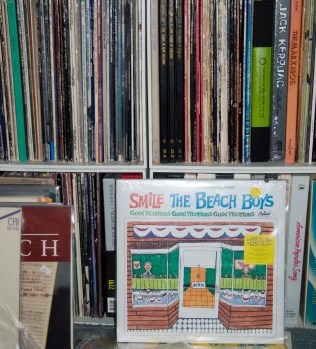
1980s: I’m buying lots of LPs.

1990s: I’m buying lots of CDs.

2000s: I’m downloading lots of music files.

2010s: I’m buying lots of LPs.

What’s going on? As record companies contemplate the end of CD production, LPs are gaining popularity. TIME magazine caught the trend early, but failed to mention activity in vast used LP stores (separate blog post, in the works).

For newcomers, or those whose memory was fogged by digital d-rays, here’s what you need to know…

You need a turntable, a tone arm, a cartridge, a stylus, some cables, a phono per-amp, an amplifier, more cables, and loudspeakers. Back in the day, all of this stuff was combined in a “record player.”

Here in 2011-12, it’s more complicated–and that’s without the USB connection to your computer.

One popular, convenient choice is Audio-Technica’s PL-120, available for about $300. It includes everything you need except the amp and speakers. And, you can connect it to your computer to create digital versions of your LPs.

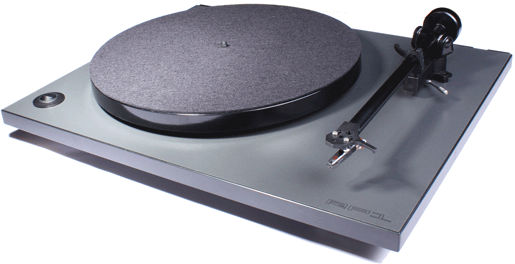
Rega's RP1 Turntable, an audiophile choice.

If you’re willing to invest more money for better sound, the audiophile choice is Rega’s RP-1, which includes a superior tone arm, a better drive system (to spin the platter) and other features that contribute to a cleaner, more focused presentation. The cartridge (which typically includes the stylus) is an accessory–each cartridge design possesses unique sonic characteristics–is a separate purchase. Rega’s RP1 accessory kit costs an additional $200, and includes Rega’s Bias 2 cartridge and several useful accessories.

Audio-Technica's all-in-one, lower-priced USB turntable.

Better would be another favorite cartridge, Audio-Technica’s ML-440. With turntable, tone arm and cartridge in place, you need a phono preamp. At about $150, one good choice is Music Hall’s PA 1.2. I leave the choice of amplifier and loudspeakers to you–the old system stored in your basement or found in a good used stereo shop will be just fine. Audiogon.com is an online store specializing in audiophile equipment, but a local dealer may provide both friendly advice and a place to listen before you buy.

How about a used turntable? Maybe from a reliable high-end dealer, but not from some random eBay source. Used cartridge? I wouldn’t do that. Instead, I would opt for the all-in-one Audio-Technica PL-120. But first, learn from:

Jerry Raskin’s Needle Doctor, which sells all sorts of cool stuff, not just needles!

Audio Advisor

Music Direct

“Absolutely, extraordinarily bad”

That’s how innerfidelity.com editor-in-chief Tyll Hertsens described the sound quality of  Beats by Dr. Dre headphones on the front page of this morning’s NY Times Business section (link below).

Yeah, they’re very heavy on the bass. And they’re best for music where bass drives the musical experience. And sometimes, if you listen loud, there’s distortion. On the other hand, Beats are fashion statement, and people wear them not only to listen, but to be seen listening.

Headphones as pictured (from the company website): $349. That’s a lot of money for a pair of headphones. Industry observers are impressed by the team of Dr. Dre and Monster Cable because they’ve opened a new market where price sensitivity matters less than lifestyle choices.

By comparison, a pair of AKG K240 Professional Studio Headphones cost $199.

If you have a pair of Beats, or manage to try a pair in a store, share your impressions.

http://beatsbydre.com/Default.aspx

http://www.nytimes.com/2011/11/20/business/beats-headphones-expand-dr-dres-business-world.html?partner=yahoofinance

http://www.innerfidelity.com/

Fellini on the bed

The room is almost completely dark. There is a single light source on this night of the October power outtage. It is Fellini’s 8 1/2 on an iPad screen. The images are sharp, contrasty, perfectly photographed in wonderful black-and-white. And, it sounds pretty good, too.

I love my iPad, but the sound is just awful. A dozen manufacturers now sell portable Bluetooth speakers. Some of these speakers are reasonably priced and sound good, too–but most are either over $100 or not worth the cost because they lack clarity, bass, punch, whatever. Forget about the Bluetooth part–it doesn’t work properly, it’s a technology that is far inferior to something much simpler: a $10 cable with one end that plugs into the speakers and the other end into the iPad. That combination is reliable enough to watch Fellini’s 8 1/2 with no interruption, and no Rice Krispies crinkling that is common among Bluetooth devices of all sorts, my little phone earpiece among them.

I’d love to tell you that I have secret source for the best sound at the best price. In fact, I found my speaker by making a friend of a salesperson at a local Best Buy store. As some of the salespeople are wont to do–provided there is no manager nearby–my guy opened several packages and allowed me to listen to several devices.

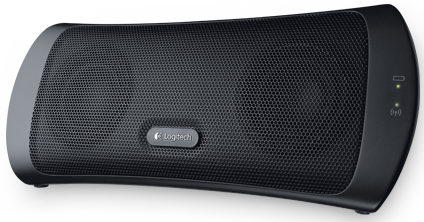
My favorite–still a favorite several months later, in fact–was the Logitech Wireless USB Speaker, which I use as neither a wireless device nor a USB device.  It costs about $70, and comes with a carrying case. I leave it in my car’s trunk so that anywhere I go, it’s available. I’ve used it to entertain a group of people watching video from a computer screen (the computer’s speakers were crappy), and another group of people attempting to watch a projected image during an office presentation (the projector’s speakers were inadequate). During the summer, when I write on my porch on warm days, the speaker provides the background music. And on a dark and stormy night, it provides a clear, crisp, well-articulated soundtrack with a reasonable amount of bass.

I was less enthusiastic about the more expensive Jawbone Jambox, which costs twice as much and tends toward the boomy approach to bass. When I was shopping earlier this summer, there were few choices. Now, there are more. But I think I’ve found a good one, and I recommend it wholeheartedly.