Useful iPad Stuff

(This turned out to be a popular blog post, but I neglected to mention a favorite product, so I’ve revised the article. See below.)

A collection of products that I’ve been meaning to write about…

First–and this one is free–is the 150-plus page iPad Buyer’s Guide from iLounge. If any one publication is the definitive iPad guide, this must be it. It begins with a very complete guide to every iPad model on the planet–very useful for those who are considering a purchase, a skip-over for those who already own one–then digs into articles about iPad innovators, including Inkling (which makes the interactive travel guides I wrote about last week). Just about every aspect of the iPad culture is explored, including some decidedly weird comments from the doubters (I thought we were past this negative stuff, but obviously, they do not). There are pages and pages about useful accessories, top apps, lots more. What’s more, everything is presented in a punchy, fun-to-browse way. It’s available for your computer screen in one-page or two-page-spread format, or in one-page specifically for the iPad. Nice work!
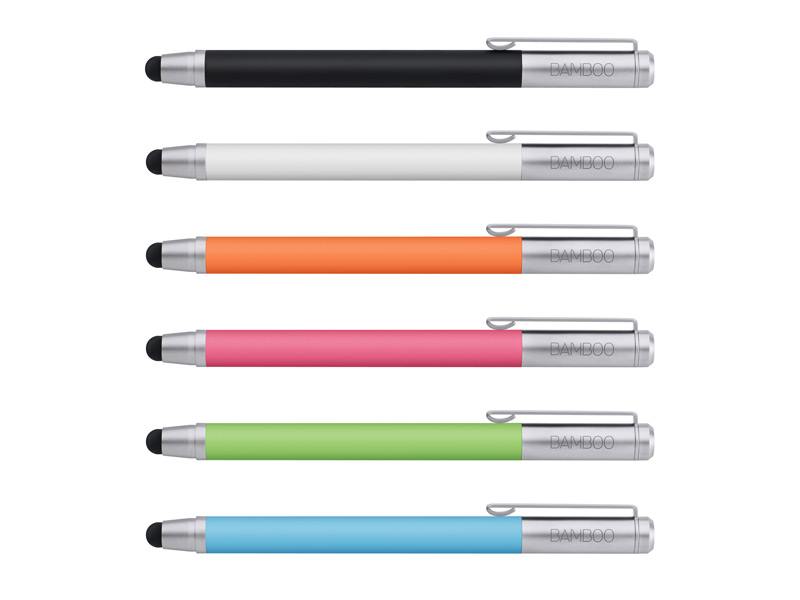
Second, a surprise, at least to me. I’ve used an iPhone for years, and an iPad for a year or so. The input device is my finger, and until yesterday, that worked just fine. Just for fun, I tried an iPad stylus. I liked it. A lot. There are lots of iPad styli available–including the colorful series of Bamboo stylus products from Wacom, and the one I used, the AluPen from Just|Mobile. The AluPen is about four inches long, and feels like a fat crayon. The rubber tip makes contact with the screen’s surface with surprising accuracy. I was able to execute every iPad function more smoothly (and with no fingertip oil or friction), so the experience seemed smoother, quicker, and more precise. Consistent with current trends, stylus makers now offer two models, one with a built-in pen (the kind you use to write on paper, the kind with ink). The AluPen Pro uses Pelikan ink, which seems consistent with Just|Mobile’s higher-quality approach to their whole product line. Before you buy, be sure to explore the extensive text, pictures and video on The Verge.

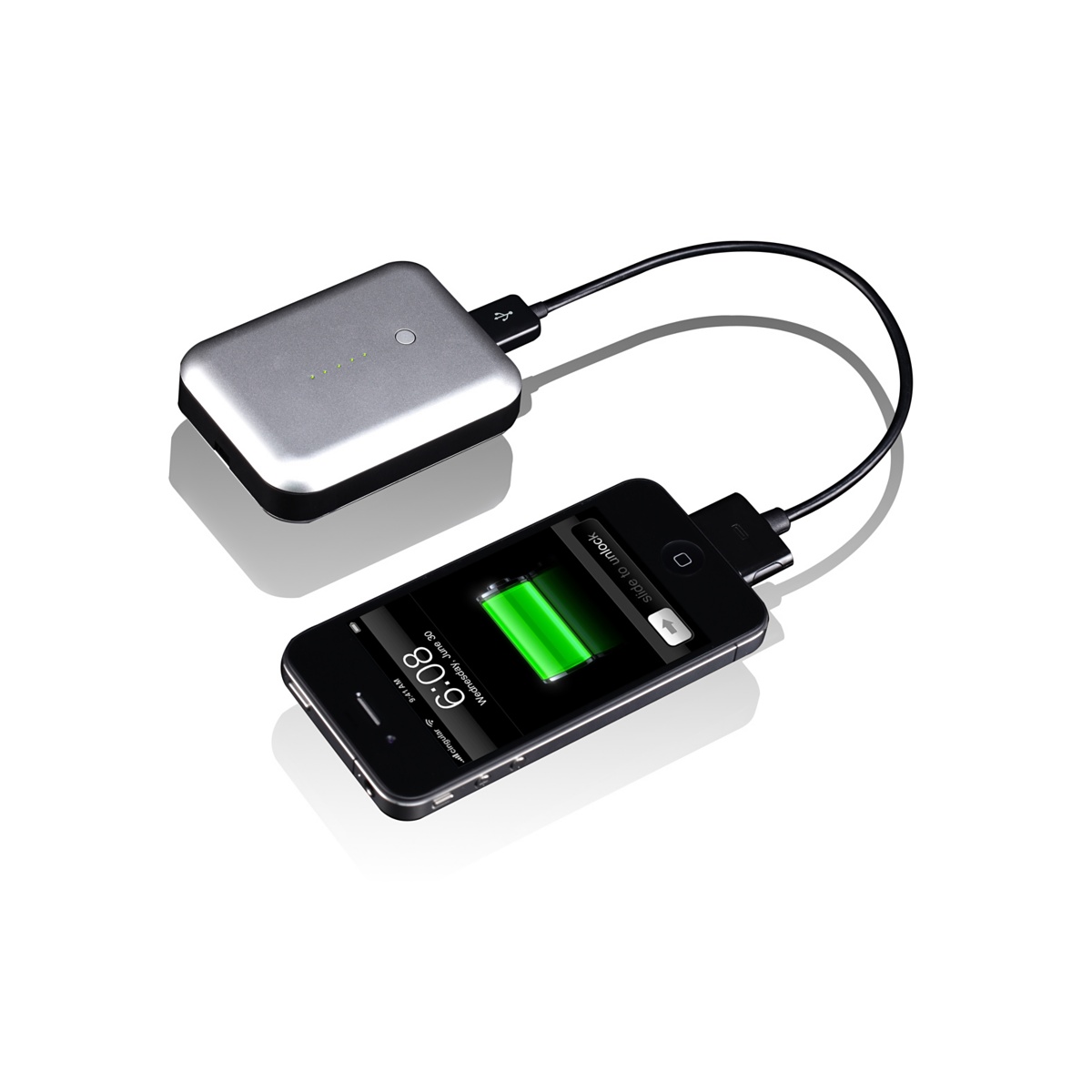
Third, remote power. At January’s Consumer Electronics Show, lots of companies were showing remote power accessories for both iPhone and iPad. Once again, I was impressed by the Just|Mobile products, despite their odd name: Gum. The Gum Plus is the smaller unit, designed mostly for the iPhone (which it can charge several times without being refreshed), and, in a pinch, you can use it to charge the iPad, if not fully, then enough to keep working for a while. For the iPad, you’ll want the larger, and somewhat heavier, Gum Max, which carries enough portable power to completely recharge an iPad, and then, an iPhone. The way this works: you plug the GUM into your AC outlet, fill it with power, and then, carry it with you. When you need the power, you plug your iPhone or iPad into the portable GUM unit. Then, when time and access permit, you recharge the GUM, and, presumably, your iPhone and iPad, too. Some people will use these devices regularly. If you plan to use the Gum only sometimes, you must remember to discharge and recharge the unit for best results.
Fourth, remote storage. Apple designed the iPad so that its local storage would be limited… and the cloud would provide the rest. Unfortunately, even 64GB is not enough local storage for those who rely upon the iPad as their primary portable device, and there is no such thing as a USB Flash Drive or SD Card to augment storage. I am very impressed with the idea of the Seagate’s GoFlex Satellite Drive, and as soon as it’s up and running, I will report back to you.

I reposted because I forgot my favorite new iPad accessory. It’s an eraser. But it doesn’t erase ink or pencil. It erases the ridiculous smudges that magically appear on every iPad screen. I use it often, especially on sunny days when the reflected finger grease (sorry) makes it difficult to see the screen properly. So, here’s the solid plastic 3-inch by 4-inch white plastic eraser with a specially-made black bottom…my best friend when the smudges become annoying on an otherwise beautiful day. The company is Best iProducts. The iEraser costs $14.95, and it’s proudly made in America. They can imprint company logos. It works on a bare screen, but not with a screen protector. All of which is nice to know, but what I really like is that this little eraser really works. First time, every time. Smudges gone! And it couldn’t be simpler. Small company, good product, who could ask for anything more?

 

Gestures in a Virtual World

This slideshow requires JavaScript.

Two interesting articles, each overlapping the other, both worth reading because they may change your thinking about the ways we interact with computers and the virtual world.

The first article, from the BBC, is about surgeons in a London hospital who are learning to use voice commands and hand gestures to control medical instruments. The process, based upon Microsoft’s Kinect technology (more on this in the second article), allows greater precision and higher efficiency while eliminating some sterilization issues. For certain procedures, this “touch-less” approach to medicine is likely to become the norm within the next 10 years or so.

The second article, from the NY Times, is about Microsoft’s shift from “does not condone the modification of its products” and would “work closely with law enforcement . . . to keep Kinect tamper-resistant…” to an understanding that Kinect was going to become something greater than a videogame input device, and that Microsoft might not control the ways in which Kinect would be used in the marketplace. Eventually, Microsoft decided to release a non-game version of Kinect, still bound by a range of rules that are hopelessly out of step with today’s open-everything tech development world. The story is longish, and worth reading because, well, the article’s author said it so well:

The idea of a loosely knit band of outsider creative coders forcing a massive company to rethink a crucial new product is appealing.

I suspect both articles are the result of Microsoft’s publicity machine, both supporting an expanded view of Kinect specifically and Microsoft generally. No matter. Both are interesting, and the trend is worth a few minutes of your time. As the heat in this area increases, the keyboard, mouse, and other 20th century input devices become less likely to survive, at least in their present conception.

The 21st Century Pen

Great idea no. 1: pull a quill, dip it in ink, and write on parchment. The idea lasted about a thousand years.

Great idea no. 2: figure out how the ink can be contained within the pen. After a century or so of experimentation, mass production of fountain pens began in the  1880s.

Great idea no. 3: the ballpoint pen goes on sale in 1945.

Almost great idea no. 4: LiveScribe, a pen that remembers what you wrote, when you wrote it.

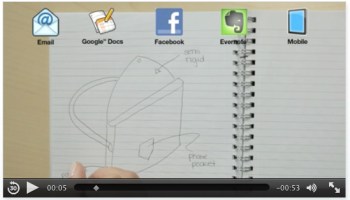
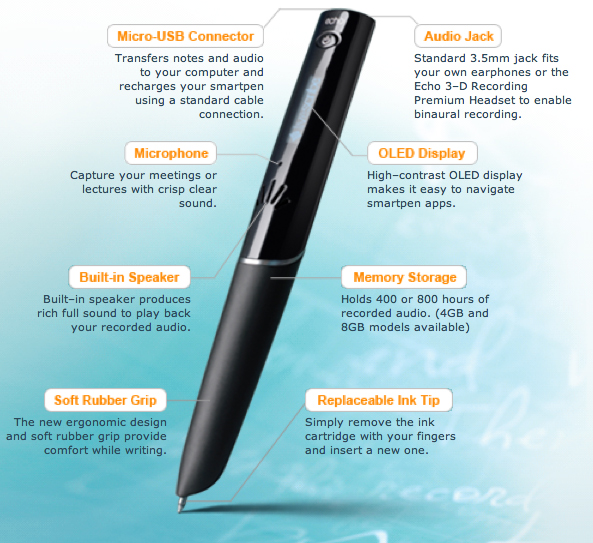
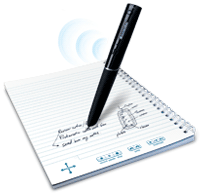
LiveScribe is, in fact, the brand name for several smart pens. The one I tried called is the Echo. Several Echo models are available for about $125-250; the difference between them is the amount of internal memory.  As you can see from the layout below, the pen records and stores up to 800 hours of audio, writes in ink, contains a small microphone and loudspeaker, and connects to your computer via USB for downloads and for charging. That’s half the story.


The other half of the story is the special paper required by the pen. It’s a tiny matrix of dots imprinted on “LiveScribe Dot Paper” available as notepads, sticky notes, journals, notebooks, sticky notes–you can even print the special paper on any laser printer. I think the notebooks are best–and I believe it is wise to invest in LiveScribe’s $25 Portfolio to keep both the pen and the notebook in a single binder so that neither strays far from the other. Both are required for LiveScribe to do its magic.

How does it work?

The Echo has an on/off button. When flipped on, I see the time and the remaining battery power. In the notebook, I find the crossed arrow and click on its center point. This causes the pen’s display to read (and the pen’s internal voice to say) “Main Menu.” Then, I choose another icon (located on every notebook 2-page spread) labelled “Record” and we’re off. The pen records audio and it also remembers what was written, by time. Press “Play” and you hear the recording. Click anywhere in your notebook’s written text and the pen will tell you when the text was written by day and date.

There are other features–and more coming as LiveScribe develops this ingenious device not only as a pen but as a portable computing platform. You can draw a small piano and play it with your pen. You can adjust date and time, configure for left or right-handed writing, adjust playback speed, calculate  (there’s a printed calculator on the inside front cover of the notebook–the result appears on the pen’s display).

It all works well, but the display on the pen is pretty small, and it’s not easy to remember every command. You can send any page, or group of pages, to Facebook, Evernote, to your desktop, as a graphic in a text message, or as a graphic in an email. The trick is to remember how to do all of these things, especially if you don’t use these features every day. Here’s how the system works:

One more term that LiveScribe has begun to popularize: “PenCast.” That is: you write and draw with the pen, narrate your work, then package it up for viewing. It’s a bit like a traditional presentation, a bit like a conversation around a whiteboard, and it’s quite effective.

Sending the pen’s contents to your computer requires the installation of some free software as well as Adobe AIR, which is also free. Although free, the connection process is not intuitive. Here’s where the teeny screen on the pen becomes awkward, and the lack of printed “Connect to…” commands on the notebook pages results in a tedious exercise. If you don’t use the LiveScribe pen regularly, it’s very easy to forget how to send notes to email, Evernote, your desktop, etc. And when you do, the result is not an audio-visual file, but just a pdf (without the audio accompaniment). To get both, you must produce a PenCast–not hard to do, but again, you must remember the special particulars of this device. Given the large number of clickable commands in each notebook, I sure wish the “send” commands were included among them. And, I sure wish there was more visual feedback coming from the desktop software, where character counts are not limited, as they are on the pen.

One more not-wild-about-it: the pen’s tip should be covered when not in use, but the small plastic cover is small, slick, easy to use. Hopefully, a future pen design will erase this concern.

Still, this is an impressive step forward in the history of pens (seriously, this is how progress looks). As the LiveScribe community grows–and it is growing steadily–the design inefficiencies will become non-issues.

It’s interesting that this is, in essence, a paper-and-pen product, a kind of enhanced notebook system, as opposed to a fully digital solution. It’s nice to be able to take notes in a notebook, to use a pen on paper, and to know that there’s some technology to enhance the experience, and to transfer all of it to a computer for storage or sharing. It’s old-school in its way, but when you get the system working properly and you use it every day (so that the commands become natural, not tedious steps along the way), LiveScribe is an impressive product indeed.

Is the iPad Mini Coming This Fall, Not Summer? (Updated)

Key facts, or, at least, key rumors courtesy of MacRumors:

  • $250-300 retail price
  • “A 7.85-inch “iPad mini” display with a resolution of 1024×768 would carry a pixel density of 163 pixels per inch, exactly the same density as the non-Retina iPhone and iPod touch models.”
  • Competes with upcoming Windows 8 devices

No, this is not a definite product. But it is an intriguing rumor.

But today’s visit to Barnes & Noble, and yesterday’s visit to B&H Photo in Manhattan confirm one counterintuitive idea: in comparison with competitive products, the iPad is kinda big. I like it that way, but I use my iPad for business purposes. For casual use, something smaller might be just the thing.

UPDATE as of July 3, 2012:

“The new model will have a screen that’s 7 inches to 8 inches diagonally, less than the current 9.7-inch version, said the people, who asked not to be identified because Apple hasn’t made its plans public. The product, which Apple may announce by October, won’t have the high-definition screen featured on the iPad that was released in March, one of the people said.”–reported by Bloomberg, posted in MacRumors.

A Quality Camera You Won’t Leave at Home (4 of 4)

Continuing the series about small, high-powered digital cameras, our discussion finishes up with video. And this is the part that confuses me most. These cameras shoot very pretty pictures–high-definition, widescreen, beautiful image quality. But none of these cameras allows the user to control or monitor the audio associated with that video.

Audio Rant

Let me rant on that first, and then, we’ll talk pictures. Each of these cameras can record audio with a built-in microphone, usually a stereo microphone. What’s missing: an audio meter so you can see whether the audio being recorded is too loud or too soft, a jack for an external microphone, and a jack for an external earbud or headphone to monitor the audio as it is being recorded. In comparison with the photo and video imaging in these cameras, these audio capabilities are very simple. But they are largely absent.

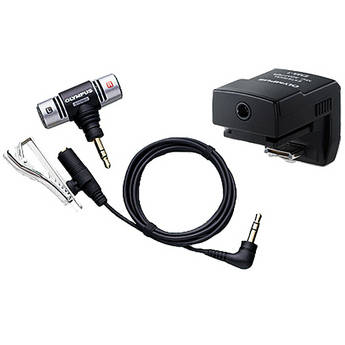
This Olympus device adds a microphone via the camera's flash shoe. It costs $60 at B&H, the source of this photo.

Olympus offers an $89 microphone and cable (SEMA-1) that slides into the hot shoe of the PEN cameras, and it works nicely, but the cable is short, and because it’s connected directly above the lens, the cable finds its way into the shot whenever the camera is turned or manipulated. So what we have is a high-quality digital audio recorder that’s useful only to record “wild sound”–the ambient sound on location. To record sound that’s comparable in quality to the video side, you must record audio separately, on a standalone digital recorder, and then match the audio and the video, on separate tracks, in your editing software. That’s possible, if you have time and patience, and a good set of editing skills. (This will be the topic of an article in the near future.)

End of rant.

Very Good Video

On the picture side, the cameras are very, very good good. Even the $499 Olympus E-PM1 can record up to 29 minutes of  magnificent 1080 60i HD video by just pressing a button. The newest Olympus E-M5, scheduled for April, takes a leap forward by recording H.264 .mov files, making capture and editing easier, and mostly eliminates the dreaded “jello effect” in which vertical lines wobble during a pan of even moderate speed–an improvement over current PEN cameras.

This rather ugly picture is part of a rather clear video explanation of the jello effect.

This is not to minimize the astonishing video image quality available from these cameras–perhaps more astonishing because motion video is not the primary purpose or function of these cameras. Certainly, we’re seeing professional videographers use their DSLRS, with special grips, to record television programs–digital photography has really changed the way we think about video production. And, if you place a mirrorless camera on a tripod, you can achieve stunning results. Even hand-held, with image stabilization, automatic exposure, and automatic focus, the Olympus and Panasonic cameras can do great things.

The same is true, with varying degrees with success on the focus side, and in contrasty situations, for competitors. Of course, you can use just about DSLR to shoot terrific still pictures and still video. And, in most cases, you’ll be able to do so with an earplug, an external microphone, and much more control over the video as it is being recorded. But those cameras are bigger and heavier than their mirrorless counterparts.

Summing Up

If you want to own a full-featured digital camera that takes great pictures and offers every conceivable feature, buy yourself a DSLR. You can buy a very good one, perhaps the Canon EOS Rebel T3i with an inexpensive 18-135mm lens, with an 18 MP APS-C sensor for just over $1,000.

For me, this is a camera that’s fun to use, fun to own, and likely to leave home only sometimes. It’s just too big and too heavy for me to carry along with me. Certainly, I would bring it special events or when I feel like spending an afternoon taking pictures.

I would be more likely to carry something like the new Canon G1X ($799), which offers a 14 MP sensor that’s slightly larger than the one used by micro four thirds cameras, but smaller than the typical APS-C standard. It’s a wonderful small camera, a bit heavier and bulkier than it appears to be, with an optical viewfinder (old school: you simply look through it, like a telescope) with plenty of manual control. The lens deflates my enthusiasm: it’s a zoom, 28-112 mm with not much of a large aperture: f/2.8-5.8. If this camera was offered with a normal prime lens and a maximum aperture of, say, f/2.0, I’d be all over it. Still, this is a camera I want to know more about.

Essentially, I want the equivalent of a good DSLR, but I am not willing to carry around anything that’s bulky, large or heavy. This is why mirrorless cameras intrigue me. So far, I believe the Olympus E-P3 offers the best combination of solid construction, good design, superior image quality, and, most important of all, very good prime (non-zoom) lenses at reasonable prices (and, zoom lenses, too). I love the fact that these cameras (like their DSLR siblings) shoot high quality video as a kind of bonus. And as much as I have come to enjoy the EP-3, I am very intrigued by the new-ish Panasonic GX1, and even more intrigued by the E-M5, the first new Olympus for 2012.

For a complete rundown on all mirrorless cameras, circa December, 2011, click here.

And, BTW, here’s a really clear review of the E-P3.

—–

Here are the links to the rest of The Quality Camera That Goes Everywhere:

Part 1: Lens

Part 2:  Sensor

Part 3: Body

A Quality Camera You Won’t Leave at Home (3 of 4)

Good solid camera body, good grip, pancake-style wide angle lens, easy to handle, easy to control. I like the Olympus PEN E-P3 camera.

In the two past articles, we looked at digital camera systems by focusing on the lenses and the image sensors. Now, it all comes together with an article about digital camera bodies. As you know from the previous two articles, I am especially interested in a camera system that offers high quality images but does so with a small, lightweight package that I can carry with me everywhere I go.

What the Body Should Do

Despite too many features and never enough buttons or controls, every digital camera body serves essentially the same functions. Backing away from the land of the complicated, here’s what I expect from a digital camera body:

It must be easy to handle, and hold steady, while composing and taking a picture. It is exceedingly difficult to do this with just two points of contact. You need a triangle for stability. Or, you need a tripod (or monopod). At the very least, the body must include a sturdy hand grip.

The various knobs, buttons and switches must be large enough to manipulate, and well-placed so they can be operated without looking at the labels.

The most common operations should require no more than one touch.

It must offer automatic exposure and automatic focus, each with a manual option.

Ideally, the body should be stabilized by technology as well as my own hands.

What Most Bodies Don’t Do

In the land of micro four thirds, APS-C and similar cameras, and on most point-and-shoot cameras, there is no built-in viewfinder. This is a problem for several reasons.

First, the viewfinder completes the triangle that allows steady hand-held work.

Second, the viewfinder blocks out light and distraction so you can concentrate on composition and exposure.

Third, if the viewfinder is an accessory, it’s likely to be small, expensive, and easy to lose. Expensive: about $250 for a high-tech item that’s much smaller than a golf ball.

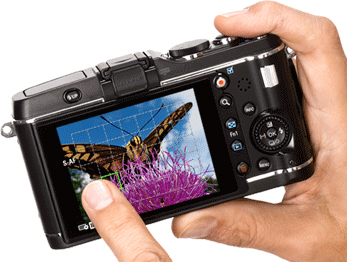
Here's a look at the back of the E-P3. The left finger is pointing at a focal point. In one mode, this finger touch can trigger the shutter.

Features

Camera manufacturers love to market their cameras by emphasizing features. After using an E-P3 for several months, my initial thought has been confirmed time and again. Most of what the camera does, I don’t need. And, as it happens, what a micro four thirds camera does is somewhat less than what a DSLR does. Most of it is clutter, or, at least, image work that would be more effectively done not in the field, but with a portable or desktop computer whose screen allows a far more critical approach to changes in color temperature, or conversion to monochrome.

How I’ve Learned to Shoot

I shoot RAW. That’s important. Shooting RAW images allows me to capture as much picture information as possible, and then, in the quiet of my home office, I edit the images, knowing that the original remains intact. RAW images require more storage space on SD cards than JPEGs require–so buy yourself an additional card (they are becoming inexpensive) or two. I should mention that RAW shooting requires special software, such as Apple’s Aperture or Adobe Bridge (comes with Photoshop).

I use manual and automatic exposure, and I use manual and automatic focus. When I have the time, and the shooting situation allows, I will mess with f/stops and shutter speeds. Not every shooting situation allows, so I rely upon automatic.

On the Olympus E-P3, I leave White Balance in automatic mode, and I do the same with Image Stabilization. Two fewer things to think about.

I keep the Art Filters off (I can apply special effects later), and stick with either Natural or Vivid images.

I shoot in 4:3 format, and may decide to crop later on.

I keep the flash in the off position. I’m glad it’s built into the E-P3 (it’s not always part of micro four thirds cameras), but I don’t use it except in special situations because I use faster (larger aperture) lenses.

The OLED screen on the E-P3 is a touch screen with just a few features that make use of this technology. One that I use often combines the selection of the image’s focal point with a shutter release. I just point at the spot where I want the image to be focused, and the EP-3 takes the picture. Cool!

Buttons, Menu Screens, and Interfaces

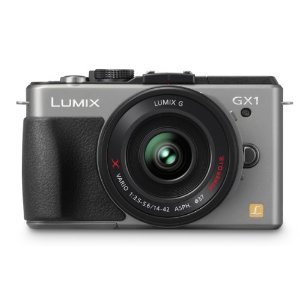
A handsome, modern body for Panasonic's very capable GX1 micro four thirds camera.

At first, every new interface seems confusing. Use the camera every day for a few weeks, and everything becomes easier. I like the way that Panasonic’s GX-1 displays f/stops and shutter speeds. I like the layout of the Olympus E-P3’s physical buttons are laid out (but I wish each one contained a tiny LED so I could find it in the dark). I find the grid guides very useful on the Olympus as well–and I never turn them off.

Every camera includes some outstanding button and menu features, and some that don’t matter a whole lot in the real world. When you’re in the store, you may be much affected by the confusing menu. Get past it. Instead, concentrate on whether the camera feels good in your hands, whether the technology is sufficient for your needs, and on the quality of the lenses that can be used with the body you have in mind.

Advanced Technology

In this era of high-tech everything, it’s easy enough to overlook the obvious. Olympus, Panasonic and the others have packed an enormously sophisticated computer into a box half the size of a roast beef sandwich. The result is a camera system with tremendous flexibility and very impressive image quality.

Although I’ve questioned the accessory viewfinder concept, the implementation is very impressive, moreso on the VF-2 with its 1.4 million dots (very high resolution, very bright screen), less so with the more utilitarian, and less costly, VF-3 (just under a million dots, and you’d be surprised by the difference). The VF-2 costs $249, and the VF-3 costs $179. These fit onto any of the recent Olympus PEN cameras (see below).

Face detection amazes me. Scene Select  makes it easy to, for example, shoot fireworks without messing around with optimum settings. Very convenient.

Small stuff matters, too. An infrared beam allows accurate focusing under dim lighting conditions.

It’s easy to shoot multiple exposures and to remain in focus while doing so.

These cameras shoot movies (not uncommon in 2012, but still amazing to me, and detailed more fully in the next article).

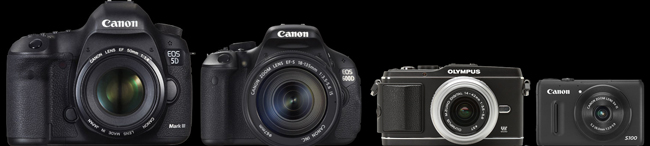
Here's a relative size comparison between a full-sized professional DSLR, a consumer DSLR, a micro four thirds camera with interchangeable lenses (but no mirror, so it's not an SLR, and so, it's a mirror less camera), and one of the best small compact cameras.

Body Styles

In fact, there are about a hundred mirrorless cameras and camera bodies for sale at B&H.

At $7,000 or more, Leica makes four full-frame mirrorless cameras; their lenses are exquisite, and, sadly, so are their prices.

Fuji’s X-Pro 1 is a 16MP APS-C camera, coming in April, that costs $1,699 for the body. It’s a terrific camera, but somewhat heavy (some would say, professional in heft) in this smaller class. Sony’s NEX-7 is a 24 MP champ, but I find the lenses too large for the small body; buy the body with a kit lens for $1,349, or the 16 MP model, with fewer features, for half that price.

The Nikon 1 camera comes in two models: the J1 with a 10-30mm lens (in 35mm lingo, that’s a 27-72mm lens) for $600 or the V1, which adds a built-in viewfinder, for $900. The Nikon 1 comes in colors, including red and pink (two years from now, will anybody be glad they bought a red camera body with a red lens?)

The micro four thirds cameras also come in colors (sigh). The starter model is Olympus’s $499 E-PM1, complete with kit lens, or Panasonic’s $399 GF3, body only. When I compare these two cameras on the very useful Snapsort website, the winner is the Olympus because it includes in-camera image stabilization, and other features associated with costlier models. When hold these two cameras in my hand, I find the controls on the Olympus a bit tiny and the lack of a grip  off-putting, but in truth, the camera is small enough for use without one.

The mid-price models ($699) are Panasonic’s G3 for including the kit lens and thankfully, a built-in viewfinder (though not as good as the better add-on versions), which competes with the Olympus E-PL3. Both offer tilt LED screens so you can use the camera by holding it over your head or at the level of a child or pet’s eyes.

Serious photographers will likely spend a bit more money for either the Panasonic GX-1 ($799 with kit lens) or my current favorite, the Olympus E-P3 ($899 with kit lens). For me, it’s a close call, because both cameras are solidly built (more solidly, it seems, that their lower-priced kin), and because the cameras are intelligently designed, with every feature, and every button, in a reasonable, logical place. The Olympus feels better in my hands, but you may prefer the Panasonic for the same reason. I like the Olympus images a lot–the color is true, the sharpness and depth are present in every shot, and, well, the camera just makes sense to me.

Quick Changes

This market changes every year, and sometimes, more than once a year. A new Panasonic model GF5 is likely by summer. Olympus’s new E-M5, with a 16 MP sensor, image quality that competes successfully with the larger APC-S technology, and a built-in viewfinder is just around the corner. BH Photo is already selling it with delivery likely in late April, for $999 for the body alone, or $1,299 for the body with a new 12-50mm kit lens. And everybody is wondering whether Canon will enter the category with a powerful, small, interchangeable lens kit of its own.

And…

Oh, one more thing. Video. Now standard in many digital cameras, the video capabilities of mirrorless cameras are worth a look. The video article will be final one in this series.

Part 1: Lens

Part 2:  Sensor

Part 4: Video

A Quality Camera You Won’t Leave at Home (2 of 4)

I took this picture with an Olympus PEN camera because it was small enough to tote on a day in NYC. I left my bigger camera at home. Somehow, I always do.

For most photographers trained in the 20th century, the universal standard was 35mm film. The size of the negative: about 35mm wide, and about 24mm high, or, about 1 inch by 1.4 inches. Serious professional photographers preferred larger negatives, and the 120 film format remained (and remains) popular: here, the negative is 2 1/4 inches square, or wider, several times larger than the 35mm film popular with consumers. Larger negatives offer superior image quality, but they also require larger and more costly cameras and lenses.

Digital Image Sensors

So film is old-school, Kodak is gasping for survival, and everyone’s shooting snapshots with their iPhones using a 5 megapixel sensor that’s the size of a your smallest fingernail. And, for most purposes, including posting pictures on Facebook and printing snapshots, the image quality is adequate–as long as you’re shooting in place that has enough light, and not too much contrast.

What’s a sensor? It’s a flat surface filled with a great many small light-sensitive receptors. There are two popular designs: CMOS and CCD. The difference between them is complicated, and explained here. http://en.wikipedia.org/wiki/Image_sensor

ISO and Sensitivity

In the film days, 400 ISO (or, if you’re older, ASA) film was four times as sensitive as 100 ISO film. In other words, using 400 ISO film instead of 100 ISO film offered benefits similar to using a lens with a large maximum aperture, perhaps an f/1.4 lens in place of an f3.6 lens.

The comparison is not a perfect one, though. Increased sensitivity often comes with increased grain, reduced detail, and lesser color quality / color clarity. Cameras that cost more than a few hundred dollars are fine up to about 800 ISO, but then, the image degrades. Newer sensors do a far better job in the 800, 1600 and even 3200 ISO range than older models. This is the push: buy a camera with better “low light sensitivity”–that is, with improved image rendition in the higher ISO ranges–and your 2012-vintage 16 MP camera will produce better images than my 2010-vintage 12 MP camera with its ancient two-year-old sensor design.

Megapixels and Sensor Size

Although camera marketers have latched onto megapixels as a way to justify different camera prices (a 10 MP camera costs more than a 5 MP camera), the number of megapixels on the image sensor should not guide you, at least not from the start.

Instead, focus on the size of the sensor. A “full-frame” sensor is the size of 35mm film–and requires a large, professional-quality body and accompanying lenses. For example the new Canon EOS 5D Mark III is a $3,500 camera that weighs about two pounds and occupies about 90 cubic inches, without a lens.

By comparison, an Olympus E-P3 uses a micro four thirds sensor that’s about 40% of the size, but it costs less than $1,000, weighs 11 ounces, and occupies less than 20 cubic inches, also without a lens.

In the real world of my life, I will not carry five pounds of camera, lenses and accessories with me everywhere, but I will carry a pound. If the image quality is acceptable.

Nikon, Sony, Fuji, and the Rest

In fact, several different sensor designs are becoming popular.

You’ve probably seen commercials and print ads for the Nikon 1 system, for example. It’s based upon a CX sensor format that’s about a quarter of the full 35mm frame. Image quality is good–and with the small sensor, Nikon has been able to manufacture small bodies (as small as reasonable ergonomics allow), and small lenses.

Sony’s small system is called the NEX, and they’ve already been through several generations their APC-S sensor system. The sensor size is somewhat larger than the micro four thirds standard, but somehow, this has resulted in an awkward combination of slightly larger lenses and slightly smaller bodies. The standard zoom, priced at $299, weighs about 7 ounces, but it’s about 2 1/2 inches wide and tall. This is a reasonable size for the lens, but the body is about 25% too small to balance the whole contraption. Fact is, APC-S requires a slightly larger body–16 cubic inches isn’t enough. Samsung, with its NX200, offers a seemingly more bulky body for an APS-C sensor, but, alas, there is no APC-S collective for that format, so Sony lenses are not compatible with Samsung lenses.

Fuji’s upcoming X-Pro 1 also uses a proprietary APS-C sensor for a wonderful new interchangeable lens system, but again, the larger sensor is associated with serious weight – the camera weighs a pound, occupies nearly 30 cubic inches without a lens, and operates (at a very high level) with (for now) just three proprietary lenses.

Panasonic and Olympus

Neither Panasonic nor Olympus are among the very largest camera makers, but they have benefitted from working together. By year end, there will be about 18 lenses in their micro four thirds format, each of them fully operable with significant advances in their micro four thirds sensor technology.

In fact, Olympus got off to a very good start with its earliest PEN cameras. Early on, the company’s engineers and management understood the importance of rendering accurate flesh tones, as well as a neutral, pleasing color palette. (Fujifilm and Nikon have also excelled in this quest.) By combining this special feature with the small size made possible by the micro four thirds format, PEN cameras quickly became a popular choice for serious photographers.

At this moment in 2012, Panasonic offers an extraordinary little micro four thirds camera, the GX1 ($699) that weighs just 11 ounces, occupies less than 20 cubic inches, and offers very impressive image quality with a 16 MB sensor. It’s filled with nifty features that will be addressed in the next article). This camera’s small size and wide array of available lenses and accessories makes it very appealing.

And yet, many photographers seem to prefer the slightly older Olympus E-P3, the current top-of-the-line PEN camera. It costs more ($899), and offers only a 12MB sensor, but the images are consistently excellent. This is not due to the number of megapixels, but instead, it is due to the right combination of engineering, aesthetic decisions during the design process (incorporating both lens and sensor design), and a corporate culture (a culture that has apparently remained intact despite gargantuan financial issues at the Board level).

This moment in 2012 (I am writing on the day after St. Patrick’s Day) is about to change.  Olympus is reading its small 16 MP camera, the E-M5, and a new Panasonic GF-5 is also on its way.

The Whole Package

Of course, it’s not just the sensor and it’s not just the lenses that make a camera or camera system. It’s the overall design philosophy, most often captured in the design of the camera body. That’s what’s coming up next.

Part 1: Lens

Part 3: Body

Part 4: Video

A Quality Camera You Won’t Leave at Home (1 of 4)

It's not about cameras, it's about making pictures. And you can't make a picture if the camera is too heavy or too cumbersome to bring along with you. On a recent visit to NYC's MOMA, I took pictures of objects and paintings that I wanted to know better. With PEN in shoulder bag, I took pictures in one of the world's great museums--something I would never have done with a heavier camera because that camera would have remained at home.

For most of photography’s history, there have been two types of cameras: snapshot cameras and serious creative tools. The digital revolution has obscured the boundary line with an immense number of features and over 500 different digital camera models, but three fundamentals remain.

First, you need a good lens to take a good picture.

Second, you need a camera whose construction won’t let you down.

Third, you need the best possible surface to record the image.

For me, there’s a fourth. I need a camera that isn’t too large or too heavy for me to carry almost everywhere I go.

And for you, there may be a fifth. How good are the camera’s video capabilities?

In this article, and several to follow, I’ll look at each of the fundamentals and, hopefully, encourage you to buy the best possible camera for your unique personal needs. Much of the information in these articles will focus on a system designed by Olympus cameras, but I will cover other systems, too.

Buying a Lens

Whether a lens is bought as part of the camera (common on point-and-shoot cameras), or removable (as on DSLR cameras), your first decision is whether that lens ought to be a zoom lens.

Certainly, a zoom lens is convenient and versatile. Often, a zoom lens is inexpensive. And, more often, you simply have no choice because the camera and the lens are permanently attached to one another.

Let’s use the Olympus PEN system as our example. Each of the PEN bodies is offered with an inexpensive “kit” lens as part of a discounted package: in this case, a 14-42mm 1:3.5-5.6 lens. The PEN system is based upon small cameras and small lenses–an advantage we’ll discuss later on–in the land of 35mm cameras, this lens would be a 28-84mm lens, covering wide angle, normal and telephoto focal lengths. That’s useful, and typical of kit lenses. So, too, is the aperture: a lens with a 3.5-5.6 maximum aperture is not designed to shoot in dim or low light situations. This is a typical disadvantage for kit zoom lenses–and it’s a show-stopper for me. Here’s why:

Given the choice of a lens with a wide opening–designed to shoot in low light–or an accessory flash that adds bulk, requires batteries, and smoothly illuminates only a limited area–I’ll choose the lens every time.

And, I’ll make it a prime lens, not a zoom. Why?

Three reasons. First, I must think about the image, my position, the framing, the composition, and the appropriate tool to create the image. Second, the maximum aperture is likely to be larger. Third, the image quality is likely to be better: sharper, clearer, with better color rendition and far less distortion.

So let’s have a look at some Olympus PEN lenses. There are eleven in the current product line, with several more coming this spring, and there is full compatibility with a dozen more in the Panasonic catalog, all related to a new-ish photographic standard called Micro Four Thirds that will be explained later in these posts.

Remember: the kit lens is 14-42mm 1:3.5-5.6 lens, and if you bought it outside of the kit, it would cost $299. Instead, I would buy one wide angle and one telephoto lens.

The subject was 164 meters away from me. The image was shot with a short telephoto lens (see below), the Olympus 45mm (a 90mm equivalent).

Although the image is not absolutely perfect, I was impressed by the detail on the horse blanket, the horse's muscles, the water falling off the hoof, and the overall clarity of the color. Remember: this was shot from quite a distance. This is a crop from the above photo. Yes, there's a bit of fringe distortion around the yellow, but remember you're looking at an enlargement of over 500%--the equivalent of a 4x6 inch print blown up to 20x 30 inches. Not perfect, but impressive.

Short Telephoto

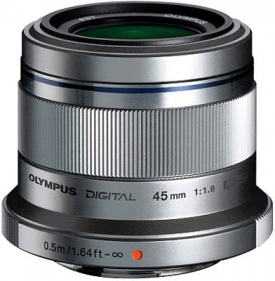
The Olympus 45mm lens for micro four thirds is only about 2 inches wide and high.

Instead, I would spend a little more for OIympus’s 45mm 1.8 lens, a 90mm equivalent designed for portraits (a shorter lens distorts facial features), and to pull in landscapes that are a bit far off. It costs $399.

I’ve read a lot of test reports about this lens (you should, too, before you buy any lens). This one is typical.

 The Olympus M.ZUIKO DIGITAL 45mm f/1.8 is a lens that makes sense because it’s small, useful, and excellent. The important center resolution is already on a very good level straight from wide open aperture and only the corners are somewhat softer here. The quality is very high across the image field when stopping down to f/4. Vignetting, lateral chromatic aberrations as well as distortions are all well controlled and not relevant in field conditions.

Short Wide Angle

I’ve been using OIympus 17mm f/2.8 wide angle lens quite successfully, and, generally, I find it to be excellent. In doing my research, I’ve found web reviews with grades in the B or B- range. Panasonic’s 20mm f/1.7 may be a better choice but it costs a bit more and it’s closer to a normal lens (50mm lens in 35mm camera lingo) than a wide angle. The Olympus 17mm lens costs $299, and the Panasonic 20mm lens costs $399. Both are “pancake” lenses–less than an inch thick. In fact, the Olympus 45mm lens is less than 2 inches thick.

Shorter, and Longer

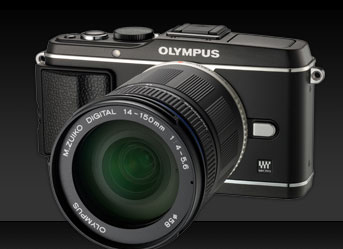
Here's an E-P3 with a longer zoom lens--it maxes out at 150mm, or, in 35mm lingo, 300mm (long enough for wildlife, not long enough for baseball).

For most people–that is, most people who are serious about photography–these two lenses will serve just about any purpose. You can go wider with Olympus’s 12mm 2.0 lens, but it costs $799. You cannot go deeper with a prime lens; instead, you’ll need either Olympus’s remarkable 75-300 f/4.8-6.7 for $899, and if you do, you’ll be thankful for the PEN system’s built-in image stabilization feature, again discussed later on. Take a moment here: that’s a lens that, in 35mm terms, gets up to 600mm, remarkable reach for a lens that weighs less than a pound and is less than 5 inches long. Here are some sample images.

Speed and Weight

At the risk of repeating myself, I consider speed and weight to be critical factors for my lenses.

Speed matters–that is, the largest available aperture matters–because I can shoot in a wider range of lighting situations with a faster lens. I much prefer a 1.8 lens to a 3.5 lens because a 1.8 lens allows me to shoot with HALF as much available light (3.5 divided by 1.8 is, roughly, 2).

Weight matters, and so does size. I’m not a professional photographer, but I do like to carry a camera with me. Olympus’s 45mm lens weighs 116 grams, or about 4 ounces, and their 17mm weighs 71 grams, or about 2.5 ounces. For less than 7 ounces, I’m carrying a relatively complete photographic kit, one that offers high quality images, solid and reliable design, and almost no strain on my shoulder or neck. In theory and in practice, this turns out to be a very good idea.

Other Options

As we’ll explore in the next post, the Olympus-Panasonic effort in micro four thirds technology is paralleled in a Sony system called NEX, a Nikon system called Nikon 1, Fuji with its X system, and several others. Each is based upon a particular image sensor design, and that begins our next chapter, which covers not body design (as you might expect) but instead, the 21st century equivalent of photographic film. Stay tuned.


Part 2:  Sensor

Part 3: Body

Part 4: Video

Secrets of Memory – Exposed!

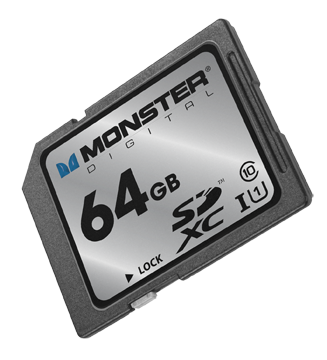
I just received a piece of plastic, about the size of a postage stamp, containing as much memory as a MacBook Air: 64GB. And that made me wonder: is the 64GB on the Monster Digital SD XC USH-1 Class 10 Vault Series card (got all that?) the same as the  64GB of flash memory inside the Air?

Well, no, it’s not. Not according to Mike Ridling and Mark Morrissey, the President and Head of Storage Technology at Monster Digital.

We started at the beginning: spinning disks. Over the decades, the disks became smaller, and when Apple used the technology in the iPod, 1 in 3 units failed. So, Apple went shopping for a better solution.

At the time, flash drives had been around for about five years, and they were popular, but limited in terms of storage capacity. Camera manufacturers were experimenting with ways to store large number of images in a non-volatile format (that is, when the power goes off, the stored material remains). Then, Apple adopted flash memory for their portable devices–and the market shifted from spinning disks to non-volatile, highly portable, small-sized memory.

What’s inside that SD card? A tiny controller that routes data into and out of the card, and organizes the data on the card’s silicon chip so that it’s accessible and so that the card lasts as long as possible (but not forever).

About six years ago, the Secure Digital Association (SD = Secure Data) standardized the metrics for both memory capacity (64GB) and access speed (Class 10). In fact, the access speed matters–but the information is not always easy to find in your device’s instructions. If you own a big DSLR, buy Class 10 cards. Ditto for any camcorder that costs more than, say, $600-700. A Class 6 card is sufficient for a lesser camcorder or a more modest digital still camera. If you’re using the card in a smart phone or a low resolution camera (say, 2-3 megapixels), then a Class 2 is all you need. Of course, Class 10 cards cost more than Class 2 cards.

If you require higher transfer rates, you’ll want a UHS-1 compatible card, but note that not all of these cards are compatible with all devices. (Monster emphasized that their card works with a lot of different devices.)

Right now, the largest available SD cards are 128GB, but we’ll see 256GB in a year or so. Somehow, through the miracle of engineering, the cards are able to store more data but they don’t become larger (more data is stored within the available space). This means we can expect compatibility for a longer period of years.

Now what about the 64GB SD card in the 64GB MacBook Air? Can I simply double my storage capacity with the purchase of a $200 memory card? Well, sort of. The SATA3 solid state drive in the MacBook Air transfers data at 6GB per second. How does the SD card compare? Well, it’s slower. A lot slower: 80MB per second. This is why the SD card is better suited to, say, storing documents and transferring documents on the Air than, say, running Photoshop. In fact, the 64GB and it’s big sister, the 128GB are ideal for storing either almost 25,000 photographs, nearly 11 hours of HD video, over 1,000 hours of digital music. It’s ideal for use in an HD video camera, for example.

I did ask about whether technology was changing quickly enough to affect my thinking about the next generation Air (coming in May, we think). The answer came as something of a surprise: a new external drive for the Air (and other devices) that would plug into the new Thunderbolt port. Offering a transfer rate of about 10GB per second (1/6 of the internal drive, but a heck of a lot faster than the SD card), this is probably the next step in portable memory for portable computers.

And what about iPad storage? Yeah, it’s kinda messy. Apple really didn’t design iPads for external storage, so the solutions are workarounds. That probably won’t change in the future.

So, I’ve learned to use terms such as “transfer rate” and “Class 10” with some knowledge that I lacked yesterday. And, I’ve gotta say, I have a soft spot for Monster. So, thanks to the two executives who helped me to navigate this technology.

I Want to Watch TV on My iPad (The Plot Thickens)

Here’s the original story published on March 6, 2012:

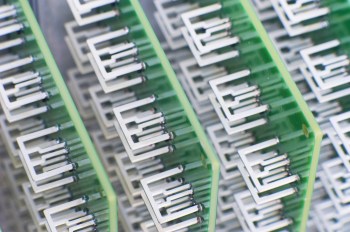
You’re looking at an array of television antennas. These antennas are used to capture local broadcast signals that you can watch, if you pay a monthly subscription fee, on your computer, tablet, or phone. Aereo (formerly Bamboom) is the company behind the scheme, and, as you might expect, they’ll be spending a lot of time in the legal system as they argue with broadcasters regarding the rights and wrongs of live retransmission (that is, if Aereo is to survive, the broadcast networks want to see monthly cash–just like they receive from the cable operators).

Ah, the free airwaves, the ones that broadcasters use for the public good. Ah, the intellectual property that broadcasters carry over those airwaves, the IP that cable service providers pay to carry. Ah, the unresolved legal gotcha!! Any company that attempts to make those signals available via a secondary distribution scheme must pay for the right, or so say the broadcast networks.

The price for the service? $12 per month. The debut date? March 12. The place: for now, the New York metropolitan area.

For cord cutters, this may be a terrific deal. But it’s unclear whether the courts will block Aereo’s progress, as they have with ivi.tv and others who attempted to climb the walls of the castle without paying the required tribute (or, as I’m adding in my updated version of this article… others who attempted to challenge the current system of copyright and payments for distribution rights to intellectual property).

Slingbox? That’s okay. Over-the-air mobile TV? That’s not ready yet, except in a few markets on a test basis. Watch over-the-air TV? Sure. Watch via cable or satellite? As long as you’re paying for the privilege. Watch on another device? Nope, not yet. Or, maybe the answer is yes. We’ll find out in a few weeks.

_____

Here’s the update that I wrote on March 12, 2012:

From Bloomberg: Predicting a “great fight” with traditional media companies, billionaire Barry Diller said he plans to expand his new Aereo Web-based television service to 75 to 100 cities within a year, reports Bloomberg.

Diller, speaking at the South by Southwest Interactive festival in Austin, Texas, noted that efforts by Walt Disney Co. and other media companies to cite copyright violations were “absolutely predictable,” since entrenched companies always protect their turf, the story says.

Want to know more? Here’s a bunch of links:

The tech explanation:

http://www.techspot.com/news/47467-aereo-offers-tv-over-internet-with-antennas-engineered-to-comply-with-law.html

The consumer angle:

http://www.forbes.com/sites/dorothypomerantz/2012/02/29/how-much-are-you-willing-to-pay-to-cut-the-cord/

The business story:

http://online.wsj.com/article/SB10001424052970204059804577229451364593094.html?mod=wsj_share_tweet#printMode

The investment story:

http://www.bizjournals.com/sanfrancisco/news/2012/02/14/iac-l20-million-aereo-barry-diller-vc.html?s=print

_____

Here’s the update as of July 17, 2012

Again from Bloomberg (July 13, 2012): “A U.S. district judge this week allowed Aereo to continue operating while television networks pursue a copyright lawsuit against the company. Aereo captures broadcast signals with small antennas and streams them to devices such as Apple Inc. (AAPL)’s iPad, without paying for the programming.” As a result of the ruling, Diller is now planning a nationwide rollout.

As I pondered what all of this might mean, I read an essay on TV NewsCheck’s website, written by television executive Lee Spieckerman. I contacted him, and we spoke for a while about the ruling and its implications. In short, he believes that Judge Nathan bungled the decision:

“We see loopy rulings from Federal judges all the time, and I think this fits into that category… She misread the governing law!”

Spieckerman’s argument is based in part upon law and in part upon common industry practice. His legal argument tracks back to a 1993 law which requires operators of paid television systems to secure the necessary rights from local broadcasters. The concept is called “retransmission consent” and that ruling has proven to be something of a windfall for local broadcasters as a result of the fees paid by cable operators in exchange for this consent. According to  Spieckerman, these fees are now worth about $2 billion to the commercial broadcast network, plus an additional several billion dollars to local stations. This, plus the additional revenues from political advertising resulting from the Citizens United decision, provide the advertising base necessary for local television news to survive. (Seems to me, we should all understand the economics and consequences of this new approach to journalism funding–a worthwhile topic for a future article). Back to his other argument: “there is no tradition in this country for renting antennas–nobody rents antennas!”

Digging deeper with Mr. Spieckerman, and the real argument emerges. This is all about copyright infringement, and protection of distribution rights associated with intellectual property. Judge Nathan’s ruling begins to disrupt a system by which cable operators compensate owners of cable networks and local stations. ESPN receives $4.69 per cable subscriber–do the math and that’s about $50 per year per subscriber multiplied by 100 million subscribers, and that’s $5 billion per year in subscription fees. Spieckerman believes local broadcast station fees to be 20-50 cents, but acknowledges that these deals are confidential. (Consider that Comcast, Time Warner, and other cable operators charge consumers charge those 100 million subscribers over $1,000 per year–1o0 million x $100 = $100,0o0,000,000, or $100 billion, also good raw material for another Digital Insider article.)

Of course, the local station operators are anxious to negotiate with Diller’s Aereo. And Diller is anxious to go with the Judge’s ruling because it requires no fees. For now, according to Bloomberg,

We’re going to really start marketing… Within a year and a half, certainly by ’13, we’ll be in most major markets.”

To which Mr. Spieckerman counters:

Who is going to be next? This is a pandora’s box, and when you start circumventing and tearing down the few elements there are in the industry and inviting the destruction of an important industry. If I have any intellectual property that I want to distribute, I do not want anybody able to steal my material.”