Easy-to-Use Audio Studio-to-Go

The Zoom H4n has become one of my favorite tools, but most people have never heard of it, or seen it, or even know that such a thing exists.

Zoom makes portable audio recorders–pocket sized recording studios about the size of Sony’s original Walkman, but so much more versatile. This is the ideal companion for a digital camera or camcorder–with far better sound, and far more control over the recording process. It’s ideal for recording of music rehearsals, recitals, and performances. It’s handy for audio interviews, and for the recording of meetings. With proper cabling and a phono pre-amp, you can digitize your vinyl LPs. It’s a useful four track audio recorder, so you can use it to make a record. And, of course, you can use it to listen to music, speeches, podcasts, any audio recording with remarkable fidelity because everything is digital.

Let’s take it from the top…and the bottom.

On top, there is an X-Y (crisscrossed) pair of small microphones. The quality is good, the sound is clean, and they can each be adjusted to cover either a 90-degree pickup area (for more intimate situations or to reduce unwanted noise), or a 120-pickup pattern (to pick up a wider area). Or, plug one or two professional microphones into the bottom (1/4 inch phono plugs or XLR connectors). Or, plug an 1/8 inch mini stereo cable into the mic jack on the back). Control the input level by watching digital VU meter on the small golden screen (backlit when necessary) and adjusting the rocker switch with one finger during the record session.

Here’s a closer look at the screen. No, it’s not iPhone quality, but yes, it’s functional. Time code runs on top, file number next, then sound levels. Buttons below allow track selection, and in another mode, allow selection of files and formats. Buttons are small, screen is small, but everything works fine in the field.

You can choose to record in either .wav (high quality) or .mp3 (low quality, but smaller file sizes) at various sample rates. In multitrack mode, you can record on each of up to four tracks, or play back on up to three of them. Buttons are small, but overdubbing is within the capabilities of this little machine, and that’s useful if you are recording your own tracks for a music demo, for example, because you can listen to your primary vocal while laying down a harmony track, for example, or listen to the drum track while playing your saxophone).

For more sophisticated work–and an easier time–use the Zoom H4n as the interface between, say, your microphones and a more robust Digital Audio Workstation (such as Logic Pro, Garage Band and Samplitude), but, sadly, not ProTools, which requires only M-Audio devices.

Need a metronome or a guitar tuner? They’re built-in, too.

You will record on an SD card. Power comes from either an AC cable or handy AA batteries. You can plug the Zoom H4n into your computer via a USB micro connector. If you need more battery time, flip into “stamina mode” which shuts down some features and dramatically increases recording time (6 hours in normal mode, 11 in stamina mode).

 The Zoom H4n is all so well thought out! I wish every product was as thoughtfully designed!

Recently, I used the Zoom to record audio interviews while recording video interviews on the Olympus PEN EP-3 digital (still) camera. I placed the Zoom just out of frame, and later, in editing, matched the audio track from the Zoom with the EP-3’s video and audio tracks (once synchronized, the Olympus audio track was muted, and subsequently, replaced). Under the right circumstances, this is a better solution than a wired external microphone or a finicky wireless microphone. What’s more, the Zoom provides broadcast-quality results. The sound quality is fabulous. And because the Zoom is small, it fits into my small shoulder bag alongside the small micro four thirds Olympus PEN EP-3. This is a complete HD quality remote shooting rig that I can easily carry in a shoulder bag with plenty of available space for an iPad, wallet, cell phone, ear buds, and (much) more. Add a 32GB SD card, and I can carry hundreds of record albums with me, just in case I feel like listening, not recording.

There is so much more. If you’re intrigued, simply download the instruction manual.

The Zoom H4n price: under $300. And, for $199, you can enjoy a similar device with reduced features with an H2n (seems less sturdy to me, though). And if that’s still too much, Zoom offers a $99 alternative, model H1.

Go-Anywhere Hard Drives + MacAir Storage Ideas

This year, one of my projects has been a documentary about my father. I shot the documentary with an professional HD camera, edited in Adobe Premiere Pro on an iMac, and found myself in a mess of troubles. Then, I learned that serious editing requires an external hard drive. I’ve become a fan of these small devices, in part because they speed up the process and reduce crashes, and in part, because it’s easy to tote the whole project from one computer (at my home) to another (in my office, an hour away). When files are especially large, it’s helpful to bypass digital transfer via ftp and the like, and simply ship the entire drive from one place to another.

Mostly, I’ve been using  GoFlex Pro drives from Seagate. All of the images, video, and audio files that I recorded in the UK in May are now on a 750GB drive that costs about $125. It’s about 3 inches by 5 inches by a half-inch thick, and weighs about a third of a pound. At 7200RPM, it’s fast. It comes with a removable cable adapter, so you can use it as a FireWire 800 drive (for video editing), or as a USB 2.0 drive (offering about half the data transfer speed of FireWire 800, but useful because not every computer includes a FireWire 800 jack). Facing the future, you can buy a Thunderbolt adapter, which allows a connection that’s a dozen times faster than FireWire 800. The flexibility may be useful, but the cost is high: a $90 adapter for a drive that costs $125. (Note that Thunderbolt portable drives are not yet available, and that Thunderbolt desktop drives are still quite costly.) In any case, this drive is designed for use by either a Mac or a Windows computer.

If you haven’t explored portable external drives in a while, you’re likely to be surprised by their appealing combination of small size, light weight, high capacity, speed, and reasonable price. Some even come in colors (not sure why this is important, but it is a trend worth noting). Whether you’re buying for back-up, for convenience (no need to bring your laptop; just bring the drive), or for special projects, they’re worth a look.

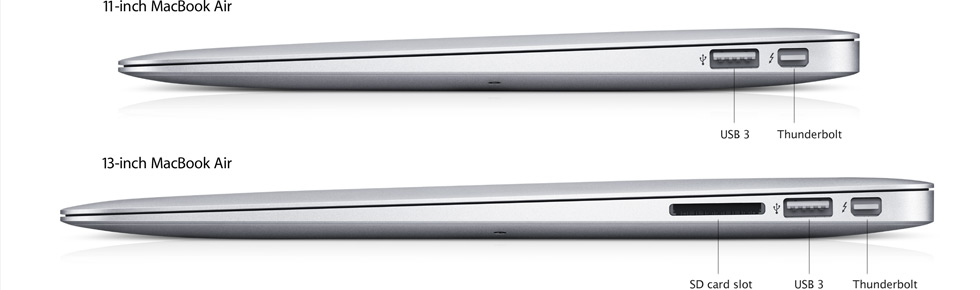
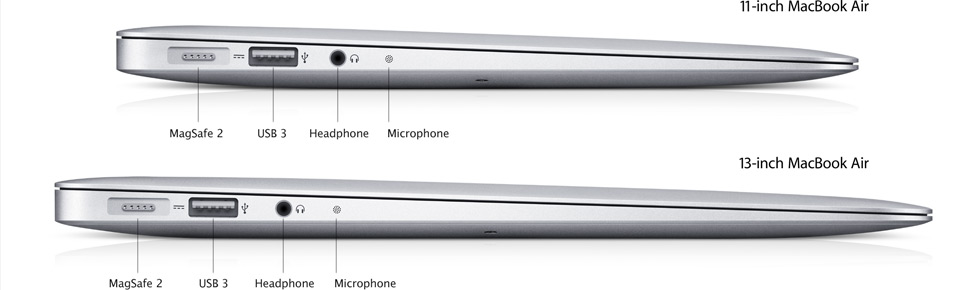
What’s more, if you’ve got your eye on one of those new MacBook Air models, the portable drive adds a lot of storage without requiring a large investment in dollars or weight. Buy an 11-inch with just 64GB internal storage for $999 from Apple, then spend about $125 more to increase your available storage by 750GB (with USB 2.0, you’ll be transferring at a half a gig per second, not speedy, but certainly acceptable for most uses). Better yet, spend $225 for 10 GB per second Thunderbolt speed–Thunderbolt is now standard on every Air. By comparison, you may beef up storage with a 64GB or 128GB SD card, but transfer speed is under 100MB per second, a whole lot slower than other options. Below, left-side and right-side views of the new Air, showing both USB 3.0 and Thunderbolt connectors.

Useful iPad Stuff

(This turned out to be a popular blog post, but I neglected to mention a favorite product, so I’ve revised the article. See below.)

A collection of products that I’ve been meaning to write about…

First–and this one is free–is the 150-plus page iPad Buyer’s Guide from iLounge. If any one publication is the definitive iPad guide, this must be it. It begins with a very complete guide to every iPad model on the planet–very useful for those who are considering a purchase, a skip-over for those who already own one–then digs into articles about iPad innovators, including Inkling (which makes the interactive travel guides I wrote about last week). Just about every aspect of the iPad culture is explored, including some decidedly weird comments from the doubters (I thought we were past this negative stuff, but obviously, they do not). There are pages and pages about useful accessories, top apps, lots more. What’s more, everything is presented in a punchy, fun-to-browse way. It’s available for your computer screen in one-page or two-page-spread format, or in one-page specifically for the iPad. Nice work!

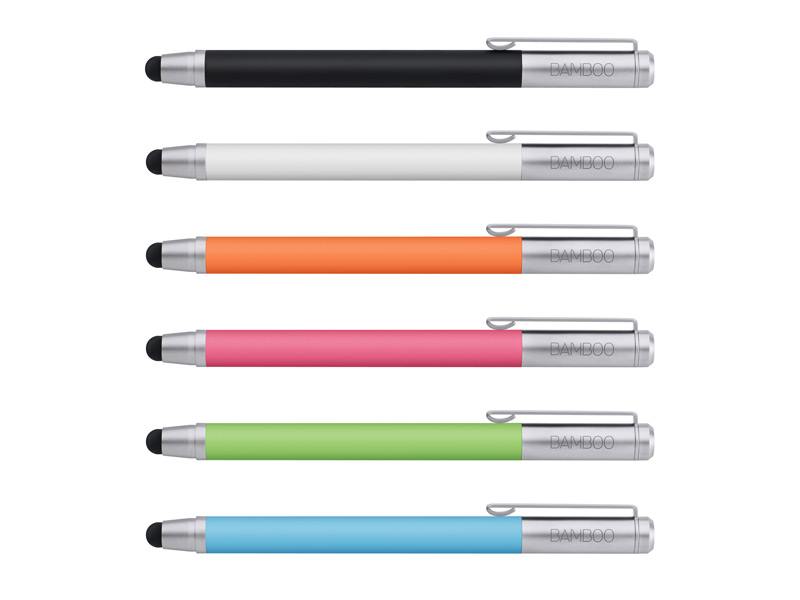
Second, a surprise, at least to me. I’ve used an iPhone for years, and an iPad for a year or so. The input device is my finger, and until yesterday, that worked just fine. Just for fun, I tried an iPad stylus. I liked it. A lot. There are lots of iPad styli available–including the colorful series of Bamboo stylus products from Wacom, and the one I used, the AluPen from Just|Mobile. The AluPen is about four inches long, and feels like a fat crayon. The rubber tip makes contact with the screen’s surface with surprising accuracy. I was able to execute every iPad function more smoothly (and with no fingertip oil or friction), so the experience seemed smoother, quicker, and more precise. Consistent with current trends, stylus makers now offer two models, one with a built-in pen (the kind you use to write on paper, the kind with ink). The AluPen Pro uses Pelikan ink, which seems consistent with Just|Mobile’s higher-quality approach to their whole product line. Before you buy, be sure to explore the extensive text, pictures and video on The Verge.

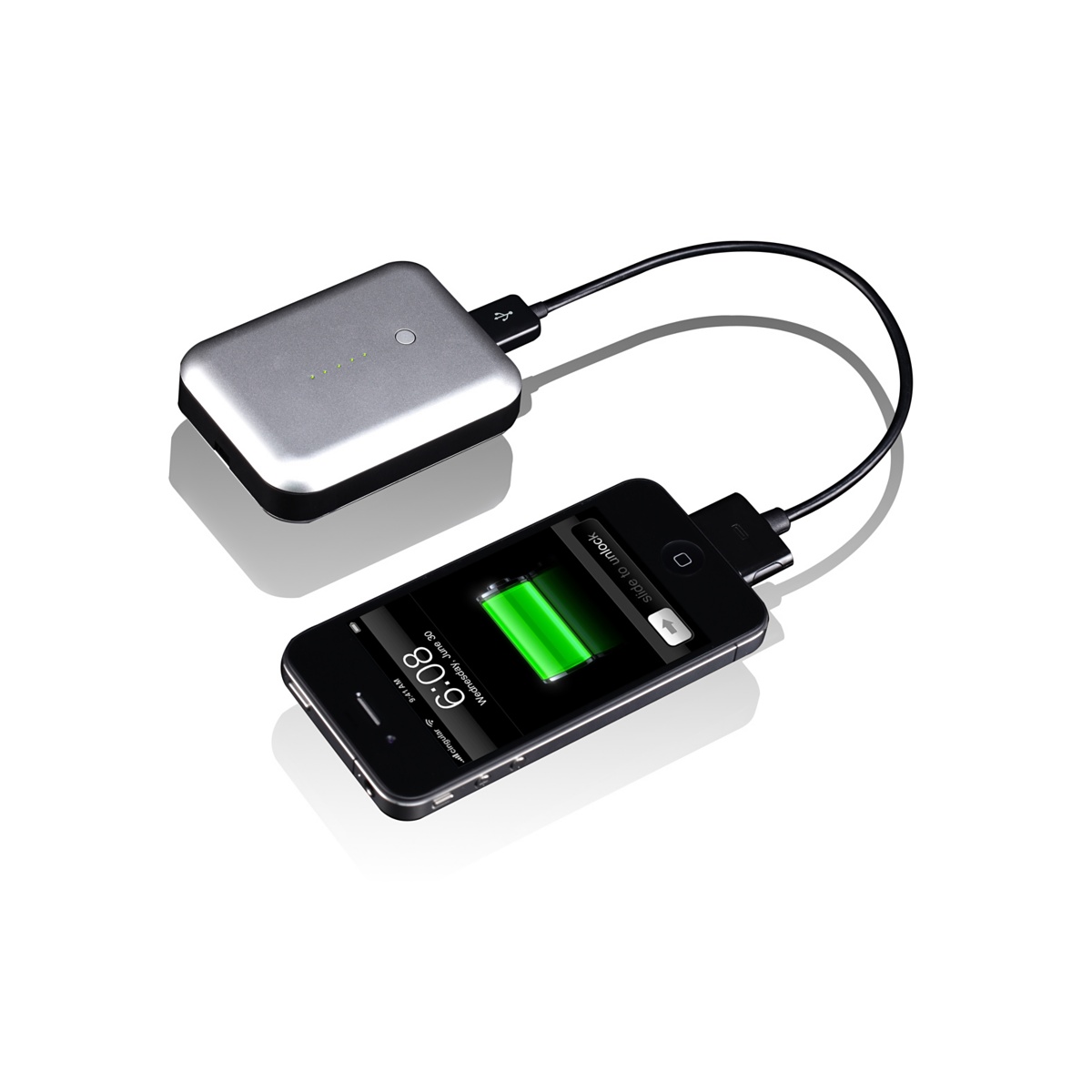
Third, remote power. At January’s Consumer Electronics Show, lots of companies were showing remote power accessories for both iPhone and iPad. Once again, I was impressed by the Just|Mobile products, despite their odd name: Gum. The Gum Plus is the smaller unit, designed mostly for the iPhone (which it can charge several times without being refreshed), and, in a pinch, you can use it to charge the iPad, if not fully, then enough to keep working for a while. For the iPad, you’ll want the larger, and somewhat heavier, Gum Max, which carries enough portable power to completely recharge an iPad, and then, an iPhone. The way this works: you plug the GUM into your AC outlet, fill it with power, and then, carry it with you. When you need the power, you plug your iPhone or iPad into the portable GUM unit. Then, when time and access permit, you recharge the GUM, and, presumably, your iPhone and iPad, too. Some people will use these devices regularly. If you plan to use the Gum only sometimes, you must remember to discharge and recharge the unit for best results.

Fourth, remote storage. Apple designed the iPad so that its local storage would be limited… and the cloud would provide the rest. Unfortunately, even 64GB is not enough local storage for those who rely upon the iPad as their primary portable device, and there is no such thing as a USB Flash Drive or SD Card to augment storage. I am very impressed with the idea of the Seagate’s GoFlex Satellite Drive, and as soon as it’s up and running, I will report back to you.

I reposted because I forgot my favorite new iPad accessory. It’s an eraser. But it doesn’t erase ink or pencil. It erases the ridiculous smudges that magically appear on every iPad screen. I use it often, especially on sunny days when the reflected finger grease (sorry) makes it difficult to see the screen properly. So, here’s the solid plastic 3-inch by 4-inch white plastic eraser with a specially-made black bottom…my best friend when the smudges become annoying on an otherwise beautiful day. The company is Best iProducts. The iEraser costs $14.95, and it’s proudly made in America. They can imprint company logos. It works on a bare screen, but not with a screen protector. All of which is nice to know, but what I really like is that this little eraser really works. First time, every time. Smudges gone! And it couldn’t be simpler. Small company, good product, who could ask for anything more?


Digital Travel Guides and the Future of Publishing

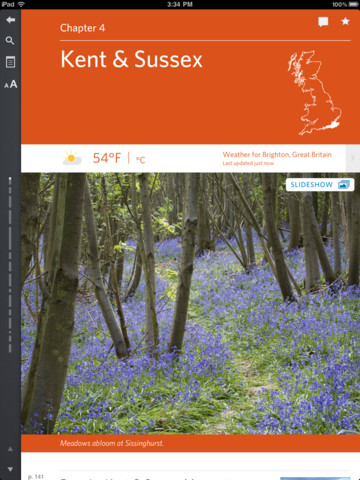
As the Kent & Sussex chapter of a traveler’s eBook begins, the page shows the current temperature. Just a hint of what’s to come in digital travel guides…

Not enough room in the suitcase? Maybe it’s time to ditch the travel guidebook and try the eBook version instead. I did, and learned a lot about what a traveler’s eBook ought to be.

Travel guides are very different from other types of fiction and nonfiction books. They are only partially read. They are intensely used, but only for a few weeks. They are out of date shortly after they are published. And if you’re doing a lot of traveling, they can become quite heavy.

An eBook on an iPad? Less weight. Full color. An opportunity to integrate with digital maps and Trip Advisor, build an itinerary, make reservations, maybe connect with chapters in history or nature books.

Well, we’re not there yet, but we are seeing the beginning of a new era in travel guides.

Lonely Planet has yet to make its big move into iPad publishing, but they offer one excellent idea: the purchase of individual chapters as PDF files for just under $5 a piece. For example, Lonely Planet’s digital England book can be purchased for $17.49, or you can buy the Devon & Cornwall chapter for $4.95. Either way, it’s mostly well-written text with very helpful guidance, plenty of links, and, take note, designed for iPhone with only with 2x magnification feature on.

Fodor’s London Travel Guide is a full-featured app with plenty of maps, color images, lists with links, and easy access to places to visit, lodgings, restaurants, and nightlife. In fact, the app is organized so that it’s easy to read the text blurb about the London Zoo, then quickly refer to a restaurant map to find Lemonia, a highly-regarded Greek restaurant nearby. Read the description of Portobello Market, click, then there it is on a full-screen map. It’s easy to use and effective.

Working with an eBook design firm called Inkling, Frommer’s offers a more ambitious take on the digital travel guide. The eBook is organized in chapters, but each chapter begins with several points of entry: favorite moments in the region, a three-day trip, a five-day journey, favorite sites to visit, popular destinations in detail, and more. Choose the Cotswolds village of Moreton-on-the-Marsh and there’s a well-written description of the village, tips about what’s nearby, quick access to area maps, and an overall design that’s clearly designed for digital devices. This series is called “Day by Day”, so I expected an itinerary planner to coordinate with my iPad’s Calendar app. That’s not yet a feature, but I suspect it was discussed during this superior product’s design phases.

I used all three guides, often and successfully, and never once missed the books that I did not carry with me. My favorite: Frommer’s. But I suspect that next week’s BookExpo will find publishers to introducing the next generation of interactive travel guides.

What’s next? Certainly, full integration with Google Maps, Trip Advisor, Kayak and other reservations systems, Calendar, email. Those seem to be within reach, but they only scratch the surface of what could be done. There’s a gigantic social network opportunity here, whether it’s couch surfing or house swapping, or simply asking whether anybody in the Pembrokeshire area feels like taking a hike today. Right now, publishers are cautiously experimenting with books that become books on screens, but this caution may result in the demise of yet another industry. Travel publishers possess a unique opportunity to bring places to life, to involve community members (think Zagat’s but on a massive scale), to truly invent the future of publishing on a large, interactive scale. It’s interesting to contemplate whether this work can be done, or will be done, by travel publishers owned by much larger publishing conglomerates, or whether smaller, more flexible and potentially more innovative publishers will map this particular journey into the future.

(Digital) Money, Honey

We pay for just about everything with a credit card, a debit card, PayPal. Even parking meters accept card payments. Cash is dirty, difficult to store, easy to lose, and (for better or for worse) leaves no trace. The end of money has been predicted for a long time. Maybe now’s the time that money, like photographic film, drive-in theaters, and typewriters, fades away.

That’s the theory behind WIRED contributing editor David Wolman’s book, The End of Money published by Da Capo. The book is an easy read, filled with anecdotes, interesting histories, and a great many examples of alternatives to our current cash-and-coins conception of valuable exchange. Wolman points out the present system is, in fact, quite new, and that most of human history did not involve pennies, pfennigs, or pesos. He estimates that one of every twenty British coins is counterfeit. He points to cash on ice both in Alaska Senator Ted Stevens’ freezer and also in a visit to the fallen Icelandic economy. (There are so many wonderful slang terms: cold hard cash among them). He explores alternative currencies. The one about Liberty Dollars–“a private voluntary free-market currency backed entirely by silver and gold.”–is a long trip through the complexities of alternative currencies and contemporary Federal conceptions of money.

There’s discussion–not enough for my taste–about smart cards and the use of mobile devices as digital wallets. Here, the focus is on the many small daily transactions that remain cash-intensive, and the potential for a simpler, less costly, more manageable system based upon digital transactions. The upside: you’re never short a quarter for the parking meter; the downside: every time you park your car, you’re making an entry into your permanent record.

Be sure to read the crazy story. It’s just one paragraph on Wikipedia.

It’s interesting to muse on the current use of simulated currencies, if only to understand our possible future behaviors: accumulating gold coins in games, such as World of Warcraft; the possible connections between gamefied badges and currency that can be exchanged for real or virtual goods and services; the use of Quids on the (now gone?) website Superfluid, where “they’re placeholders for favors” (perhaps not unlike the favor/exchange economy that drives power and accomplishment in the nation’s capital). Where might frequent flier miles fit into the money equation? Or Disney Dollars that pay for fun in Orlando (now largely replaced by Disney Gift Cards because they yield far more digital data, and because the residue is easily converted to profit.) How about the barter economy that has been so well-nourished on the internet: you build my website, I do your taxes.

How does taxation fit into any of this? None of us love taxes, but we’ve certainly become attached to, say, our interstate highway system. I suppose most transactions will be digital, and so, there is a trackable moment of exchange, and at that moment, the tax authorities can step-in (digitally) and collect. How about pay checks? Direct deposit eliminates the old-fashioned notion of “cashing the paycheck”–and, perhaps, acknowledging the weirdness of Big Brother, preparing one’s own personal tax return may seem equally old school (armed with your entire digital financial life, the government could certainly outsource your tax return, mine to, to an outfit in Malaysia or Peru).

Are coins and cash going away? Not this year, but maybe in ten years. It’s fascinating to contemplate the possibilities. And, along the way, it’s fun to browse or read The End of Money.

It’s also fun to watch the CBS Sunday Morning report that was inspired by the book. If you can find the link, let me know and I’ll post it (couldn’t find it on the CBS Sunday Morning site).

The 21st Century Pen

Great idea no. 1: pull a quill, dip it in ink, and write on parchment. The idea lasted about a thousand years.

Great idea no. 2: figure out how the ink can be contained within the pen. After a century or so of experimentation, mass production of fountain pens began in the  1880s.

Great idea no. 3: the ballpoint pen goes on sale in 1945.

Almost great idea no. 4: LiveScribe, a pen that remembers what you wrote, when you wrote it.

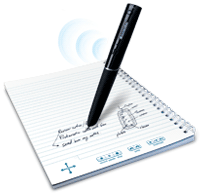
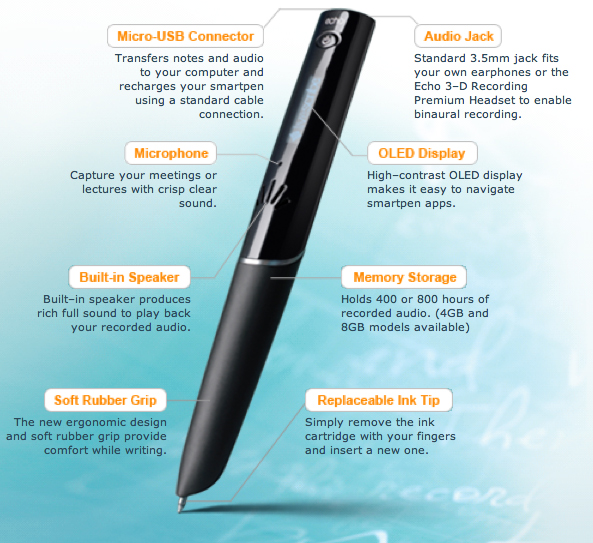
LiveScribe is, in fact, the brand name for several smart pens. The one I tried called is the Echo. Several Echo models are available for about $125-250; the difference between them is the amount of internal memory.  As you can see from the layout below, the pen records and stores up to 800 hours of audio, writes in ink, contains a small microphone and loudspeaker, and connects to your computer via USB for downloads and for charging. That’s half the story.


The other half of the story is the special paper required by the pen. It’s a tiny matrix of dots imprinted on “LiveScribe Dot Paper” available as notepads, sticky notes, journals, notebooks, sticky notes–you can even print the special paper on any laser printer. I think the notebooks are best–and I believe it is wise to invest in LiveScribe’s $25 Portfolio to keep both the pen and the notebook in a single binder so that neither strays far from the other. Both are required for LiveScribe to do its magic.

How does it work?

The Echo has an on/off button. When flipped on, I see the time and the remaining battery power. In the notebook, I find the crossed arrow and click on its center point. This causes the pen’s display to read (and the pen’s internal voice to say) “Main Menu.” Then, I choose another icon (located on every notebook 2-page spread) labelled “Record” and we’re off. The pen records audio and it also remembers what was written, by time. Press “Play” and you hear the recording. Click anywhere in your notebook’s written text and the pen will tell you when the text was written by day and date.

There are other features–and more coming as LiveScribe develops this ingenious device not only as a pen but as a portable computing platform. You can draw a small piano and play it with your pen. You can adjust date and time, configure for left or right-handed writing, adjust playback speed, calculate  (there’s a printed calculator on the inside front cover of the notebook–the result appears on the pen’s display).

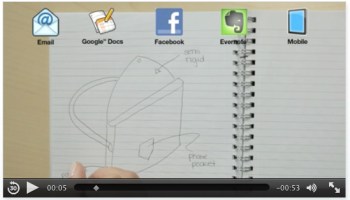
It all works well, but the display on the pen is pretty small, and it’s not easy to remember every command. You can send any page, or group of pages, to Facebook, Evernote, to your desktop, as a graphic in a text message, or as a graphic in an email. The trick is to remember how to do all of these things, especially if you don’t use these features every day. Here’s how the system works:

One more term that LiveScribe has begun to popularize: “PenCast.” That is: you write and draw with the pen, narrate your work, then package it up for viewing. It’s a bit like a traditional presentation, a bit like a conversation around a whiteboard, and it’s quite effective.

Sending the pen’s contents to your computer requires the installation of some free software as well as Adobe AIR, which is also free. Although free, the connection process is not intuitive. Here’s where the teeny screen on the pen becomes awkward, and the lack of printed “Connect to…” commands on the notebook pages results in a tedious exercise. If you don’t use the LiveScribe pen regularly, it’s very easy to forget how to send notes to email, Evernote, your desktop, etc. And when you do, the result is not an audio-visual file, but just a pdf (without the audio accompaniment). To get both, you must produce a PenCast–not hard to do, but again, you must remember the special particulars of this device. Given the large number of clickable commands in each notebook, I sure wish the “send” commands were included among them. And, I sure wish there was more visual feedback coming from the desktop software, where character counts are not limited, as they are on the pen.

One more not-wild-about-it: the pen’s tip should be covered when not in use, but the small plastic cover is small, slick, easy to use. Hopefully, a future pen design will erase this concern.

Still, this is an impressive step forward in the history of pens (seriously, this is how progress looks). As the LiveScribe community grows–and it is growing steadily–the design inefficiencies will become non-issues.

It’s interesting that this is, in essence, a paper-and-pen product, a kind of enhanced notebook system, as opposed to a fully digital solution. It’s nice to be able to take notes in a notebook, to use a pen on paper, and to know that there’s some technology to enhance the experience, and to transfer all of it to a computer for storage or sharing. It’s old-school in its way, but when you get the system working properly and you use it every day (so that the commands become natural, not tedious steps along the way), LiveScribe is an impressive product indeed.

Is the iPad Mini Coming This Fall, Not Summer? (Updated)

Key facts, or, at least, key rumors courtesy of MacRumors:

  • $250-300 retail price
  • “A 7.85-inch “iPad mini” display with a resolution of 1024×768 would carry a pixel density of 163 pixels per inch, exactly the same density as the non-Retina iPhone and iPod touch models.”
  • Competes with upcoming Windows 8 devices

No, this is not a definite product. But it is an intriguing rumor.

But today’s visit to Barnes & Noble, and yesterday’s visit to B&H Photo in Manhattan confirm one counterintuitive idea: in comparison with competitive products, the iPad is kinda big. I like it that way, but I use my iPad for business purposes. For casual use, something smaller might be just the thing.

UPDATE as of July 3, 2012:

“The new model will have a screen that’s 7 inches to 8 inches diagonally, less than the current 9.7-inch version, said the people, who asked not to be identified because Apple hasn’t made its plans public. The product, which Apple may announce by October, won’t have the high-definition screen featured on the iPad that was released in March, one of the people said.”–reported by Bloomberg, posted in MacRumors.

Do You Think You Can App?


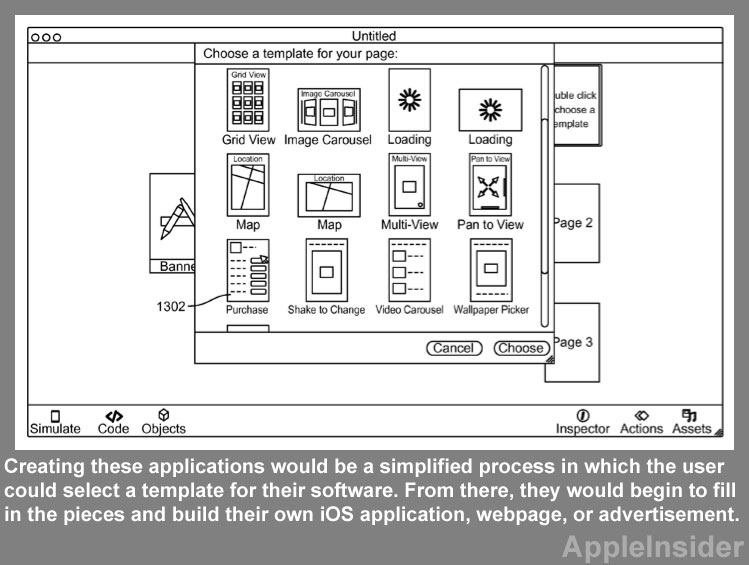
Think back to the time when you wondered whether you could desktop publish (before you knew what a “font” was), build your own website, or shoot or edit video? All of these were once unavailable to the average person. Now, Apple has filed a patent that could lead to make-your-own apps.

No surprise that message boards are filled with doubt. Making apps is too specialized, too complicated, too much of a commitment for the average person, too demanding in terms of knowledge and training and skills. Doubters point to iWeb, which was a make-your-own website tool that Apple provided, then pulled from the market.

Still, I wouldn’t dismiss the idea too quickly. No, most of us can’t or won’t build our own websites, but technology and invention race around the rocks–so we blog, and post images, and Tweet, and distribute information via tools that weren’t available the day before yesterday.

Do I want my own app? Sure, I guess, but the question suggests a solution chasing a problem.

If we flip the question, and assume, for example, that we (jointly) own an artisanal bread bakery, we might want to make it easy for our customers to know what’s baking, and what’s fresh out of the over, and we might not want to pay someone to build an app. A bake-your-own app might be just the thing for small business, or for authors who want to provide more than an eBook can easily provide, the list of potential problems that a homegrown app could solve is large. What’s more, the interactivity of a good app creates a high level of engagement between the provider and the customer, so apps could be the step beyond blogs and tweeting.

But I think there’s even more to the question. Blogs, tweets, apps–these assume current technology. And yet, we know that current technology lasts only a few years before the whole game changes. By 2015, we’ll be into advanced optical displays, a better cloud that makes the whole idea of local storage and local apps obsolete. Quite likely, we’ll be buying a broader range of devices–and I’m sure I don’t want a circa-2012 app as the my interface with thousands of internet radio stations (I really want easy-to-use internet radio in my car with lots and lots of stations from around the world).

Nothing is standing still–and that’s one of the challenges addressed in the Apple Insider article–how to build apps that easily (and automatically) customize for an increasingly varied range of devices.

Secrets of Memory – Exposed!

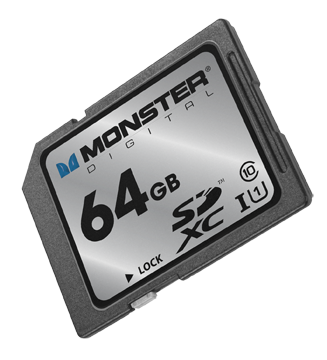
I just received a piece of plastic, about the size of a postage stamp, containing as much memory as a MacBook Air: 64GB. And that made me wonder: is the 64GB on the Monster Digital SD XC USH-1 Class 10 Vault Series card (got all that?) the same as the  64GB of flash memory inside the Air?

Well, no, it’s not. Not according to Mike Ridling and Mark Morrissey, the President and Head of Storage Technology at Monster Digital.

We started at the beginning: spinning disks. Over the decades, the disks became smaller, and when Apple used the technology in the iPod, 1 in 3 units failed. So, Apple went shopping for a better solution.

At the time, flash drives had been around for about five years, and they were popular, but limited in terms of storage capacity. Camera manufacturers were experimenting with ways to store large number of images in a non-volatile format (that is, when the power goes off, the stored material remains). Then, Apple adopted flash memory for their portable devices–and the market shifted from spinning disks to non-volatile, highly portable, small-sized memory.

What’s inside that SD card? A tiny controller that routes data into and out of the card, and organizes the data on the card’s silicon chip so that it’s accessible and so that the card lasts as long as possible (but not forever).

About six years ago, the Secure Digital Association (SD = Secure Data) standardized the metrics for both memory capacity (64GB) and access speed (Class 10). In fact, the access speed matters–but the information is not always easy to find in your device’s instructions. If you own a big DSLR, buy Class 10 cards. Ditto for any camcorder that costs more than, say, $600-700. A Class 6 card is sufficient for a lesser camcorder or a more modest digital still camera. If you’re using the card in a smart phone or a low resolution camera (say, 2-3 megapixels), then a Class 2 is all you need. Of course, Class 10 cards cost more than Class 2 cards.

If you require higher transfer rates, you’ll want a UHS-1 compatible card, but note that not all of these cards are compatible with all devices. (Monster emphasized that their card works with a lot of different devices.)

Right now, the largest available SD cards are 128GB, but we’ll see 256GB in a year or so. Somehow, through the miracle of engineering, the cards are able to store more data but they don’t become larger (more data is stored within the available space). This means we can expect compatibility for a longer period of years.

Now what about the 64GB SD card in the 64GB MacBook Air? Can I simply double my storage capacity with the purchase of a $200 memory card? Well, sort of. The SATA3 solid state drive in the MacBook Air transfers data at 6GB per second. How does the SD card compare? Well, it’s slower. A lot slower: 80MB per second. This is why the SD card is better suited to, say, storing documents and transferring documents on the Air than, say, running Photoshop. In fact, the 64GB and it’s big sister, the 128GB are ideal for storing either almost 25,000 photographs, nearly 11 hours of HD video, over 1,000 hours of digital music. It’s ideal for use in an HD video camera, for example.

I did ask about whether technology was changing quickly enough to affect my thinking about the next generation Air (coming in May, we think). The answer came as something of a surprise: a new external drive for the Air (and other devices) that would plug into the new Thunderbolt port. Offering a transfer rate of about 10GB per second (1/6 of the internal drive, but a heck of a lot faster than the SD card), this is probably the next step in portable memory for portable computers.

And what about iPad storage? Yeah, it’s kinda messy. Apple really didn’t design iPads for external storage, so the solutions are workarounds. That probably won’t change in the future.

So, I’ve learned to use terms such as “transfer rate” and “Class 10” with some knowledge that I lacked yesterday. And, I’ve gotta say, I have a soft spot for Monster. So, thanks to the two executives who helped me to navigate this technology.

I Want to Watch TV on My iPad (The Plot Thickens)

Here’s the original story published on March 6, 2012:

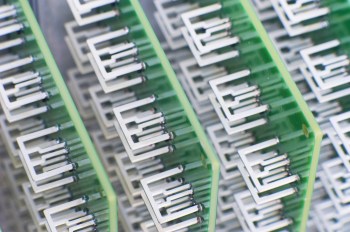
You’re looking at an array of television antennas. These antennas are used to capture local broadcast signals that you can watch, if you pay a monthly subscription fee, on your computer, tablet, or phone. Aereo (formerly Bamboom) is the company behind the scheme, and, as you might expect, they’ll be spending a lot of time in the legal system as they argue with broadcasters regarding the rights and wrongs of live retransmission (that is, if Aereo is to survive, the broadcast networks want to see monthly cash–just like they receive from the cable operators).

Ah, the free airwaves, the ones that broadcasters use for the public good. Ah, the intellectual property that broadcasters carry over those airwaves, the IP that cable service providers pay to carry. Ah, the unresolved legal gotcha!! Any company that attempts to make those signals available via a secondary distribution scheme must pay for the right, or so say the broadcast networks.

The price for the service? $12 per month. The debut date? March 12. The place: for now, the New York metropolitan area.

For cord cutters, this may be a terrific deal. But it’s unclear whether the courts will block Aereo’s progress, as they have with ivi.tv and others who attempted to climb the walls of the castle without paying the required tribute (or, as I’m adding in my updated version of this article… others who attempted to challenge the current system of copyright and payments for distribution rights to intellectual property).

Slingbox? That’s okay. Over-the-air mobile TV? That’s not ready yet, except in a few markets on a test basis. Watch over-the-air TV? Sure. Watch via cable or satellite? As long as you’re paying for the privilege. Watch on another device? Nope, not yet. Or, maybe the answer is yes. We’ll find out in a few weeks.

_____

Here’s the update that I wrote on March 12, 2012:

From Bloomberg: Predicting a “great fight” with traditional media companies, billionaire Barry Diller said he plans to expand his new Aereo Web-based television service to 75 to 100 cities within a year, reports Bloomberg.

Diller, speaking at the South by Southwest Interactive festival in Austin, Texas, noted that efforts by Walt Disney Co. and other media companies to cite copyright violations were “absolutely predictable,” since entrenched companies always protect their turf, the story says.

Want to know more? Here’s a bunch of links:

The tech explanation:

http://www.techspot.com/news/47467-aereo-offers-tv-over-internet-with-antennas-engineered-to-comply-with-law.html

The consumer angle:

http://www.forbes.com/sites/dorothypomerantz/2012/02/29/how-much-are-you-willing-to-pay-to-cut-the-cord/

The business story:

http://online.wsj.com/article/SB10001424052970204059804577229451364593094.html?mod=wsj_share_tweet#printMode

The investment story:

http://www.bizjournals.com/sanfrancisco/news/2012/02/14/iac-l20-million-aereo-barry-diller-vc.html?s=print

_____

Here’s the update as of July 17, 2012

Again from Bloomberg (July 13, 2012): “A U.S. district judge this week allowed Aereo to continue operating while television networks pursue a copyright lawsuit against the company. Aereo captures broadcast signals with small antennas and streams them to devices such as Apple Inc. (AAPL)’s iPad, without paying for the programming.” As a result of the ruling, Diller is now planning a nationwide rollout.

As I pondered what all of this might mean, I read an essay on TV NewsCheck’s website, written by television executive Lee Spieckerman. I contacted him, and we spoke for a while about the ruling and its implications. In short, he believes that Judge Nathan bungled the decision:

“We see loopy rulings from Federal judges all the time, and I think this fits into that category… She misread the governing law!”

Spieckerman’s argument is based in part upon law and in part upon common industry practice. His legal argument tracks back to a 1993 law which requires operators of paid television systems to secure the necessary rights from local broadcasters. The concept is called “retransmission consent” and that ruling has proven to be something of a windfall for local broadcasters as a result of the fees paid by cable operators in exchange for this consent. According to  Spieckerman, these fees are now worth about $2 billion to the commercial broadcast network, plus an additional several billion dollars to local stations. This, plus the additional revenues from political advertising resulting from the Citizens United decision, provide the advertising base necessary for local television news to survive. (Seems to me, we should all understand the economics and consequences of this new approach to journalism funding–a worthwhile topic for a future article). Back to his other argument: “there is no tradition in this country for renting antennas–nobody rents antennas!”

Digging deeper with Mr. Spieckerman, and the real argument emerges. This is all about copyright infringement, and protection of distribution rights associated with intellectual property. Judge Nathan’s ruling begins to disrupt a system by which cable operators compensate owners of cable networks and local stations. ESPN receives $4.69 per cable subscriber–do the math and that’s about $50 per year per subscriber multiplied by 100 million subscribers, and that’s $5 billion per year in subscription fees. Spieckerman believes local broadcast station fees to be 20-50 cents, but acknowledges that these deals are confidential. (Consider that Comcast, Time Warner, and other cable operators charge consumers charge those 100 million subscribers over $1,000 per year–1o0 million x $100 = $100,0o0,000,000, or $100 billion, also good raw material for another Digital Insider article.)

Of course, the local station operators are anxious to negotiate with Diller’s Aereo. And Diller is anxious to go with the Judge’s ruling because it requires no fees. For now, according to Bloomberg,

We’re going to really start marketing… Within a year and a half, certainly by ’13, we’ll be in most major markets.”

To which Mr. Spieckerman counters:

Who is going to be next? This is a pandora’s box, and when you start circumventing and tearing down the few elements there are in the industry and inviting the destruction of an important industry. If I have any intellectual property that I want to distribute, I do not want anybody able to steal my material.”