This seems like it should be easy, but it’s not, so I thought I would capture the steps I used to record ONLY the person I am interviewing — and not my own video image.
In an ideal world, you would (a) open your ZOOM account, and (b) select the person to be recorded. In the real (and sometimes complicated) world of ZOOM, you must (a) sign up for a more expensive ZOOM account, such as ZOOM Pro, and (b) go through a dozen steps for each individual recording. Yes, this is crazy, and I sure wish ZOOM would read this article and make things much easier for everyone. Until they do, here’s what I now know how to do. I hope it’s helpful.

1 – Sign into the ZOOM call, and make sure you are the HOST.
2 – Blur your video background, if you like.
3 – Log into a second computer on a ZOOM account that is not your own. The computer can be the same wifi network as your first computer, but it must use a different ZOOM account. Be sure to JOIN the conversation. NOTE: It’s best for the second computer to be an actual computer, not a phone or tablet — unless you can completely silence the phone or tablet, Otherwise, you may hear feedback. If you must use a phone or tablet, place it in a drawer in another room.
4 – On the first computer’s ZOOM screen, ADMIT the second log-in by pressing “Admit.”
5 – Return to the second computer. Press RETURN to accept the audio question. MUTE the microphone, and shut off the computer’s speaker(s).
6- Now you are ready to ADMIT the interviewee’s computer on your first computer.
7 – Immediately after admitting the interviewee’s ZOOM account, click on the upper right corner to see a drop-down menu. Select SPOTLIGHT FOR EVERYONE.
8 – Be sure you are in SPEAKER view on your first computer. Now, press the RECORD button. You can record either to your ZOOM cloud account or to your first computer’s selected disk drive.
9 – Begin the conversation. You will be seeing, and recording, only the interviewee. Check to make sure that (a) the spotlight is in place (upper left corner of the ZOOM screen), and (b) you are indeed recording (upper right corner of the ZOOM screen).
10 – When the conversation ends, STOP the recording and end the ZOOM call. ZOOM will automatically begin to process the recorded files (audio, video, and some other files). Leave your first computer alone, let the processing take place without interruption. Meanwhile, go to the SECOND computer to confirm that there is no active ZOOM conversation. (It should have disconnected when the ZOOM call ended).
11 – After a few minutes, ZOOM will open a new file that is labelled with time and date, and the name of the ZOOM conversation. The file will contain the audio and video files, etc. Find the .mp4 file and play it, or play parts of it. You should see ONLY the interviewee, but you should hear all of the voices that spoke during the ZOOM call.
12 – If you are doing this multiple times, it’s wise to issue a separate ZOOM invitation for each conversation. That way, each conversation will record separately, in its own file folder.


 Sure,
Sure,  When I traveled this summer, I insisted upon reliable portable power for my flashlight, tablet and smart phone, but I wasn’t about to carry a Yeti. Fortunately, Goal Zero offers a nifty small battery and charger that makes an ideal gift. No AC power, but the USB system is very well designed. I especially like the Venture 70 Recharger because it will charge a tablet once or twice, or a phone a half dozen times. And, it comes with a built-in (very bright) flashlight. The USB cables frame the device and never get lost. You can charge the device via an AC/USB combination overnight. The Venture 70 costs $150, and you can add a

 Enter the


 A monthly subscription fee buys access to a library of short- and long-form programs in four general categories: science, technology, civilization and the human spirit. Some programs are produced by Curiosity Studios—mostly, these are short-form interviews with scientists and other experts, often illustrated with animation. At the start, many of the long-form programs will come from TVO (that’s TVOntario, one of the best non-fiction producers in Canada), Japan’s NHK, France’s ZED, and of course, the BBC Worldwide. With two or three years, the service anticipates 2-3,000 titles; this year, subscribers will have access to about half that number of programs. Happily, John recognizes the challenges associated with VOD navigation, and I’m hoping to see Curiosity Stream reinvent the visual interface so that their programs are easy to find.
 The assortment of programs being assembled for the March 18, 2015 launch. Many are reminiscent of what The Discovery Channel used to be—before its prime time schedule began to resemble other cable channels (“Naked and Afraid,” etc.). Among the titles announced so far: “The Nano Revolution,” “Simon Schama: Shakespeare and Us,” “The Age of Robots,” “Destination Pluto,” and “Scotland: Rome’s Last Frontier.” There will be 4K programming, too—UltraHD for those who own the newer high-resolution TV sets—including a newly commissioned project called “Big Picture Earth” by the filmmaker responsible for “Sunrise Earth.”
 month, you can watch in standard resolution—a terrific on-ramp for viewers who are either new to SVOD or are more likely to be fairly light users, at least the start. At this price, it’s almost a trial subscription with an easy upsell to 720 HD resolution at $3.99 per month (which is all that most people probably need right now). For those with more extravagant viewing habits, 1080 HD resolution costs $5.99 per month; the 4K Ultra HD service costs $9.99 per month (but at the start, there won’t be a lot of 4K programming available—still, some is far more than most other services offer today).
 example, let’s assume that a high quality outdoor production costs about $750K to produce. If one company foots the bill, their programming budget only goes so far. But if Curiosity, for example, puts in $250K to control North American rights, and finds two partners, perhaps one in Asia and another in Europe, and each of them also puts in $250K for their respective territories, then nobody is out of pocket for more than $250K. Rights beyond North America, Europe and Asia provide additional revenue, which is typically shared by the funding producers. This “split exploitation” concept has been around since the 198os, and it works. In the SVOD marketplace, there will be many opportunities for future exploitation, which makes the venture progressively more profitable, and steadily increases the programming budgets, which generate more and better programming, and more subscribers… the circle continues to grow.
 Unlike Ted Turner, whose approach to cable was mass market (TBS, TNT, and very broad-based news with CNN), Hendricks has always focused on nonfiction, documentaries, outdoors and reality (in the best sense, and also with many programming ventures way down market—Discovery owns TLC, so you can thank him for “Honey Boo Boo”). The point: he knows how to play the game, understands how to segment the market. His first pass: a three-bucket breakdown that includes (a) historically light TV viewers, the 1 in 8 of us, the 17 million U.S. households for whom TV is not a big part of daily life; (b) the connected world of perhaps 100 million cable and satellite homes, the ones that often complain that “there’s nothing good on TV” where he hopes to capture about 10 million households; and the rising 4K market, which he projects at 10 million households total and perhaps 5 million subscribers to Curiosity. By playing a more upmarket game from the start—he’s betting that there are enough documentary, adventure, curious viewers willing to pay at least a few dollars per month to see what Curiosity offers and to support what would seem to be a very promising future.
 Could he be defeated by Netflix hiring a former Discovery executive assigned to buying up lots of rights to Curiosity / Discovery -type programming from the short list of global suppliers? Sure, but it’s not likely that Netflix will zero-in on the nonfiction programs that Curiosity Stream plans to acquire. The nuanced understanding of programming for, and marketing to, this particular audience is not something that Netflix can easily replicate. Hulu probably won’t go there, and neither will Amazon. YouTube is interested in other aspects of the business, so it’s likely that John and his team will be able to build the same kind of success that they enjoyed with Discovery.
 To begin, think not about the objects, but about our desires. We want to know it all—but not all of the time. Sometimes, we just want to know whether it’s cold outside, or whether the dog has been fed. We don’t know the details, don’t really need to know the precise temperature or the moment in time when the dog’s bowl was filled with food. So instead of a thermometer, or, more intensely, a digital thermometer that reports temperature to the tenth of a degree, how about a glowing orb? Or, as author-scientist-innovator-professor David Rose describes his invention, an Ambient Orb. He writes, in his new-ish book, Enchanted Objects, “They aren’t disruptive. They have a calm presence. They don’t require you to do anything…They are there, in every room of the house with the exact information you expect from them.” So he reimagined a crystal ball that contains LEDs that change color, and report the information you need by glowing in your choice of hues. “As the colors change, you glance and know if the pollen count in the air is higher than usual.”
 Why not a jacket that hugs the wearer every time she receives a “like” on her Facebook page? (This, from one of David’s students.) Or a toothbrush that knows it is being used (and being used properly), and recognizes your good work, rewarding you with a discount at the dentist? (Oy. The gamification of dentistry! Nah, not in David’s hands. He’s smarter than that—check this out.) One of his entrepreneurial firms was hired by a big pharmaceutical firm to bring some life to the little plastic pill containers. Hoping to change the behavior of the the many patients who do not take our prescribed meds, David’s company, Vitality, changed the cap. The cap glows when you’re supposed to take a pill. Even better, the GlowCap texts you when you’ve forgotten to take a pill, and automatically sends refill messages your local pharmacy. The “adherence rate” is up to 94 percent, far better than the 71 percent achieved by a standard (boring, non-glowing, non-internet connected) vial. It’s information at a glance, again non-disruptive.
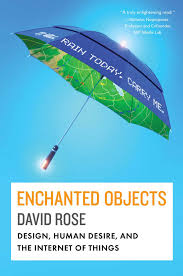 David’s vision of the future: whatever the device may do, it must be affordable, indestructible, easily used, and, when it makes sense, wearable. Lovable, too—his clever illustration of interactive medicine packaging are based upon faces that transform themselves. They’re happy when you’re doing the right thing, grumpy if you’re not.
 David dreams of on-demand objects, and objects that learn and respond to personal needs. Vending machines, for example, that customize their offerings based upon “a prediction of what the person will like.” He envisions “digital shadows” for objects—information associated with physical objects enhanced by digital projection.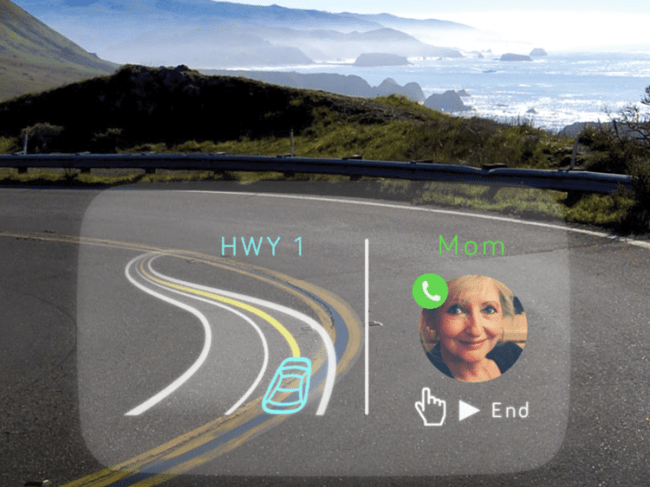

 Digital Insider