CES 2013: What Mattered and Why

Just after Christmas, the Consumer Electronics Show convenes in Las Vegas to showcase all that’s new for the coming year. Most of it is upgrades, retreads, and modest improvements over the past year’s stuff. Some of it suggests a new shape for the industry, and for the ways that we work, play, and communicate. Here’s a brief rundown on what might matter most:

  • The disk drive maker Seagate will soon offer a “local cloud” storage device that you can set up in your home or office. Local storage, easily reached via local wi-fi. IT professionals will recognize this as a NAS, short for Network Attached Storage. At about $250 for 4TB, the lesser configurations don’t save enough money to be worth your time.
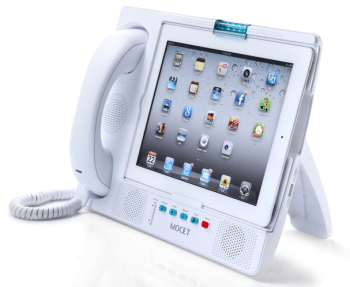
  • Expanded uses for phones and tablets. One shining example is the new MOCET iPad Communicator. Phones and tablets are extremely versatile. Adding capabilities beyond, say, a clock radio or external speakers, will become increasingly commonplace. Remember: you’re carrying a fairly powerful computer. Why not put it to use?
    MOCET

    To go to the site, click on the picture.

  • OLED is a video technology that allows for very thin screens–and flexible ones. The price of manufacture is dropping, so we’ll begin to see OLED screens enter the race between plasma and LED screens. Eventually, this organic (!) technology will win out, and become commonplace. (The “O” in OLED stands for “organic.)
  • Previously, I wrote about the new 4K screens. They’re beginning to be shown as demos.
  • Touch screens and gestures will begin to replace keyboards and remote controls. As the technology allows for greater precision, older ways of interacting with computers (and tablets) and with videogames and TV sets will shift our conception of an interface into the modern age.
  • Smart phones seem to be getting larger–more screen real estate is better for mail, web, games, and movies. Tablets seems to be getting smaller (the line between a small tablet and a big phone is becoming difficult to discern). Tablets are also becoming larger–imagine what you could do with a 20-inch portable tablet! Here, we’re starting to blur the distinction between a computer monitor, a TV set and a tablet. It’s tough to forecast where these trends are heading.
  • Samsung has become the Sony of the 2010s–an exciting company with innovation in every direction. The quality is there, too. But there are still lessons to be learned about user interfaces and design.
  • Very small storage devices are continuing to expand their storage dimensions. Kingston, for example, showed off a 1TB flash drive–larger than the popular thumb drives, but still quite portable.
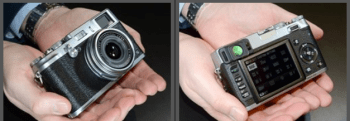
  • From DPReview's coverage, the latest Fujifilm digital camera. Click on the image to see their story.

    From DPReview’s coverage, the latest Fujifilm digital camera. Click on the image to see their story.

    It’s now a regular routine: cool new cameras introduced at CES. For a solid rundown, visit DPReview. I think my favorite stuff is the expansion of Fuji small-sensor line. These cameras look like the real think, shoot terrific images, and tend to be somewhat more intuitive in their interfaces. (More on these soon.)

  • Automotive electronics has always been a key aspect of CES. Sure, car stereos and car security systems remain center stage. Now that cars plug into wall sockets, the vehicles themselves are becoming digital devices. This time around, lots of cars as harbingers. Next time, I’ll bet we start seeing hybrid devices that confuse the definitions of bicycles, motorcycles, golf carts, and other short-range transportation devices.
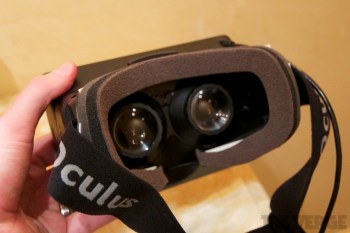
  • Oculus Verge

    To read The Verge’s story about the Oculus Rift, click on the image.

  • Your smartphone and/or your tablet will become a monitoring control center and remote control. You know how we’re beginning to program a DVR from afar? Or read date/time stamps on the foods in the fridge? It won’t be long before we all have a remote dashboard to tell us about the fuel in the car, the meds in the bathroom, when the last time the dog was walked, body fat, etc. add some robotic controls and digital life becomes even more interesting.
  • I’ve wondered why immersive video game displays have taken so long to gain traction in the marketplace. Now, it looks like the (Kickstarter-funded) Oculus Rift will change the way gamers see and experience the experience of game play. There’s good multimedia coverage in The Verge.

The Fourth Good Idea (The One That Works!)

Good idea #1 – On every iPad, Apple includes a slot for an SD card. That way, I can copy a file from my computer, insert it into the player without any fuss, and edit a document or watch a movie.

Didn’t happen.

Good idea #2 – Recognizing the error of its ways, Apple introduces a $30 accessory called the Camera Connection Kit. It includes two small white blocks, one of which allows the insertion of an SD card into an iPad. But only for transferring pictures. Forget about editing a Pages or Numbers file, or watching a movie.

Good idea #3 – Seagate introduces GoFlex, a lightweight, portable disk drive that connects, wirelessly, to any iPad. The secret is a wireless network created by the device; that’s how the connection to the iPad is made. The capacity is 500GB, a very healthy amount of space for all sorts of files. Unfortunately, Seagate’s interface technology proves difficult to use, and, at least for me, it seems to work less often than other devices. (Seagate has provided help, not once but several times. New Year’s Resolution: Since I love this idea, I will try again and get it right.) It costs less than $200.

AirstashGood idea #4 – Maxell introduces AirStash. It’s a small wireless network, and it worked the first time. There are three parts, well-integrated. The first is an app, clean and simple, just a list of files organized by file type (movies, etc.) The second in an SD card (up to 32GB). You insert the SD card into your computer, load it up with files, and plug it into the third part. That’s a device roughly the size of a large cigarette lighter. On one end: an SD card slot. On the other, well, nothing you need to make the connection (more on that in a moment). You find the AirStash network in the list of available wireless networks, make the connection, return to the app, and just watch the movie (or whatever it is you want to do). From time to time, you need to recharge the AirStash battery–that’s the third part, a USB plug that you insert into any computer or USB/AC adapter for the recharge.

My test device was loaded with several good films: I watched The King’s Speech and Inception, and both played flawlessly.

Sorry, but I can’t resist:

Good idea #5: AirStash is updated so that it can be used without shutting down the WiFi network that you usually use. Right now, that’s a flaw. I hope it will be fixed.

So, that’s the story. AirStash is a product that really works. And it’s simple enough that I was able to write an article about half as long as usual, simply because, well, this really is a simple product to use, and to explain. Whoever made this happen, good work! (And thank you for solving the problem that Apple never should have created in the first place!)

AirStash Phone

Here’s a look at the AirStash app for the iPhone. Simple, straightforward and intuitive.

It’s a Clean Machine

Spending too much time in the dusty bins of used record stores, I often buy “perfectly good” LPs for less than $5. It’s a bargain: terrific old Leonard Bernstein (or, if you prefer, Jethro Tull or Blondie) recordings for far less than their CD equivalents would cost, and far more fun than their digital file equivalents.

The Spin-Clean is a cost-effective ($79) way to bathe a vinyl record.

The Spin-Clean is a cost-effective ($79) way to bathe a vinyl record. Click on the picture for more infromation.

But old records are often dirty. And they’re not always easy to wash. For one thing, you don’t want to wet the paper labels (one on each side), so submersion is out of the question. This leaves the listener in the decidedly odd position of either dipping the vertical LP and spinning it in a trough, or wiping it ’round, which is both awkward and potentially damaging.

So what’s a listener to do?

Buy a cleaning machine.

There are several kinds. One involves a bin, and looks kinda awkward. Most people use a rectangular box with a vacuum cleaner inside (seriously!). In this category, the long-time industry leader is a company that I recall from decades ago: Nitty Gritty.

Nitty Gritty 1

The Nitty Gritty 1.0 is the lowest priced product in the company’s line. It contains a vacuum cleaner.

You’re looking at the least expensive Nitty Gritty machine, the Model 1.0. A quick tour helps to explain what this cleaning machine does, and suggests the options available on the more expensive models.

On the left, the low cylinder is, in fact, the top half of a sandwich. Lift the wooden part and you’ll find that it’s the top pad, and that the bottom pad is on the machine. Place the vinyl record in-between, and the pads cover the top and bottom labels. The rest of the record is exposed. And that takes us to the slot in the middle of the machine. It’s covered in velvet, because this is the place where the vinyl is exposed to a powerful vacuum cleaner that sits just below the slot. With this model, you hand-turn the LP by finger-control (there’s a slight indent in the top pad, just about visible in the photo). The remaining items are a wet solution (see below) and a small brush. And, over on the far right, there’s an on-off switch. For more on how it works, click here.

Does it work? Yes, the system works really well. A record that’s dusty will be cleaned, and much of the surface noise will disappear. Results are much improved with the application of the Pure 2 solution; 16 ounces will keep most listeners going for a year or two.

The Nitty Gritty products are well-made, and so, they’re not inexpensive. Budget $500 plus shipping and you’ll be fine with an oak-grained model or something equally attractive. For twice the price, the record turns automatically and the fluid is dispensed by the machine, not by hand. The product line is explained on Nitty Gritty’s website.

Is it worth the money? I guess that question can only be answered “yes” by someone who (a) frequently listens to vinyl; (b) believes that a $500 turntable is in the inexpensive / affordable range, and (c) has invested in a full-scale, grown-up stereo system. If you’re among those people, this would seem to be an essential accessory in an analog world, one that’s often overlooked, in part, because few people seem to know that such a contraption exists. It does, and for serious listeners, it’s a good investment.

For even more information, watch this video from someone who cares deeply, and knows a lot, about keeping records clean.

Watch This! – and Listen to Everything Differently!!

Julian Treasure spends a lot of time listening. What he hears is, often, different from you hear and I hear. He listens to environments, acoustics, classrooms, hospital rooms, offices, city streets, conference rooms, and other places where poor acoustic design and ambient noise make listening very difficult indeed.

He describes, for example, a cleverly designed modern school building with open-walled classrooms where, for the most part, students could not hear the teacher. He describes the stress levels associated with teaching due, almost entirely, to ambient noise, and their related impact on heart disease. He describes errors in hospitals due to high noise levels (twice as high as they were decades ago, which makes healing more difficult to achieve). He’s convinced that poor school performance is directly connected with poor behavior due to noisy, stressed environments.

He wonders whether the architects who design with their eyes ever use their ears.

And he does all of this in a marvelous–and fairly brief–TED Talk that everyone ought to watch. You’ll find it here.

And, for that matter, you’ll also find Mr. Treasure in several other TED Talks conveniently listed beside his 2012 video.


Soundbar vs. Surround

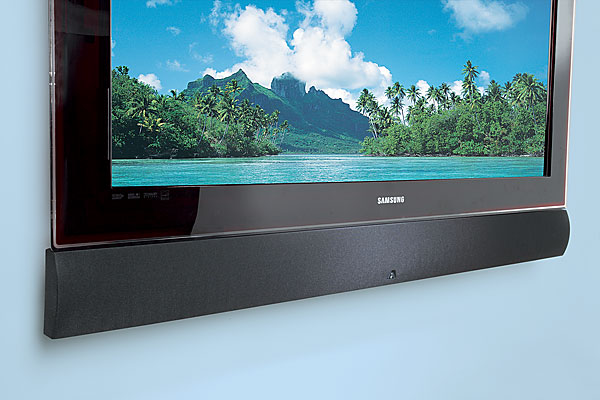
From the Crutchfield site (the image is your link), a look at an Artisan soundbar mounted just below a Samsung flat screen TV set. Although visually appealing, inexpensive and easy to install, soundbars don’t always play well with TV sets. What’s more their sound quality is outdistanced by even a modest surround sound system.

Roughly 4 out of 5 American households now watch television on a flat screen. A smaller number have made their new TV sets part of a full-scale home theater with a proper surround sound audio system. If you haven’t yet taken the plunge (many people do not, mostly because of the wiring and additional equipment required), consider a soundbar.

What’s a soundbar? It’s a long, slender box that’s meant to be placed, or mounted, several inches above or below your flat screen TV. Inside the box, you’ll find at least three loudspeakers: one on the left, one on the right, and one in the center. These easy-to-install setup effectively replaces the older idea of three standalone boxes (one for the left stereo channel, one for the right, one for the center audio channel used in a surround sound setup). Packaged as a single unit, the soundbar is less cumbersome, requires less space, and fits into any flat screen setup.

A typical setup is best enjoyed with at least three additional loudspeakers: a sub-woofer (to emphasize the sounds heard in the lowest portion of the audible spectrum), and a pair of rear speakers (to provide the same 3-D effect that you hear in movie theaters).

Polk Audio’s SurroundBar  (several hundred dollars) is not typical. Patented technology provides the 3-D effect without the addition of rear speakers. Yamaha’s more costly (nearly $2,000) solution, the YSP-5100,  does the job with more sophisticated technology to provide even better sound.

Many soundbars offer a wireless connection to a nearby sub-woofer. (Personally, I prefer wires because they’re easily hidden and more reliable).

It’s all a fine idea, at least in theory. In practice, the concept is new and often tricky in a real world setup. Most TV sets are not yet designed to work with a soundbar so there are conflicts and problems associated with volume adjustments and the visual feedback that a typical on-screen volume control provides. CNET reports other issues that should be familiar to you before your purchase a soundbar.

Seems to me, the soundbar falls into the category of “good idea, but it needs work.” Personally, I prefer the superior sound and slightly more complicated setup of a small surround sound setup. One small loudspeaker left and right, one in the center, and you’ve spent about $300 comparable to a typical soundbar, but the stereo separation will be far better, and the hassles will be fewer. You can buy a decent stereo surround sound receiver for under $200. (If these prices are high, you can buy good stuff used at Audiogon or from similar sources. A subwoofer can be purchased at reasonable prices, too, and used gear in this category is often a safe bet.

Easy-to-Use Audio Studio-to-Go

The Zoom H4n has become one of my favorite tools, but most people have never heard of it, or seen it, or even know that such a thing exists.

Zoom makes portable audio recorders–pocket sized recording studios about the size of Sony’s original Walkman, but so much more versatile. This is the ideal companion for a digital camera or camcorder–with far better sound, and far more control over the recording process. It’s ideal for recording of music rehearsals, recitals, and performances. It’s handy for audio interviews, and for the recording of meetings. With proper cabling and a phono pre-amp, you can digitize your vinyl LPs. It’s a useful four track audio recorder, so you can use it to make a record. And, of course, you can use it to listen to music, speeches, podcasts, any audio recording with remarkable fidelity because everything is digital.

Let’s take it from the top…and the bottom.

On top, there is an X-Y (crisscrossed) pair of small microphones. The quality is good, the sound is clean, and they can each be adjusted to cover either a 90-degree pickup area (for more intimate situations or to reduce unwanted noise), or a 120-pickup pattern (to pick up a wider area). Or, plug one or two professional microphones into the bottom (1/4 inch phono plugs or XLR connectors). Or, plug an 1/8 inch mini stereo cable into the mic jack on the back). Control the input level by watching digital VU meter on the small golden screen (backlit when necessary) and adjusting the rocker switch with one finger during the record session.

Here’s a closer look at the screen. No, it’s not iPhone quality, but yes, it’s functional. Time code runs on top, file number next, then sound levels. Buttons below allow track selection, and in another mode, allow selection of files and formats. Buttons are small, screen is small, but everything works fine in the field.

You can choose to record in either .wav (high quality) or .mp3 (low quality, but smaller file sizes) at various sample rates. In multitrack mode, you can record on each of up to four tracks, or play back on up to three of them. Buttons are small, but overdubbing is within the capabilities of this little machine, and that’s useful if you are recording your own tracks for a music demo, for example, because you can listen to your primary vocal while laying down a harmony track, for example, or listen to the drum track while playing your saxophone).

For more sophisticated work–and an easier time–use the Zoom H4n as the interface between, say, your microphones and a more robust Digital Audio Workstation (such as Logic Pro, Garage Band and Samplitude), but, sadly, not ProTools, which requires only M-Audio devices.

Need a metronome or a guitar tuner? They’re built-in, too.

You will record on an SD card. Power comes from either an AC cable or handy AA batteries. You can plug the Zoom H4n into your computer via a USB micro connector. If you need more battery time, flip into “stamina mode” which shuts down some features and dramatically increases recording time (6 hours in normal mode, 11 in stamina mode).

 The Zoom H4n is all so well thought out! I wish every product was as thoughtfully designed!

Recently, I used the Zoom to record audio interviews while recording video interviews on the Olympus PEN EP-3 digital (still) camera. I placed the Zoom just out of frame, and later, in editing, matched the audio track from the Zoom with the EP-3’s video and audio tracks (once synchronized, the Olympus audio track was muted, and subsequently, replaced). Under the right circumstances, this is a better solution than a wired external microphone or a finicky wireless microphone. What’s more, the Zoom provides broadcast-quality results. The sound quality is fabulous. And because the Zoom is small, it fits into my small shoulder bag alongside the small micro four thirds Olympus PEN EP-3. This is a complete HD quality remote shooting rig that I can easily carry in a shoulder bag with plenty of available space for an iPad, wallet, cell phone, ear buds, and (much) more. Add a 32GB SD card, and I can carry hundreds of record albums with me, just in case I feel like listening, not recording.

There is so much more. If you’re intrigued, simply download the instruction manual.

The Zoom H4n price: under $300. And, for $199, you can enjoy a similar device with reduced features with an H2n (seems less sturdy to me, though). And if that’s still too much, Zoom offers a $99 alternative, model H1.

My 500-Year-Old CD

Day by day, there’s not much that we encounter from the year 1611. Shakespeare was busy writing The Tempest. Henry Hudson died. Marco de Dominis published a scientific explanation of rainbows. A year later, tobacco was first planted in Virginia, and the Dutch started using Manhattan Island as a trading center.

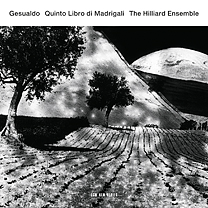
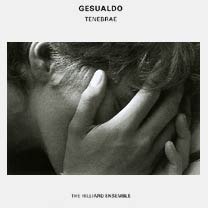
In 1611, Carlo Gesualdo wrote some of the most uplifting music for voices in the history of the medium, a book of madrigals. This creative work did not come easily. Count Gesualdo of Venoso’s story involves his instigation of the gang murder of his own wildly unfaithful wife (he plunged the sword into her body, and not just once, shouting, repeatedly, “she’s not dead yet!”), then moves through remarkable bouts with depression and abuse, including the dozen men to beat him daily (I’ll spare you details, but you can find them here and in lots of places on the internet). As crazy stories of composers lives go, he’s the hands-down winner. His story is deeply disturbing. His music is miraculous. Witness his captivating Tenebrae, one of the classic items from the formidable ECM catalog, first released in 1991, and consistently astonishing, a record I return to on a regular basis, a record that I recommend with little hesitation to any serious listener. And now, for 2012, witness the same Hilliard Ensemble treating five hundred year old music as if it was contemporary art. The newer disc is called Quinto Libre di Madrigali, and it is fascinating. The title and notes explain: this is the fifth of six books of madrigals, this one created late in the composer’s life. From the liner notes: “The whole collection constitutes a gallery of dramatically lit portraits of human emotions with a heavy emphasis on the extremes of joy and despair.”

There are six voices: a soprano, a pair of countertenors, a pair of tenors, and a baritone. (Soprano Monika Mauch and second countertenor David Gould frequently sing with the four-man Hilliard Ensemble; on this recording, Mauch is stunning.) All six singers sound like angels, and if you close your eyes, it’s easy to imagine these voices climbing up a heavenly spire in search of their lord. They sing in unison, they sing in pairs, they sing in harmony, they sing alone. They climb. They intertwine. They rest and they bounce. They exchange leads almost as if they contain the souls of jazz musicians to come. In musical terms, Gesualdo’s music is often described as “deeply chromatic”–a madman coloring with the brightest possible pigments and an extraordinary level of precision, probably based upon some sort of serious mental illness that caused his creative light to burn just a little too brightly. Two years after he composed these madrigals, he was dead.

Gesualdo’s work is not background music. It is music that captures the imagination, and elevates the spirit in a primal, deeply human way. There are no musical instruments, only voices, and open space.

This is not the best choice of music to play through computer speakers. ECM sets high standards for each of its recording projects, and this one, in particular, demonstrates the care that must be taken in order to record a wide range of vocal performances. The precision, the soaring thrusts, the extraordinary quiet passages, the contemplative quality of the whole, all of this has been meticulously prepared for your enjoyment. Listening through inferior equipment is like trying to contemplate the Mona Lisa by looking at a postage stamp. Best to listen through quality headphones, or on a good stereo system. The CD sounds a whole lot better than a computer file with reduced clarity and range. Trust me on this one: buy the CD, and allow yourself the time and space to listen with your whole being.

The Hilliard Ensemble, plus two additional vocalists. If you’re intrigued, be sure to explore the ensemble’s work with composer Arvo Pärt as well.

Nico? On the top of the list?

On newsstands until July 25, 2012

Number 13 on the list of all-time best albums, according to Rolling Stone, is the 1967 Verve Records release, The Velvet Underground and Nico. It’s also the number 1 album on The  Observer’s 2005 list, “The 50 Albums that Changed Music,” which is, in fact, more interesting than the new Rolling Stone standalone $11.95 magazine now on newsstands.

I decided to explore the web in search of other top 500 lists, and their kin.

My very favorite list comes from the British music magazine, The Wire because it discards the arbitrary distinctions and deals with music, not categories. So we’ve got  work by Igor Stravinsky, Bessie Smith, Louis Armstrong, Jelly Roll Morton, Cecil Taylor, Lennie Tristano, Oliver Messaien next to the inevitable Stevie Wonder, Joni Mitchell, the Rolling Stones, the Beatles, and Marvin Gaye.

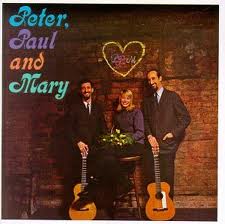
I especially like The Observer list because it acknowledges world music, beginning with their #24, Youssou N’Dour’s Immigres, and because each of the list’s entries are explained in a clever way: “Without this … N’Dour wouldn’t have met Peter Gabriel, there’d have been no African presence at Live 8. In fact, ‘world music’ would not exist as a section in Western collections.” Similarly, the Fairport Convention gets its due for introducing folk music into the British rock scene as #45, Liege and Lief, an absolutely lovely album with a lineup that includes the spectacular Sandy Denny as female lead vocalist. (Similar due should have been paid to Peter, Paul & Mary on the American / Rolling Stone side, as the celebrated Bob Dylan’s career (he occupies RS slots #4, #9, #16, #31… ten slots in all) would have mattered less without the spectacular success of their top ten single versions of Dylan’s “Blowin’ in the Wind” and “Don’t Think Twice, It’s Alright.”

The Virgin 1000 list is fun because it is massive. And, sure enough, there’s that critically acclaimed Nico album in the top 15, with Miles Davis’s Kind of Blue nearby (these lists don’t quite know what to make of jazz, or country, or most of the other genres–no bluegrass, a bit of gospel, etc.), but every list seems to include Kind of Blue and John Coltrane’s A Love Supreme. For those who wish to explore jazz beyond the limited view of Rolling Stone and other mainstream music publications, one good starting place is an Amazon list of jazz recordings, whose top ten includes Ella Fitzgerald, Dizzy Gillespie, João Gilberto, Charles Mingus, and Thelonious Monk. An equally worthwhile list of world music recordings is also found on Amazon, a category mostly ignored by the RS list, save for Bob Marley albums, and, happily, The Indestructable Beat of Soweto, a stunning collection of South African music from the mid-1990s. On that Amazon world music list, I’m not sure that I would have placed Fela Kuti’s adventure with Cream drummer Ginger Baker at #3, but I’m sure glad to see the Bulgarian State Television Women’s Choir hanging out near Ali Farka Toure, Gal Costa, and Huun-Huur Tu, all artists with spectacular albums and names that most Americans have never heard before.

The top 200 albums on RS’s list also confused me because just three of those top 200 were made in the 21st century (Radiohead’s Kid A, Kanye West’s Late Registration, and Arcade Fire’s Funeral), just five if you go up to the top 250 (add: Green Day’s American Idiot and Eminem’s Marshall Mathers LP). Sure, there are the weird choices–that happens with any list like this–so The Zombies’ Odessey and Oracle claims slot #100, and  Quicksilver Messenger Service’s 1969 album, Happy Trails, makes it to #189.

And you know that I’m ending this article with my list of albums that Rolling Stone missed, but should have included:

  • T-Bone Walker – Complete Imperial Recordings
  • Folkways: The Original Vision – mostly songs by Leadbelly and Woody Guthrie
  • The Essential Pete Seeger – or any of the various compilations of his work for Columbia Records
  • Chet Atkins – Guitar Legend: The RCA Years
  • Peter, Paul & Mary – Moving or Album 1700 or Ten Years Together
  • Harry Nilsson – Harry and also Nilsson Sings Newman
  • Larua Nyro – Eli and the Thirteenth Confession, Gonna Take a Miracle, and the spectacular, surprising Time and Love 3-CD collection
  • Blood Sweat & Tears – their second album
  • John Sebastian – Best of, or his first solo album, John B. Sebastian
  • Billy Joel – Piano Man (among some of his best character / story work)
  • Elton John – his first album, as sweet as they come
  • Weather Report – the jazz group’s first album, self-titled
  • Van Morrison – Tupelo Honey
  • The Traveling Wilburys – their first album

Sorry my list isn’t longer or more interesting (kinda heavy on the late 1960s early 1970s–just as the RS was, in fact!). I’m writing away from home. More later on this.

A Quality Camera You Won’t Leave at Home (4 of 4)

Continuing the series about small, high-powered digital cameras, our discussion finishes up with video. And this is the part that confuses me most. These cameras shoot very pretty pictures–high-definition, widescreen, beautiful image quality. But none of these cameras allows the user to control or monitor the audio associated with that video.

Audio Rant

Let me rant on that first, and then, we’ll talk pictures. Each of these cameras can record audio with a built-in microphone, usually a stereo microphone. What’s missing: an audio meter so you can see whether the audio being recorded is too loud or too soft, a jack for an external microphone, and a jack for an external earbud or headphone to monitor the audio as it is being recorded. In comparison with the photo and video imaging in these cameras, these audio capabilities are very simple. But they are largely absent.

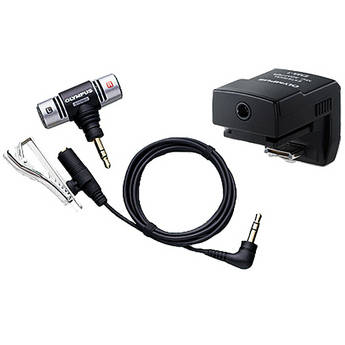
This Olympus device adds a microphone via the camera's flash shoe. It costs $60 at B&H, the source of this photo.

Olympus offers an $89 microphone and cable (SEMA-1) that slides into the hot shoe of the PEN cameras, and it works nicely, but the cable is short, and because it’s connected directly above the lens, the cable finds its way into the shot whenever the camera is turned or manipulated. So what we have is a high-quality digital audio recorder that’s useful only to record “wild sound”–the ambient sound on location. To record sound that’s comparable in quality to the video side, you must record audio separately, on a standalone digital recorder, and then match the audio and the video, on separate tracks, in your editing software. That’s possible, if you have time and patience, and a good set of editing skills. (This will be the topic of an article in the near future.)

End of rant.

Very Good Video

On the picture side, the cameras are very, very good good. Even the $499 Olympus E-PM1 can record up to 29 minutes of  magnificent 1080 60i HD video by just pressing a button. The newest Olympus E-M5, scheduled for April, takes a leap forward by recording H.264 .mov files, making capture and editing easier, and mostly eliminates the dreaded “jello effect” in which vertical lines wobble during a pan of even moderate speed–an improvement over current PEN cameras.

This rather ugly picture is part of a rather clear video explanation of the jello effect.

This is not to minimize the astonishing video image quality available from these cameras–perhaps more astonishing because motion video is not the primary purpose or function of these cameras. Certainly, we’re seeing professional videographers use their DSLRS, with special grips, to record television programs–digital photography has really changed the way we think about video production. And, if you place a mirrorless camera on a tripod, you can achieve stunning results. Even hand-held, with image stabilization, automatic exposure, and automatic focus, the Olympus and Panasonic cameras can do great things.

The same is true, with varying degrees with success on the focus side, and in contrasty situations, for competitors. Of course, you can use just about DSLR to shoot terrific still pictures and still video. And, in most cases, you’ll be able to do so with an earplug, an external microphone, and much more control over the video as it is being recorded. But those cameras are bigger and heavier than their mirrorless counterparts.

Summing Up

If you want to own a full-featured digital camera that takes great pictures and offers every conceivable feature, buy yourself a DSLR. You can buy a very good one, perhaps the Canon EOS Rebel T3i with an inexpensive 18-135mm lens, with an 18 MP APS-C sensor for just over $1,000.

For me, this is a camera that’s fun to use, fun to own, and likely to leave home only sometimes. It’s just too big and too heavy for me to carry along with me. Certainly, I would bring it special events or when I feel like spending an afternoon taking pictures.

I would be more likely to carry something like the new Canon G1X ($799), which offers a 14 MP sensor that’s slightly larger than the one used by micro four thirds cameras, but smaller than the typical APS-C standard. It’s a wonderful small camera, a bit heavier and bulkier than it appears to be, with an optical viewfinder (old school: you simply look through it, like a telescope) with plenty of manual control. The lens deflates my enthusiasm: it’s a zoom, 28-112 mm with not much of a large aperture: f/2.8-5.8. If this camera was offered with a normal prime lens and a maximum aperture of, say, f/2.0, I’d be all over it. Still, this is a camera I want to know more about.

Essentially, I want the equivalent of a good DSLR, but I am not willing to carry around anything that’s bulky, large or heavy. This is why mirrorless cameras intrigue me. So far, I believe the Olympus E-P3 offers the best combination of solid construction, good design, superior image quality, and, most important of all, very good prime (non-zoom) lenses at reasonable prices (and, zoom lenses, too). I love the fact that these cameras (like their DSLR siblings) shoot high quality video as a kind of bonus. And as much as I have come to enjoy the EP-3, I am very intrigued by the new-ish Panasonic GX1, and even more intrigued by the E-M5, the first new Olympus for 2012.

For a complete rundown on all mirrorless cameras, circa December, 2011, click here.

And, BTW, here’s a really clear review of the E-P3.

—–

Here are the links to the rest of The Quality Camera That Goes Everywhere:

Part 1: Lens

Part 2:  Sensor

Part 3: Body

Secrets of Memory – Exposed!

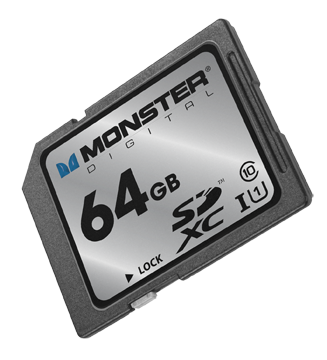
I just received a piece of plastic, about the size of a postage stamp, containing as much memory as a MacBook Air: 64GB. And that made me wonder: is the 64GB on the Monster Digital SD XC USH-1 Class 10 Vault Series card (got all that?) the same as the  64GB of flash memory inside the Air?

Well, no, it’s not. Not according to Mike Ridling and Mark Morrissey, the President and Head of Storage Technology at Monster Digital.

We started at the beginning: spinning disks. Over the decades, the disks became smaller, and when Apple used the technology in the iPod, 1 in 3 units failed. So, Apple went shopping for a better solution.

At the time, flash drives had been around for about five years, and they were popular, but limited in terms of storage capacity. Camera manufacturers were experimenting with ways to store large number of images in a non-volatile format (that is, when the power goes off, the stored material remains). Then, Apple adopted flash memory for their portable devices–and the market shifted from spinning disks to non-volatile, highly portable, small-sized memory.

What’s inside that SD card? A tiny controller that routes data into and out of the card, and organizes the data on the card’s silicon chip so that it’s accessible and so that the card lasts as long as possible (but not forever).

About six years ago, the Secure Digital Association (SD = Secure Data) standardized the metrics for both memory capacity (64GB) and access speed (Class 10). In fact, the access speed matters–but the information is not always easy to find in your device’s instructions. If you own a big DSLR, buy Class 10 cards. Ditto for any camcorder that costs more than, say, $600-700. A Class 6 card is sufficient for a lesser camcorder or a more modest digital still camera. If you’re using the card in a smart phone or a low resolution camera (say, 2-3 megapixels), then a Class 2 is all you need. Of course, Class 10 cards cost more than Class 2 cards.

If you require higher transfer rates, you’ll want a UHS-1 compatible card, but note that not all of these cards are compatible with all devices. (Monster emphasized that their card works with a lot of different devices.)

Right now, the largest available SD cards are 128GB, but we’ll see 256GB in a year or so. Somehow, through the miracle of engineering, the cards are able to store more data but they don’t become larger (more data is stored within the available space). This means we can expect compatibility for a longer period of years.

Now what about the 64GB SD card in the 64GB MacBook Air? Can I simply double my storage capacity with the purchase of a $200 memory card? Well, sort of. The SATA3 solid state drive in the MacBook Air transfers data at 6GB per second. How does the SD card compare? Well, it’s slower. A lot slower: 80MB per second. This is why the SD card is better suited to, say, storing documents and transferring documents on the Air than, say, running Photoshop. In fact, the 64GB and it’s big sister, the 128GB are ideal for storing either almost 25,000 photographs, nearly 11 hours of HD video, over 1,000 hours of digital music. It’s ideal for use in an HD video camera, for example.

I did ask about whether technology was changing quickly enough to affect my thinking about the next generation Air (coming in May, we think). The answer came as something of a surprise: a new external drive for the Air (and other devices) that would plug into the new Thunderbolt port. Offering a transfer rate of about 10GB per second (1/6 of the internal drive, but a heck of a lot faster than the SD card), this is probably the next step in portable memory for portable computers.

And what about iPad storage? Yeah, it’s kinda messy. Apple really didn’t design iPads for external storage, so the solutions are workarounds. That probably won’t change in the future.

So, I’ve learned to use terms such as “transfer rate” and “Class 10” with some knowledge that I lacked yesterday. And, I’ve gotta say, I have a soft spot for Monster. So, thanks to the two executives who helped me to navigate this technology.