A Quality Camera You Won’t Leave at Home (2 of 4)

I took this picture with an Olympus PEN camera because it was small enough to tote on a day in NYC. I left my bigger camera at home. Somehow, I always do.

For most photographers trained in the 20th century, the universal standard was 35mm film. The size of the negative: about 35mm wide, and about 24mm high, or, about 1 inch by 1.4 inches. Serious professional photographers preferred larger negatives, and the 120 film format remained (and remains) popular: here, the negative is 2 1/4 inches square, or wider, several times larger than the 35mm film popular with consumers. Larger negatives offer superior image quality, but they also require larger and more costly cameras and lenses.

Digital Image Sensors

So film is old-school, Kodak is gasping for survival, and everyone’s shooting snapshots with their iPhones using a 5 megapixel sensor that’s the size of a your smallest fingernail. And, for most purposes, including posting pictures on Facebook and printing snapshots, the image quality is adequate–as long as you’re shooting in place that has enough light, and not too much contrast.

What’s a sensor? It’s a flat surface filled with a great many small light-sensitive receptors. There are two popular designs: CMOS and CCD. The difference between them is complicated, and explained here. http://en.wikipedia.org/wiki/Image_sensor

ISO and Sensitivity

In the film days, 400 ISO (or, if you’re older, ASA) film was four times as sensitive as 100 ISO film. In other words, using 400 ISO film instead of 100 ISO film offered benefits similar to using a lens with a large maximum aperture, perhaps an f/1.4 lens in place of an f3.6 lens.

The comparison is not a perfect one, though. Increased sensitivity often comes with increased grain, reduced detail, and lesser color quality / color clarity. Cameras that cost more than a few hundred dollars are fine up to about 800 ISO, but then, the image degrades. Newer sensors do a far better job in the 800, 1600 and even 3200 ISO range than older models. This is the push: buy a camera with better “low light sensitivity”–that is, with improved image rendition in the higher ISO ranges–and your 2012-vintage 16 MP camera will produce better images than my 2010-vintage 12 MP camera with its ancient two-year-old sensor design.

Megapixels and Sensor Size

Although camera marketers have latched onto megapixels as a way to justify different camera prices (a 10 MP camera costs more than a 5 MP camera), the number of megapixels on the image sensor should not guide you, at least not from the start.

Instead, focus on the size of the sensor. A “full-frame” sensor is the size of 35mm film–and requires a large, professional-quality body and accompanying lenses. For example the new Canon EOS 5D Mark III is a $3,500 camera that weighs about two pounds and occupies about 90 cubic inches, without a lens.

By comparison, an Olympus E-P3 uses a micro four thirds sensor that’s about 40% of the size, but it costs less than $1,000, weighs 11 ounces, and occupies less than 20 cubic inches, also without a lens.

In the real world of my life, I will not carry five pounds of camera, lenses and accessories with me everywhere, but I will carry a pound. If the image quality is acceptable.

Nikon, Sony, Fuji, and the Rest

In fact, several different sensor designs are becoming popular.

You’ve probably seen commercials and print ads for the Nikon 1 system, for example. It’s based upon a CX sensor format that’s about a quarter of the full 35mm frame. Image quality is good–and with the small sensor, Nikon has been able to manufacture small bodies (as small as reasonable ergonomics allow), and small lenses.

Sony’s small system is called the NEX, and they’ve already been through several generations their APC-S sensor system. The sensor size is somewhat larger than the micro four thirds standard, but somehow, this has resulted in an awkward combination of slightly larger lenses and slightly smaller bodies. The standard zoom, priced at $299, weighs about 7 ounces, but it’s about 2 1/2 inches wide and tall. This is a reasonable size for the lens, but the body is about 25% too small to balance the whole contraption. Fact is, APC-S requires a slightly larger body–16 cubic inches isn’t enough. Samsung, with its NX200, offers a seemingly more bulky body for an APS-C sensor, but, alas, there is no APC-S collective for that format, so Sony lenses are not compatible with Samsung lenses.

Fuji’s upcoming X-Pro 1 also uses a proprietary APS-C sensor for a wonderful new interchangeable lens system, but again, the larger sensor is associated with serious weight – the camera weighs a pound, occupies nearly 30 cubic inches without a lens, and operates (at a very high level) with (for now) just three proprietary lenses.

Panasonic and Olympus

Neither Panasonic nor Olympus are among the very largest camera makers, but they have benefitted from working together. By year end, there will be about 18 lenses in their micro four thirds format, each of them fully operable with significant advances in their micro four thirds sensor technology.

In fact, Olympus got off to a very good start with its earliest PEN cameras. Early on, the company’s engineers and management understood the importance of rendering accurate flesh tones, as well as a neutral, pleasing color palette. (Fujifilm and Nikon have also excelled in this quest.) By combining this special feature with the small size made possible by the micro four thirds format, PEN cameras quickly became a popular choice for serious photographers.

At this moment in 2012, Panasonic offers an extraordinary little micro four thirds camera, the GX1 ($699) that weighs just 11 ounces, occupies less than 20 cubic inches, and offers very impressive image quality with a 16 MB sensor. It’s filled with nifty features that will be addressed in the next article). This camera’s small size and wide array of available lenses and accessories makes it very appealing.

And yet, many photographers seem to prefer the slightly older Olympus E-P3, the current top-of-the-line PEN camera. It costs more ($899), and offers only a 12MB sensor, but the images are consistently excellent. This is not due to the number of megapixels, but instead, it is due to the right combination of engineering, aesthetic decisions during the design process (incorporating both lens and sensor design), and a corporate culture (a culture that has apparently remained intact despite gargantuan financial issues at the Board level).

This moment in 2012 (I am writing on the day after St. Patrick’s Day) is about to change.  Olympus is reading its small 16 MP camera, the E-M5, and a new Panasonic GF-5 is also on its way.

The Whole Package

Of course, it’s not just the sensor and it’s not just the lenses that make a camera or camera system. It’s the overall design philosophy, most often captured in the design of the camera body. That’s what’s coming up next.


Part 1: Lens

Part 3: Body

Part 4: Video

A Quality Camera You Won’t Leave at Home (1 of 4)

It's not about cameras, it's about making pictures. And you can't make a picture if the camera is too heavy or too cumbersome to bring along with you. On a recent visit to NYC's MOMA, I took pictures of objects and paintings that I wanted to know better. With PEN in shoulder bag, I took pictures in one of the world's great museums--something I would never have done with a heavier camera because that camera would have remained at home.

For most of photography’s history, there have been two types of cameras: snapshot cameras and serious creative tools. The digital revolution has obscured the boundary line with an immense number of features and over 500 different digital camera models, but three fundamentals remain.

First, you need a good lens to take a good picture.

Second, you need a camera whose construction won’t let you down.

Third, you need the best possible surface to record the image.

For me, there’s a fourth. I need a camera that isn’t too large or too heavy for me to carry almost everywhere I go.

And for you, there may be a fifth. How good are the camera’s video capabilities?

In this article, and several to follow, I’ll look at each of the fundamentals and, hopefully, encourage you to buy the best possible camera for your unique personal needs. Much of the information in these articles will focus on a system designed by Olympus cameras, but I will cover other systems, too.

Buying a Lens

Whether a lens is bought as part of the camera (common on point-and-shoot cameras), or removable (as on DSLR cameras), your first decision is whether that lens ought to be a zoom lens.

Certainly, a zoom lens is convenient and versatile. Often, a zoom lens is inexpensive. And, more often, you simply have no choice because the camera and the lens are permanently attached to one another.

Let’s use the Olympus PEN system as our example. Each of the PEN bodies is offered with an inexpensive “kit” lens as part of a discounted package: in this case, a 14-42mm 1:3.5-5.6 lens. The PEN system is based upon small cameras and small lenses–an advantage we’ll discuss later on–in the land of 35mm cameras, this lens would be a 28-84mm lens, covering wide angle, normal and telephoto focal lengths. That’s useful, and typical of kit lenses. So, too, is the aperture: a lens with a 3.5-5.6 maximum aperture is not designed to shoot in dim or low light situations. This is a typical disadvantage for kit zoom lenses–and it’s a show-stopper for me. Here’s why:

Given the choice of a lens with a wide opening–designed to shoot in low light–or an accessory flash that adds bulk, requires batteries, and smoothly illuminates only a limited area–I’ll choose the lens every time.

And, I’ll make it a prime lens, not a zoom. Why?

Three reasons. First, I must think about the image, my position, the framing, the composition, and the appropriate tool to create the image. Second, the maximum aperture is likely to be larger. Third, the image quality is likely to be better: sharper, clearer, with better color rendition and far less distortion.

So let’s have a look at some Olympus PEN lenses. There are eleven in the current product line, with several more coming this spring, and there is full compatibility with a dozen more in the Panasonic catalog, all related to a new-ish photographic standard called Micro Four Thirds that will be explained later in these posts.

Remember: the kit lens is 14-42mm 1:3.5-5.6 lens, and if you bought it outside of the kit, it would cost $299. Instead, I would buy one wide angle and one telephoto lens.

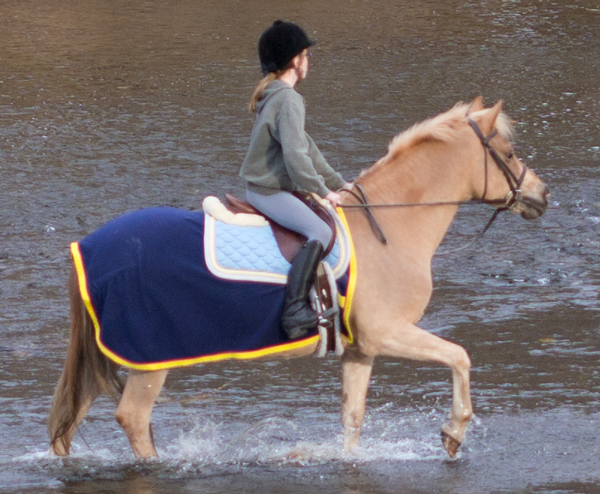
The subject was 164 meters away from me. The image was shot with a short telephoto lens (see below), the Olympus 45mm (a 90mm equivalent).

Although the image is not absolutely perfect, I was impressed by the detail on the horse blanket, the horse's muscles, the water falling off the hoof, and the overall clarity of the color. Remember: this was shot from quite a distance. This is a crop from the above photo. Yes, there's a bit of fringe distortion around the yellow, but remember you're looking at an enlargement of over 500%--the equivalent of a 4x6 inch print blown up to 20x 30 inches. Not perfect, but impressive.

Short Telephoto

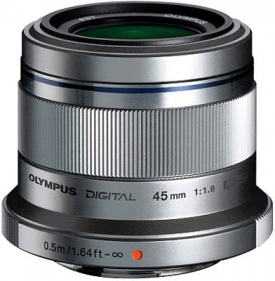
The Olympus 45mm lens for micro four thirds is only about 2 inches wide and high.

Instead, I would spend a little more for OIympus’s 45mm 1.8 lens, a 90mm equivalent designed for portraits (a shorter lens distorts facial features), and to pull in landscapes that are a bit far off. It costs $399.

I’ve read a lot of test reports about this lens (you should, too, before you buy any lens). This one is typical.

 The Olympus M.ZUIKO DIGITAL 45mm f/1.8 is a lens that makes sense because it’s small, useful, and excellent. The important center resolution is already on a very good level straight from wide open aperture and only the corners are somewhat softer here. The quality is very high across the image field when stopping down to f/4. Vignetting, lateral chromatic aberrations as well as distortions are all well controlled and not relevant in field conditions.

Short Wide Angle

I’ve been using OIympus 17mm f/2.8 wide angle lens quite successfully, and, generally, I find it to be excellent. In doing my research, I’ve found web reviews with grades in the B or B- range. Panasonic’s 20mm f/1.7 may be a better choice but it costs a bit more and it’s closer to a normal lens (50mm lens in 35mm camera lingo) than a wide angle. The Olympus 17mm lens costs $299, and the Panasonic 20mm lens costs $399. Both are “pancake” lenses–less than an inch thick. In fact, the Olympus 45mm lens is less than 2 inches thick.

Shorter, and Longer

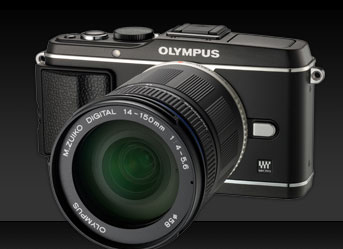
Here's an E-P3 with a longer zoom lens--it maxes out at 150mm, or, in 35mm lingo, 300mm (long enough for wildlife, not long enough for baseball).

For most people–that is, most people who are serious about photography–these two lenses will serve just about any purpose. You can go wider with Olympus’s 12mm 2.0 lens, but it costs $799. You cannot go deeper with a prime lens; instead, you’ll need either Olympus’s remarkable 75-300 f/4.8-6.7 for $899, and if you do, you’ll be thankful for the PEN system’s built-in image stabilization feature, again discussed later on. Take a moment here: that’s a lens that, in 35mm terms, gets up to 600mm, remarkable reach for a lens that weighs less than a pound and is less than 5 inches long. Here are some sample images.

Speed and Weight

At the risk of repeating myself, I consider speed and weight to be critical factors for my lenses.

Speed matters–that is, the largest available aperture matters–because I can shoot in a wider range of lighting situations with a faster lens. I much prefer a 1.8 lens to a 3.5 lens because a 1.8 lens allows me to shoot with HALF as much available light (3.5 divided by 1.8 is, roughly, 2).

Weight matters, and so does size. I’m not a professional photographer, but I do like to carry a camera with me. Olympus’s 45mm lens weighs 116 grams, or about 4 ounces, and their 17mm weighs 71 grams, or about 2.5 ounces. For less than 7 ounces, I’m carrying a relatively complete photographic kit, one that offers high quality images, solid and reliable design, and almost no strain on my shoulder or neck. In theory and in practice, this turns out to be a very good idea.

Other Options

As we’ll explore in the next post, the Olympus-Panasonic effort in micro four thirds technology is paralleled in a Sony system called NEX, a Nikon system called Nikon 1, Fuji with its X system, and several others. Each is based upon a particular image sensor design, and that begins our next chapter, which covers not body design (as you might expect) but instead, the 21st century equivalent of photographic film. Stay tuned.


Part 2:  Sensor

Part 3: Body

Part 4: Video

Secrets of Memory – Exposed!

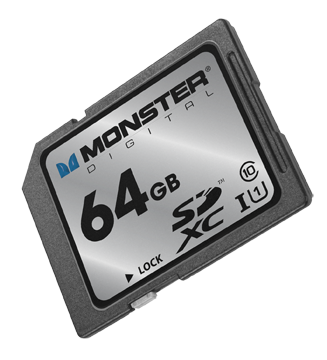
I just received a piece of plastic, about the size of a postage stamp, containing as much memory as a MacBook Air: 64GB. And that made me wonder: is the 64GB on the Monster Digital SD XC USH-1 Class 10 Vault Series card (got all that?) the same as the  64GB of flash memory inside the Air?

Well, no, it’s not. Not according to Mike Ridling and Mark Morrissey, the President and Head of Storage Technology at Monster Digital.

We started at the beginning: spinning disks. Over the decades, the disks became smaller, and when Apple used the technology in the iPod, 1 in 3 units failed. So, Apple went shopping for a better solution.

At the time, flash drives had been around for about five years, and they were popular, but limited in terms of storage capacity. Camera manufacturers were experimenting with ways to store large number of images in a non-volatile format (that is, when the power goes off, the stored material remains). Then, Apple adopted flash memory for their portable devices–and the market shifted from spinning disks to non-volatile, highly portable, small-sized memory.

What’s inside that SD card? A tiny controller that routes data into and out of the card, and organizes the data on the card’s silicon chip so that it’s accessible and so that the card lasts as long as possible (but not forever).

About six years ago, the Secure Digital Association (SD = Secure Data) standardized the metrics for both memory capacity (64GB) and access speed (Class 10). In fact, the access speed matters–but the information is not always easy to find in your device’s instructions. If you own a big DSLR, buy Class 10 cards. Ditto for any camcorder that costs more than, say, $600-700. A Class 6 card is sufficient for a lesser camcorder or a more modest digital still camera. If you’re using the card in a smart phone or a low resolution camera (say, 2-3 megapixels), then a Class 2 is all you need. Of course, Class 10 cards cost more than Class 2 cards.

If you require higher transfer rates, you’ll want a UHS-1 compatible card, but note that not all of these cards are compatible with all devices. (Monster emphasized that their card works with a lot of different devices.)

Right now, the largest available SD cards are 128GB, but we’ll see 256GB in a year or so. Somehow, through the miracle of engineering, the cards are able to store more data but they don’t become larger (more data is stored within the available space). This means we can expect compatibility for a longer period of years.

Now what about the 64GB SD card in the 64GB MacBook Air? Can I simply double my storage capacity with the purchase of a $200 memory card? Well, sort of. The SATA3 solid state drive in the MacBook Air transfers data at 6GB per second. How does the SD card compare? Well, it’s slower. A lot slower: 80MB per second. This is why the SD card is better suited to, say, storing documents and transferring documents on the Air than, say, running Photoshop. In fact, the 64GB and it’s big sister, the 128GB are ideal for storing either almost 25,000 photographs, nearly 11 hours of HD video, over 1,000 hours of digital music. It’s ideal for use in an HD video camera, for example.

I did ask about whether technology was changing quickly enough to affect my thinking about the next generation Air (coming in May, we think). The answer came as something of a surprise: a new external drive for the Air (and other devices) that would plug into the new Thunderbolt port. Offering a transfer rate of about 10GB per second (1/6 of the internal drive, but a heck of a lot faster than the SD card), this is probably the next step in portable memory for portable computers.

And what about iPad storage? Yeah, it’s kinda messy. Apple really didn’t design iPads for external storage, so the solutions are workarounds. That probably won’t change in the future.

So, I’ve learned to use terms such as “transfer rate” and “Class 10” with some knowledge that I lacked yesterday. And, I’ve gotta say, I have a soft spot for Monster. So, thanks to the two executives who helped me to navigate this technology.

You Bought the Camera. Now Buy the Book.

You spend $300, maybe $400, on a feature-rich digital camera. You start by shooting in automatic mode, then experiment with aperture or shutter priority, white balance, low light shooting and maybe a few special effects.

You want to understand image manipulation, image processing, image retouching, but these are not easy to learn, and they are difficult to master.

There’s a large gap between (a) what today’s cameras and software can do, and (b) our understanding of these features and how to use them.

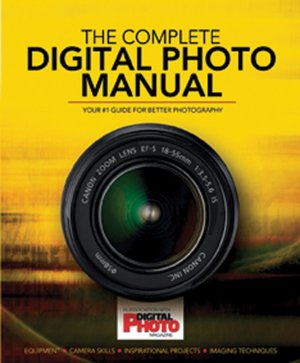
After a Goldilocks routine (too artsy, too techy, etc), I found a wonderful guide in The Complete Digital Photo Manual. Just the right balance for me–written in plain language with lots of helpful diagrams and photographs.

The book begins with an illustrated section about compact cameras–higher end models like Canon’s G10, cameras built for extreme conditions, super zooms–followed by a walk through various types of DSLR cameras and the most common features. There’s an important sidebar about image sensors. Then, it’s on to a similar section about lenses.

Next, the book explains how to set up the camera, explaining each of the features commonly offered on digital camera menus. The are good, clear explanations about metering patterns and histograms, white balance and image sharpness.

And then, about 1/3 of the way through the book, comes the best stuff. Every significant Photoshop tool and menu item is simply explained, often with step-by-step diagrams and abundant examples and illustrations. Two-page spreads include Hue/Saturation, clone Stamp and Healing Brush, Layer Masks, Channels, Hand Coloring, and more.

Then, there’s another group of spreads offering specific direction to, for example, Replace a Boring Sky, Blur Waves with a Long Exposure, lots more.

The last of the truly helpful sections explains how to make good use of RAW images, a feature viable on most serious cameras.

The Complete Digital Photo Manual was produced in association with England’s Digital Photo Magazine.

The book costs less than $25 at Barnes & Noble (and other fine retailers). Think about it: you spent how much on the digital camera? Why wouldn’t you make this investment?

Why Buy a Camcorder?

On my iPhone, I can shoot video. I can edit, too. I can shoot video on my camcorder, but I can’t edit (not easily, anyway). And that got me to thinking about just what I might want or need in a standalone video recording device.

Although you can find camcorders that record onto videotape or DVD, the standard recording format is now the SD card–the same type of card used in most digital cameras, but with far more available storage capacity.

Less than $200 buys a pocketable video camera and recorder, similar in design to the Flip camera that was popular a few years ago. JVC sells about eight different models, all quite similar to the Flip cameras and to one another. All shoot HD-quality movies, 5MP still images, and easily transfer creative work to a nearby computer via USB connection. The GC-WP10A is especially appealing because it’s waterproof, records time lapse, includes face detection, a 3-inch touch screen, and an image stabilizer to reduce shaky videography (which is a common problem with small hand-held cameras). Compare it with JVC’s GC-FM1BUS, which shoots 8MP still images and offers an HDMI output to digital TV screens, but lacks face detection. Spend fifty dollars less, and you’ll save money but sacrifice some features. If not JVC, you will find similar products from Kodak, Samsung, and lots of other companies. In this price range, there will not a tremendous difference in features or reliability.

If you’re heading in this direction, be sure to check out the Zoom Q3--made by a company now well-known for high-quality portable audio recorders (which I will write about in a future blog post). I really like the design of the Q3–and its emphasis on audio recording.

Beginning around $250, you can buy a digital camcorder with a long zoom len

s, image stabilization, and adequate low-light shooting capability in a package that easily fits into your jacket pocket. Try, for example, Panasonic’s HDC-SD80R, which sells for less than $300, with a 32x zoom lens (that is, if you are 32 feet away, you will appear to be just 1 foot away from the camera). If you visit Panasonic’s camcorder website, you w

ill find 23 similar Panasonic models with prices as low as about $200 and as high as $1,000+. What’s the difference? The HDC-TM900K sells for about $900, and includes three image sensors, which means superior image quality, manual control over exposure and focus (with manual control, more professional results are possible, but these require skill, practice and patience). The lens is better, too. Is one camera worth $600 more than another? If you’re shooting video for YouTube, the answer is probably “no” (though the manual controls would be useful). If you’re shooting video to be seen on a 50-inch HD monitor, the answer is “yes.”

For a few hundred dollars more, you can buy similar camcorders with interchangeable lenses.

But wait! That’s just the beginning!!

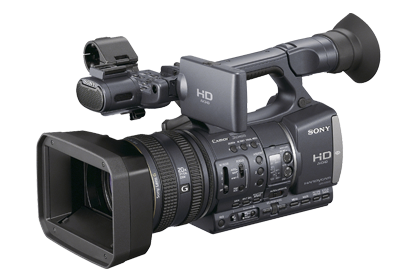
For professional quality results, plan to spend about $2,000 for a model similar to Sony’s HDR-FX7. The big difference between these lower-priced pro models and lesser lights is three-fold: image quality, technical capabilities, and creative control.

Image quality is easy to understand, and easy to see. The sensor and the associated image processing technology is superior to lower-priced models, and so is the lens. The viewfinder offers more detail, better contrast, more accurate color, and more detailed information about camera settings. The lens is, roughly, a 20x optical zoom. The zoom controls are smooth, and can be handled with nuance.

Jump to the $3,500 model HDR-AX2000 for professional XLR microphone connectors, even better image sensing and processing, and vastly improved low-light shooting. You could shoot a television series for a cable network with this camera. In fact, many professional production companies now use these cameras–and others like it–for just that purpose.

Look for a post about dual system audio recording in the near future.

So: which camcorder is right for you?

If you shoot a few minutes of video from time to time, and post your output on the web, then you may be able to use your smartphone.

If you shoot some videos, and some still pictures, and you really don’t need high quality audio, or even a microphone for the occasional interview, then you can use a recent vintage digital still camera. If yours is more than 2-3 years old, it may be time for an update if you want to shoot video.

If you are serious about still photography and videography, then you should consider a digital SLR, with its long zoom lens and substantial body size. Although most digital SLR bodies include a built-in stereo microphone, your work will be better if you attach a stereo microphone, or shoot “double system” with an entirely separate audio recorder (the topic of a future blog post).

In fact, it makes more sense to invest in a digital SLR than a standalone camcorder in the $300-$1,000 range. These are useful if you shoot a lot of video–but you can do the same, with greater flexibility–with a digital SLR.

If you serious about videography, then a serious prosumer or low-range professional camcorder is the appropriate choice. Most people who use these cameras devote considerable time to video editing–the camera alone isn’t going to make anyone a star. Fortunately, video editing software is now widely available at reasonable prices. Unfortunately, professional quality video editing requires a lot of time and careful work.

With any of these HD camcorders, the work can be stunning. For the best results, professionals rely on quality lenses, sensors, image processing and microphones.

Meet Boxie


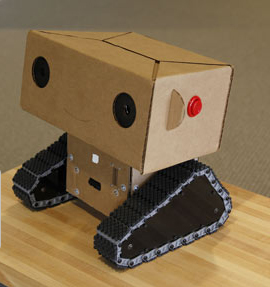
Boxie is a friendly little robot who lives and works at MIT Media Lab. He’s a busy little guy, and his story may change your perceptions of robots in our future.

Boxie Labcast