On his way in, Mr. Elbaz meets Mr. Smelie, on his way out

Gil Elbaz’s new company plans to collect, organize and distribute every fact on the face of the earth (and, presumably, above and below it). His company was featured on the front page of today’s New York Times Sunday Business Section.

The sum of human knowledge from a hundred years ago.

Colin Macfarquhar’s old company dates back to about 1770, when Colin and partner Andrew Bell hired William Smelie to put together the first edition of the Encyclopaedia Britannica. Smelie was 28 years old at the time, and he managed to produce, with collaborators, over 2,500 pages in three volumes. This month, after 15 editions, and all sorts of contortionist moves to contain and present an increasing vast store of information, the old EB gave up. No more editions. They’re done. After more than 200 years of successful publication of facts in books, the task became overwhelming as the publication business was overwhelmed by the crowd sourced newcomer, not yet a decade old, called Wikipedia. And the old Britannica ceased publication.

‘Tis a sad day, I suppose, but neither the Encyclopedia Britannica, nor the World Book Encyclopedia (which was always easier to read and more enjoyable to browse because of its reliance upon pictures), nor Colliers or the others, were superior reference tools.

From the NY Timesarticle about the EB’s demise:

William Smelie was responsible for the first Encyclopaedia Britannica, a stunning accomplishment that lasted centuries, but never overcame the digital revolution.

(In) one widely publicized study, published in 2005 by Nature, called into question Britannica’s presumed accuracy advantage over Wikipedia. The study said that out of 42 competing entries, Wikipedia made an average of four errors in each article, and Britannica three. Britannica responded with a lengthy rebuttal saying the study was error-laden and “completely without merit.”

Early in my career, I wrote and researched questions for television game shows, where a contestant’s knowledge (and memory) of facts could be converted into thousands of dollars. We kept several encyclopedias in the office. Each one had a pad above it, where writers and researchers made note of errors. Each pad was dozens of pages long. There were lots and lots of mistakes, some stunning in their stupidity: Paris was the capital of Egypt, that sort of thing, resulting from too many pages being pushed through a manual system at speeds that made sense only to a publisher.

Gil Elbaz, founder of Factual.

Factual’s plan, outlined in a big orange room with a few tables and walled with whiteboards, is to build the world’s chief reference point for thousands of interconnected supercomputing clouds.” Based upon the NY Times article, it would be fair to assume that Factual and EB are looking at information differently–both in terms of process and scale:

Geared to both big companies and smaller software developers, it includes available government data, terabytes of corporate data and information on 60 million places in 50 countries, each described by 17 to 40 attributes. Factual knows more than 800,000 restaurants in 30 different ways, including location, ownership and ratings by diners and health boards. It also contains information on half a billion Web pages, a list of America’s high schools and data on the offices, specialties and insurance preferences of 1.8 million United States health care professionals. There are also listings of 14,000 wine grape varietals, of military aircraft accidents from 1950 to 1974, and of body masses of major celebrities.

There is reason to be confident in Mr. Elbaz’s vision and ability to execute: his prior company, “Applied Semantics software quickly scanned thousands of Web pages for their meaning. By parsing content, it could tell businesses what kind of ads would work well on a particular page. It had 45 employees and was profitable when Google acquired it in 2003 for $102 million in cash and pre-I.P.O. stock.”

So, say goodbye to yet another long-standing institution, acknowledge the intermediary step that caused the change, and welcome yet another new way of thinking enabled by the massive technology shifts that we’ve experienced in our recent lifetimes. Gee, this is moving along quickly!…

A Quality Camera You Won’t Leave at Home (3 of 4)

Good solid camera body, good grip, pancake-style wide angle lens, easy to handle, easy to control. I like the Olympus PEN E-P3 camera.

In the two past articles, we looked at digital camera systems by focusing on the lenses and the image sensors. Now, it all comes together with an article about digital camera bodies. As you know from the previous two articles, I am especially interested in a camera system that offers high quality images but does so with a small, lightweight package that I can carry with me everywhere I go.

What the Body Should Do

Despite too many features and never enough buttons or controls, every digital camera body serves essentially the same functions. Backing away from the land of the complicated, here’s what I expect from a digital camera body:

It must be easy to handle, and hold steady, while composing and taking a picture. It is exceedingly difficult to do this with just two points of contact. You need a triangle for stability. Or, you need a tripod (or monopod). At the very least, the body must include a sturdy hand grip.

The various knobs, buttons and switches must be large enough to manipulate, and well-placed so they can be operated without looking at the labels.

The most common operations should require no more than one touch.

It must offer automatic exposure and automatic focus, each with a manual option.

Ideally, the body should be stabilized by technology as well as my own hands.

What Most Bodies Don’t Do

In the land of micro four thirds, APS-C and similar cameras, and on most point-and-shoot cameras, there is no built-in viewfinder. This is a problem for several reasons.

First, the viewfinder completes the triangle that allows steady hand-held work.

Second, the viewfinder blocks out light and distraction so you can concentrate on composition and exposure.

Third, if the viewfinder is an accessory, it’s likely to be small, expensive, and easy to lose. Expensive: about $250 for a high-tech item that’s much smaller than a golf ball.

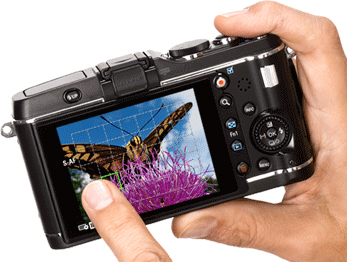
Here's a look at the back of the E-P3. The left finger is pointing at a focal point. In one mode, this finger touch can trigger the shutter.

Features

Camera manufacturers love to market their cameras by emphasizing features. After using an E-P3 for several months, my initial thought has been confirmed time and again. Most of what the camera does, I don’t need. And, as it happens, what a micro four thirds camera does is somewhat less than what a DSLR does. Most of it is clutter, or, at least, image work that would be more effectively done not in the field, but with a portable or desktop computer whose screen allows a far more critical approach to changes in color temperature, or conversion to monochrome.

How I’ve Learned to Shoot

I shoot RAW. That’s important. Shooting RAW images allows me to capture as much picture information as possible, and then, in the quiet of my home office, I edit the images, knowing that the original remains intact. RAW images require more storage space on SD cards than JPEGs require–so buy yourself an additional card (they are becoming inexpensive) or two. I should mention that RAW shooting requires special software, such as Apple’s Aperture or Adobe Bridge (comes with Photoshop).

I use manual and automatic exposure, and I use manual and automatic focus. When I have the time, and the shooting situation allows, I will mess with f/stops and shutter speeds. Not every shooting situation allows, so I rely upon automatic.

On the Olympus E-P3, I leave White Balance in automatic mode, and I do the same with Image Stabilization. Two fewer things to think about.

I keep the Art Filters off (I can apply special effects later), and stick with either Natural or Vivid images.

I shoot in 4:3 format, and may decide to crop later on.

I keep the flash in the off position. I’m glad it’s built into the E-P3 (it’s not always part of micro four thirds cameras), but I don’t use it except in special situations because I use faster (larger aperture) lenses.

The OLED screen on the E-P3 is a touch screen with just a few features that make use of this technology. One that I use often combines the selection of the image’s focal point with a shutter release. I just point at the spot where I want the image to be focused, and the EP-3 takes the picture. Cool!

Buttons, Menu Screens, and Interfaces

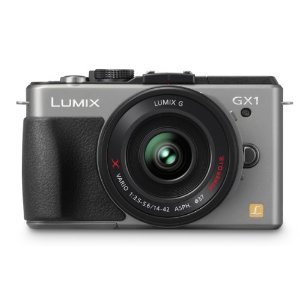
A handsome, modern body for Panasonic's very capable GX1 micro four thirds camera.

At first, every new interface seems confusing. Use the camera every day for a few weeks, and everything becomes easier. I like the way that Panasonic’s GX-1 displays f/stops and shutter speeds. I like the layout of the Olympus E-P3’s physical buttons are laid out (but I wish each one contained a tiny LED so I could find it in the dark). I find the grid guides very useful on the Olympus as well–and I never turn them off.

Every camera includes some outstanding button and menu features, and some that don’t matter a whole lot in the real world. When you’re in the store, you may be much affected by the confusing menu. Get past it. Instead, concentrate on whether the camera feels good in your hands, whether the technology is sufficient for your needs, and on the quality of the lenses that can be used with the body you have in mind.

Advanced Technology

In this era of high-tech everything, it’s easy enough to overlook the obvious. Olympus, Panasonic and the others have packed an enormously sophisticated computer into a box half the size of a roast beef sandwich. The result is a camera system with tremendous flexibility and very impressive image quality.

Although I’ve questioned the accessory viewfinder concept, the implementation is very impressive, moreso on the VF-2 with its 1.4 million dots (very high resolution, very bright screen), less so with the more utilitarian, and less costly, VF-3 (just under a million dots, and you’d be surprised by the difference). The VF-2 costs $249, and the VF-3 costs $179. These fit onto any of the recent Olympus PEN cameras (see below).

Face detection amazes me. Scene Select  makes it easy to, for example, shoot fireworks without messing around with optimum settings. Very convenient.

Small stuff matters, too. An infrared beam allows accurate focusing under dim lighting conditions.

It’s easy to shoot multiple exposures and to remain in focus while doing so.

These cameras shoot movies (not uncommon in 2012, but still amazing to me, and detailed more fully in the next article).

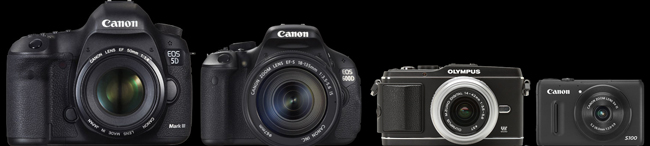
Here's a relative size comparison between a full-sized professional DSLR, a consumer DSLR, a micro four thirds camera with interchangeable lenses (but no mirror, so it's not an SLR, and so, it's a mirror less camera), and one of the best small compact cameras.

Body Styles

In fact, there are about a hundred mirrorless cameras and camera bodies for sale at B&H.

At $7,000 or more, Leica makes four full-frame mirrorless cameras; their lenses are exquisite, and, sadly, so are their prices.

Fuji’s X-Pro 1 is a 16MP APS-C camera, coming in April, that costs $1,699 for the body. It’s a terrific camera, but somewhat heavy (some would say, professional in heft) in this smaller class. Sony’s NEX-7 is a 24 MP champ, but I find the lenses too large for the small body; buy the body with a kit lens for $1,349, or the 16 MP model, with fewer features, for half that price.

The Nikon 1 camera comes in two models: the J1 with a 10-30mm lens (in 35mm lingo, that’s a 27-72mm lens) for $600 or the V1, which adds a built-in viewfinder, for $900. The Nikon 1 comes in colors, including red and pink (two years from now, will anybody be glad they bought a red camera body with a red lens?)

The micro four thirds cameras also come in colors (sigh). The starter model is Olympus’s $499 E-PM1, complete with kit lens, or Panasonic’s $399 GF3, body only. When I compare these two cameras on the very useful Snapsort website, the winner is the Olympus because it includes in-camera image stabilization, and other features associated with costlier models. When hold these two cameras in my hand, I find the controls on the Olympus a bit tiny and the lack of a grip  off-putting, but in truth, the camera is small enough for use without one.

The mid-price models ($699) are Panasonic’s G3 for including the kit lens and thankfully, a built-in viewfinder (though not as good as the better add-on versions), which competes with the Olympus E-PL3. Both offer tilt LED screens so you can use the camera by holding it over your head or at the level of a child or pet’s eyes.

Serious photographers will likely spend a bit more money for either the Panasonic GX-1 ($799 with kit lens) or my current favorite, the Olympus E-P3 ($899 with kit lens). For me, it’s a close call, because both cameras are solidly built (more solidly, it seems, that their lower-priced kin), and because the cameras are intelligently designed, with every feature, and every button, in a reasonable, logical place. The Olympus feels better in my hands, but you may prefer the Panasonic for the same reason. I like the Olympus images a lot–the color is true, the sharpness and depth are present in every shot, and, well, the camera just makes sense to me.

Quick Changes

This market changes every year, and sometimes, more than once a year. A new Panasonic model GF5 is likely by summer. Olympus’s new E-M5, with a 16 MP sensor, image quality that competes successfully with the larger APC-S technology, and a built-in viewfinder is just around the corner. BH Photo is already selling it with delivery likely in late April, for $999 for the body alone, or $1,299 for the body with a new 12-50mm kit lens. And everybody is wondering whether Canon will enter the category with a powerful, small, interchangeable lens kit of its own.

And…

Oh, one more thing. Video. Now standard in many digital cameras, the video capabilities of mirrorless cameras are worth a look. The video article will be final one in this series.

Part 1: Lens

Part 2:  Sensor

Part 4: Video

A Quality Camera You Won’t Leave at Home (2 of 4)

I took this picture with an Olympus PEN camera because it was small enough to tote on a day in NYC. I left my bigger camera at home. Somehow, I always do.

For most photographers trained in the 20th century, the universal standard was 35mm film. The size of the negative: about 35mm wide, and about 24mm high, or, about 1 inch by 1.4 inches. Serious professional photographers preferred larger negatives, and the 120 film format remained (and remains) popular: here, the negative is 2 1/4 inches square, or wider, several times larger than the 35mm film popular with consumers. Larger negatives offer superior image quality, but they also require larger and more costly cameras and lenses.

Digital Image Sensors

So film is old-school, Kodak is gasping for survival, and everyone’s shooting snapshots with their iPhones using a 5 megapixel sensor that’s the size of a your smallest fingernail. And, for most purposes, including posting pictures on Facebook and printing snapshots, the image quality is adequate–as long as you’re shooting in place that has enough light, and not too much contrast.

What’s a sensor? It’s a flat surface filled with a great many small light-sensitive receptors. There are two popular designs: CMOS and CCD. The difference between them is complicated, and explained here. http://en.wikipedia.org/wiki/Image_sensor

ISO and Sensitivity

In the film days, 400 ISO (or, if you’re older, ASA) film was four times as sensitive as 100 ISO film. In other words, using 400 ISO film instead of 100 ISO film offered benefits similar to using a lens with a large maximum aperture, perhaps an f/1.4 lens in place of an f3.6 lens.

The comparison is not a perfect one, though. Increased sensitivity often comes with increased grain, reduced detail, and lesser color quality / color clarity. Cameras that cost more than a few hundred dollars are fine up to about 800 ISO, but then, the image degrades. Newer sensors do a far better job in the 800, 1600 and even 3200 ISO range than older models. This is the push: buy a camera with better “low light sensitivity”–that is, with improved image rendition in the higher ISO ranges–and your 2012-vintage 16 MP camera will produce better images than my 2010-vintage 12 MP camera with its ancient two-year-old sensor design.

Megapixels and Sensor Size

Although camera marketers have latched onto megapixels as a way to justify different camera prices (a 10 MP camera costs more than a 5 MP camera), the number of megapixels on the image sensor should not guide you, at least not from the start.

Instead, focus on the size of the sensor. A “full-frame” sensor is the size of 35mm film–and requires a large, professional-quality body and accompanying lenses. For example the new Canon EOS 5D Mark III is a $3,500 camera that weighs about two pounds and occupies about 90 cubic inches, without a lens.

By comparison, an Olympus E-P3 uses a micro four thirds sensor that’s about 40% of the size, but it costs less than $1,000, weighs 11 ounces, and occupies less than 20 cubic inches, also without a lens.

In the real world of my life, I will not carry five pounds of camera, lenses and accessories with me everywhere, but I will carry a pound. If the image quality is acceptable.

Nikon, Sony, Fuji, and the Rest

In fact, several different sensor designs are becoming popular.

You’ve probably seen commercials and print ads for the Nikon 1 system, for example. It’s based upon a CX sensor format that’s about a quarter of the full 35mm frame. Image quality is good–and with the small sensor, Nikon has been able to manufacture small bodies (as small as reasonable ergonomics allow), and small lenses.

Sony’s small system is called the NEX, and they’ve already been through several generations their APC-S sensor system. The sensor size is somewhat larger than the micro four thirds standard, but somehow, this has resulted in an awkward combination of slightly larger lenses and slightly smaller bodies. The standard zoom, priced at $299, weighs about 7 ounces, but it’s about 2 1/2 inches wide and tall. This is a reasonable size for the lens, but the body is about 25% too small to balance the whole contraption. Fact is, APC-S requires a slightly larger body–16 cubic inches isn’t enough. Samsung, with its NX200, offers a seemingly more bulky body for an APS-C sensor, but, alas, there is no APC-S collective for that format, so Sony lenses are not compatible with Samsung lenses.

Fuji’s upcoming X-Pro 1 also uses a proprietary APS-C sensor for a wonderful new interchangeable lens system, but again, the larger sensor is associated with serious weight – the camera weighs a pound, occupies nearly 30 cubic inches without a lens, and operates (at a very high level) with (for now) just three proprietary lenses.

Panasonic and Olympus

Neither Panasonic nor Olympus are among the very largest camera makers, but they have benefitted from working together. By year end, there will be about 18 lenses in their micro four thirds format, each of them fully operable with significant advances in their micro four thirds sensor technology.

In fact, Olympus got off to a very good start with its earliest PEN cameras. Early on, the company’s engineers and management understood the importance of rendering accurate flesh tones, as well as a neutral, pleasing color palette. (Fujifilm and Nikon have also excelled in this quest.) By combining this special feature with the small size made possible by the micro four thirds format, PEN cameras quickly became a popular choice for serious photographers.

At this moment in 2012, Panasonic offers an extraordinary little micro four thirds camera, the GX1 ($699) that weighs just 11 ounces, occupies less than 20 cubic inches, and offers very impressive image quality with a 16 MB sensor. It’s filled with nifty features that will be addressed in the next article). This camera’s small size and wide array of available lenses and accessories makes it very appealing.

And yet, many photographers seem to prefer the slightly older Olympus E-P3, the current top-of-the-line PEN camera. It costs more ($899), and offers only a 12MB sensor, but the images are consistently excellent. This is not due to the number of megapixels, but instead, it is due to the right combination of engineering, aesthetic decisions during the design process (incorporating both lens and sensor design), and a corporate culture (a culture that has apparently remained intact despite gargantuan financial issues at the Board level).

This moment in 2012 (I am writing on the day after St. Patrick’s Day) is about to change.  Olympus is reading its small 16 MP camera, the E-M5, and a new Panasonic GF-5 is also on its way.

The Whole Package

Of course, it’s not just the sensor and it’s not just the lenses that make a camera or camera system. It’s the overall design philosophy, most often captured in the design of the camera body. That’s what’s coming up next.

Part 1: Lens

Part 3: Body

Part 4: Video

A Quality Camera You Won’t Leave at Home (1 of 4)

It's not about cameras, it's about making pictures. And you can't make a picture if the camera is too heavy or too cumbersome to bring along with you. On a recent visit to NYC's MOMA, I took pictures of objects and paintings that I wanted to know better. With PEN in shoulder bag, I took pictures in one of the world's great museums--something I would never have done with a heavier camera because that camera would have remained at home.

For most of photography’s history, there have been two types of cameras: snapshot cameras and serious creative tools. The digital revolution has obscured the boundary line with an immense number of features and over 500 different digital camera models, but three fundamentals remain.

First, you need a good lens to take a good picture.

Second, you need a camera whose construction won’t let you down.

Third, you need the best possible surface to record the image.

For me, there’s a fourth. I need a camera that isn’t too large or too heavy for me to carry almost everywhere I go.

And for you, there may be a fifth. How good are the camera’s video capabilities?

In this article, and several to follow, I’ll look at each of the fundamentals and, hopefully, encourage you to buy the best possible camera for your unique personal needs. Much of the information in these articles will focus on a system designed by Olympus cameras, but I will cover other systems, too.

Buying a Lens

Whether a lens is bought as part of the camera (common on point-and-shoot cameras), or removable (as on DSLR cameras), your first decision is whether that lens ought to be a zoom lens.

Certainly, a zoom lens is convenient and versatile. Often, a zoom lens is inexpensive. And, more often, you simply have no choice because the camera and the lens are permanently attached to one another.

Let’s use the Olympus PEN system as our example. Each of the PEN bodies is offered with an inexpensive “kit” lens as part of a discounted package: in this case, a 14-42mm 1:3.5-5.6 lens. The PEN system is based upon small cameras and small lenses–an advantage we’ll discuss later on–in the land of 35mm cameras, this lens would be a 28-84mm lens, covering wide angle, normal and telephoto focal lengths. That’s useful, and typical of kit lenses. So, too, is the aperture: a lens with a 3.5-5.6 maximum aperture is not designed to shoot in dim or low light situations. This is a typical disadvantage for kit zoom lenses–and it’s a show-stopper for me. Here’s why:

Given the choice of a lens with a wide opening–designed to shoot in low light–or an accessory flash that adds bulk, requires batteries, and smoothly illuminates only a limited area–I’ll choose the lens every time.

And, I’ll make it a prime lens, not a zoom. Why?

Three reasons. First, I must think about the image, my position, the framing, the composition, and the appropriate tool to create the image. Second, the maximum aperture is likely to be larger. Third, the image quality is likely to be better: sharper, clearer, with better color rendition and far less distortion.

So let’s have a look at some Olympus PEN lenses. There are eleven in the current product line, with several more coming this spring, and there is full compatibility with a dozen more in the Panasonic catalog, all related to a new-ish photographic standard called Micro Four Thirds that will be explained later in these posts.

Remember: the kit lens is 14-42mm 1:3.5-5.6 lens, and if you bought it outside of the kit, it would cost $299. Instead, I would buy one wide angle and one telephoto lens.

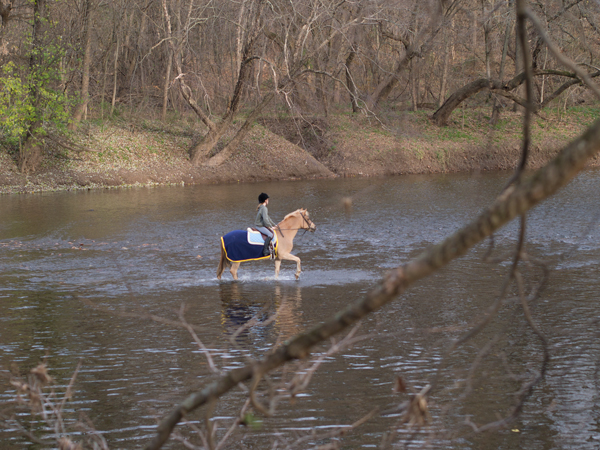
The subject was 164 meters away from me. The image was shot with a short telephoto lens (see below), the Olympus 45mm (a 90mm equivalent).

Although the image is not absolutely perfect, I was impressed by the detail on the horse blanket, the horse's muscles, the water falling off the hoof, and the overall clarity of the color. Remember: this was shot from quite a distance. This is a crop from the above photo. Yes, there's a bit of fringe distortion around the yellow, but remember you're looking at an enlargement of over 500%--the equivalent of a 4x6 inch print blown up to 20x 30 inches. Not perfect, but impressive.

Short Telephoto

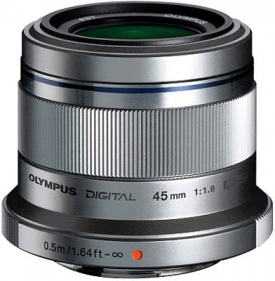
The Olympus 45mm lens for micro four thirds is only about 2 inches wide and high.

Instead, I would spend a little more for OIympus’s 45mm 1.8 lens, a 90mm equivalent designed for portraits (a shorter lens distorts facial features), and to pull in landscapes that are a bit far off. It costs $399.

I’ve read a lot of test reports about this lens (you should, too, before you buy any lens). This one is typical.

 The Olympus M.ZUIKO DIGITAL 45mm f/1.8 is a lens that makes sense because it’s small, useful, and excellent. The important center resolution is already on a very good level straight from wide open aperture and only the corners are somewhat softer here. The quality is very high across the image field when stopping down to f/4. Vignetting, lateral chromatic aberrations as well as distortions are all well controlled and not relevant in field conditions.

Short Wide Angle

I’ve been using OIympus 17mm f/2.8 wide angle lens quite successfully, and, generally, I find it to be excellent. In doing my research, I’ve found web reviews with grades in the B or B- range. Panasonic’s 20mm f/1.7 may be a better choice but it costs a bit more and it’s closer to a normal lens (50mm lens in 35mm camera lingo) than a wide angle. The Olympus 17mm lens costs $299, and the Panasonic 20mm lens costs $399. Both are “pancake” lenses–less than an inch thick. In fact, the Olympus 45mm lens is less than 2 inches thick.

Shorter, and Longer

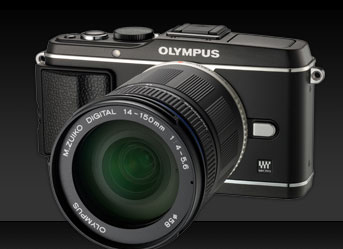
Here's an E-P3 with a longer zoom lens--it maxes out at 150mm, or, in 35mm lingo, 300mm (long enough for wildlife, not long enough for baseball).

For most people–that is, most people who are serious about photography–these two lenses will serve just about any purpose. You can go wider with Olympus’s 12mm 2.0 lens, but it costs $799. You cannot go deeper with a prime lens; instead, you’ll need either Olympus’s remarkable 75-300 f/4.8-6.7 for $899, and if you do, you’ll be thankful for the PEN system’s built-in image stabilization feature, again discussed later on. Take a moment here: that’s a lens that, in 35mm terms, gets up to 600mm, remarkable reach for a lens that weighs less than a pound and is less than 5 inches long. Here are some sample images.

Speed and Weight

At the risk of repeating myself, I consider speed and weight to be critical factors for my lenses.

Speed matters–that is, the largest available aperture matters–because I can shoot in a wider range of lighting situations with a faster lens. I much prefer a 1.8 lens to a 3.5 lens because a 1.8 lens allows me to shoot with HALF as much available light (3.5 divided by 1.8 is, roughly, 2).

Weight matters, and so does size. I’m not a professional photographer, but I do like to carry a camera with me. Olympus’s 45mm lens weighs 116 grams, or about 4 ounces, and their 17mm weighs 71 grams, or about 2.5 ounces. For less than 7 ounces, I’m carrying a relatively complete photographic kit, one that offers high quality images, solid and reliable design, and almost no strain on my shoulder or neck. In theory and in practice, this turns out to be a very good idea.

Other Options

As we’ll explore in the next post, the Olympus-Panasonic effort in micro four thirds technology is paralleled in a Sony system called NEX, a Nikon system called Nikon 1, Fuji with its X system, and several others. Each is based upon a particular image sensor design, and that begins our next chapter, which covers not body design (as you might expect) but instead, the 21st century equivalent of photographic film. Stay tuned.


Part 2:  Sensor

Part 3: Body

Part 4: Video

Secrets of Memory – Exposed!

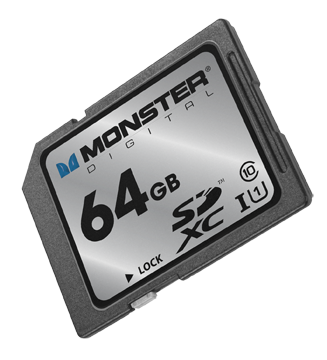
I just received a piece of plastic, about the size of a postage stamp, containing as much memory as a MacBook Air: 64GB. And that made me wonder: is the 64GB on the Monster Digital SD XC USH-1 Class 10 Vault Series card (got all that?) the same as the  64GB of flash memory inside the Air?

Well, no, it’s not. Not according to Mike Ridling and Mark Morrissey, the President and Head of Storage Technology at Monster Digital.

We started at the beginning: spinning disks. Over the decades, the disks became smaller, and when Apple used the technology in the iPod, 1 in 3 units failed. So, Apple went shopping for a better solution.

At the time, flash drives had been around for about five years, and they were popular, but limited in terms of storage capacity. Camera manufacturers were experimenting with ways to store large number of images in a non-volatile format (that is, when the power goes off, the stored material remains). Then, Apple adopted flash memory for their portable devices–and the market shifted from spinning disks to non-volatile, highly portable, small-sized memory.

What’s inside that SD card? A tiny controller that routes data into and out of the card, and organizes the data on the card’s silicon chip so that it’s accessible and so that the card lasts as long as possible (but not forever).

About six years ago, the Secure Digital Association (SD = Secure Data) standardized the metrics for both memory capacity (64GB) and access speed (Class 10). In fact, the access speed matters–but the information is not always easy to find in your device’s instructions. If you own a big DSLR, buy Class 10 cards. Ditto for any camcorder that costs more than, say, $600-700. A Class 6 card is sufficient for a lesser camcorder or a more modest digital still camera. If you’re using the card in a smart phone or a low resolution camera (say, 2-3 megapixels), then a Class 2 is all you need. Of course, Class 10 cards cost more than Class 2 cards.

If you require higher transfer rates, you’ll want a UHS-1 compatible card, but note that not all of these cards are compatible with all devices. (Monster emphasized that their card works with a lot of different devices.)

Right now, the largest available SD cards are 128GB, but we’ll see 256GB in a year or so. Somehow, through the miracle of engineering, the cards are able to store more data but they don’t become larger (more data is stored within the available space). This means we can expect compatibility for a longer period of years.

Now what about the 64GB SD card in the 64GB MacBook Air? Can I simply double my storage capacity with the purchase of a $200 memory card? Well, sort of. The SATA3 solid state drive in the MacBook Air transfers data at 6GB per second. How does the SD card compare? Well, it’s slower. A lot slower: 80MB per second. This is why the SD card is better suited to, say, storing documents and transferring documents on the Air than, say, running Photoshop. In fact, the 64GB and it’s big sister, the 128GB are ideal for storing either almost 25,000 photographs, nearly 11 hours of HD video, over 1,000 hours of digital music. It’s ideal for use in an HD video camera, for example.

I did ask about whether technology was changing quickly enough to affect my thinking about the next generation Air (coming in May, we think). The answer came as something of a surprise: a new external drive for the Air (and other devices) that would plug into the new Thunderbolt port. Offering a transfer rate of about 10GB per second (1/6 of the internal drive, but a heck of a lot faster than the SD card), this is probably the next step in portable memory for portable computers.

And what about iPad storage? Yeah, it’s kinda messy. Apple really didn’t design iPads for external storage, so the solutions are workarounds. That probably won’t change in the future.

So, I’ve learned to use terms such as “transfer rate” and “Class 10” with some knowledge that I lacked yesterday. And, I’ve gotta say, I have a soft spot for Monster. So, thanks to the two executives who helped me to navigate this technology.

Food: The Meta-layer

Past few months, everybody’s talking about the meta-layer. We don’t just watch TV. We add a meta-layer, tweeting about the Academy Awards, commenting on comments–ideas piled on ideas. We’re learning to comment on everything, with or without the requisite knowledge of the facts involved, rarely with the research needed to form a coherent opinion.

Not so with Mr. Gopnik, whose past stories about his young family’s life in Paris (Paris to the Moon) and their return to Manhattan (Through the Children’s Gate) are among my most-recommended books, and whose 2011 book, The Table Comes First: Family, France, and the Meaning of Food has provided several months of nourishing food for thought, or thoughts about food, probably some of each.

Where did restaurants come from? Who came up with the idea of not just eating outside the home, but dining there? (Long answer, begins around the French revolution). Quite rightly, he compares the restaurant customer to an aristocrat, accustomed to being served (and served beautifully). Gopnik delights in grazing through the thoughts of Brillat-Savarin and Grimod–two early, influential writers about food and dining–but I like the bit that he found in Robert Frost best:

“Home is a place where, when you have to go there, they have to take you in. A restaurant is a place where, when you go there, they not only have to take you in but act as though they were glad to see you. In cities of strangers, this pretense can be very dear.”

This is a book in which New Yorker writer Adam Gopnik thinks about food, and thinks about how others think, and have thought, about food. He goes deep, with some chapters so mired in philosophy or history that they eventually become indigestible. Fortunately, these are exceptions. And when the going becomes thick, he pauses for to write an email to Elizabeth Pennell, who wrote with intelligence and wisdom about food about a century ago; these chatty emails cover the true benefits of cinnamon, the best ways to cook lamb, the extraordinary use of hot air in the hard-to-find and hard-to-cook pommel soufflés, his dog Butterscotch’s love for steak, and other lighthearted stuff.

Adam Gopnik is a regular contributor to The New Yorker.

This is not a book to read over a single meal. It is, instead, book to be savored, bit by bit, over several months. There is simply too much information, too many glimpses and meta ideas, too much richness and provocation and serious research, to be enjoyed quickly. It is slow food for the brain–imagine that, in an era of emails and tweets–much of it about topics I’ve never really thought much about.

For example, Gopnik compares “cook it at home” recipe books that restaurants sell with the home game version of, say, Hollywood Squares. Certainly, there is a resemblance, but the resources and the spicing are entirely different, and so is the experience. He tells a long and funny/odd story about his search for a live chicken that can be purchased, cooked, and eaten within the bounds of New York City, and another about the cleverness of farming tilapia to feed large urban populations, then adds the zesty meta-layer, invoking Adam Smith and the total cost associated with what he believes to be a current fad for localism. And so:

“If Kenyan greens take less total energy than Plattsburgh tomatoes, then we should revel in them no matter how far they have to travel.”

And so it goes, through questions about whether we really can taste the differences between wines (or whether the situation and the artifice overpower the actual human capacity for taste), the imperfection of memory as it applies to the fancy French restaurants of 20th century Manhattan, why sugar was used mostly to flavor tea in England but became the impetus for the pasty industry in France, the various ethical arguments for and against the slaughter of animals for human consumption, and so much more.

As with his own food choices–today, spicy beans and rice, tomorrow, a complicated and challenging attempt at a classic French dish from a century ago–some sections are rich with friendly storytelling and some are thick with pretense, serious thinking, and historical reconsiderations. Unlike Twitter, you need not absorb every idea in an instant. There is time enough to consider the meta-layer, to appreciate the fine writing that has long been Gopnik’s strong suit, time enough to think about what Gopnik has said about what others have said and done, and perchance, to learn something about their ideas by reading Brillat-Savarin in the original (on my list, but not for this year).

On Our Side

Ani DiFranco marching in DC for Women’s Lives in 2004. Her new album is entitled Which Side Are You On?

I love Ani DiFranco’s commanding version of Pete Seeger’s classic, “¿Which Side Are You On?” Her vocal is strident and scolding, hopeful and demanding. With each verse, she raises important questions, and insists that we, at least, think about the answers. The backup voices, percussion and increasing distortion suggests a dark revolutionary march; she’s in front of the angry crowd, instructing, inciting, leading the charge. She’s terrific.

She’s provocative when she sings about “Promiscuity,” offering a cool lyrical analysis with “promiscuity is nothing more than traveling, there’s more than one way to see the world.” She’s fully exposed on “Life Boat,” a song about a failed mom’s sadness and self-image featuring “red scabby hands” and “purple scabby feet.” She’s political and forceful when she proposes an “Amendment” to provide civil rights to women, a good song that promotes the “right to civil union with equal rights and equal protection, intolerance finally ruined.”

This is Ani DiFranco’s ambitious, righteous, significant side. She is a songwriter and a performer who thinks, and isn’t at all afraid to tell us what she thinks and why.

Then, there’s the other side, the side that confuses me, the writer who takes the easy way out, as on “Zoo,” where we’re treated to “I can no longer watch TV cuz that shit really melts my brain…” and “I go to do my food shopping and all I can see is packaging and a mountain of garbage about to be happening…” Sure, every record’s got its B-sides, but DiFranco’s good work is so strong, I wince when I hear work I wish she had done better. Moreso because her lyrics are both interesting to the ear and smart enough to be worth reading. And, even moreso because her songs quickly become old friends, worthy of replays for weeks on end. The more I listen, the more I like what I hear.

But I do keep coming back to the Seeger song. He plays some banjo at the start of it, but it’s Ani DiFranco’s power that electrifies the song and its meaning. And it’s that song that anchors this album, a nod from one authentic performer to another. Wouldn’t it be fun to hear her perform an album filled with Seeger songs, a female counter to Bruce Springsteen’s We Shall Overcome: The Seeger Sessions, or maybe, even better, an album exposing lesser-knowns who took sides in their time: Phil Ochs, Tom Paxton, maybe Joan Baez, too.

Buy the album directly from the artist’s Righteous Babe label.

I’m investing $165K in the child who lives next door

In the U.S., 76 million students are currently enrolled in pre-K through graduate school. About 55 million students are in pre-K, elementary, junior high, or high school, and about 20 million more are enrolled in community colleges, four year colleges and universities, and graduate programs.

The cost of a pre-K through 12th grade education: $650 billion for 55 million people, or about $12,000 per student per year. Figure a total investment of $165,000 per student for the entire pre-K through high school run. In fact, nearly nine out of ten adults finish high school (most by 18, some later).

Add four years of college, and the total per-student investment exceeds $200,000. As it turns out, that’s the investment made by or for about one in three American adults.

Here’s another way to think about it. You’re in a room with ten people. One of those people never finished high school. Six finished high school, but not college. Three finished college. This is America:

“Between 2000 and 2010, the percentage of the adult population 25 years of age and over who had completed high school rose from 84 to 87%, and the percentage of adults with a bachelor’s degree increased from 26% to 30%.”

Researchers argue about whether the precise high school drop-out rate is closer to 12% or 33%–a very wide range–but 25% is comfortably in-between, hence the “one-in-four” assumption. For minority students, the drop-out rate is somewhere between 50% (yikes!) and 85%, so one-in-three seems to be a reasonable starting point for any discussion. This is an enormous problem. High school drop-outs earn far less than graduates, and often disrupt families and communities because their options are comparatively narrow.

Is there reason to be concerned about one in three Americans graduating from college?

As part of its College Completion agenda, The College Board reports the number of 25-34 year olds with an Associate Degree, or better, in various countries. The results are a bit surprising: there are four countries with over 50% rates, Korea, Canada, the Russian Federation (!), and Japan. There are eleven countries with rates higher than the U.S.; at about 41%, we’re comparable with Israel, France, and Sweden, and (again surprising), far ahead of Germany (24%). Expand the view from 25-35 to 25-64, and the results change a lot: the U.S. is fourth on the list with only Russia above the 50% mark–so it’s reasonable to assume that Korea, Canada and Japan have made great strides during the past few years, but the U.S. has not. Dig deeper and the reasons become clear: the white population seems to be twice as likely to hold a degree than the Latino population, which is growing quickly in the U.S.

Dig deeper and the situation becomes even more complicated.

So, what have I learned in my late night exploration of educational statistics?

1. Assuming our economy can provide the necessary jobs, we should probably set a 50% goal for college graduation. Assuming current trends continue, we will reach that figure within the next 10 or 20 years.

2. Unlike others, I don’t feel that the U.S. must lead in every category. We’re within a reasonable range among comparable nations, and that’s a good starting point.

3. The high school drop-out rate is alarming, both for the individuals involved and for the development of our society. The reasons why we don’t achieve a high school graduation rate are many: inadequate schools, old-fashioned ideas, insufficient budgets, inadequate family and community support for families, poor preparation in key skills necessary for high school success, peer pressure involving gangs, guns, violence, drugs, limited options, and so on.

No, this post does not end with a solid solution or even a rational recommendation. I’m just taking notes on stats that seem important, and devoting part of my day to understanding the bounds of the issue. I hope you will, too.

Notes:

High school rates: http://voxeu.org/index.php?q=node/930

History of pre-K through grade 12 enrollment, plus higher education: http://nces.ed.gov/programs/digest/d10/tables/dt10_003.asp?referrer=report

Lots more good stuff here (the source of the quote, too): http://nces.ed.gov/programs/digest/d10/

As always, Wikipedia offers abundant information, this time with lots of charts and graphs: http://en.wikipedia.org/wiki/Educational_attainment_in_the_United_States

College Board stats from: Organisation for Economic Co-operation and Development, 2010

I Want to Watch TV on My iPad (The Plot Thickens)

Here’s the original story published on March 6, 2012:

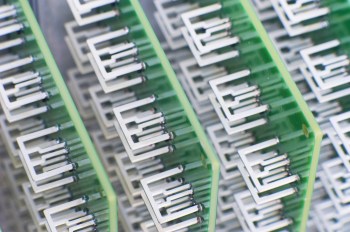
You’re looking at an array of television antennas. These antennas are used to capture local broadcast signals that you can watch, if you pay a monthly subscription fee, on your computer, tablet, or phone. Aereo (formerly Bamboom) is the company behind the scheme, and, as you might expect, they’ll be spending a lot of time in the legal system as they argue with broadcasters regarding the rights and wrongs of live retransmission (that is, if Aereo is to survive, the broadcast networks want to see monthly cash–just like they receive from the cable operators).

Ah, the free airwaves, the ones that broadcasters use for the public good. Ah, the intellectual property that broadcasters carry over those airwaves, the IP that cable service providers pay to carry. Ah, the unresolved legal gotcha!! Any company that attempts to make those signals available via a secondary distribution scheme must pay for the right, or so say the broadcast networks.

The price for the service? $12 per month. The debut date? March 12. The place: for now, the New York metropolitan area.

For cord cutters, this may be a terrific deal. But it’s unclear whether the courts will block Aereo’s progress, as they have with ivi.tv and others who attempted to climb the walls of the castle without paying the required tribute (or, as I’m adding in my updated version of this article… others who attempted to challenge the current system of copyright and payments for distribution rights to intellectual property).

Slingbox? That’s okay. Over-the-air mobile TV? That’s not ready yet, except in a few markets on a test basis. Watch over-the-air TV? Sure. Watch via cable or satellite? As long as you’re paying for the privilege. Watch on another device? Nope, not yet. Or, maybe the answer is yes. We’ll find out in a few weeks.

_____

Here’s the update that I wrote on March 12, 2012:

From Bloomberg: Predicting a “great fight” with traditional media companies, billionaire Barry Diller said he plans to expand his new Aereo Web-based television service to 75 to 100 cities within a year, reports Bloomberg.

Diller, speaking at the South by Southwest Interactive festival in Austin, Texas, noted that efforts by Walt Disney Co. and other media companies to cite copyright violations were “absolutely predictable,” since entrenched companies always protect their turf, the story says.

Want to know more? Here’s a bunch of links:

The tech explanation:

http://www.techspot.com/news/47467-aereo-offers-tv-over-internet-with-antennas-engineered-to-comply-with-law.html

The consumer angle:

http://www.forbes.com/sites/dorothypomerantz/2012/02/29/how-much-are-you-willing-to-pay-to-cut-the-cord/

The business story:

http://online.wsj.com/article/SB10001424052970204059804577229451364593094.html?mod=wsj_share_tweet#printMode

The investment story:

http://www.bizjournals.com/sanfrancisco/news/2012/02/14/iac-l20-million-aereo-barry-diller-vc.html?s=print

_____

Here’s the update as of July 17, 2012

Again from Bloomberg (July 13, 2012): “A U.S. district judge this week allowed Aereo to continue operating while television networks pursue a copyright lawsuit against the company. Aereo captures broadcast signals with small antennas and streams them to devices such as Apple Inc. (AAPL)’s iPad, without paying for the programming.” As a result of the ruling, Diller is now planning a nationwide rollout.

As I pondered what all of this might mean, I read an essay on TV NewsCheck’s website, written by television executive Lee Spieckerman. I contacted him, and we spoke for a while about the ruling and its implications. In short, he believes that Judge Nathan bungled the decision:

“We see loopy rulings from Federal judges all the time, and I think this fits into that category… She misread the governing law!”

Spieckerman’s argument is based in part upon law and in part upon common industry practice. His legal argument tracks back to a 1993 law which requires operators of paid television systems to secure the necessary rights from local broadcasters. The concept is called “retransmission consent” and that ruling has proven to be something of a windfall for local broadcasters as a result of the fees paid by cable operators in exchange for this consent. According to  Spieckerman, these fees are now worth about $2 billion to the commercial broadcast network, plus an additional several billion dollars to local stations. This, plus the additional revenues from political advertising resulting from the Citizens United decision, provide the advertising base necessary for local television news to survive. (Seems to me, we should all understand the economics and consequences of this new approach to journalism funding–a worthwhile topic for a future article). Back to his other argument: “there is no tradition in this country for renting antennas–nobody rents antennas!”

Digging deeper with Mr. Spieckerman, and the real argument emerges. This is all about copyright infringement, and protection of distribution rights associated with intellectual property. Judge Nathan’s ruling begins to disrupt a system by which cable operators compensate owners of cable networks and local stations. ESPN receives $4.69 per cable subscriber–do the math and that’s about $50 per year per subscriber multiplied by 100 million subscribers, and that’s $5 billion per year in subscription fees. Spieckerman believes local broadcast station fees to be 20-50 cents, but acknowledges that these deals are confidential. (Consider that Comcast, Time Warner, and other cable operators charge consumers charge those 100 million subscribers over $1,000 per year–1o0 million x $100 = $100,0o0,000,000, or $100 billion, also good raw material for another Digital Insider article.)

Of course, the local station operators are anxious to negotiate with Diller’s Aereo. And Diller is anxious to go with the Judge’s ruling because it requires no fees. For now, according to Bloomberg,

We’re going to really start marketing… Within a year and a half, certainly by ’13, we’ll be in most major markets.”

To which Mr. Spieckerman counters:

Who is going to be next? This is a pandora’s box, and when you start circumventing and tearing down the few elements there are in the industry and inviting the destruction of an important industry. If I have any intellectual property that I want to distribute, I do not want anybody able to steal my material.”

Going Postal in the Year 2022

As the U.S. Postal Service struggles to find its 21st century business model, it competes with FREE–that is, the 4.6 zillion emails we write, send and read every day, and with a fairly spiffy FedEx, and a reliably massive United Parcel Service. If I want to send somebody a message, I use email (or texting). If I want to send somebody a package, I use FedEx or UPS.

Today, I visited my neighborhood mailbox and learned about the 13-ounce rule. (Yes, it was new to me, too.) The sticker on the mailbox says, if the package weighs 13 ounces or more, you cannot drop it into the mail box. Instead, you must take the package to the “retail service counter at a Post Office.”

Yes, the USPS is behind the times. According to Wikipedia, the USPS is also:

(a) the second largest civilian employer in the United States (574,000 workers)

(b) the largest vehicle fleet operator in the world

(c) legally obligated to serve all Americans, regardless of geography, at uniform price and quality

(d) a protected monopoly in certain categories (non-package mail, use of mailboxes, etc.)

(e) operates 31,000 individual post offices

(f) delivers 600 million pieces of mail to more than 100 million delivery points — every day!

The knee-jerk reaction would be “well, let’s just modernize the whole darned system.” Or, let’s digitize it, or perform a magical internet transformation. The USPS and the K-12 school system have been mostly untouched by the digital revolution. The status quo is just too strong.

“To establish Post Offices” is among the powers assigned to Congress in the U.S. Constitution. One reason why we insisted upon Post Offices was to distribute newspapers in the 1700s. Within ten or twenty years, there may be no physical newspapers, and the future of print magazines, paper bills and invoices, legal notices, and other flat mail is equally dim. For the USPS, there are fewer letters to deliver, and fading enthusiasm for their once-vital services. To make things worse–as only a large government bureaucracy can do–the U.S. Postal Service is hobbled by a strange political situation that resulted in huge unfunded Federal mandate.

So as I find an alternate means to mail my 14-ounce package without using a 13-ounce-limit mailbox, here’s a thought experiment for a late winter’s day:

If you were in charge of a future version of a U.S. postal system–government operated or otherwise–how would you construct a 21st century system?