Bend Me, Shape Me, See Right Through Me

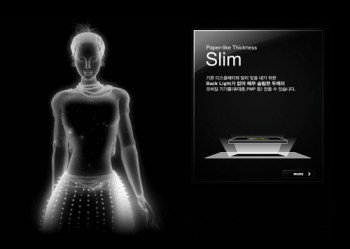
This falls into the category of “totally amazing stuff.” You’re looking at one of several Samsung screens that will probably be available sometime in 2012. Yes, that’s a cell phone. Apparently, Samsung (which is turning itself into an awesome company on the display side, BTW) is working with Nokia to bring this concept to life, and to market, and to change everybody’s notions of what a phone, and a display, can be.

Initially, Samsung’s new screens will be introduced in Nokia phones.  Soon after, there will be tablets that are not only flexible, but see-through. Imagine looking through a map, with interactive directions, and directly in front of you at the same time. (Certainly, there will be heads-up displays used in automobiles for just that purpose, but maybe that comes a bit later on.)

The technology is called “flexible AMOLED.”

Interesting? This is just one of many mind-blowing moments in Samsung’s (Japanese-language) video. And, if you want more insight, check out this article in the London Daily Mail.

Even more interesting a thoroughly conceptual video from Samsung which illuminates the company’s view of their future. (It may take a moment to load.)
Apple TV in 2012?

Here's one of several pictures of the current Apple TV interface. For more, visit http://www.apple.com/appletv/

Apple has been experimenting with home television since 2006, when the company introduced Apple TV. Released last year, second generation Apple TV has sold over 2 million units. Apple TV is an accessory. The new product will be a complete solution: a TV set with an Apple logo, Apple software, and Apple’s reinvention of yet another product category.

For those unfamiliar with Apple TV, here’s the Apple blurb:

“With Apple TV, everything you want to watch — movies, TV shows, photo slideshows, and more — plays wirelessly on your widescreen TV. No managing storage. No syncing to your iTunes library. HD movies and TV shows from iTunes and Netflix play over the Internet on your HDTV, and music and photos stream from your computer. All you have to do is click and watch.”

According to Smarthouse, there will be three Apple models: 32″, a mid-size, and 55″. It will include “A totally new software interface has been written that allows users to call up programs using voice commands via the new Siri personal assistant app…” It may be operated by your existing iPad or iPhone (provided it’s Siri-ous).

Add Apple’s FaceTime and the TV becomes a big-screen video conferencing center, fully compatible with millions of iPhones and iPads.

How might the new TV look? The first place that answers come together tends to be MacRumors, my favorite Mac site for its up-to-the-minute coverage, its willingness to republish rumors from reliable sources (often with smart commentary), and the site’s Buyer’s Guide, which tells consumers when to buy each Mac and Apple portable device.

How much will it cost? I’m guessing $1,199 for the low-priced model, and $1,99 for the high, with a $1,499 price point for the in-between model. Just a guess based upon Apple’s past practices. If I was in charge of television at Sony, or any other high-priced television manufacturer, I would be very, very concerned. And I would not bother to convince myself that, somehow, DroidTV (or whatever) is likely to win the race.

Why?

1. With the iPad turning three years old, Apple’s huge base of early adopters will be ready for a new, high-priced toy.

2. For a decade, Apple has been studying this market, figuring out the best integrated hardware, network, usability, operating system and app plays.

3. Apple already sells an accessory product with the base functionality already in place and operating in two million homes (three or four million by launch time).

4. Apple has a well-developed retail network–people like to see a TV before buying. Best Buy, Radio Shack, and Target sell Apple products.

No competitor enjoys these advantages.

Why Buy a Camcorder?

On my iPhone, I can shoot video. I can edit, too. I can shoot video on my camcorder, but I can’t edit (not easily, anyway). And that got me to thinking about just what I might want or need in a standalone video recording device.

Although you can find camcorders that record onto videotape or DVD, the standard recording format is now the SD card–the same type of card used in most digital cameras, but with far more available storage capacity.

Less than $200 buys a pocketable video camera and recorder, similar in design to the Flip camera that was popular a few years ago. JVC sells about eight different models, all quite similar to the Flip cameras and to one another. All shoot HD-quality movies, 5MP still images, and easily transfer creative work to a nearby computer via USB connection. The GC-WP10A is especially appealing because it’s waterproof, records time lapse, includes face detection, a 3-inch touch screen, and an image stabilizer to reduce shaky videography (which is a common problem with small hand-held cameras). Compare it with JVC’s GC-FM1BUS, which shoots 8MP still images and offers an HDMI output to digital TV screens, but lacks face detection. Spend fifty dollars less, and you’ll save money but sacrifice some features. If not JVC, you will find similar products from Kodak, Samsung, and lots of other companies. In this price range, there will not a tremendous difference in features or reliability.

If you’re heading in this direction, be sure to check out the Zoom Q3--made by a company now well-known for high-quality portable audio recorders (which I will write about in a future blog post). I really like the design of the Q3–and its emphasis on audio recording.

Beginning around $250, you can buy a digital camcorder with a long zoom len

s, image stabilization, and adequate low-light shooting capability in a package that easily fits into your jacket pocket. Try, for example, Panasonic’s HDC-SD80R, which sells for less than $300, with a 32x zoom lens (that is, if you are 32 feet away, you will appear to be just 1 foot away from the camera). If you visit Panasonic’s camcorder website, you w

ill find 23 similar Panasonic models with prices as low as about $200 and as high as $1,000+. What’s the difference? The HDC-TM900K sells for about $900, and includes three image sensors, which means superior image quality, manual control over exposure and focus (with manual control, more professional results are possible, but these require skill, practice and patience). The lens is better, too. Is one camera worth $600 more than another? If you’re shooting video for YouTube, the answer is probably “no” (though the manual controls would be useful). If you’re shooting video to be seen on a 50-inch HD monitor, the answer is “yes.”

For a few hundred dollars more, you can buy similar camcorders with interchangeable lenses.

But wait! That’s just the beginning!!

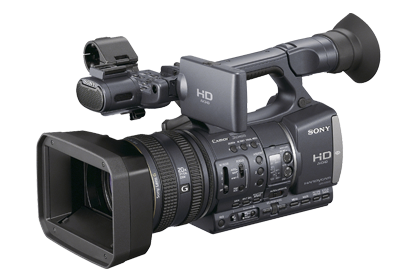
For professional quality results, plan to spend about $2,000 for a model similar to Sony’s HDR-FX7. The big difference between these lower-priced pro models and lesser lights is three-fold: image quality, technical capabilities, and creative control.

Image quality is easy to understand, and easy to see. The sensor and the associated image processing technology is superior to lower-priced models, and so is the lens. The viewfinder offers more detail, better contrast, more accurate color, and more detailed information about camera settings. The lens is, roughly, a 20x optical zoom. The zoom controls are smooth, and can be handled with nuance.

Jump to the $3,500 model HDR-AX2000 for professional XLR microphone connectors, even better image sensing and processing, and vastly improved low-light shooting. You could shoot a television series for a cable network with this camera. In fact, many professional production companies now use these cameras–and others like it–for just that purpose.

Look for a post about dual system audio recording in the near future.

So: which camcorder is right for you?

If you shoot a few minutes of video from time to time, and post your output on the web, then you may be able to use your smartphone.

If you shoot some videos, and some still pictures, and you really don’t need high quality audio, or even a microphone for the occasional interview, then you can use a recent vintage digital still camera. If yours is more than 2-3 years old, it may be time for an update if you want to shoot video.

If you are serious about still photography and videography, then you should consider a digital SLR, with its long zoom lens and substantial body size. Although most digital SLR bodies include a built-in stereo microphone, your work will be better if you attach a stereo microphone, or shoot “double system” with an entirely separate audio recorder (the topic of a future blog post).

In fact, it makes more sense to invest in a digital SLR than a standalone camcorder in the $300-$1,000 range. These are useful if you shoot a lot of video–but you can do the same, with greater flexibility–with a digital SLR.

If you serious about videography, then a serious prosumer or low-range professional camcorder is the appropriate choice. Most people who use these cameras devote considerable time to video editing–the camera alone isn’t going to make anyone a star. Fortunately, video editing software is now widely available at reasonable prices. Unfortunately, professional quality video editing requires a lot of time and careful work.

With any of these HD camcorders, the work can be stunning. For the best results, professionals rely on quality lenses, sensors, image processing and microphones.

Meet Boxie


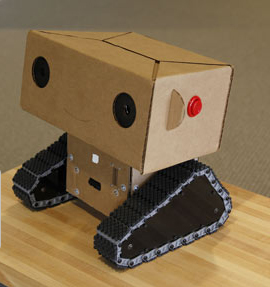
Boxie is a friendly little robot who lives and works at MIT Media Lab. He’s a busy little guy, and his story may change your perceptions of robots in our future.

Boxie Labcast